Philips AC4236/10 - Quick Guide
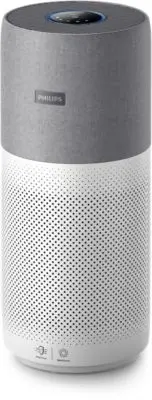
The Philips Mars TFTAC4236 air purifier is a smart device that combines advanced filtration with wireless connectivity through its User Manual covers essential topics like remote control via the Clean Home+ app, real-time air quality monitoring (including PM2.5 and gas levels), and maintenance routines for its NanoProtect filter system. Key areas include app-based operation, visual display indicators for operational status, and scheduled or condition-driven filter care to ensure optimal performance. The manual also emphasizes smart connectivity features that allow users to track device health and adjust settings remotely.


Table of Contents:
- Page 1 – App Connectivity and Filter Maintenance Procedures
- Page 2 – Device Operation and Air Quality Monitoring
- Page 3 – Application Control and Filter Replacement
- Page 4 – Control Interface and Maintenance based on Visual Alerts
- Page 5 – Comprehensive Control and Maintenance Guide
Mars
TFT_AC4236
Dach_EN
90x127mm
When display shows
When display shows
Time to clean the NanoProtect filter Series 3
Time to replace the NanoProtect
filter Series 3
Press to check filter lifetime status.
!
Press for 3 seconds to reset after cleaning or replacing filter.
3000 038 71683-1
The filter may produce smell after being used for a while because of the
absorption of indoor air. Remove the filter and place it where it has direct
sunlight and ventilation for several hours. Re-install and try using it again.
If the odor remains, please replace the filter.
Connectivity
Auto mode
Display
Control
Turbo mode
Sleep mode
PM2.5
indicator
Air quality
light
Indoor allergen
index
Gas
indicator
Good
Poor Very poor
Fair
Allergen index
1-12, 1 indicates
best air quality
Gas index
from L1-L4,
L1 indicates
best air quality
Filter cleaning
alert
Filter replacement
alert
Wi-Fi
indicator
Clean Home+
Open the app and click on "Connect a New Device"
or press the "+" button to connect your device.
Please follow the steps in the app.
You can use the app to control the purifier and check
air quality. Download and install the Philips app
Power
Light
on/off
Display
switch
Mode
switch
Auto
Turbo
Sleep
IAI
PM2.5
Gas
Filter status/
reset
Maintenance
2
1
PM2.5
IAI
Gas
1
PM2.5
IAI
Gas
NanoProtect filter Series 3 (FY4440/30)
2
PM2.5
IAI
Gas
1
PM2.5
IAI
Gas
1
"Loading the manual" means you need to wait until the file loads and becomes available for online reading. Some manuals are very large, and the time they take to appear depends on your internet speed.
Was this manual helpful?
About this manual
- Brand
- Philips
- Model
- AC4236/10
- Document type
- Quick Guide
- Language(s)
- German, English, French, Italian, Dutch
- Pages
- 5
- File size
- 2.5 MB
- Format
Other Manuals for Philips AC4236/10
Summary
Instructions for connecting the device via the application, controlling functions, display indicators, and maintenance procedures for the NanoProtect filter.
Operation controls, air quality display indicators (IAI, PM2.5, Gas), and maintenance instructions for NanoProtect filters, along with remote control and status monitoring via the application.
Using the application for device control, interpreting display indicators for air quality and filter status, and procedures for cleaning and replacing the NanoProtect series 3 filter.
Ask a question
Related manuals
Popular Philips Other


More Philips Other models
 Philips AC4072/11 User Manual
 Philips AC4074 Manual
 Philips AC4076 Manual
 Philips AC4080/10 User Manual
 Philips AC4220/12 User Manual
 Philips AC4221/11 User Manual
 Philips AC4550/10 User Manual
 Philips AC4558/50 User Manual
 Philips AC5659/10 User Manual
 Philips ACT100 Manual
 Philips ACT 7585 Manual
 Philips AD7000W Manual