Page 2 - Contents
Contents 1 Safety 1.1 Safety definitions................................................... 31.2 General safety instructions....................................31.3 Safety instructions for installation..........................41.4 Safety instructions for operation............................41.5 Sa...
Page 3 - Safety; Safety definitions
1 Safety 1.1 Safety definitions Warnings, cautions and notes are used to point out specially important parts of the manual. WARNING: Used if there is a risk of injury or death for the operator or bystanders if the instructions in the manual are not obeyed. CAUTION: Used if there is a risk of damage ...
Page 5 - To lift and move the product
of electrical/mechanical abuse. Avoid storage in direct sunlight. 1.7 To lift and move the product WARNING: The product must be set to OFF before you lift the product. The product is disabled when the Main switch is set to the 0 position. CAUTION: Do not lift the product when it is parked in the cha...
Page 6 - Introduction; Connect
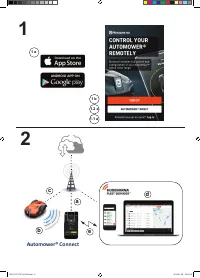
2 Introduction Serial number: Product number: PIN code: The serial number and the product number are on the product rating plate and on the product carton.• Register your product on www.husqvarna.com. Enter the serial number of the product, the product number and the date of purchase to register you...
Page 10 - Overview of the settings structure in Automower
2.8 Overview of the settings structure in Automower ® Connect (1) Operation Cutting time Low High Intensity Weather timer Spiral cutting Cutting height ECO mode Medium Low High Medium Very low Very high Schedule Edit Overview Schedule settings Change current Schedule settings Add new Schedule settin...
Page 11 - Overview of the settings structure Automower
2.9 Overview of the settings structure Automower ® Connect (2) Installation Find charging station Drive past wire Reversing distance Exit angles Corridor width Lawn coverage Charging station signal Follow boundary wire Follow guide 1/2/3 GPS assisted navigation (default) Area 1/2/3/4/5 How often Bou...
Page 12 - Overview of the settings structure in Automower
2.10 Overview of the settings structure in Automower ® Connect (3) (Bluetooth ® short-range connectivity only) General Security Create new loop signal New loop signal GeoFence Change PIN code Theft protection Time lock Require PIN code Alarm STOP button pressed Carried away Time & date Reset to ...
Page 13 - Installation; Main components for installation; To examine where to put the charging
3 Installation 3.1 Introduction - Installation WARNING: Read and understand the safety chapter before you install the product. CAUTION: Use original spare parts and installation material. Note: Refer to www.husqvarna.com for more information about installation. Automower ® 550 has the Automower ® Cl...
Page 17 - wire
B A Note: The product must be manually moved between the main area and the secondary area. • Put the boundary wire around the secondary area (B) to make an island. Refer to To make an island on page 16. Note: The boundary wire must be put as 1 loop around all of the work area (A + B). Note: When the...
Page 18 - Club Solution; Installation of the product
B D C A 3.4.6 Automower ® Club Solution Automower ® Club Solution makes it possible to use 2 or 3 products in one installation. It requires special configuration in the product and the installation of the boundary wires and charging stations is different. To use Automower ® Club Solution, speak to y...
Page 22 - Direct
For more information about the operating modes Start, Park and Pause, refer to Operation on page 30. 3.10.4 Account In this menu there is an overview of the account settings and you can log off from the app. 3.10.4.1 To set the unit format1. Select the unit format Metric or Imperial. 3.10.5 My mower...
Page 23 - Settings
4 Settings The product has factory settings but the settings can be adapted to each work area. 4.1 Schedule In Schedule you can change the schedule settings for the product.The schedule function controls which hours the product should operate and not operate. When the product is not operating it is ...
Page 28 - Husqvarna Fleet Services
4. Wait for confirmation that the loop signal has been generated. This usually takes about 10 seconds. 4.7.2 To change the PIN code 1. Select Security > Change PIN code in the app. 2. Enter the PIN code. 3. Enter the new PIN code. 4. Enter the new PIN code to confirm. 5. Make a note of the new PI...
Page 30 - Operation
5 Operation 5.1 Main switch WARNING: Read and understand the safety chapter before you use the product. • Set the Main switch to the 1 position to start the product. • Set the Main switch to the 0 position to set the product to OFF. 5.2 Start 1. Set the Main switch to the 1 position. 2. Open the Aut...
Page 32 - Maintenance; Maintenance schedule
6 Maintenance 6.1 Introduction - maintenance WARNING: Set the product to OFF before you do maintenance on the product. WARNING: Use protective gloves. For better operation and lifetime of the product, make sure to clean the product regularly and replace worn parts.When the product is new, examine th...
Page 33 - Clean the product; To clean the chassis and blade disc
To prepare Weekly Every year Every third year Examine the rubber grommets on the chassis to make sure that it is sealed correctly. O Examine the skid plate and skid plate bearing. O Examine the rubber bellows in the cutting height adjustment system. O Examine the rubber bellows for the collision col...
Page 36 - Troubleshooting
7 Troubleshooting 7.1 Introduction - troubleshooting All messages can be found in the Messages menu in Automower ® Connect. More suggestions for steps to take in the event of malfunction or symptoms can be found on www.husqvarna.com. Note: The Messages menu is only available for short-range connecti...
Page 41 - Information messages
7.3 Information messages The list below shows a number of information messages that may be found in the Messages menu in the Automower ® Connect app. Contact your local Husqvarna representative if the same message appears often. Message Cause Action Low battery The product cannot find the charging s...
Page 45 - Finding breaks in the loop wire
Symptoms Cause Action The product turns round and stays on a small area for several minutes. This is completely normal for the product. The product have GPS assisted navigation that contributes to an even result. No action. Uneven mowing re- sults. The product works too few hours per day. Increase t...
Page 48 - Transportation, storage and disposal
8 Transportation, storage and disposal 8.1 Transportation The supplied Li-ion batteries obey the Dangerous Goods Legislation requirements.• Obey all applicable national regulations. • Obey the special requirement on package and labels for commercial transportations, including by third parties and fo...
Page 49 - Technical data
9 Technical data 9.1 Technical data Dimensions Automower ® 520 Automower ® 550 Length, cm / in. 72 / 28.3 72 / 28.3 Width, cm / in. 56 / 22 56 / 22 Height, cm / in. 31 / 12 31 / 12 Weight, kg / lb 13.3 / 29.3 12.9 / 28.4 Electrical system Automower ® 520 Automower ® 550 Battery, Lithium-Ion 18.5 V/4...
Page 51 - Registered trademarks
Frequency Band Support Bluetooth ® Frequency range 2400.0-2483.5 MHz Automower ® Connect 2G GSM 850 MHz, E-GSM 900 MHz, DCS 1800 MHz, PCS 1900 MHz Automower ® Connect 3G Band 19 (800 MHz), Band 5 (850 MHz), Band 8 (900 MHz), Band 2 (1900 MHz), Band 1 (2100 MHz) Automower ® Connect 4G Band 12 (700 MH...
Page 52 - 0 Original EU Declaration of Conformity
10 Original EU Declaration of Conformity 52 - Original EU Declaration of Conformity 1439 - 016 - 03.10.2023
Page 53 - 1 EU Declaration of Conformity
11 EU Declaration of Conformity We, Husqvarna AB, SE 561 82 Huskvarna, SWEDEN, Tel. +46 36 146500 declare on our sole responsibility that the product: Description Robotic lawn mower Brand Husqvarna Type/Model HUSQVARNA AUTOMOWER ® 520/550 Identification Serial numbers dating from 2023 week 47 compli...
Page 54 - 2 Original UK Declaration of Conformity
12 Original UK Declaration of Conformity 54 - Original UK Declaration of Conformity 1439 - 016 - 03.10.2023