Page 2 - Contents
Contents 1 Safety 1.1 Safety definitions................................................... 31.2 General safety instructions....................................31.3 Safety instructions for installation..........................41.4 Safety instructions for operation............................41.5 Sa...
Page 3 - Safety; Safety definitions
1 Safety 1.1 Safety definitions Warnings, cautions and notes are used to point out specially important parts of the manual. WARNING: Used if there is a risk of injury or death for the operator or bystanders if the instructions in the manual are not obeyed. CAUTION: Used if there is a risk of damage ...
Page 5 - To lift and move the product
of electrical/mechanical abuse. Avoid storage in direct sunlight. 1.7 To lift and move the product WARNING: The product must be set to OFF before you lift the product. The product is disabled when the indicator on the jog wheel goes off. CAUTION: Do not lift the product when it is parked in the char...
Page 6 - Introduction; Connect
2 Introduction 2.1 Introduction Factory PIN code: 1234 Serial number: Product number: The serial number and the product number are on the product rating plate and on the product carton.• Register your product on www.husqvarna.com. Enter the serial number of the product, the product number and the da...
Page 7 - Product overview Automower
2.4 Product overview Automower ® 320/430X/450X NERA Automower 320 NERA Automower 430X/450X NERA 16 17 28 22 29 24 25 27 26 23 35 30 33 31 32 4 2 7 3 5 18 34 19 20 8 11 10 9 12 13 14 15 1 6 21 1. Product body 2. Top cover 3. Front wheels 4. Rear wheels 5. Radar 6. Headlights 7. Accessory hub 8. Displ...
Page 9 - Access
2.8 Automower ® Access A B C D • The display (A) shows the status bar and the main menu symbols. Refer to Symbols on the display on page 9. • The START button (B) is used to start the operation of product. • The jog wheel (C) is turned to move through the menu structure and pushed to select. • The S...
Page 12 - Installation; Main components for installation; To examine where to put the charging
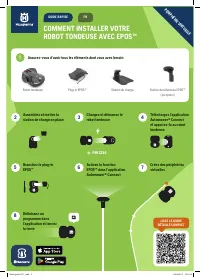
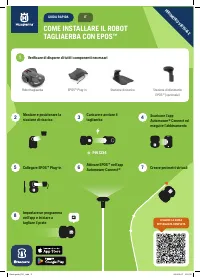
3 Installation 3.1 Introduction - Installation Read this chapter to install the product with a boundary wire. A boundary wire is not necessary if you install the product with the EPOS ™ . Read the operator's manual for the reference station to install it with the product. WARNING: Read and understan...
Page 16 - wire
Note: The product must be manually moved between the main area and the secondary area. B A • Put the boundary wire around the secondary area (B) to make an island. Refer to To make an island on page 15. Note: The boundary wire must be put as 1 loop around all of the work area (A + B). Note: When the...
Page 17 - Installation of the product; Connect app
B D C A 3.5 Installation of the product 3.5.1 Installation tools • Hammer/plastic mallet: To simplify putting the stakes into the ground. • Edge cutter/straight spade: To bury the boundary wire. • Combination pliers: For cutting the boundary wire and pressing the connectors together. • Adjustable pl...
Page 19 - stakes
1. Put the boundary wire around all of the work area. Start and complete the installation behind the charging station. 2. Open the connector and put the boundary wire in the connector. 3. Close the connector with a pair of pliers. 4. Cut the boundary wire 1-2 cm / 0.4-0.8 in. above each connector. 5...
Page 21 - Settings; To calculate the schedule setting for
4 Settings This chapter gives information about the settings for the product that you can make in the Automower ® Connect app. All setting for the product are available in Automower ® Connect. Some settings can also be made in Automower ® Access, refer to Automower ® Access on page 9. The product ha...
Page 27 - Operation; To set the product to ON
5 Operation The most frequently used operation settings are included in the Automower ® Access, refer to Automower ® Access on page 6. All operating modes are available in the Automower ® Connect app. 5.1 To set the product to ON WARNING: Read and understand the safety chapter before you use the pro...
Page 29 - Maintenance; Maintenance schedule
6 Maintenance 6.1 Introduction - maintenance WARNING: Set the product to OFF before you do maintenance on the product. WARNING: Use protective gloves. For better operation and lifetime of the product, make sure to clean the product regularly and replace worn parts.When the product is new, examine th...
Page 30 - Clean the product; disc
To prepare Weekly Every year Every third year Examine the skid plate and skid plate bearing. O Examine the rubber bellows in the cutting height adjustment system. O Examine the rubber bellows for the collision columns. O Replace the rubber bellows for the collision columns. O Examine and clean the a...
Page 31 - Replacement of the blades
4. Put the body of the product adjacent to the chassis of the product or tilt it against a wall. 5. Put the product onto its side. 6. Clean the blade disc bellows for the blade disc and chassis with a brush. At the same time, make sure that the blade disc rotates freely. Make sure that the blades ar...
Page 33 - Troubleshooting
7 Troubleshooting 7.1 Messages The messages in the table below are shown in Automower ® Connect and Automower ® Access. Speak to your Husqvarna representative if the same message shows frequently. Message Cause Action Wrong PIN code An incorrect PIN code has been entered. 5 tries are permitted, and ...
Page 41 - Finding breaks in the loop wire
Symptoms Cause Action The product is parked for hours in the charging station. The product has operated the maximum cut- ting time for the day. No action. Refer to Schedule on page 21. The hatch is closed but the START button is not pushed. Push the STOP button to open the hatch. Enter the PIN code ...
Page 44 - Transportation, storage and disposal; To put the product into storage
8 Transportation, storage and disposal 8.1 Transportation The supplied Li-ion batteries obey the Dangerous Goods Legislation requirements.• Obey all applicable national regulations. • Obey the special requirement on package and labels for commercial transportations, including by third parties and fo...
Page 46 - Technical data
9 Technical data 9.1 Technical data Dimensions Automower ® 320 NERA Automower ® 430X NERA Automower ® 450X NERA Length, cm/in. 75/29.6 75/29.6 75/29.6 Width, cm/in. 54/21.4 54/21.4 54/21.4 Height, cm/in. 28/11.1 28/11.1 28/11.1 Weight, kg/lb 12.8 / 28 14.6 / 32 14.5 / 32 Electrical system Automower ...