Husqvarna Automower 450X NERA - Quick Guide
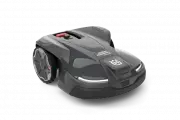
This quick installation guide covers the setup of a Husqvarna robotic lawn mower, whether equipped with EPOS™ technology or perimeter boundary cables. The instructions focus on preparing components, assembling the charging station, connecting essential systems–such as the EPOS plug-in or boundary wire–and integrating it with the Automower® Connect app for scheduling and virtual boundary management. Key topics include hardware assembly, app pairing, safety setup via virtual perimeters, and operational scheduling to ensure efficient lawn maintenance.


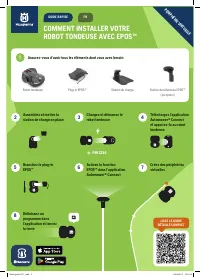
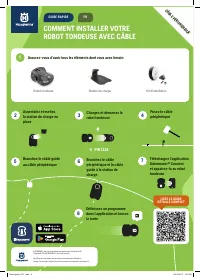
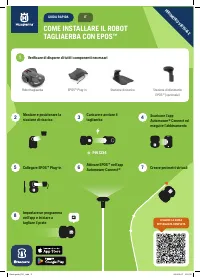
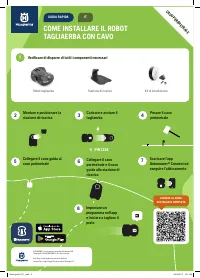


Table of Contents:
- Page 1 – EPOS™ Technology Installation Steps
- Page 2 – Boundary Cable Setup Procedure
- Page 3 – EPOS™ System Setup Guide
- Page 4 – Corded Robotic Mower Installation
- Page 5 – EPOS™ Robotic Mower Setup
- Page 6 – Perimeter Cable Installation
- Page 7 – EPOS™ System Installation Guide
- Page 8 – Boundary Wire Installation
SO INSTALLIEREN SIE IHREN
MÄHROBOTER MIT EPOS™
Mähroboter
EPOS™ Referenzstation
(optional)
EPOS™ Plug-in
Ladestation
2
Ladestation
zusammenbauen und
platzieren
5
EPOS™ Plug-in
anschließen
8
Zeitplan in der App
festlegen und mit dem
Mähen beginnen
3
Mäher aufladen und
starten
6
EPOS™ in der Automower®
Connect-App aktivieren
4
Automower® Connect-
App herunterladen und
koppeln
7
Virtuelle Begrenzungen
erstellen
PIN 1234
1
Sicherstellen, dass Sie alles zur Hand haben, was Sie benötigen
VIR
TUELLE BEGRENZUNG
AUSFÜHRLICHEN
LEITFADEN LESEN
DE
KURZANLEITUNG
Quick guide_P21_.indd 1
Quick guide_P21_.indd 1
2024-09-17 9:51:56
2024-09-17 9:51:56
"Loading the manual" means you need to wait until the file loads and becomes available for online reading. Some manuals are very large, and the time they take to appear depends on your internet speed.
Was this manual helpful?
About this manual
- Brand
- Husqvarna
- Model
- Automower 450X NERA
- Document type
- Quick Guide
- Language(s)
- German, English, French, Italian
- Pages
- 8
- File size
- 592.7 KB
- Format
Other Manuals for Husqvarna Automower 450X NERA
Summary
Quick installation guide detailing eight steps for setting up a robotic mower using EPOS™ technology, including component preparation, charging station assembly, charging procedures, app pairing, plug-in activation, boundary creation, and scheduling.
Instructions for setting up a robotic mower using a boundary cable, covering equipment preparation, charging station assembly, starting the mower, laying the boundary cable, cable connection, app pairing, and schedule setting.
Eight steps for setting up a lawn mower using the EPOS™ system, including gathering components, assembling the charging station, charging/starting, app pairing, connecting the plug-in, enabling EPOS™, creating virtual perimeters, and setting a mowing program.
Ask a question
Related manuals
Popular Husqvarna Other


More Husqvarna Other models
 Husqvarna Automower 435X AWD NERA Quick Guide
 Husqvarna Automower 440 User Manual
 Husqvarna Automower 450X User Manual
 Husqvarna AUTOMOWER 450X EPOS Quick Guide
 Husqvarna AUTOMOWER 450XH Quick Guide
 Husqvarna AUTOMOWER 450XH EPOS Quick Guide
 Husqvarna AUTOMOWER 520 Quick Guide
 Husqvarna Automower 535 AWD EPOS User Manual
 Husqvarna AUTOMOWER 550 EPOS Quick Guide
 Husqvarna AUTOMOWER 550H Quick Guide
 Husqvarna AUTOMOWER 550H EPOS Quick Guide
 Husqvarna Automower Aspire R4 Quick Guide