Husqvarna AUTOMOWER 550H - Quick Guide
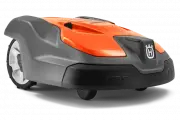
The Husqvarna Automower robotic lawn mowers–such as the 520H/550H models–are covered by a remote control manual, focusing on their smart connectivity and fleet management features. This guide highlights how to pair devices with mobile apps (via Bluetooth, GPS, or cloud services), perform maintenance like blade replacement, interpret LED indicators for operational status, and ensure safety before use. It also emphasizes fleet management capabilities through Husqvarna Fleet Services™, enabling remote monitoring and control from smartphones.
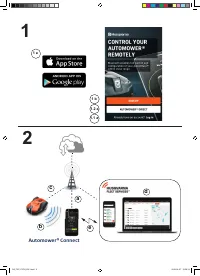




Table of Contents:
- Page 1 – Product Identification and Quick Guide
- Page 2 – Remote Control Setup via Mobile Application
- Page 3 – Initial Setup and Connectivity
- Page 4 – Maintenance, Safety, and Troubleshooting Procedures
- Page 5 – Automower Connect App Setup and Fleet Management
- Page 6 – Fleet Services Pairing and Maintenance Indicators
- Page 7 – Remote Control and Fleet Management Integration
- Page 8 – Fleet Services Pairing and Maintenance Details
- Page 9 – Connectivity Features via Mobile Application
- Page 10 – Fleet Services Operations and Troubleshooting
- Page 11 – Mower Installation and Physical Safety
- Page 12 – Indicator Light Status Definitions
H U S Q VA R N A A U T O M O W E R
®
520H/550H
Q U I C K G U I D E
G U Í A R Á P I D A
G U I D E R A P I D E
G U I A R Á P I D O
QG_P2C, P2CH_2021.indd 1
QG_P2C, P2CH_2021.indd 1
2020-04-27 15:37:34
2020-04-27 15:37:34
"Loading the manual" means you need to wait until the file loads and becomes available for online reading. Some manuals are very large, and the time they take to appear depends on your internet speed.
Was this manual helpful?
About this manual
- Brand
- Husqvarna
- Model
- AUTOMOWER 550H
- Document type
- Quick Guide
- Language(s)
- English, Spanish, French
- Pages
- 12
- File size
- 2.2 MB
- Format
Other Manuals for Husqvarna AUTOMOWER 550H
Summary
Cover information for the robotic lawn mower, including model identification and quick guide details.
Instructions for remote control of the Automower using the Connect app and connection methods to fleet management platforms.
Steps for starting with the Connect app, pairing the mower with a mobile device, utilizing Automower Direct, and accessing fleet management services.
Ask a question
Related manuals
Popular Husqvarna Other


More Husqvarna Other models
 Husqvarna AUTOMOWER 450XH Quick Guide
 Husqvarna AUTOMOWER 450XH EPOS Quick Guide
 Husqvarna Automower 450X NERA Quick Guide
 Husqvarna AUTOMOWER 520 Quick Guide
 Husqvarna Automower 535 AWD EPOS User Manual
 Husqvarna AUTOMOWER 550 EPOS Quick Guide
 Husqvarna AUTOMOWER 550H EPOS Quick Guide
 Husqvarna Automower Aspire R4 Quick Guide
 Husqvarna BV650 Manual
 Husqvarna Chain Saw Manual
 Husqvarna CR 250 Manual
 Husqvarna crt51 Manual