Prestigio MultiPad WIZE 3021 3G (PMT30X1_3G) - User Manual

Prestigio MultiPad WIZE 3021 3G (PMT30X1_3G) Tablet – User Manual, read for free online in PDF format. We hope this helps you resolve any issues you may have. If you have further questions, please contact us through the contact form.


Table of Contents:
- Page 2 – Android; Nano SIM; TF
- Page 3 – Home screen; Open an app; In the list menu, tap and hold an app, and drag it to the right place; Connect to the Internet; Connect to a wireless network
- Page 4 – Remove an app
- Page 5 – Подключение к сети Интернет; Подключение к беспроводной сети; Главное меню; Открыть приложение
- Page 6 – Добавить пиктограмму в главное меню
- Page 8 – GOVERNING LAW; Avoiding hearing damage; Correct disposal of the product; Copyright and trademark notice
- Page 9 – Обращайтесь с устройством бережно
- Page 10 – Защита авторских прав и торговых марок; Регулирующий закон; рекомендованные производителем; Предостережения при использовании батареи и; Утилизация устройства
- Page 11 – Warranty Card
- Page 12 – Гарантийный талон
+/-
RESET
PMT3011_3G_QSG_V1.0.indb 1
5/26/2015 11:45:54 AM
"Loading the manual" means you need to wait until the file loads and becomes available for online reading. Some manuals are very large, and the time they take to appear depends on your internet speed.
Summary
Dual Core, 1.3 GHz 10.1” TN, 16:9, 1024*600 GPS, A-GPS 8 GB Flash + 512 MB RAM 0.3 MP + 2.0 MP 56 00 mAh Android TM 4.4, KitKat® WCDMA: 900/2100 MHz; GSM: 850/900/1800/1900 MHz 261*164*10 mm (H*W*D) Micro SDHC/SDXC, up to 32 GB Wi-Fi (802.11 b/g/n), 3G, Bluetooth 4.0+HS 585 g (approx.) Nano SIM Stan...
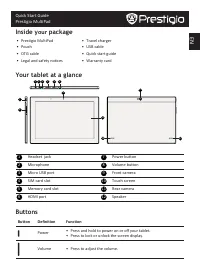
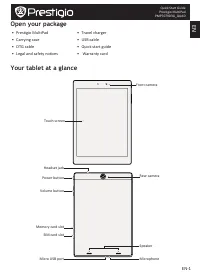
Quick Start Guide Prestigio MultiPad EN Home screen The Home screen can have multiple panels. To view the apps and widgets on the other panels, swipe towards the left or the right. Use the notifications panel Slide down from the top left of the screen to open the notifications panel. When you get a ...
EN Quick Start Guide Prestigio MultiPad As Prestigio continuously updates and improves its products, your device’s software and hardware may have a slightly different appearance or modified functionalities than those presented in this quick start guide. Prestigio hereby states that this device compl...