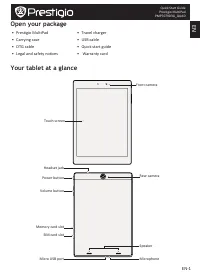
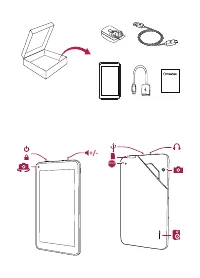
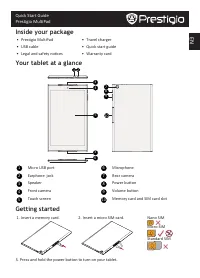
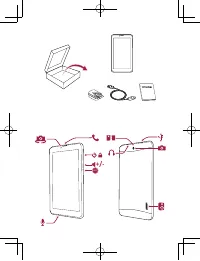
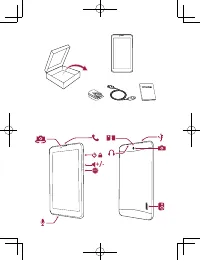
Page 2 - Buttons; Getting started
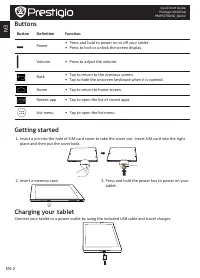
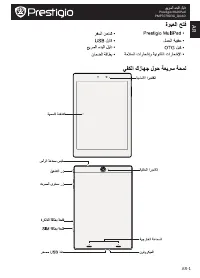
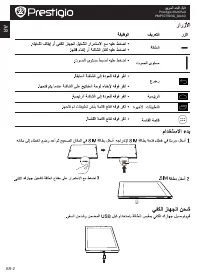
EN-2 EN Quick Start Guide Prestigio MultiPad PMP7079D3G_QUAD Buttons Button Definition Function Power • Press and hold to power on or off your tablet. • Press to lock or unlock the screen display. Volume • Press to adjust the volume. Back • Tap to return to the previous screen. • Tap to hide the ons...
Page 3 - Make a call; Add an app icon to home screen; Use your apps; Open an app; Connect to internet; Turn on or off data connection
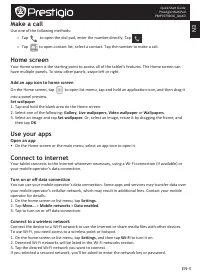
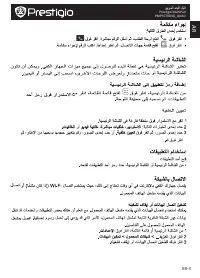
EN EN-3 Quick Start Guide Prestigio MultiPad PMP7079D3G_QUAD Make a call Use one of the following methods: » Tap to open the dial pad, enter the number directly. Tap . » Tap to open contact list, select a contact. Tap the number to make a call. Home screen Your Home screen is the starting point to a...
Page 4 - Technical Specifications
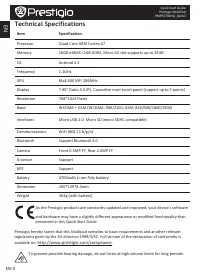
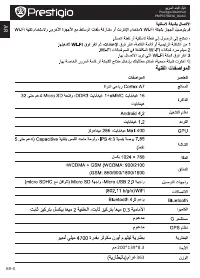
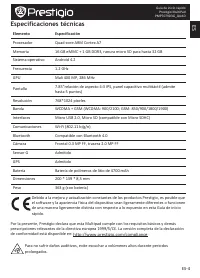
EN-4 EN Quick Start Guide Prestigio MultiPad PMP7079D3G_QUAD Technical Specifications Item Specification Processor Quad Core ARM Cortex A7 Memory 16GB eMMC+1GB DDR3, Micro SD slot supports up to 32GB OS Android 4.2 Frequency 1.2GHz GPU Mali 400 MP, 286MHz Display 7.85” Ratio 4:3 IPS, Capacitive muti...
Page 5 - Комплект поставки
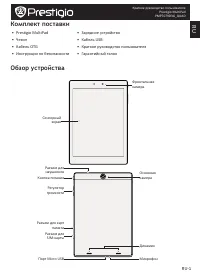
RU-1 RU Краткое руководство пользователя Prestigio MultiPad PMP7079D3G_QUAD Комплект поставки • Prestigio MultiPad • Зарядное устройство • Чехол • Кабель USB • Кабель OTG • Краткое руководство пользователя • Инструкции по безопасности • Гарантийный талон Обзор устройства Сенсорный экран Фронтальная ...
Page 6 - Кнопки; Начало работы; Зарядка устройства
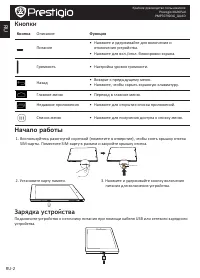
RU-2 RU Краткое руководство пользователя Prestigio MultiPad PMP7079D3G_QUAD Кнопки Кнопка Описание Функция Питание • Нажмите и удерживайте для включения и отключения устройства. • Нажмите для вкл./откл. блокировки экрана. Громкость • Настройка уровня громкости. Назад • Возврат к предыдущему меню. • ...
Page 7 - Осуществление вызоваl; Открыть приложение; Подключение к сети Интернет
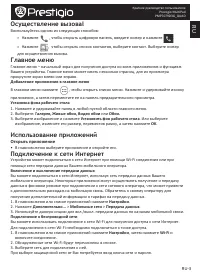
RU-3 RU Краткое руководство пользователя Prestigio MultiPad PMP7079D3G_QUAD Осуществление вызоваl Воспользуйтесь одним из следующих способов: » Нажмите , чтобы открыть цифровую панель, введите номер и нажмите . » Нажмите , чтобы открыть список контактов, выберите контакт. Выберите номер для осуществ...
Page 8 - Технические характеристики
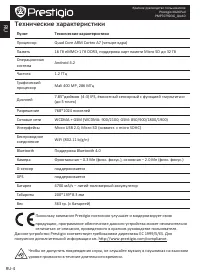
RU-4 RU Краткое руководство пользователя Prestigio MultiPad PMP7079D3G_QUAD Технические характеристики Пункт Технические характеристики Процессор Quad Core ARM Cortex A7 (четыре ядра) Память 16 Гб eMMC+1 Гб DDR3, поддержка карт памяти Micro SD до 32 Гб Операционная система Android 4.2 Частота 1.2 ГГ...
Page 14 - Отворете вашия пакет
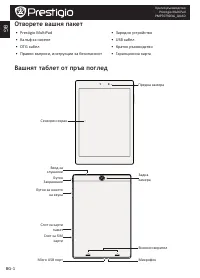
BG-1 BG Кратко ръководство Prestigio MultiPad PMP7079D3G_QUAD Отворете вашия пакет • Prestigio MultiPad • Зарядно устройство • Калъф за носене • USB кабел • OTG кабел • Кратко ръководство • Правни въпроси, инструкции за безопасност • Гаранционна карта Вашият таблет от пръв поглед Сензорен екран Пред...
Page 15 - Бутони; Първи стъпки
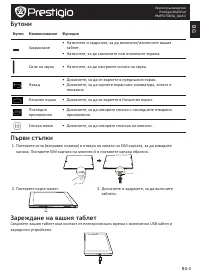
BG-2 BG Кратко ръководство Prestigio MultiPad PMP7079D3G_QUAD Бутони Бутон Наименование Функция Захранване • Натиснете и задръжте, за да включите/изключите вашия таблет. • Натиснете, за да заключите или отключите екрана. Сила на звука • Натиснете, за да настроите силата на звука. Назад • Докоснете, ...
Page 16 - Как да направите повикване; Добавяне на икона на приложение в Началния екран; Използване на вашите приложения; Отворете приложение; Свързване към Интернет; Включване или изключване на връзката за данни; Свързване към безжична мрежа
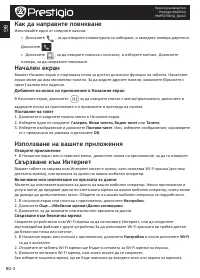
BG-3 BG Кратко ръководство Prestigio MultiPad PMP7079D3G_QUAD Как да направите повикване Използвайте един от следните начини: » Докоснете , за да отворите клавиатурата за набиране, и въведете номера директно. Докоснете . » Докоснете , за да отворите списъка с контакти, и изберете контакт. Докоснете ...
Page 17 - Технически спецификации
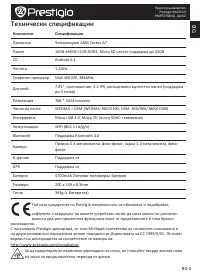
BG-4 BG Кратко ръководство Prestigio MultiPad PMP7079D3G_QUAD Технически спецификации Компонент Спецификация Процесор Четириядрен ARM Cortex A7 Памет 16GB eMMC+1GB DDR3, Micro SD слотът поддържа до 32GB ОС Android 4.2 Честота 1.2GHz Графичен процесор Mali 400 MP, 286MHz Дисплей 7.85”, съотношение, 4...
Page 18 - Otevřete balení
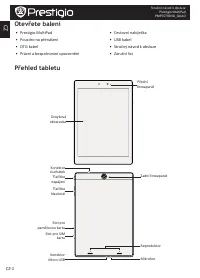
CZ-1 CZ Stručný návod k obsluze Prestigio MultiPad PMP7079D3G_QUAD Otevřete balení • Prestigio MultiPad • Cestovní nabíječka • Pouzdro na přenášení • USB kabel • OTG kabel • Stručný návod k obsluze • Právní a bezpečnostní upozornění • Záruční list Přehled tabletu Dotyková obrazovka Přední fotoaparát...
Page 19 - Tlačítka; Začínáme
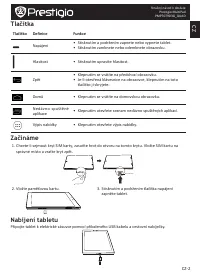
CZ-2 CZ Stručný návod k obsluze Prestigio MultiPad PMP7079D3G_QUAD Tlačítka Tlačítko Definice Funkce Napájení • Stisknutím a podržením zapnete nebo vypnete tablet. • Stisknutím zamknete nebo odemknete obrazovku. Hlasitost • Stisknutím upravíte hlasitost. Zpět • Klepnutím se vrátíte na předchozí obra...
Page 20 - Volání; Přidání ikony aplikace na domovskou obrazovku; Použití aplikací; Otevření aplikace; Připojení k internetu; Zapnutí či vypnutí datového připojení
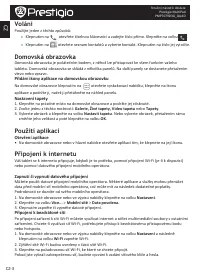
CZ-3 CZ Stručný návod k obsluze Prestigio MultiPad PMP7079D3G_QUAD Volání Použijte jeden z těchto způsobů: » Klepnutím na otevřete číselnou klávesnici a zadejte číslo přímo. Klepněte na volbu . » Klepnutím na otevřete seznam kontaktů a vyberte kontakt. Klepnutím na číslo jej vytočíte. Domovská obraz...
Page 21 - Technické parametry
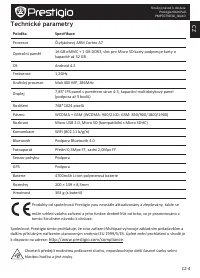
CZ-4 CZ Stručný návod k obsluze Prestigio MultiPad PMP7079D3G_QUAD Technické parametry Položka Specifikace Procesor Čtyřjádrový ARM Cortex A7 Operační paměť 16 GB eMMC + 1 GB DDR3, slot pro Micro SD karty podporuje karty o kapacitě až 32 GB OS Android 4.2 Frekvence 1,2GHz Grafický procesor Mali 400 ...
Page 22 - Öffnen Sie Ihr Paket
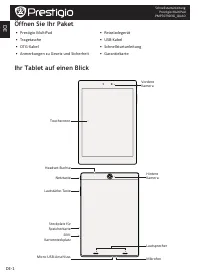
DE-1 DE Schnellstartanleitung Prestigio MultiPad PMP7079D3G_QUAD Öffnen Sie Ihr Paket • Prestigio MultiPad • Reiseladegerät • Tragetasche • USB-Kabel • OTG-Kabel • Schnellstartanleitung • Anmerkungen zu Gesetz und Sicherheit • Garantiekarte Ihr Tablet auf einen Blick Touchscreen Vordere Kamera Netzt...
Page 23 - Tasten; Erste Schritte; Aufladen des Tablets
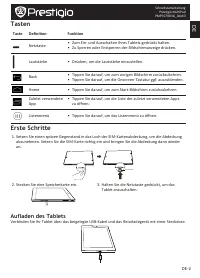
DE-2 DE Schnellstartanleitung Prestigio MultiPad PMP7079D3G_QUAD Tasten Taste Definition Funktion Netztaste • Zum Ein- und Ausschalten Ihres Tablets gedrückt halten. • Zu Sperren oder Entsperren der Bildschirmanzeige drücken. Lautstärke • Drücken, um die Lautstärke einzustellen. Back • Tippen Sie da...
Page 24 - Einen Anruf durchführen; App-Symbol zum Start-Bildschirm hinzufügen; Verwenden von Apps; Öffnen einer App; Verbindung mit dem Internet; Datenverbindung ein- oder ausschalten
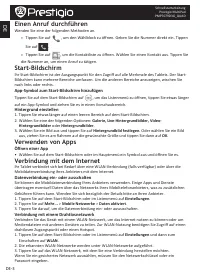
DE-3 DE Schnellstartanleitung Prestigio MultiPad PMP7079D3G_QUAD Einen Anruf durchführen Wenden Sie eine der folgenden Methoden an. » Tippen Sie auf , um den Wählblock zu öffnen. Geben Sie die Nummer direkt ein. Tippen Sie auf . » Tippen Sie auf , um die Kontaktliste zu öffnen. Wählen Sie einen Kont...
Page 25 - Technische Daten
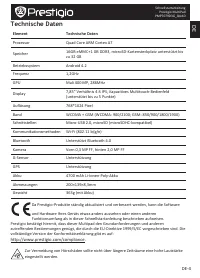
DE-4 DE Schnellstartanleitung Prestigio MultiPad PMP7079D3G_QUAD Technische Daten Element Technische Daten Prozessor Quad Core ARM Cortex A7 Speicher 16GB eMMC+1 GB DDR3, microSD-Kartensteckplatz unterstützt bis zu 32 GB Betriebssystem Android 4.2 Frequenz 1,2GHz GPU Mali 400 MP, 286MHz Display 7,85...
Page 26 - EE; Pakendis olevad esemed
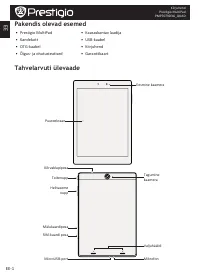
EE-1 EE Kiirjuhend Prestigio MultiPad PMP7079D3G_QUAD Pakendis olevad esemed • Prestigio MultiPad • Kaasaskantav laadija • Kandekott • USB-kaabel • OTG-kaabel • Kiirjuhend • Õigus- ja ohutusteatised • Garantiikaart Tahvelarvuti ülevaade Puuteekraan Eesmine kaamera Toitenupp Tagumine kaamera Helitase...
Page 27 - Nupud; Alustamine
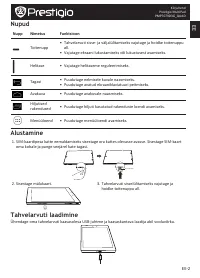
EE-2 EE Kiirjuhend Prestigio MultiPad PMP7079D3G_QUAD Nupud Nupp Nimetus Funktsioon Toitenupp • Tahvelarvuti sisse- ja väljalülitamiseks vajutage ja hoidke toitenuppu all. • Vajutage ekraani lukustamiseks või lukustusest avamiseks. Helitase • Vajutage helitaseme reguleerimiseks. Tagasi • Puudutage e...
Page 28 - Helistamine; Rakenduse ikooni lisamine avakuvale; Rakenduste kasutamine; Rakenduse avamine; Internetiühenduse loomine; Andmesideühenduse sisse- ja väljalülitamine
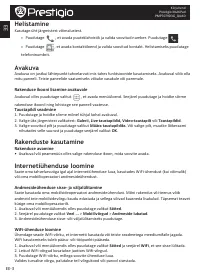
EE-3 EE Kiirjuhend Prestigio MultiPad PMP7079D3G_QUAD Helistamine Kasutage üht järgmistest võimalustest. » Puudutage , et avada puuteklahvistik ja valida soovitud number. Puudutage . » Puudutage , et avada kontaktiloend ja valida soovitud kontakt. Helistamiseks puudutage telefoninumbrit. Avakuva Ava...
Page 29 - Tehnilised andmed
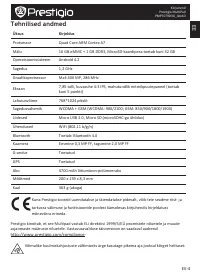
EE-4 EE Kiirjuhend Prestigio MultiPad PMP7079D3G_QUAD Tehnilised andmed Üksus Kirjeldus Protsessor Quad Core ARM Cortex A7 Mälu 16 GB eMMC + 1 GB DDR3, MicroSD-kaardipesa toetab kuni 32 GB Operatsioonisüsteem Android 4.2 Sagedus 1,2 GHz Graafikaprotsessor Mali 400 MP, 286 MHz Ekraan 7,85 tolli, kuva...
Page 30 - Volumen de suministro
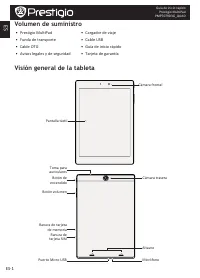
ES-1 ES Guía de inicio rápido Prestigio MultiPad PMP7079D3G_QUAD Volumen de suministro • Prestigio MultiPad • Cargador de viaje • Funda de transporte • Cable USB • Cable OTG • Guía de inicio rápido • Avisos legales y de seguridad • Tarjeta de garantía Visión general de la tableta Pantalla táctil Cám...
Page 31 - Botones; Iniciación
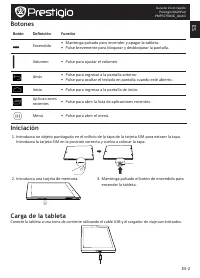
ES-2 ES Guía de inicio rápido Prestigio MultiPad PMP7079D3G_QUAD Botones Botón Definición Función Encendido • Mantenga pulsado para encender y apagar la tableta. • Pulse brevemente para bloquear y desbloquear la pantalla. Volumen • Pulse para ajustar el volumen. Atrás • Pulse para regresar a la pant...
Page 32 - Hacer una llamada; Añadir el icono de una aplicación a la pantalla de Inicio; Uso de las aplicaciones; Abrir una aplicación; Conexión a internet; Encender y apagar la conexión de datos
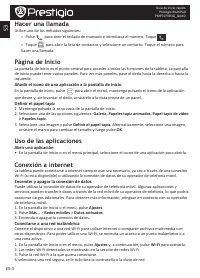
ES-3 ES Guía de inicio rápido Prestigio MultiPad PMP7079D3G_QUAD Hacer una llamada Utilice uno de los métodos siguientes: » Pulse para abrir el teclado de marcado e introduzca el número. Toque . » Toque para abrir la lista de contactos y seleccione un contacto. Toque el número para hacer una llamada...
Page 33 - Especificaciones técnicas
ES-4 ES Guía de inicio rápido Prestigio MultiPad PMP7079D3G_QUAD Especificaciones técnicas Elemento Especificación Procesador Quad-core ARM Cortex A7 Memoria 16 GB eMMC + 1 GB DDR3, ranura micro SD para hasta 32 GB Sistema operativo Android 4.2 Frecuencia 1.2 GHz GPU Mali 400 MP, 286 MHz Pantalla 7....
Page 34 - Ouvrez votre emballage
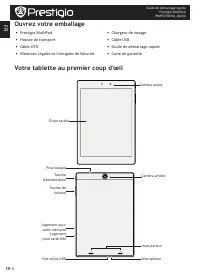
FR-1 FR Guide de démarrage rapide Prestigio MultiPad PMP7079D3G_QUAD Ouvrez votre emballage • Prestigio MultiPad • Chargeur de voyage • Housse de transport • Câble USB • Сâble OTG • Guide de démarrage rapide • Mentions Légales et Consignes de Sécurité • Carte de garantie Votre tablette au premier co...
Page 35 - Boutons; Mise en marche
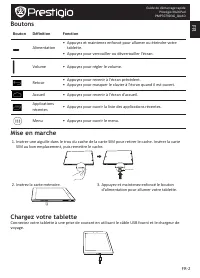
FR-2 FR Guide de démarrage rapide Prestigio MultiPad PMP7079D3G_QUAD Boutons Bouton Définition Fonction Alimentation • Appuyez et maintenez enfoncé pour allumer ou éteindre votre tablette. • Appuyez pour verrouiller ou déverrouiller l'écran. Volume • Appuyez pour régler le volume. Retour • Appuyez p...
Page 36 - Effectuer un appel; Modifier le fond d’écran; Utilisation de vos applications; Ouvrir une application; Se connecter à Internet; Activer ou désactiver la connexion de données
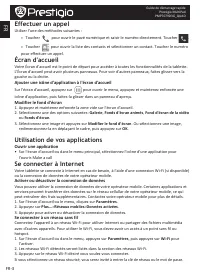
FR-3 FR Guide de démarrage rapide Prestigio MultiPad PMP7079D3G_QUAD Effectuer un appel Utiliser l'une des méthodes suivantes : » Toucher pour ouvrir le pavé numérique et saisir le numéro directement. Toucher . » Toucher pour ouvrir la liste des contacts et sélectionner un contact. Toucher le numéro...
Page 37 - Spécifications techniques
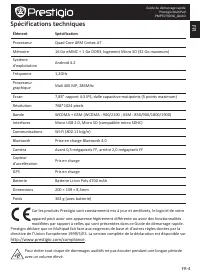
FR-4 FR Guide de démarrage rapide Prestigio MultiPad PMP7079D3G_QUAD Spécifications techniques Élément Spécification Processeur Quad Core ARM Cortex A7 Mémoire 16 Go eMMC + 1 Go DDR3, logement Micro SD (32 Go maximum) Système d'exploitation Android 4.2 Fréquence 1,2GHz Processeur graphique Mali 400 ...
Page 38 - Ανοίξτε το πακέτο σας
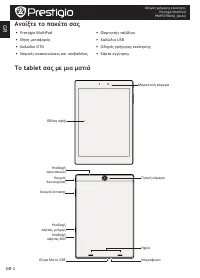
GR-1 GR Οδηγός γρήγορης εκκίνησης Prestigio MultiPad PMP7079D3G_QUAD Ανοίξτε το πακέτο σας • Prestigio MultiPad • Φορτιστής ταξιδίου • Θήκη μεταφοράς • Καλώδιο USB • Καλώδιο OTG • Οδηγός γρήγορης εκκίνησης • Νομικές ανακοινώσεις και ασφαλείας • Κάρτα εγγύησης Το tablet σας με μια ματιά Oθόνη αφής Μπ...
Page 39 - Κουμπιά; Ξεκινώντας
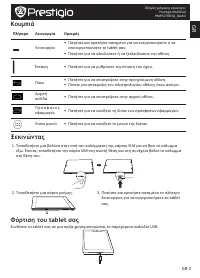
GR-2 GR Οδηγός γρήγορης εκκίνησης Prestigio MultiPad PMP7079D3G_QUAD Κουμπιά Πλήκτρο Λειτουργία Ορισμός Λειτουργία • Πατήστε και κρατήστε πατημένο για να ενεργοποιήσετε ή να απενεργοποιήσετε το tablet σας. • Πατήστε για να κλειδώσετε ή να ξεκλειδώσετε την οθόνη. Ένταση • Πατήστε για να ρυθμίσετε την...
Page 40 - Πραγματοποιήστε μια κλήση; Προσθέστε ένα εικονίδιο εφαρμογής στην αρχική οθόνη; Χρησιμοποιήστε τις εφαρμογές σας; Ανοίξτε μια εφαρμογή; Σύνδεση στο διαδίκτυο; Ενεργοποίηση ή απενεργοποίηση της σύνδεσης δεδομένων
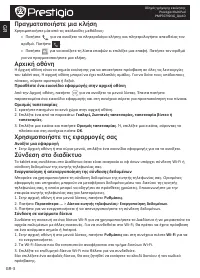
GR-3 GR Οδηγός γρήγορης εκκίνησης Prestigio MultiPad PMP7079D3G_QUAD Πραγματοποιήστε μια κλήση Χρησιμοποιήστε μία από τις ακόλουθες μεθόδους: » Πατήστε για να ανοίξετε το πληκτρολόγιο κλήσης και πληκτρολογήστε απευθείας τον αριθμό. Πατήστε . » Πατήστε για να ανοίξετε τη λίστα επαφών κι επιλέξτε μια ...
Page 41 - Τεχνικές Προδιαγραφές
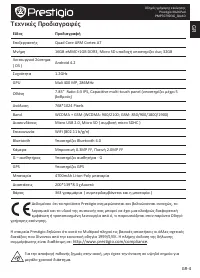
GR-4 GR Οδηγός γρήγορης εκκίνησης Prestigio MultiPad PMP7079D3G_QUAD Τεχνικές Προδιαγραφές Είδος Προδιαγραφή Επεξεργαστής Quad Core ARM Cortex A7 Μνήμη 16GB eMMC+1GB DDR3, Micro SD υποδοχή υποστηρίζει έως 32GB Λειτουργικό Σύστημα ( OS ) Android 4.2 Συχνότητα 1.2GHz GPU Mali 400 MP, 286MHz Οθόνη 7.85...
Page 42 - Otvaranje paketa
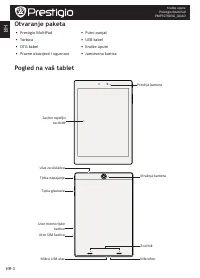
HR-1 HR Kratke upute Prestigio MultiPad PMP7079D3G_QUAD Otvaranje paketa • Prestigio MultiPad • Putni punjač • Torbica • USB kabel • OTG kabel • Kratke upute • Pravne obavijesti i sigurnost • Jamstvena kartica Pogled na va š tablet Zaslon osjetljiv na dodir Prednja kamera Tipka napajanje Stražnja ka...
Page 43 - Tipke; Početak
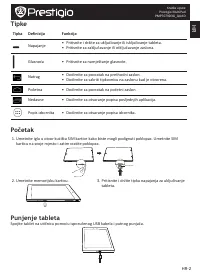
HR-2 HR Kratke upute Prestigio MultiPad PMP7079D3G_QUAD Tipke Tipka Definicija Funkcija Napajanje • Pritisnite i držite za uključivanje ili isključivanje tableta. • Pritisnite za zaključavanje ili otključavanje zaslona. Glasnoća • Pritisnite za namještanje glasnoće. Natrag • Dodirnite za povratak na...
Page 44 - Uspostavljanje poziva; Dodati ikonu aplikacije na početnom zaslonu; Korištenje aplikacije; Otvorite aplikaciju; Spajanje na internet; Uključivanje ili isključivanje podatkovne veze
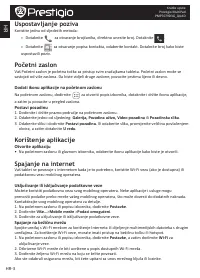
HR-3 HR Kratke upute Prestigio MultiPad PMP7079D3G_QUAD Uspostavljanje poziva Koristite jednu od sljedećih metoda: » Dotaknite za otvaranje brojčanika, direktno unesite broj. Dotaknite . » Dotaknite za otvaranje popisa kontakta, odaberite kontakt. Dotaknite broj kako biste uspostavili poziv. Početni...
Page 45 - Tehničke specifikacije
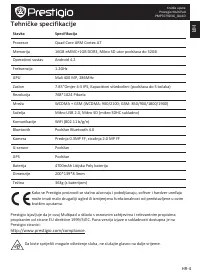
HR-4 HR Kratke upute Prestigio MultiPad PMP7079D3G_QUAD Tehničke specifikacije Stavka Specifikacija Procesor Quad Core ARM Cortex A7 Memorija 16GB eMMC+1GB DDR3, Mikro SD utor podržava do 32GB Operativni sustav Android 4.2 Frekvencija 1.2GHz GPU Mali 400 MP, 286MHz Zaslon 7.85”Omjer 4:3 IPS, Kapacit...
Page 46 - A csomag felnyitása
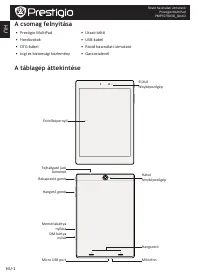
HU-1 HU Rövid használati útmutató Prestigio MultiPad PMP7079D3G_QUAD A csomag felnyitása • Prestigio MultiPad • Utazó töltő • Hordozótok • USB-kábel • OTG-kábel • Rövid használati útmutató • Jogi és biztonsági közlemény • Garancialevél A táblagép áttekintése Érintőképernyő Elülső fényképezőgép Bekap...
Page 47 - Gombok; Kezdő lépések; A táblagép feltöltése
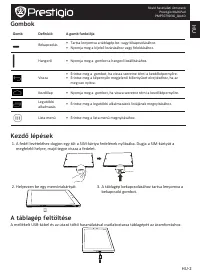
HU-2 HU Rövid használati útmutató Prestigio MultiPad PMP7079D3G_QUAD Gombok Gomb Definíció A gomb funkciója Bekapcsolás • Tartsa lenyomva a táblagép be- vagy kikapcsolásához. • Nyomja meg a kijelző lezárásához vagy feloldásához. Hangerő • Nyomja meg a gombot a hangerő beállításához. Vissza • Érintse...
Page 48 - Hívásindítás; Alkalmazás ikon hozzáadása a kezdőképernyőhöz; Az alkalmazások használata; Alkalmazás megnyitása; Kapcsolódás az internethez; Adatkapcsolat be- vagy kikapcsolása
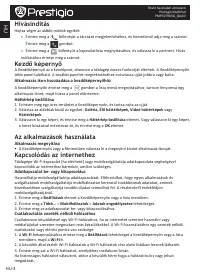
HU-3 HU Rövid használati útmutató Prestigio MultiPad PMP7079D3G_QUAD Hívásindítás Hajtsa végre az alábbi módok egyikét: » Érintse meg a billentyűt a tárcsázó megjelenítéséhez, és közvetlenül adja meg a számot. Érintse meg a gombot. » Érintse meg a billentyűt a kapcsolatlista megnyitásához, és válass...
Page 49 - Műszaki jellemzők
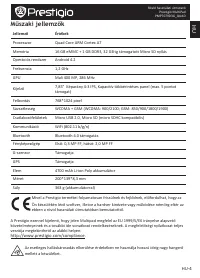
HU-4 HU Rövid használati útmutató Prestigio MultiPad PMP7079D3G_QUAD Műszaki jellemzők Jellemző Értékek Processzor Quad Core ARM Cortex A7 Memória 16 GB eMMC + 1 GB DDR3, 32 GB-ig támogatott Micro SD nyílás Operációs rendszer Android 4.2 Frekvencia 1,2 GHz GPU Mali 400 MP, 286 MHz Kijelző 7,85” Képa...
Page 50 - Apri la confezione
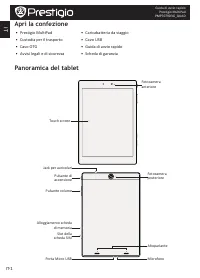
IT-1 IT Guida di avvio rapido Prestigio MultiPad PMP7079D3G_QUAD Apri la confezione • Prestigio MultiPad • Caricabatteria da viaggio • Custodia per il trasporto • Cavo USB • Cavo OTG • Guida di avvio rapido • Avvisi legali e di sicurezza • Scheda di garanzia Panoramica del tablet Touch screen Fotoca...
Page 51 - Pulsanti; Per iniziare
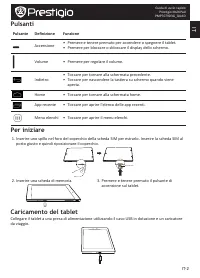
IT-2 IT Guida di avvio rapido Prestigio MultiPad PMP7079D3G_QUAD Pulsanti Pulsante Definizione Funzione Accensione • Premere e tenere premuto per accendere o spegnere il tablet. • Premere per bloccare o sbloccare il display dello schermo. Volume • Premere per regolare il volume. Indietro • Toccare p...
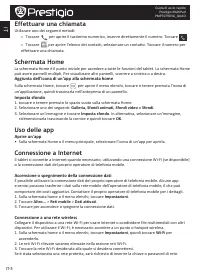
Page 52 - Effettuare una chiamata; Aggiunta dell'icona di un'app alla schermata home; Uso delle app; Accensione o spegnimento della connessione dati
IT-3 IT Guida di avvio rapido Prestigio MultiPad PMP7079D3G_QUAD Effettuare una chiamata Utilizzare uno dei seguenti metodi: » Toccare per aprire il tastierino numerico, inserire direttamente il numero. Toccare . » Toccare per aprire l'elenco dei contatti, selezionare un contatto. Toccare il numero ...
Page 53 - Specifiche tecniche
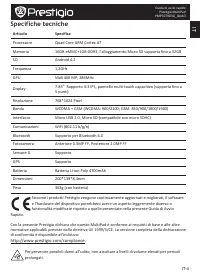
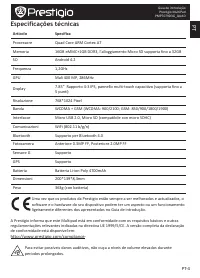
IT-4 IT Guida di avvio rapido Prestigio MultiPad PMP7079D3G_QUAD Specifiche tecniche Articolo Specifica Processore Quad Core ARM Cortex A7 Memoria 16GB eMMC+1GB DDR3, l'alloggiamento Micro SD supporta fino a 32GB SO Android 4.2 Frequenza 1,2GHz GPU Mali 400 MP, 286MHz Display 7.85” Rapporto 4:3 IPS,...
Page 54 - Atidarius pakuotę
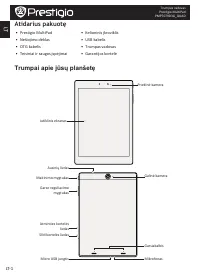
LT-1 LT Trumpas vadovas Prestigio MultiPad PMP7079D3G_QUAD Atidarius pakuotę • Prestigio MultiPad • Kelioninis įkroviklis • Nešiojimo dėklas • USB kabelis • OTG kabelis • Trumpas vadovas • Teisiniai ir saugos įspėjimai • Garantijos kortelė Trumpai apie jūsų planšetę Jutiklinis ekranas Priekinė kamer...
Page 55 - Mygtukai; Darbo pradžia
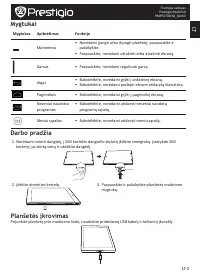
LT-2 LT Trumpas vadovas Prestigio MultiPad PMP7079D3G_QUAD Mygtukai Mygtukas Apibrėžimas Funkcija Maitinimas • Norėdami įjungti arba išjungti planšetę, paspauskite ir palaikykite. • Paspauskite, norėdami užrakinti arba atrakinti ekraną. Garsas • Paspauskite, norėdami reguliuoti garsą. Atgal • Bakste...
Page 56 - Skambinimas; Programos piktogramos padėjimas ant pagrindinio ekrano; Programų naudojimas; Programos paleidimas; Prisijungimas prie interneto; Duomenų ryšio įjungimas ir išjungimas
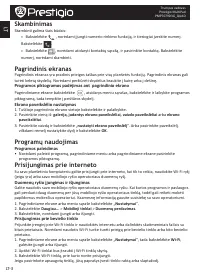
LT-3 LT Trumpas vadovas Prestigio MultiPad PMP7079D3G_QUAD Skambinimas Skambinti galima šiais būdais: » Bakstelėkite , norėdami įjungti numerio rinkimo funkciją, ir tiesiogiai įveskite numerį. Bakstelėkite . » Bakstelėkite , norėdami atidaryti kontaktų sąrašą, ir pasirinkite kontaktą. Bakstelėkite n...
Page 57 - Techninės specifikacijos
LT-4 LT Trumpas vadovas Prestigio MultiPad PMP7079D3G_QUAD Techninės specifikacijos Punktas Specifikacija Procesorius Keturių branduolių ARM Cortex A7 Atmintis 16GB eMMC+1GB DDR3, Micro SD lizdas palaiko korteles iki 32GB OS Android 4.2 Dažnis 1.2GHz GPU Mali 400 MP, 286MHz Ekranas 7.85” Santykis 4:...
Page 58 - Atveriet iepakojumu
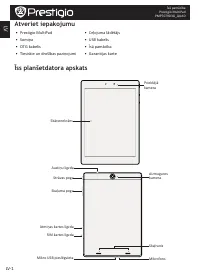
LV-1 LV Īsā pamācība Prestigio MultiPad PMP7079D3G_QUAD Atveriet iepakojumu • Prestigio MultiPad • Ceļojuma lādētājs • Somiņa • USB kabelis • OTG kabelis • Īsā pamācība • Tiesiskie un drošības paziņojumi • Garantijas karte Īss planšetdatora apskats Skārienekrāns Priekšējā kamera Strāvas poga Aizmugu...
Page 59 - Pogas; Uzsākšana
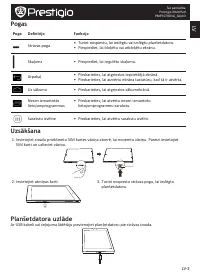
LV-2 LV Īsā pamācība Prestigio MultiPad PMP7079D3G_QUAD Pogas Poga Definīcija Funkcija Strāvas poga • Turiet nospiestu, lai ieslēgtu vai izslēgtu planšetdatoru. • Piespiediet, lai bloķētu vai atbloķētu ekrānu. Skaļums • Piespiediet, lai regulētu skaļumu. Atpakaļ • Pieskarieties, lai atgrieztos iepri...
Page 60 - Zvanīšana; Lietojumprogrammas pievienošana sākumekrānam; Lietojumprogrammu izmantošana; Atveriet lietojumprogrammu; Pieslēgšanās internetam; Datu savienojuma ieslēgšana un izslēgšana
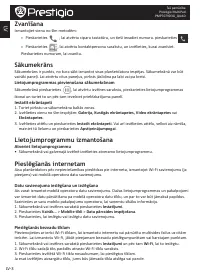
LV-3 LV Īsā pamācība Prestigio MultiPad PMP7079D3G_QUAD Zvanīšana Izmantojiet vienu no šīm metodēm: » Pieskarieties , lai atvērtu ciparu tastatūru, un tieši ievadiet numuru. pieskarieties . » Pieskarieties , lai atvērtu kontaktpersonu sarakstu, un izvēlieties, kurai zvanīsiet. Pieskarieties numuram,...
Page 61 - Tehniskā specifikācija
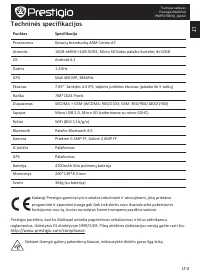
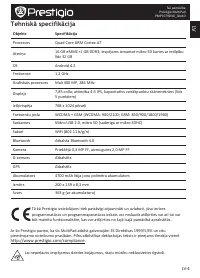
LV-4 LV Īsā pamācība Prestigio MultiPad PMP7079D3G_QUAD Tehniskā specifikācija Objekts Specifikācija Procesors Quad Core ARM Cortex A7 Atmiņa 16 GB eMMC+1 GB DDR3; iespējams izmantot mikro SD kartes ar ietilpību līdz 32 GB OS Android 4.2 Frekvence 1,2 GHz Grafiskais procesors Mali 400 MP, 286 MHz Di...
Page 62 - Open de verpakking
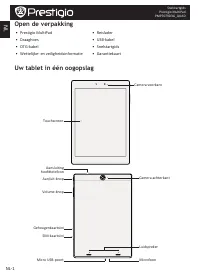
NL-1 NL Snelstartgids Prestigio MultiPad PMP7079D3G_QUAD Open de verpakking • Prestigio MultiPad • Reislader • Draaghoes • USB-kabel • OTG-kabel • Snelstartgids • Wettelijke- en veiligheidsinformatie • Garantiekaart Uw tablet in één oogopslag Touchscreen Camera voorkant Aan/uit-knop Camera achterkan...
Page 63 - Knoppen; Aan de slag
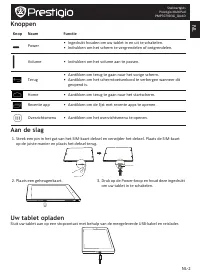
NL-2 NL Snelstartgids Prestigio MultiPad PMP7079D3G_QUAD Knoppen Knop Naam Functie Power • Ingedrukt houden om uw tablet in en uit te schakelen. • Indrukken om het scherm te vergrendelen of ontgrendelen. Volume • Indrukken om het volume aan te passen. Terug • Aantikken om terug te gaan naar het vori...
Page 64 - Bellen; Een app-icoon aan het startscherm toevoegen; Uw apps gebruiken; Een app openen; Verbinden met internet; Dataverbinding in- of uitschakelen
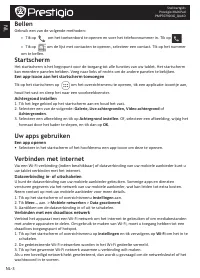
NL-3 NL Snelstartgids Prestigio MultiPad PMP7079D3G_QUAD Bellen Gebruik een van de volgende methoden: » Tik op om het toetsenbord te openen en voer het telefoonnummer in. Tik op . » Tik op om de lijst met contacten te openen, selecteer een contact. Tik op het nummer om te bellen. Startscherm Het sta...
Page 65 - Technische specificaties
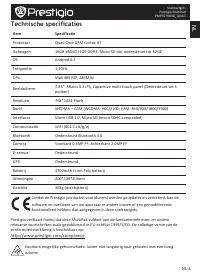
NL-4 NL Snelstartgids Prestigio MultiPad PMP7079D3G_QUAD Technische specificaties Item Specificatie Processor Quad Core ARM Cortex A7 Geheugen 16GB eMMC+1GB DDR3, Micro SD slot ondersteunt tot 32GB OS Android 4.2 Frequentie 1,2GHz GPU Mali 400 MP, 286MHz Beeldscherm 7.85” RRatio 4:3 IPS, Capacitive ...
Page 66 - Zawartość pakietu
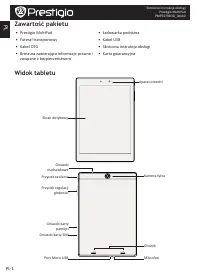
PL-1 PL Skrócona instrukcja obsługi Prestigio MultiPad PMP7079D3G_QUAD Zawartość pakietu • Prestigio MultiPad • Ładowarka podróżna • Futerał transportowy • Kabel USB • Kabel OTG • Skrócona instrukcja obsługi • Broszura zawierająca informacje prawne i związane z bezpieczeństwem • Karta gwarancyjna Wi...
Page 67 - Przyciski; Pierwsze kroki
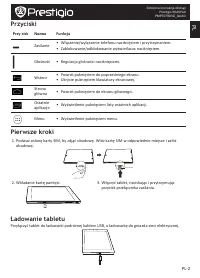
PL-2 PL Skrócona instrukcja obsługi Prestigio MultiPad PMP7079D3G_QUAD Przyciski Przy-cisk Nazwa Funkcja Zasilanie • Włączenie/wyłączenie telefonu naciśnięciem i przytrzymaniem. • Zablokowanie/odblokowanie wyświetlacza naciśnięciem. Głośność • Regulacja głośności naciśnięciami. Wstecz • Powrót pukni...
Page 68 - Nawiązywanie połączenia; Dodawanie ikony aplikacji do ekranu głównego; Korzystanie z aplikacji; Uruchamianie aplikacji; Łączenie się z Internetem; Nawiązywanie połączenia z siecią bezprzewodową
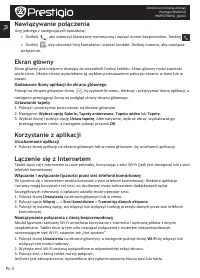
PL-3 PL Skrócona instrukcja obsługi Prestigio MultiPad PMP7079D3G_QUAD Nawiązywanie połączenia Użyj jednego z następujących sposobów: » Dotknij , aby otworzyć klawiaturę numeryczną i wpisać numer bezpośrednio. Dotknij » Dotknij , aby otworzyć listę kontaktów i wybrać kontakt. Dotknij numeru, aby naw...
Page 69 - Dane techniczne
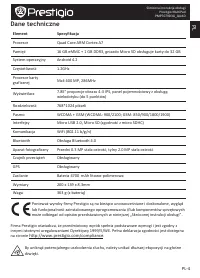
PL-4 PL Skrócona instrukcja obsługi Prestigio MultiPad PMP7079D3G_QUAD Dane techniczne Element Specyfikacja Procesor Quad Core ARM Cortex A7 Pamięć 16 GB eMMC + 1 GB DDR3, gniazdo Micro SD obsługuje karty do 32 GB System operacyjny Android 4.2 Częstotliwość 1.2GHz Procesor karty graficznej Mali 400 ...
Page 70 - Abra a embalagem
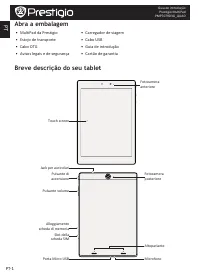
PT-1 PT Guia de introdução Prestigio MultiPad PMP7079D3G_QUAD Abra a embalagem • MultiPad da Prestigio • Carregador de viagem • Estojo de transporte • Cabo USB • Cabo OTG • Guia de introdução • Avisos legais e de segurança • Cartão de garantia Breve descrição do seu tablet Touch screen Fotocamera an...
Page 71 - Botões; Introdução
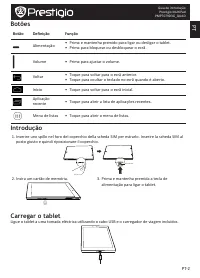
PT-2 PT Guia de introdução Prestigio MultiPad PMP7079D3G_QUAD Botões Botão Definição Função Alimentação • Prima e mantenha premido para ligar ou desligar o tablet. • Prima para bloquear ou desbloquear o ecrã. Volume • Prima para ajustar o volume. Voltar • Toque para voltar para o ecrã anterior. • To...
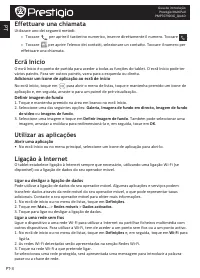
Page 72 - Adicionar um ícone de aplicação ao ecrã de início; Utilizar as aplicações; Abrir uma aplicação; Ligação à Internet; Ligar ou desligar a ligação de dados
PT-3 PT Guia de introdução Prestigio MultiPad PMP7079D3G_QUAD Effettuare una chiamata Utilizzare uno dei seguenti metodi: » Toccare per aprire il tastierino numerico, inserire direttamente il numero. Toccare . » Toccare per aprire l'elenco dei contatti, selezionare un contatto. Toccare il numero per...
Page 73 - Especificações técnicas
PT-4 PT Guia de introdução Prestigio MultiPad PMP7079D3G_QUAD Especificações técnicas Articolo Specifica Processore Quad Core ARM Cortex A7 Memoria 16GB eMMC+1GB DDR3, l'alloggiamento Micro SD supporta fino a 32GB SO Android 4.2 Frequenza 1,2GHz GPU Mali 400 MP, 286MHz Display 7.85” Rapporto 4:3 IPS...
Page 74 - Deschideti pachetul
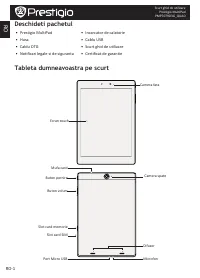
RO-1 RO Scurt ghid de utilizare Prestigio MultiPad PMP7079D3G_QUAD Deschideti pachetul • Prestigio MultiPad • Incarcator de calatorie • Husa • Cablu USB • Cablu OTG • Scurt ghid de utilizare • Notificari legale si de siguranta • Certificat de garantie Tableta dumneavoastra pe scurt Ecran touch Camer...
Page 75 - Butoane; Notiuni de baza
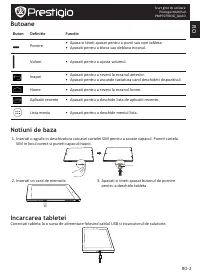
RO-2 RO Scurt ghid de utilizare Prestigio MultiPad PMP7079D3G_QUAD Butoane Buton Definitie Functie Pornire • Apasa si tineti apasat pentru a porni sau opri tableta. • Apasati pentru a bloca sau debloca ecranul. Volum • Apasati pentru a ajusta volumul. Inapoi • Apasati pentru a reveni la ecranul ante...
Page 76 - Efectuati un apel; Adaugati icon aplicatie pe ecranul home; Cum folositi aplicatiile; Deschideti o aplicatie; Conectare la internet; Porniti sau opriti conexiunea de date
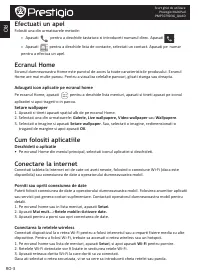
RO-3 RO Scurt ghid de utilizare Prestigio MultiPad PMP7079D3G_QUAD Efectuati un apel Folositi una din urmatoarele metode: » Apasati pentru a deschide tastatura si introduceti numarul direc. Apasati . » Apasati pentru a deschide lista de contacte, selectati un contact. Apasati pe numar pentru a efect...
Page 77 - Specificatii tehnice
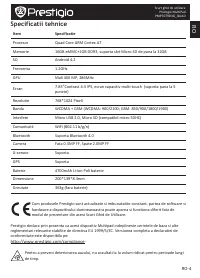
RO-4 RO Scurt ghid de utilizare Prestigio MultiPad PMP7079D3G_QUAD Specificatii tehnice Item Specificatie Procesor Quad Core ARM Cortex A7 Memorie 16GB eMMC+1GB DDR3, suporta slot Micro SD de pana la 32GB SO Android 4.2 Frecventa 1.2GHz GPU Mali 400 MP, 286MHz Ecran 7.85”Contrast 4:3 IPS, ecran capa...
Page 78 - RS; Otvorite pakovanje
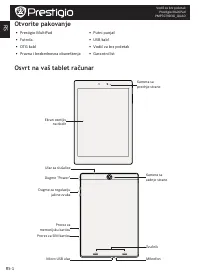
RS-1 RS Vodič za brz početak Prestigio MultiPad PMP7079D3G_QUAD Otvorite pakovanje • Prestigio MultiPad • Putni punjač • Futrola • USB kabl • OTG kabl • Vodič za brz početak • Pravna i bezbednosna obaveštenja • Garantni list Osvrt na vaš tablet računar Ekran osetljiv na dodir Kamera sa prednje stran...
Page 79 - Dugmad; Kako početi sa korišćenjem tablet računara
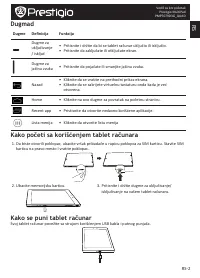
RS-2 RS Vodič za brz početak Prestigio MultiPad PMP7079D3G_QUAD Dugmad Dugme Definicija Funkcija Dugme za uključivanje / isključ • Pritisnite i držite da bi se tablet računar uključio ili isključio. • Pritisnite da zaključate ili otključate ekran. Dugme za jačinu zvuka • Pritisnite da pojačate ili s...
Page 80 - Pozivanje; Kako dodati ikonicu aplikacije na početnu stranicu; Korišćenje aplikacija; Otvaranje aplikacija; Povezivanje na internet; Uključivanje i isključivanje priključka za prenos podataka
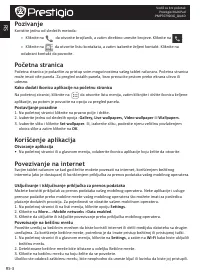
RS-3 RS Vodič za brz početak Prestigio MultiPad PMP7079D3G_QUAD Pozivanje Koristite jednu od sledećih metoda: » Kliknite na da otvorite brojčanik, a zatim direktno unesite brojeve. Kliknite na . » Kliknite na da otvorite listu kontakata, a zatim izaberite željeni kontakt. Kliknite na odabrani kontak...
Page 81 - Tehnička specifikacija
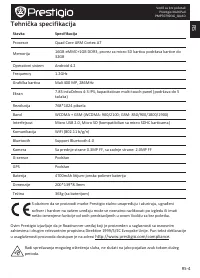
RS-4 RS Vodič za brz početak Prestigio MultiPad PMP7079D3G_QUAD Tehnička specifikacija Stavka Specifikacija Procesor Quad Core ARM Cortex A7 Memorija 16GB eMMC+1GB DDR3, prorez za micro SD karticu podržava kartice do 32GB Operativni sistem Android 4.2 Frequency 1.2GHz Grafička kartica Mali 400 MP, 2...
Page 82 - Odprite vaš paket
SI-1 SI Hitra navodila za uporabo Prestigio MultiPad PMP7079D3G_QUAD Odprite vaš paket • Prestigio MultiPad • Potovalni polnilec • Prenosna torbica • USB kabel • OTG kabel • Hitra navodila za uporabo • Pravne in varnostne informacije • Garancijski list Vaša tablica na hitro Zaslon na dotik Fotoapara...
Page 83 - Gumbi; Začetni koraki
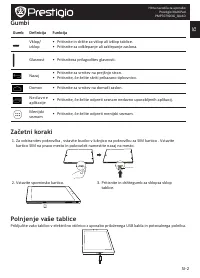
SI-2 SI Hitra navodila za uporabo Prestigio MultiPad PMP7079D3G_QUAD Gumbi Gumb Definicija Funkcija Vklop/ izklop • Pritisnite in držite za vklop ali izklop tablice. • Pritisnite za odklepanje ali zaklepanje zaslona. Glasnost • Pritisniteza prilagoditev glasnosti. Nazaj • Pritisnite za vrnitev na pr...
Page 84 - Klicanje; Dodajanje ikon aplikacij na domači zaslon; Uporaba aplikacij; Odprite aplikacijo; Povezava z internetom; Vklop/izklop prenosa podatkov
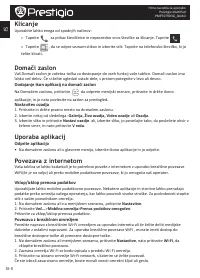
SI-3 SI Hitra navodila za uporabo Prestigio MultiPad PMP7079D3G_QUAD Klicanje Uporabite lahko enega od spodnjih načinov: » Tapnite za prikaz številčnice in neposredno vnos številke za klicanje. Tapnite . » Tapnite , da se odpre seznam stikov in izberite stik. Tapnite na telefonsko številko, ki jo že...
Page 85 - Tehnične specifikacije
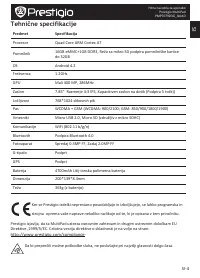
SI-4 SI Hitra navodila za uporabo Prestigio MultiPad PMP7079D3G_QUAD Tehnične specifikacije Predmet Specifikacija Procesor Quad Core ARM Cortex A7 Pomnilnik 16GB eMMC+1GB DDR3, Reža za mikro SD podpira pomnilniške kartice do 32GB OS Android 4.2 Frekvenca 1.2GHz GPU Mali 400 MP, 286MHz Zaslon 7.85” R...
Page 86 - Otvorte balenie
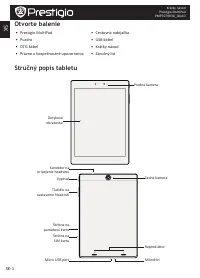
SK-1 SK Krátky návod Prestigio MultiPad PMP7079D3G_QUAD Otvorte balenie • Prestigio MultiPad • Cestovná nabíjačka • Puzdro • USB kábel • OTG kábel • Krátky návod • Právne a bezpečnostné upozornenia • Záručný list Stručný popis tabletu Dotyková obrazovka Predná kamera Vypínač Zadná kamera Tlačidlo na...
Page 87 - Tlačidlá; Začíname
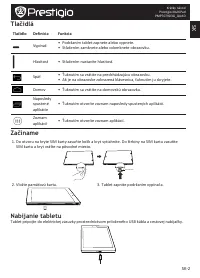
SK-2 SK Krátky návod Prestigio MultiPad PMP7079D3G_QUAD Tlačidlá Tlačidlo Definícia Funkcia Vypínač • Podržaním tablet zapnete alebo vypnete. • Stlačením zamknete alebo odomknete obrazovku. Hlasitosť • Stlačením nastavíte hlasitosť. Späť • Ťuknutím sa vrátite na predchádzajúcu obrazovku. • Ak je na ...
Page 88 - Uskutočnenie hovoru; Pridanie ikony aplikácie na domovskú obrazovku; Používanie aplikácií; Otvorenie aplikácie; Pripojenie k internetu; Zapnutie alebo vypnutie dátového pripojenia
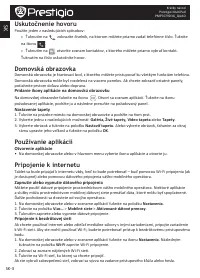
SK-3 SK Krátky návod Prestigio MultiPad PMP7079D3G_QUAD Uskutočnenie hovoru Použite jeden z nasledujúcich spôsobov: » Ťuknutím na zobrazíte číselník, na ktorom môžete priamo zadať telefónne číslo. Ťuknite na ikonu . » Ťuknutím na otvoríte zoznam kontaktov, z ktorého môžete priamo vybrať kontakt. Ťuk...
Page 89 - Technické špecifikácie
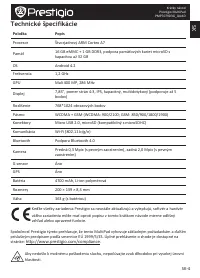
SK-4 SK Krátky návod Prestigio MultiPad PMP7079D3G_QUAD Technické špecifikácie Položka Popis Procesor Štvorjadrový ARM Cortex A7 Pamäť 16 GB eMMC + 1 GB DDR3, podpora pamäťových kariet microSD s kapacitou až 32 GB OS Android 4.2 Frekvencia 1,2 GHz GPU Mali 400 MP, 286 MHz Displej 7,85", pomer st...
Page 90 - Öppna ditt paket
SV-1 SV Snabbstartsguide Prestigio MultiPad PMP7079D3G_QUAD Öppna ditt paket • Prestigio MultiPad • Reseladdare • Fodral • USB-kabel • OTG-kabel • Snabbstartsguide • Villkor och regler samt säkerhetsinformation • Garantikort Översikt över surfplattan Pekskärm Kamera bak Strömbrytare Kamera bak Volym...
Page 91 - Knappar; Komma igång
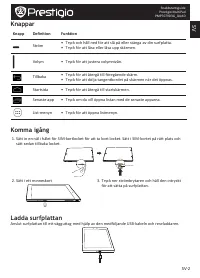
SV-2 SV Snabbstartsguide Prestigio MultiPad PMP7079D3G_QUAD Knappar Knapp Definition Funktion Ström • Tryck och håll ned för att slå på eller stänga av din surfplatta. • Tryck för att låsa eller låsa upp skärmen. Volym • Tryck för att justera volymnivån. Tillbaka • Tryck för att återgå till föregåen...
Page 92 - Ringa ett samtal; Lägga till en app på startskärmen; Använd dina appar; Öppna en app; Anslut till internet; Slå på eller av dataanslutningen
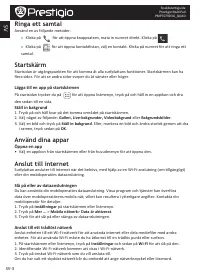
SV-3 SV Snabbstartsguide Prestigio MultiPad PMP7079D3G_QUAD Ringa ett samtal Använd en av följande metoder: » Klicka på för att öppna knappsatsen, mata in numret direkt. Klicka på . » Klicka på för att öppna kontaktlistan, välj en kontakt. Klicka på numret för att ringa ett samtal. Startskärm Starts...
Page 93 - Tekniska data
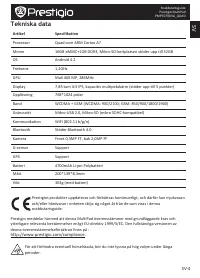
SV-4 SV Snabbstartsguide Prestigio MultiPad PMP7079D3G_QUAD Tekniska data Artikel Specifikation Processor Quad core ARM Cortex A7 Minne 16GB eMMC+1GB DDR3, Mikro-SD-kortplatsen stöder upp till 32GB OS Android 4.2 Frekvens 1,2GHz GPU Mali 400 MP, 286MHz Display 7,85 tum 4:3 IPS, kapacitiv multipekskä...
Page 94 - Paketinizi açın
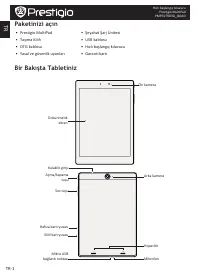
TR-1 TR Hızlı başlangıç kılavuzu Prestigio MultiPad PMP7079D3G_QUAD Paketinizi açın • Prestigio MultiPad • Şeyahat Şarj Ünitesi • Taşıma Kılıfı • USB kablosu • OTG kablosu • Hızlı başlangıç kılavuzu • Yasal ve güvenlik uyarıları • Garanti kartı Bir Bakışta Tabletiniz Dokunmatik ekran Ön kamera Açma/...
Page 95 - Tuşlar; Giriş
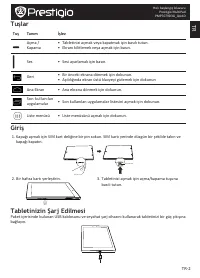
TR-2 TR Hızlı başlangıç kılavuzu Prestigio MultiPad PMP7079D3G_QUAD Tuşlar Tuş Tanım İşlev Açma / Kapama • Tabletinizi açmak veya kapatmak için basılı tutun. • Ekranı kilitlemek veya açmak için basın. Ses • Sesi ayarlamak için basın. Geri • Bir önceki ekrana dönmek için dokunun. • Açıldığında ekran ...
Page 96 - Bir arama yapma; Ana ekrana bir uygulama simgesi koymak; Uygulamaların kullanımı; Bir uygulamayı açmak; İnternete bağlanma; Veri bağlantısının açmak veya kapatmak
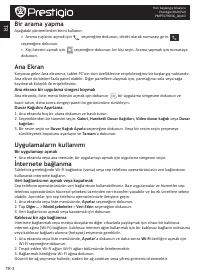
TR-3 TR Hızlı başlangıç kılavuzu Prestigio MultiPad PMP7079D3G_QUAD Bir arama yapma Aşağıdaki yöntemlerden birini kullanın: » Arama tuşlarını açmak için seçeneğine dokunun, direkt olarak numarayı girin. seçeneğine dokunun. » Kişi listesini açmak için seçeneğine dokunun, bir kişi seçin. Arama yapmak ...
Page 97 - Teknik Özellikler
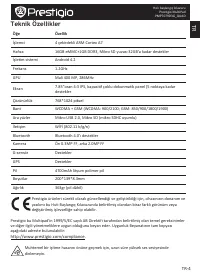
TR-4 TR Hızlı başlangıç kılavuzu Prestigio MultiPad PMP7079D3G_QUAD Teknik Özellikler Öğe Özellik İşlemci 4 çekirdekli ARM Cortex A7 Hafıza 16GB eMMC+1GB DDR3, Mikro SD yuvası 32GB’a kadar destekler İşletim sistemi Android 4.2 Frekans 1.2GHz GPU Mali 400 MP, 286MHz Ekran 7.85”oran 4:3 IPS, kapasitif...
Page 98 - Відкрийте комплект поставки; Зовнішній вигляд планшета
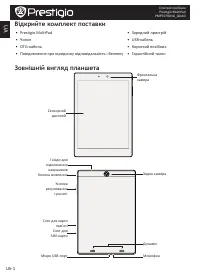
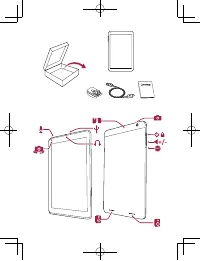
UA-1 UA Стислий посібник Prestigio MultiPad PMP7079D3G_QUAD Відкрийте комплект поставки • Prestigio MultiPad • Зарядний пристрій • Чохол • USB-кабель • OTG-кабель • Короткий посібник • Повідомлення про юридичну відповідальність і безпеку • Гарантійний талон Зовнішній вигляд планшета Сенсорний диспле...
Page 99 - Початок роботи
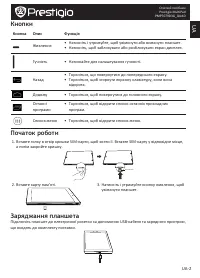
UA-2 UA Стислий посібник Prestigio MultiPad PMP7079D3G_QUAD Кнопки Кнопка Опис Функція Живлення • Натисніть і утримуйте, щоб увімкнути або вимкнути планшет. • Натисніть, щоб заблокувати або розблокувати екран дисплея. Гучність • Натискайте для налаштування гучності. Назад • Торкніться, що повернутис...
Page 100 - Як зробити дзвінок; Додавання значка програми на Головний екран; Користування прикладними програмами; Відкрийте програму; Підключення до інтернету; Увімкнення або вимкнення передачі даних
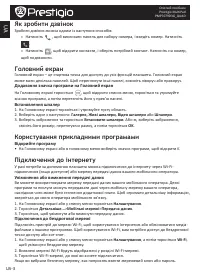
UA-3 UA Стислий посібник Prestigio MultiPad PMP7079D3G_QUAD Як зробити дзвінок Зробити дзвінок можна одним із наступних способів: » Натисніть , щоб викликати панель для набору номера, і введіть номер. Натисніть . » Натисніть , щоб відкрити контакти, і оберіть потрібний контакт. Натисніть на номер, щ...
Page 101 - Технічні характеристики
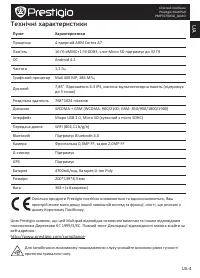
UA-4 UA Стислий посібник Prestigio MultiPad PMP7079D3G_QUAD Технічні характеристики Пункт Характеристики Процесор 4-ядерний ARM Cortex A7 Пам'ять 16 Гб eMMC+1 Гб DDR3, слот Micro SD підтримує до 32 Гб ОС Android 4.2 Частота 1,2 Гц Графічний процесор Mali 400 MP, 286 МГц Дисплей 7,85” Відношення 4:3 ...