Philips AC2936/33 - User Manual
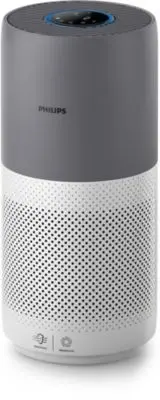
Philips AC2936/33 – User Manual, read for free online in PDF format. We hope this helps you resolve any issues you may have. If you have further questions, please contact us through the contact form.


Table of Contents:
- Page 3 – Contents; Getting started �������������������������������������������������������������������������������3
- Page 4 – Your air purifier; Product overview
- Page 5 – Controls overview; Getting started
- Page 6 – First time connection; Reset the Wi-Fi connection
- Page 7 – Using the air purifier; Air quality light
- Page 9 – Changing the mode setting; accordance with the ambient air quality�; Switching the display indicator
- Page 10 – Setting the child lock
- Page 11 – Cleaning and maintenance; Cleaning the particle sensor
- Page 14 – Filter reset; Storage
- Page 17 – 目錄
- Page 18 – 您的空氣清新機; 產品概要
- Page 19 – 控制鍵概覽; 使用入門; 安裝濾網
- Page 20 – 首次連接; 重設
- Page 21 – 使用空氣清新機; 空氣質素燈; 開關
- Page 22 – 更改模式設定
- Page 23 – 切換顯示指示燈; 使用開燈
- Page 25 – 清潔及保養; 清潔空氣清新機機身
- Page 26 – 更換濾網
- Page 27 – 重設濾網; 儲存
- Page 28 – 疑難排解
"Loading the manual" means you need to wait until the file loads and becomes available for online reading. Some manuals are very large, and the time they take to appear depends on your internet speed.
Was this manual helpful?
Helpful for 5 of 5 readers
About this manual
- Brand
- Philips
- Model
- AC2936/33
- Document type
- User Manual
- Language(s)
- English
- Pages
- 32
- File size
- 5.1 MB
- Format
Other Manuals for Philips AC2936/33
Summary
1 EN English Contents 1. Your.air.purifier.. ������������������������������������������������������������������������������2 Product overview ���������������������������������������������������������������������������������������������������������� 2 Controls overview �������������������������������...
2 EN 1 Your air purifier Congratulations on your purchase of air cleaner AC2936/AC2939.To fully benefit from the support that Philips offers, register your product at www�philips�com/welcome� Product overview Control panel Air outlet Back cover NanoProtect filter Series 3 (FY2180/30) Particle sensor
3 EN English Controls overview 2 Getting started Installing.the.filter Note: Make sure the air purifier is unplugged from the electrical outlet before installing the filter. 1 2 3 4 5 1 Pull the back cover and remove it from the appliance. 2 Pull the filter from the appliance. 3 Remove all packaging...
Ask a question
Related manuals
Popular Philips Other


More Philips Other models
 Philips AC2729/13 User Manual
 Philips AC2729/13R1 User Manual
 Philips AC2729/50 User Manual
 Philips AC2882/10 User Manual
 Philips AC2887/10 User Manual
 Philips AC2889/10 User Manual
 Philips AC2939/10 User Manual
 Philips AC2958/53 User Manual
 Philips AC2959/53 User Manual
 Philips AC3021/10 User Manual
 Philips AC3033/10 User Manual
 Philips AC3033/30 User Manual