Page 3 - Contents; Order parts or accessories ��������������������������������������������������������������������� 20
1 EN Contents 1 Important ������������������������������������������������������������������������������ 2 Safety ��������������������������������������������������������������������������������������������������������������������� 2Electromagnetic fields (EMF) ��������������������������������������...
Page 4 - Important; Safety; Danger
2 EN 1 Important Safety Read this user manual carefully before you use the appliance, and save it for future reference� Danger • Do not clean the appliance with water, any other liquid, or a (flammable) detergent, nor let them enter the appliance, to avoid electric shock and/or a fire hazard� • Do n...
Page 5 - Caution
3 EN • Standard WiFi interface based on 802�11b/g/n at 2�4 GHz with a maximum output power of 31�62 mW EIRP� Caution • This appliance is not a substitute for proper ventilation, regular vacuum cleaning, or use of an extractor hood or fan while cooking� • Always place and use the appliance on a dry, ...
Page 7 - Your air purifier; Product overview
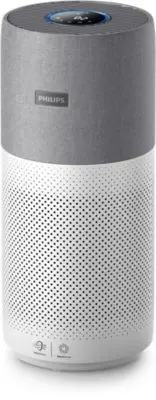
5 EN 2 Your air purifier Congratulations on your purchase, and welcome to Philips!To fully benefit from the support that Philips offers, register your product at www�philips�com/welcome� Product overview Control panel Air outlet Back cover NanoProtect filter Series 3 (FY3430/30) Particle sensor Gas ...
Page 8 - Controls overview
6 EN Controls overview Control buttons Filter status/reset button Display switch button Power on/off button Mode switch button Light on/off button Display panel Wi-Fi indicator Auto mode Turbo mode Sleep mode Indoor Allergen Index display PM2�5 display Gas pollution display Filter cleaning alert Fil...
Page 9 - Getting started; Installing the filter
7 EN 3 Getting started Installing the filter Remove all packaging of the filter before first use� Note: Make sure the air purifier is unplugged from the electrical outlet before installing the filter� 1 2 3 4 5 1 Pull the back cover and remove it from the appliance� 2 Pull the filter from the applia...
Page 11 - Using the air purifier; Understanding the air quality light; IAI
9 EN 4 Using the air purifier Understanding the air quality light The air quality light automatically goes on when the air purifier is switched on, and lights up all colors in sequence� After approximately 30 seconds, the particle sensor selects the color that corresponds to the surrounding air qual...
Page 13 - Switching the display indicator; Using the light on/off function
11 EN Switching the display indicator Note: The appliance displays IAI level by default� • Touch the button to switch display indicator among IAI/PM2�5/Gas� Using the light on/off function With the light sensor, the control panel can automatically turn on, turn off or dim according to the ambient li...
Page 14 - Checking the filter status; Cleaning and maintenance; Cleaning schedule
12 EN Checking the filter status • Touch the filter status check/reset button to check the filter service life status� » The percentage of remaining service life of the filter displays on the screen� Icon color Filter life indication Display (%) Blue Optimal service life 16-100 Blue-purple Good serv...
Page 16 - Cleaning the surface of the filter
14 EN Cleaning the surface of the filter Filter alert light status Action The filter cleaning alert displays on the screen Clean the surface of the filter with a vacuum cleaner 1 Switch off the air purifier and unplug from the power socket� 2 3 4 5 6 2 Pull the back cover and remove it from the appl...
Page 17 - Replacing the filter
15 EN Replacing the filter Understanding the healthy protection lock This air purifier is equipped with a filter replacement indicator to make sure that the air purification filter is in optimal condition when the air purifier is operating� When the filter need to be replaced, the filter replacement...
Page 18 - Filter reset; Storage
16 EN 7 Put the plug of the air purifier in the power socket� 8 Touch the button to switch on the appliance� 9 Touch and hold the filter status check/reset button for 3 seconds to reset the filter lifetime counter� 10 Wash your hands thoroughly after replacing the filter� Note: Do not smell the filt...
Page 19 - Troubleshooting
17 EN 7 Troubleshooting This chapter summarizes the most common problems you could encounter with the appliance� If you are unable to solve the problem with the information below, contact the Consumer Care Center in your country� Problem Possible solution The appliance does not work properly� • The ...
Page 22 - Guarantee and service; Order parts or accessories
20 EN 8 Guarantee and service If you need information or if you have a problem, please visit the Philips website at www�philips�com or contact the Philips Consumer Care Center in your country (you can find its phone number in the worldwide guarantee leaflet)� If there is no Consumer Care Center in y...
Page 23 - 目錄
21 ZH-T 目錄 1 重要事項 ...............................................................................22 安全 ....................................................................................................................... 22 電磁場 (EMF) ...................................................................
Page 24 - 重要事項; 安全; 危險事項
22 ZH-T 1 重要事項 安全 使用本產品前請先閱讀本用戶手冊,並保管以作將來參考。 危險事項 • 請勿用水、任何液體或(易燃)清潔劑清潔此產品,或讓它們進入此產品,以免導致觸電和 / 或火災。 • 請勿在本產品周圍噴射殺蟲劑或芳香劑等易燃物品。 警告 • 在連接本產品前,請檢查產品註明的指示電壓與當地電源電壓是否對應。 • 如果電源線損壞,為避免危險,必須由 Philips 、 Philips 授權的 維修中心或類似的合資格人士來更換。 • 若插頭、電源線或產品本身已受損,請勿使用。 • 此產品可供八歲及以上兒童,體能、感官或心智能力低下人仕,或缺乏知識及經驗人仕使用,如該等人仕已就使用...
Page 25 - 電磁場; 環保
23 ZH-T • 請勿坐或站立在裝置上。請勿在裝置上放置任何物品。 • 請勿在冷氣機正下方放置產品,以避免冷凝滴水到產品上。 • 僅使用本產品專用的原裝 Philips 濾網。請勿使用任何其他濾 網。 • 燃燒濾網可能造成對健康無可挽回的危害及 / 或危及他人生命。 不要使用濾網作為燃料或類似用途。 • 避免以硬物碰撞產品(尤其是產品的進氣口或排氣口)。 • 請勿將您的手指或其他物件放入進氣口或排氣口,以免造成身體傷害或產品故障。 • 若您使用室內煙型驅蚊劑,或該地方有油跡、香火或化學煙霧,請勿使用本產品。 • 請勿在煤氣用具、暖氣設備或壁爐旁邊使用本產品。 • 當移動及清潔產品、更換濾網或...
Page 26 - 您的空氣清新機; 產品概要
24 ZH-T 2 您的空氣清新機 感謝您購買 Philips 產品,歡迎來到 Philips 世界! 請前往以下網址註冊您的產品,以獲得 Philips 的完整支援: www.philips.com/welcome 。 產品概要 控制面板 排氣口 後蓋 NanoProtect S3 型 濾網 (FY3430/30) 微粒感應器 氣體感應器
Page 27 - 控制鍵概覽
25 ZH-T 控制鍵概覽 控制按鈕 濾網狀態 / 重設按鈕 顯示切換按鈕 電源開 / 關按鈕 模式切換按鈕 燈光開 / 關按鈕 顯示面板 Wi-Fi 指示燈 自動模式 特強模式 睡眠模式 室內致敏原指數顯示 PM2.5 顯示 氣體污染顯示 清潔濾網提示 濾網更換警示
Page 28 - 使用入門; 安裝濾網; 指示燈
26 ZH-T 3 使用入門 安裝濾網 首次使用前,請移除濾網的所有包裝。 備註: 安裝濾網前,請確保將空氣清新機的插頭從電源插座拔出。 1 2 3 4 5 1 拉起後蓋,從產品拆下。 2 從產品拉出濾網。 3 移除空氣淨化濾網的所有包裝物料。 4 將濾網裝回本產品。 5 重新裝上後蓋。 Wi-Fi 指示燈 Wi-Fi 圖示狀態 Wi-Fi 連接狀態 閃爍橙色燈光 正在連接手機 穩定顯示橙色燈光 已連接至手機 閃爍白色燈光 正在連接伺服器 穩定顯示白色燈光 已連接伺服器 關閉 Wi-Fi 功能已停用
Page 29 - 連接
27 ZH-T Wi-Fi 連接 首次設定 Wi-Fi 連線 1 前往 App Store 或 Google Play 下載並安裝 Philips 「 Clean Home+ 」應用程式。 2 將空氣清新機的插頭插入電源插座,輕按 以開啟空氣清新機。 » Wi-Fi 指示燈 於首次使用時會亮橙燈。 3 請確保您的智能手機或平板電腦已成功連線至 Wi-Fi 網絡。 4 啟動「 Clean Home+ 」應用程式。輕觸熒幕上方的「連接新裝置」或者「 + 」 按鈕,按照畫面上的指示,將空氣清新機連接至您的網絡。 備註: • 本指示僅適用於首次設定空氣清新機。如網絡有變或需要重新設定,請參閱 第 27...
Page 30 - 使用空氣清新機; 了解空氣質素燈; 過敏原; 氣體
28 ZH-T 4 使用空氣清新機 了解空氣質素燈 開啟空氣清新機時,空氣質素燈將自動亮起,並順序顯示所有顏色。約 30 秒 後,微粒感應器會根據周遭空中粒子的空氣質素,選擇相應的顏色。空氣質素燈的顏色由 PM2.5 、 IAI 和氣體 讀數的最高風險指數決定。 過敏原 專業級的 AeraSense 感應器可偵測室內空氣 過敏原的水平,透過 1 至 12 的數值反應顯示 室內空氣過敏原的潛在危險等級。 1 代表最佳 的空氣質素。 PM2.5 AeraSense 感應技術能夠準確地偵測並 快速回應,即使對空氣中最微小的粒子變化也不例外。確保可為您提供即時的 PM2.5 反應的保證。 大多數室內空...
Page 31 - 開關; 更改模式設定
29 ZH-T 開關 備註: • 請關閉門窗,以獲得最佳的空氣淨化效果。 • 窗簾必須遠離進氣口或排氣口。 1 將空氣清新機的插頭插入電源插座。 2 按下 以開啟空氣清新機。 » 空氣清新機發出嗶聲。 » 正準備運作時,「 」將顯示在螢幕上。在測量空 氣質素後,空氣清新機會顯示過敏原 /PM2.5/ 氣體 水平。 » 空氣清新機會以自動模式運作,並在螢幕上顯示 過 敏原級別。 3 輕按住 按鈕 3 秒以關閉空氣清新機。 備註: 如空氣清新機在「關閉」後繼續連接至電源插座,空氣清新機在再次 「開啟」時,將按之前的設定操作。 更改模式設定 您可輕按 按鈕,選擇自動模式、特強模式或睡眠模式。 自動模...
Page 32 - 切換顯示指示燈; 使用開燈
30 ZH-T 切換顯示指示燈 備註: 本產品預設顯示過敏原水平。 • 輕按 按鈕,切換顯示過敏原 /PM2.5/ 氣體指示燈。 使用開燈 / 關燈功能 裝置的光線感應器會讓控制面板根據環境光線自動開啟、關閉或變暗。在環境光線昏暗時,控制面板便會關閉或變暗。您可以輕按任何按鈕來喚醒所有燈光。如果沒有進一步操作,所有燈光便會關閉或變暗以配合環境光線。 您可以輕按燈光開 / 關按鈕 來關閉所有燈光和控制面板。輕按任何按鈕來喚醒所有 燈光。
Page 33 - 檢查濾網狀態; 清潔與保養; 清潔時間表
31 ZH-T 檢查濾網狀態 • 點按濾網狀態檢查 / 重設 按鈕,檢查濾網的使用壽命狀態。 » 濾網餘下的使用壽命會以百分比顯示在螢幕上。 圖示顏色 濾網使用壽命指示 顯示 (%) 藍色 最佳使用壽命 16-100 藍紫色 良好使用壽命 9-15 紫紅色 使用壽命即將結束 4-8 紅色 使用壽命結束,請更換濾網 0-3 備註: 如果 3 秒後沒有進行操作,本產品會回到正常顯示畫面。 5 清潔與保養 備註: • 必需在清潔前拔出產品插頭。 • 切勿將本產品侵入水中或任何其他液體中。 • 請勿使用磨蝕性、侵略性或易燃清潔劑(如漂白劑或酒精)清洗本產品的任何一部分。 • 請勿使用任何液體(包括水)...
Page 34 - 清潔空氣清新機機身; 清潔微粒感應器
32 ZH-T 清潔空氣清新機機身 請定時清潔本空氣清新機的內部和外部,以避免積聚塵埃。 1 用濕布輕輕擦拭布料表面。 2 使用柔軟的乾布清潔空氣清新機和排氣口的內部和外部。 備註: • 本產品表面的布料無法移除。 • 請勿使用熱水、酒精及刺激性清潔劑來清潔布料。 清潔微粒感應器 每 2 個月清潔一次微粒感應器,讓本產品發揮出最佳功能。 備註: • 如在多塵的環境內使用空氣清新機,則可能需要更常清潔。 • 如房間濕度非常高,水滴便會凝結在微粒感應器上,即使實際空氣質素良好, 空氣質素燈仍可能會顯示較差的空氣質素。如果出現這個情況,請清潔微粒 感應器。 • 不需清潔氣體感應器。 1 關閉空氣清新...
Page 35 - 清潔濾網表面; 更換濾網
33 ZH-T 清潔濾網表面 濾網指示燈狀態 動作 清潔濾網提示 會在螢 幕上顯示。 使用吸塵機清潔濾網表面 1 關閉空氣清新機,並將其從電源插座拔出。 2 3 4 5 6 2 拉起後蓋,從產品拆下。 3 從產品拉出濾網。 4 使用吸塵機清潔濾網表面。 5 將濾網裝回本產品。 6 重新裝上後蓋。 7 將空氣清新機的插頭插入電源插座。 8 按下 按鈕開啟本產品。 9 按住濾網狀態檢查 / 重設按鈕 3 秒,以重新設定濾網清潔時間。 10 清潔濾網後,必須徹底洗淨雙手。 更換濾網 了解清新保護鎖 空氣清新機設有濾網替換指示燈,以確保空氣清新機濾網在空氣清新機運作時處於良好狀態。需要更換濾網時,濾網...
Page 37 - 重設濾網; 儲存
35 ZH-T 重設濾網 您可以在屏幕顯示濾網更換警示 ( ) 之前更換濾網。更換 濾網後,您需要手動重設濾網壽命計算器。 1 輕按電源 按鈕 3 秒以關閉本產品,並將插頭從電源插 座拔出。 2 將電源插頭插入電源插座。 3 開啟電源後 15 秒內,按住 及 按鈕 3 秒,以重設濾 網壽命計算器。 6 儲存 1 關閉空氣清新機,並將插頭從牆身插座拔出。 2 清潔空氣清新機、微粒感應器和濾網表面(請參閱「清潔與保養」章節)。 3 必須讓所有部件風乾方可存放。 4 將濾網放入密封膠袋中。 5 將空氣清新機、濾網存放於陰涼乾爽的地方。 6 處理濾網後,必須徹底洗淨雙手。 7 疑難排解 本章節總結一些...
Page 39 - 保障及服務; 訂購零件或配件
37 ZH-T 問題 可行解決方案 未能成功設定 Wi-Fi 。 • 如果本產品所連接的路由器為雙頻,而目前不是連接 2.4GHz 網絡的話,請將該路由器的頻段切換至 2.4GHz , 然後再次嘗試進行配對。不支援 5GHz 網絡。 • Web 驗證網絡不受支援。 • 檢查本產品是否在 Wi-Fi 路由器所覆蓋的範圍內。您可以嘗 試將空氣清新機移近 Wi-Fi 路由器。 • 請檢查網絡名稱是否正確。網絡名稱有大小寫之分。 • 請檢查 Wi-Fi 密碼是否正確。密碼有大小寫之分。 • 根據「重設 Wi-Fi 連線」部分的指示,嘗試重新設定。 • Wi-Fi 連線可能被電磁場或其他干擾而中斷。讓本...


 Philips AC2936/33 User Manual
 Philips AC2939/10 User Manual
 Philips AC2958/53 User Manual
 Philips AC2959/53 User Manual
 Philips AC3021/10 User Manual
 Philips AC3033/10 User Manual
 Philips AC3036/10 User Manual
 Philips AC3039/10 User Manual
 Philips AC3055/50 Quick Guide
 Philips AC3055/51 User Manual
 Philips AC3059/51 User Manual
 Philips AC3220/10 User Manual