Krups Essential EA810B70 - User Manual

This User Manual covers a range of Krups coffee machines, focusing primarily on their indicator lights and operational guidance. The document provides detailed explanations for interpreting machine statuses–such as brewing readiness, cleaning cycles, water level checks, and error conditions–across multiple languages (e.g., French, German, English). It also includes visual guides for first-time setup, coffee preparation, maintenance routines like descaling and cleaning, and troubleshooting common issues like clogged filters or empty reservoirs. Safety warnings and multilingual support ensure clarity for users worldwide.
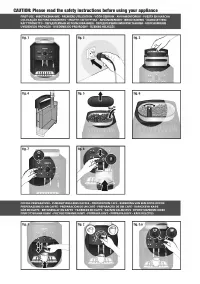
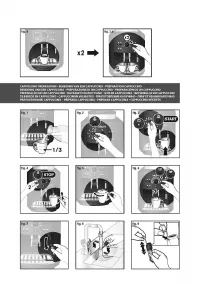
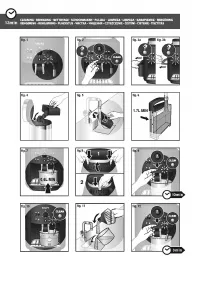
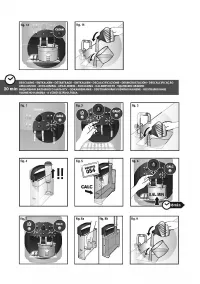
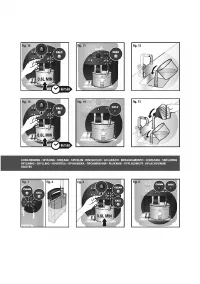
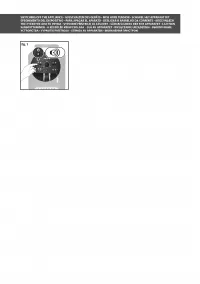
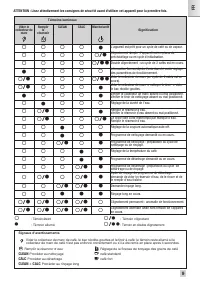
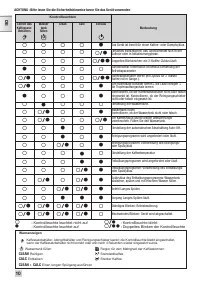


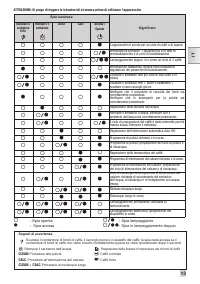
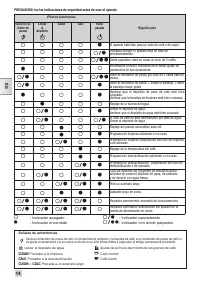

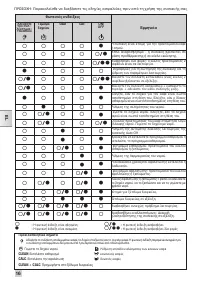


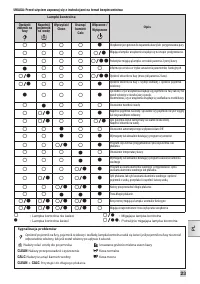


Table of Contents:
- Page 3 – First Use and Coffee Preparation Instructions
- Page 4 – Cappuccino Preparation Guide
- Page 5 – Cleaning Procedure
- Page 6 – Descaling Procedure
- Page 7 – Long Rinsing Procedure
- Page 8 – Switching Off the Appliance
- Page 9 – Indicator Light Meanings for Operations
- Page 10 – Indicator Light Meanings for Status and Errors
- Page 11 – Indicator Lights for Maintenance Operations
- Page 12 – Control Lamp Status Explanation (Dutch)
- Page 13 – Indicator Lights for Brewing and Water Level
- Page 14 – Status Indicators for Cycles and Maintenance
- Page 15 – Indicator Lights During Operational States
- Page 16 – Greek Language Indicator Light Table
- Page 17 – Swedish Language Indicator Light Meanings
- Page 18 – Interpreting Status Lights for Operations
- Page 19 – Indicator Lights and Messages Displayed
- Page 20 – Finnish Language Indicator Light Table
- Page 21 – Indicator Lights for Status and Maintenance Actions
- Page 22 – Indicator Lights and Pre-Warning Signals
- Page 23 – Polish Language Control Lights and Troubleshooting
- Page 24 – Indicator Lights and Corresponding Actions
- Page 25 – Illuminated Control Indicators and Warning Signals
- Page 26 – Hungarian Language Indicator Light Table
www.krups.com
0
A
1
7
3
6
3
b
-
0
8
.2
0
1
4
FR
HOTLINE : BE : 32 70 23 31 59 - FR : 09 74 50 10 61 - CH : 0800 37 77 37
DE
HOTLINE : DE : 0800 98 000 00 - AT : 0800 225 225 - CH : 0800 37 77 37
EN
HOTLINE: UK: 0345 330 6460 - ROI: (01) 677 4003
NL
HOTLINE : NL : 0318 58 24 24
IT
SERVIZIO CONSUMATORI: IT: 199 207701 - CH: 0800 37 77 37
ES
HOTLINE : ES : 902 31 23 00
PT
CENTRO DE CONTACTO DO CONSUMIDOR : PT : 808 284 735
EL
ΕΛΛΑΔΑ : GR : 2106371251
DK
Tlf. 44 66 31 55.
SV
Tel. 08 594 213 30
NO
Tel. 815 09 567
FI
Puh. 09 6229 420
RU
ГОРЯЧАЯ ЛИНИЯ : RU : 495 213 32 28
UK
УКРАЇНА : UK : 044 492 06 59
PL
INFOLINIA : PL : 0 801 300 420
CZ
HOTLINE : CZ : 731 010 111
SK
ZÁKAZNĺCKA LINKA : SK : 233 595 224
HU
ÜGyFéLSZOLGÁLAt : HU : (1) 8018434
567
0A17363 b
"Loading the manual" means you need to wait until the file loads and becomes available for online reading. Some manuals are very large, and the time they take to appear depends on your internet speed.
Was this manual helpful?
About this manual
- Brand
- Krups
- Model
- Essential EA810B70
- Document type
- User Manual
- Category
- Coffee Machine
- Language(s)
- German, English, Spanish, French, Italian, Dutch, Polish, Russian, Swedish
- Pages
- 26
- File size
- 2.3 MB
- Format
Summary
Step-by-step visual instructions for initial setup, plugging in the machine, adding coffee beans, and operating controls to brew coffee.
Visual steps for preparing a cappuccino, including pouring milk, selecting settings, starting the machine, and assembling the cup.
Step-by-step visual guide detailing disassembly, rinsing components, filling with water, running cleaning cycles, and time indicators.
Ask a question
Related manuals
Popular Krups Coffee Machines
 Krups Orchestro Plus FNF5 User Manual
 Krups EA82F010 Quattro Force User Manual
 Krups EA810B70 Essential User Manual
- Krups EA811010 Arabica User Manual
 Krups EA815070 User Manual
 Krups Intuition Preference+ EA875E10 User Manual
 Krups Intuition Preference EA873810 User Manual
 Krups EA829E10 Latt Express User Manual
More Krups Coffee Machines models
- Krups EA829810 Latt Express User Manual
 Krups EA844230 Falcon User Manual
 Krups EA873810 Intuition Preference User Manual
 Krups EA890110 Evidence User Manual
- Krups EA891810 Evidence User Manual
 Krups EA894810 Evidence Plus User Manual
 Krups Evidence Plus EA894810 User Manual
 Krups Intuition Essential (EA870810) User Manual
 Krups Quattro Force EA82F010 User Manual
 Krups Arabica EA811810 User Manual
 Krups Arabica Espresso (EA811010) User Manual
 Krups EA81R870 User Manual