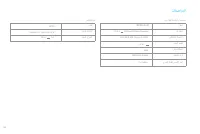
Page 3 - Safety Information; Usage
1 Safety Information Usage Restrictions This product is for floor cleaning in a home environment only. Do not use it outdoors, on non-floor surfaces, or in a commercial or industrial setting.Do not use the vacuum-mop in an area suspended above ground level without a protective barrier.Do not use the...
Page 5 - Product Overview; Accessories
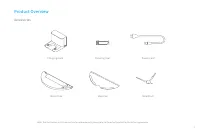
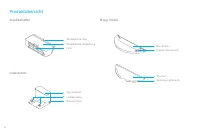
3 Product Overview Accessories Note: The illustrations in this manual are for reference only, please refer to the actual product for the actual appearance. Charging Dock Water Tank Cleaning Tool Mop Pad Power Cord Side Brush
Page 7 - Vacuum-mop and Sensors
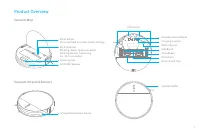
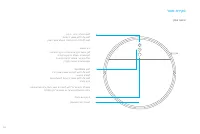
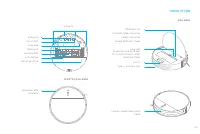
5 Product Overview Vacuum-Mop Vacuum-mop and Sensors Wi-Fi Indicator Blinking slowly: To be connected Blinking quickly: Connecting On: Wi-Fi connectedCleaning Tool Collision Buffer Infrared Deceleration Sensor Omnidirectional WheelCharging ContactsOptical SensorSide BrushMain WheelsMain BrushBrush G...
Page 8 - Dust Bin
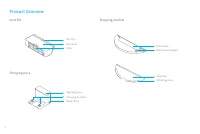
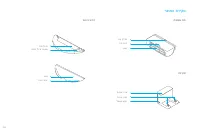
6 Bin ClipBin CoverFilter Signaling AreaCharging ContactsPower Port Water TankWater Tank Stopper Mop PadAttaching Area Product Overview Dust Bin Mopping module Charging Dock
Page 9 - Preparation
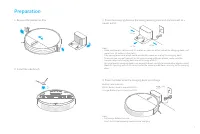
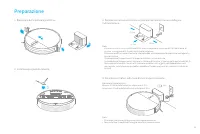
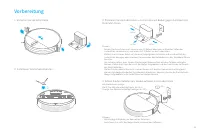
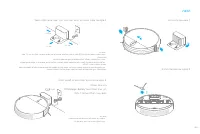
7 Preparation 2. Install the side brush Note: • Full charge before first use. • Don't install the mopping module while charging. 4. Place the robot onto the charging dock to recharge Battery Level Indicator White: Battery level is more than 15% Orange: Battery level is less than 15% ≥6h 3. Place the...
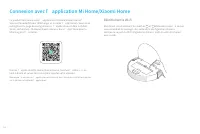
Page 10 - Connecting with Mi Home/Xiaomi Home App
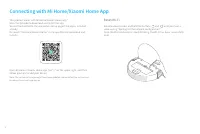
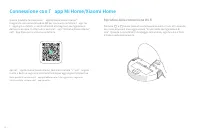
8 Connecting with Mi Home/Xiaomi Home App This product works with Mi Home/Xiaomi Home app *. Scan the QR code to download and install the app. You will be directed to the connection setup page if the app is installed already. Or search "Mi Home/Xiaomi Home" in the app Store to download and i...
Page 11 - How to Use
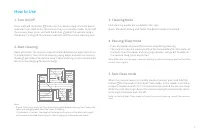
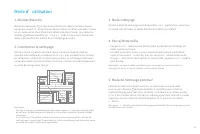
9 How to Use 3. Cleaning Mode Four cleaning modes are available in the app: Quiet, Standard, Strong and Turbo. The default mode is Standard. 4. Pausing/Sleep Mode • Press any button to pause the vacuum-mop during cleaning. • The vacuum-mop will automatically enter sleep mode after 10 minutes of inac...
Page 12 - Scheduled Cleaning; Do Not Disturb Mode
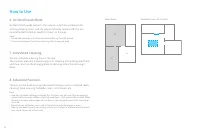
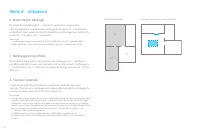
10 How to Use 7. Scheduled Cleaning You can schedule cleaning time in the app. The vacuum-mop will automatically start cleaning at the designated time and then return to the charging dock to recharge when the cleaning is done. 8. Advanced Function The app can be used to set up advanced functions suc...
Page 13 - Use the mopping function
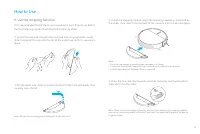
11 How to Use 9. Use the mopping function It is recommended that all floors are vacuumed at least three times before the first mopping session to achieve better cleaning effect. ③ Install the mopping module: Align the mopping module as indicated by the arrow, then slide it into the back of the vacuu...
Page 14 - FAQ
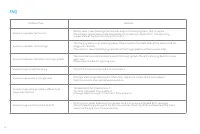
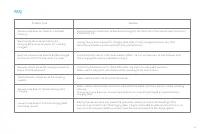
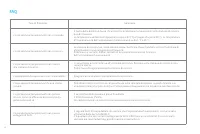
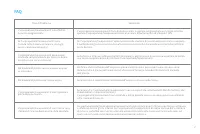
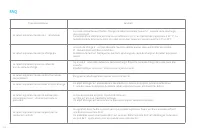
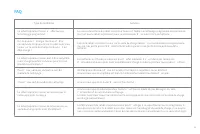
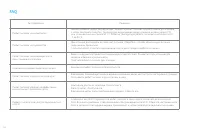
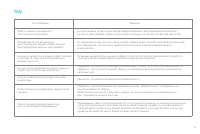
12 FAQ Problem Type Vacuum-mop does not turn on Vacuum-mop does not recharge Vacuum-mop does not return to charging dock Vacuum-mop is malfunctioning Vacuum-mop makes a strange noise Vacuum-mop no longer cleans efficiently or leaves dust behind Vacuum-mop cannot connect to Wi-Fi Solution The charging ...
Page 16 - Specifications
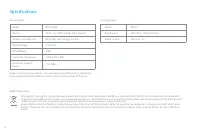
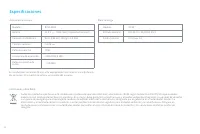
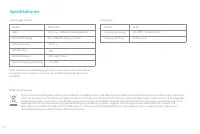
14 Specifications Battery Wireless Connectivity Rated Voltage Operation Frequency 2400-2483.5 MHz Rated Power 40W Maximum Output Power <20 dBm Model RVS5-WH0 14.4V 14.4 V 5200 mAh(Rated Capacity) Rated Input Rated Output RCS0 Model 100-240 V ~ 50/60 Hz 0.5 A 19.8 V 1 A Wi-Fi IEEE 802.11b/g/n 2.4 GHz...
Page 17 - Informazioni di sicurezza; Restrizioni per
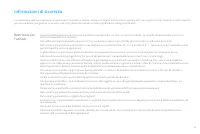
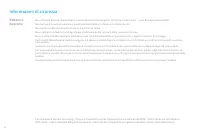
15 Informazioni di sicurezza Restrizioni per l'utilizzo Questo prodotto deve essere usato solo per pulire i pavimenti di casa. Non va usato all'esterno, su superfici diverse dai pavimenti o in ambito commerciale o industriale.Non utilizzare l'aspirapolvere/lavapavimenti in un ambiente sospeso sopra ...
Page 19 - Panoramica prodotto; Accessori
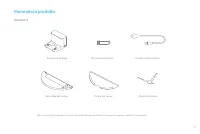
17 Panoramica prodotto Accessori Nota: Le immagini di questo manuale sono solo di riferimento, attenersi al dispositivo reale per valutare il suo aspetto Stazione di ricarica Serbatoio dell'acqua Strumento di pulizia Panno per lavare Cavo di alimentazione Spazzola laterale
Page 21 - Aspirapolvere/lavapavimenti e sensori
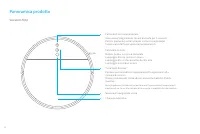
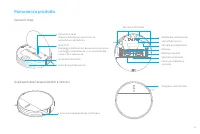
19 Panoramica prodotto Vacuum-mop Aspirapolvere/lavapavimenti e sensori Spia Wi-Fi Lampeggia lentamente: deve essere connesso Lampeggia velocemente: si sta connettendo Accesa: Wi-Fi connesso Strumento di pulizia Tampone anti collisioni Sensore di decelerazione a infrarossi Rotella omnidirezionaleCon...
Page 22 - Contenitore polvere
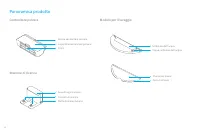
20 Fermo contenitore polvereCoperchio contenitore polvereFiltro Area di segnalazioneContatti di ricaricaPorta di alimentazione Serbatoio dell'acquaTappo serbatoio dell'acqua Panno per lavareArea di attacco Panoramica prodotto Contenitore polvere Modulo per il lavaggio Stazione di ricarica
Page 23 - Preparazione
21 Preparazione 2. Installazione spazzola laterale Nota: • Prima del suo primo utilizzo ricaricarlo completamente. • Non installare il modulo di lavaggio mentre si trova in carica. 4. Posizionare il robot sulla base di ricarica per ricaricarlo Indicatore livello batteria Bianco: il livello della bat...
Page 24 - Connessione con l’app Mi Home/Xiaomi Home; Ripristino della connessione Wi-Fi
22 Connessione con l’app Mi Home/Xiaomi Home Questo prodotto funziona con l’app Mi Home/Xiaomi Home*. Eseguire la scansione del codice QR per scaricare e installare l’app. Se l’app è già installata, si verrà indirizzati alla pagina di configurazione della connessione. In alternativa, cercare l’app &...
Page 25 - Modalità di pulizia; Modalità Spot Clean
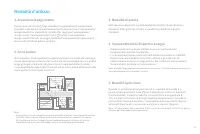
23 Modalità d'utilizzo 3. Modalità di pulizia Nell'app sono disponibili quattro modalità di pulizia: Quiet (Delicata), Standard, Strong (Forte) e Turbo. La modalità predefinita è quella Standard. 4. In pausa/Modalità Risparmio energia • Premere qualsiasi tasto per mettere in pausa l'aspirapolvere/ l...
Page 26 - Pulizia programmata; Modalità Non Disturbare
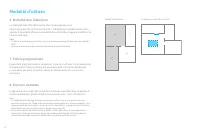
24 Modalità d'utilizzo 7. Pulizia programmata È possibile programmare un tempo per la pulizia nell'app. L'aspirapolvere/ lavapavimenti inizierà a pulire automaticamente all'orario selezionato e, una volta conclusa la pulizia, tornerà sulla stazione di ricarica per ricaricarsi. 8. Funzioni avanzate L...
Page 27 - Usare la funzione di lavaggio
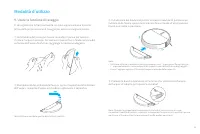
25 9. Usare la funzione di lavaggio E' consigliato che tutto il pavimento sia stato aspirato almeno tre volte prima della prima sessione di lavaggio per avere una migliore pulizia. ③ Installazione del modulo di pulizia: allineare il modulo di pulizia come indicato dalla freccia, quindi farlo scorrer...
Page 30 - Specifiche tecniche
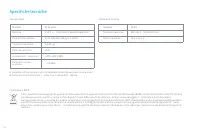
28 Specifiche tecniche Batteria Connettività wireless Tensione nominale Frequenza d’esercizio 2400-2483,5 MHz Potenza nominale 40W Potenza in uscita massima <20 dBm Modello RVS5-WH0 14,4V 14,4 V 5200 mAh (Capacità nominale) Tensione nominale Uscita nominale RCS0 Modello 100-240 V ~ 50/60 Hz 0,5 A 19...
Page 31 - Información de Seguridad; Restricciones
29 Información de Seguridad Restricciones de uso Este producto es solo apto para la limpieza de suelos en el entorno del hogar. No lo use en el exterior o en otras superficies, o en un entorno comercial o industrial.No use el aspirador en un área suspendida del suelo sin una barrera protectora.No us...
Page 33 - Descripción General del Producto; Accesorios
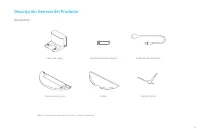
31 Descripción General del Producto Accesorios Nota: las ilustraciones de este manual son solo una referencia. Base de carga Depósito de agua Herramienta de limpieza Mopa Cable de alimentación Cepillo lateral
Page 34 - Aspirador con mopa
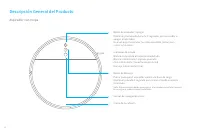
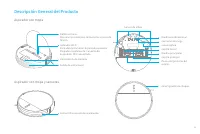
32 Descripción General del Producto Aspirador con mopa Botón de encender / apagarMantener presionado durante 3 segundos para encender o apagar el aspirador. Una vez que el aspirador ha sido encendido, pulsar para iniciar la limpieza. Cierre de la cubierta Sensor de navegación visual Indicador de est...
Page 36 - Depósito de basura
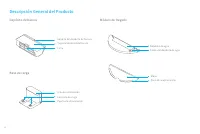
34 Soporte del depósito de basuraTapa del depósito de basuraFiltro Área de señalizaciónContacto de cargaPuerto de alimentación Depósito de aguaTapón del depósito de agua MopaZona de acoplamiento Descripción General del Producto Depósito de basura Módulo de fregado Base de carga
Page 37 - Preparación
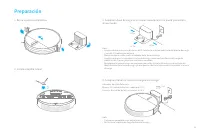
35 Preparación 2. Instale el cepillo lateral Nota: • Cargue por completo antes del primer uso • No instale el módulo de fregado durante la carga 4. Coloque el robot en la base de carga para recargar Indicador de nivel de batería Blanco: El nivel de batería es superior al 15 % Naranja: El nivel de ba...
Page 38 - Conectar con la aplicación Mi Home / Xiaomi Home
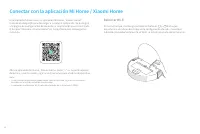
36 Conectar con la aplicación Mi Home / Xiaomi Home Este producto funciona con la aplicación Mi Home / Xiaomi Home*. Escanee el código QR para descargar e instalar la aplicación. Se le dirigirá a la página de configuración de conexión si la aplicación ya está instalada. O busque "Mi Home / Xiaom...
Page 39 - Instrucciones de uso; Modo Limpieza Localizada
37 Instrucciones de uso 3. Modo de limpieza En la aplicación hay cuatro modos de limpieza disponibles: Silencioso, Estándar, Fuerte y Turbo. El modo predeterminado es el estándar. 4. Pausar/Modo Suspensión • Pulse cualquier botón para pausar el aspirador durante la limpieza. • El aspirador activará ...
Page 40 - Limpieza programada
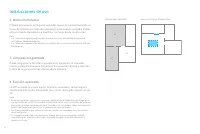
38 7. Limpieza programada Puede programar la hora de la limpieza en la aplicación. El aspirador iniciará automáticamente la limpieza en el momento indicado y volverá a la base de carga una vez haya terminado la limpieza. 8. Función avanzada La APP se puede usar para ajustar funciones avanzadas, como...
Page 41 - Usar la función de fregado
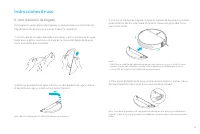
39 9. Usar la función de fregado Para lograr un mejor efecto de limpieza, se recomienda usar la función de fregado después de aspirar al menos 3 veces la superficie. ③ Instalar el módulo de fregado: Inserte el módulo de fregado en paralelo, como indica la flecha, y deslícelo en la parte trasera del ...
Page 42 - Preguntas Frecuentes
40 Preguntas Frecuentes Tipo de problema El aspirador no se enciende El aspirador no se recarga El aspirador no vuelve a la base de carga El aspirador no funciona adecuadamente. El aspirador hace un ruido extraño El aspirador no limpia de forma correcta o deja basura a su paso. El aspirador no se co...
Page 44 - Especificaciones
42 Especificaciones Batería Conexión inalámbrica Tensión nominal Frecuencia de operación 2400-2483,5 MHz Potencia nominal 40W Potencia máxima de salida <20 dBm Modelo RVS5-WH0 14,4V 14,4 V 5200 mAh (Capacidad nominal) Entrada nominal Salida nominal RCS0 Modelo 100-240 V ~ 50/60 Hz 0,5 A 19,8 V 1 A W...
Page 45 - Sicherheitsinformationen; schränkungen
43 Sicherheitsinformationen Nutzungsein- schränkungen Dieses Produkt ist nur für die Bodenreinigung in einer häuslichen Umgebung bestimmt. Benutzen Sie es nicht im Freien, auf anderen Oberflächen als dem Boden oder in einer kommerziellen oder industriellen Umgebung.Verwenden Sie den Staubsauger-Wisc...
Page 47 - Produktübersicht; Zubehör
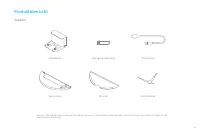
45 Produktübersicht Zubehör Hinweis: Die Abbildungen in diesem Handbuch dienen nur als Referenz, bitte beziehen Sie sich auf das eigentliche Produkt für die tatsächliche Erscheinung. Ladestation Wassertank Reinigungswerkzeug Wischer Stromkabel Seitenbürste
Page 49 - Staubsauger-Wischer und Sensoren
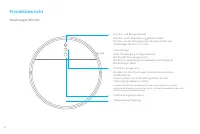
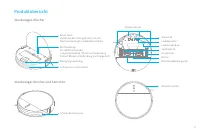
47 Produktübersicht Staubsauger-Wischer Staubsauger-Wischer und Sensoren WLAN-Anzeige An: WLAN verbunden Langsam blinkend: Wartet auf Verbindung Schnell blinkend: Verbindung wird hergestellt Reinigungswerkzeug Kollisionspuffer Infrarot-Bremssensor SteuerradLadekontaktecapteur optiqueSeitenbürsteHaup...
Page 51 - Vorbereitung
49 Vorbereitung 2. Installieren Sie die Seitenbürsten Hinweis: • Vollständige Aufladung vor dem ersten Gebrauch • Installieren Sie nicht das Mopp-Modul während des Aufladens 4. Setzen Sie den Roboter zum Wiederaufladen in die Ladestation Akkuladestandsanzeige Weiß: Der Akkustand beträgt mehr als 15 ...
Page 52 - WLAN zurücksetzen
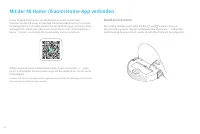
50 Mit der Mi Home-/Xiaomi Home-App verbinden Dieses Produkt funktioniert mit der Mi Home-/Xiaomi Home-App*. Scannen Sie den QR-Code, um die App herunterzuladen und zu installieren. Ist die App bereits installiert, werden Sie zur Verbindungseinrichtungs-Seite weitergeleitet. Sie können aber auch im ...
Page 53 - Verwendung; Mit der Reinigung beginnen; Punktreinigungsmodus
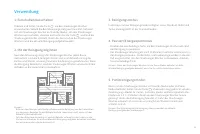
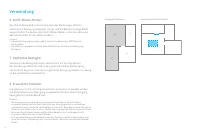
51 Verwendung 3. Reinigungsmodus In der App sind vier Reinigungsmodi verfügbar: Leise, Standard, Mittel und Turbo. Voreingestellt ist der Standardmodus. 4. Pausiert/Energiesparmodus • Drücken Sie eine beliebige Taste, um den Staubsauger-Wischer während der Reinigung zu pausieren. • Der Staubsauger-W...
Page 54 - Geplantes Reinigen; Erweiterte Funktion
52 Verwendung 7. Geplantes Reinigen Sie können die Reinigungszeiten automatisch mit der App planen. Der Staubsauger-Wischer wird zu den geplanten Zeiten die Reinigung automatisch beginnen und nach ausgeführter Reinigung wieder zur Ladung an die Ladestation zurückkehren. 8. Erweiterte Funktion Die Ap...
Page 55 - Verwenden der Kartenfunktion
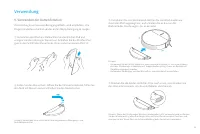
53 9. Verwenden der Kartenfunktion Zur Erzielung eines besseren Reinigungseffekts, wird empfohlen, alle Etagen mindestens dreimal vor der ersten Mopp-Reinigung zu saugen. ③ Installieren Sie das Wischmodul: Richten Sie das Wischmodul wie durch den Pfeil angezeigt aus, und schieben Sie es dann in die ...
Page 58 - Spezifikationen
56 Spezifikationen Akku WLAN-Verbindung Nennspannung Betriebsfrequenz 2400-2483,5 MHz Nennleistung 40W Maximale Ausgangsleistung <20 dBm Modell RVS5-WH0 14,4V 14,4 V 5200 mAh (Nennkapazität) Eingangsspannung Ausgangsleistung RCS0 Modell 100-240 V ~ 50/60 Hz 0,5 A 19,8 V 1 A Wi-Fi IEEE 802,11b/g/n 2,...
Page 59 - Informations sur la sécurité; Restrictions
57 Informations sur la sécurité Restrictions d’utilisation Ce produit est uniquement destiné au nettoyage des sols dans un environnement domestique. Ne l’utilisez pas à l’extérieur, sur des surfaces non planes ou dans un contexte commercial ou industriel.N’utilisez pas le robot aspirateur laveur dan...
Page 61 - Présentation du produit; Accessoires
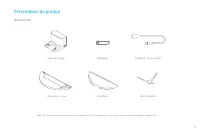
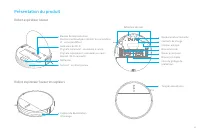
59 Présentation du produit Accessoires Note : Les illustrations de ce manuel sont uniquement à titre de référence, veuillez vous référer au produit réel pour l'aspect réel. Socle de charge Réservoir d’eau Nettoyeur Serpillière Cordon d’alimentation Brosse latérale
Page 62 - Robot aspirateur laveur
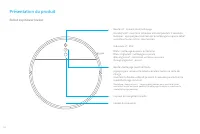
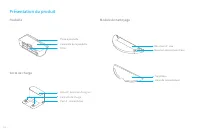
60 Présentation du produit Robot aspirateur laveur Bouton d’alimentation/nettoyageMarche/arrêt : maintenir le bouton enfoncé pendant 3 secondes Nettoyer : appuyer pour commencer le nettoyage lorsque le robot aspirateur laveur est mis sous tension Loquet du couvercle Capteur de navigation visuelle In...
Page 65 - Préparation
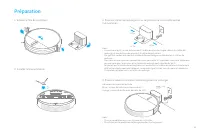
63 Préparation 2. Installer la brosse latérale Note: • Charger complétement avant la première utilisation • N'installez pas le module de nettoyage pendant le chargement 4. Placez le robot sur la station de recharge pour le recharger Indicateur du niveau de batterie Blanc : niveau de batterie au-dess...
Page 66 - Connexion avec l’application Mi Home/Xiaomi Home; Réinitialiser le Wi-Fi
64 Connexion avec l’application Mi Home/Xiaomi Home Ce produit fonctionne avec l’application Mi Home/Xiaomi Home*. Scannez le code QR pour télécharger et installer l’application. Vous serez redirigé vers la page de configuration si l’application est déjà installée. Sinon, recherchez « Mi Home/Xiaomi...
Page 67 - Mode d’utilisation; Commencer le nettoyage; Mode de nettoyage ponctuel
65 Mode d’utilisation 3. Mode nettoyage Quatre modes de nettoyage sont disponibles sur l’application: silencieux, standard, fort et turbo. Le mode Standard est défini par défaut. 4. Pause/Mode Veille • Appuyez sur n’importe quel bouton pour suspendre le nettoyage du robot aspirateur laveur. • Le rob...
Page 68 - Nettoyage programmé; Mode Ne pas déranger
66 Mode d’utilisation 7. Nettoyage programmé Vous pouvez programmer des horaires de nettoyage via l’application. Le robot aspirateur laveur commencera automatiquement le nettoyage à l’heure définie, puis il retournera au socle de charge une fois qu’il aura terminé. 8. Fonction avancée L'application ...
Page 69 - Utilisation de la fonction de nettoyage.
67 9. Utilisation de la fonction de nettoyage. Il est recommandé de passer l'aspirateur au moins trois fois sur tous les sols avant la première session de nettoyage afin d'obtenir un meilleur effet de nettoyage. ③ Installer le module de nettoyage : alignez le module de nettoyage en suivant la flèche...
Page 72 - Spécifications
70 Spécifications Batterie Connectivité sans fil Tension nominale Fréquence de fonctionnement 2400-2483,5 MHz Puissance nominale 40W Puissance maximale en sortie <20 dBm Modèle RVS5-WH0 14,4V 14,4 V 5200 mAh (Capacité nominale) Entrée nominale Sortie nominale RCS0 Modèle 100-240 V ~ 50/60 Hz 0,5 A 19...
Page 73 - Информация по технике безопасности; Ограничения на
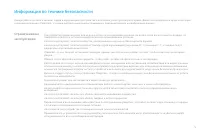
71 Информация по технике безопасности Ограничения на эксплуатацию Это устройство предназначено только для очистки пола в домашних условиях. Не используйте его на открытом воздухе, на поверхностях без пола, а также в коммерческих или промышленных условиях.Не используйте робот-пылесос в областях, расп...
Page 75 - Обзор устройства; Аксессуары
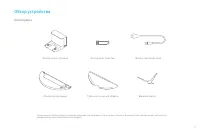
73 Обзор устройства Аксессуары Примечание: Иллюстрации в данном руководстве приведены только для справки. Внешний вид товара может отличаться, приоритетную силу имеет реальный продукт. Зарядная док-станция Резервуар для воды Инструмент очистки Губка для влажной уборки Шнур электропитания Боковая щет...
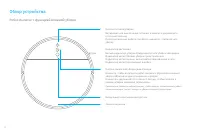
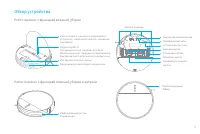
Page 76 - Робот-пылесос с функцией влажной уборки
74 Обзор устройства Робот-пылесос с функцией влажной уборки Защелка крышки Визуальный навигационный датчик Индикатор состоянияБелый индикатор: уборка продолжается или уборка завершена. Индикатор мигает белым: уборка приостановлена. Индикатор мигает синим: выполняется подключение к сети. Индикатор ми...
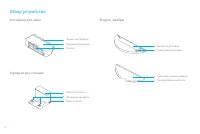
Page 78 - Контейнер для пыли
76 Зажим контейнераКрышка контейнераФильтр Область сигналаЗарядные контактыПорт питания Резервуар для водыПробка бака для воды Губка для влажной уборкиПрикрепляемая область Обзор устройства Контейнер для пыли Модуль швабры Зарядная док-станция
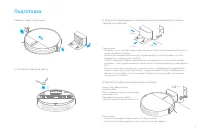
Page 79 - Подготовка
77 Подготовка 2. Установите боковую щетку Примечание: • полностью зарядите перед первым использованием • Не устанавливайте модуль для мытья полов во время зарядки 4. Поместите робота на зарядную док-станцию Индикатор уровня заряда аккумулятора Белый: уровень заряда аккумулятора превышает 15 %. Оранж...
Page 80 - Подключитесь к приложению Mi Home / Xiaomi Home
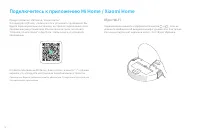
78 Подключитесь к приложению Mi Home / Xiaomi Home Продукт работает с Mi Home / Xiaomi Home*. Отсканируйте QR-код, чтобы скачать и установить приложение. Вы будете перенаправлены на страницу настройки подключения, если приложение уже установлено. Или выполните поиск по запросу "Mi Home / Xiaomi ...
Page 81 - Инструкция; Режим локальной уборки
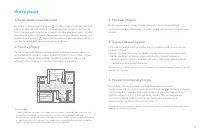
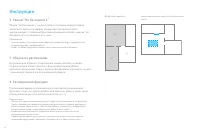
79 Инструкция 3. Режимы уборки В приложении доступно четыре режима: тихий, стандартный, интенсивный и турборежим. По умолчанию установлен стандартный режим. 4. Пауза/Спящий режим • Нажмите любую кнопку, чтобы приостановить робот-пылесос во время уборки. • Если в течение 10 минут не будет предпринято...
Page 82 - Уборка по расписанию
80 Bыбранной комнаты зоны ограниченного доступа/виртуальная стена C A B D Инструкция 7. Уборка по расписанию В приложении Mi Home / Xiaomi Home можно настроить уборку по расписанию. Робот-пылесос с функцией влажной уборки автоматически начнет уборку в назначенное время и вернется на док- станцию для...
Page 83 - Используйте функцию влажной уборки
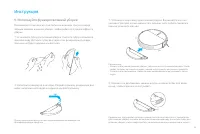
81 Инструкция 9. Используйте функцию влажной уборки Рекомендуется пылесосить все полы как минимум три раза перед первым сеансом влажной уборки, чтобы добиться лучшего эффекта уборки. ③ Установите контейнер для влажной уборки. Выровняйте его, как указано стрелкой, затем задвиньте в заднюю часть робот...
Page 86 - Технические характеристики
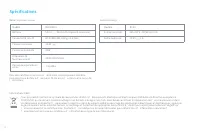
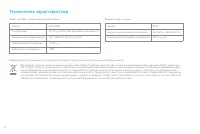
84 Технические характеристики 19,8 V 1 A Аккумулятор Номинальное напряжение Номинальная мощность 40W Модель RVS5-WH0 14,4V 14,4 V 5200 mAh (Номинальная емкость) Номинальное выходное напряжение RCS0 Модель 100-240 V ~ 50/60 Hz 0,5 A Wi-Fi IEEE 802,11b/g/n 2,4 GHz Информация об утилизации и переработк...
Page 87 - ةملاسلا تامولعم
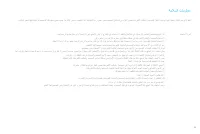
85 ةملاسلا تامولعم مادختسلاا دويق .ةيعانص وأ ةيراجت ةئيب يف وأ ةيضرلأا ريغ حطسلأا ىلع وأ جراخلا يف همدختست لا .طقف ةيلزنم ةئيب يف تايضرلأا فيظنتل صصخم جتنملا اذه .يقاو زجاح نود ضرلأا ىوتسم قوف ةقلعم ةقطنم يف ةيئابرهكلا ةسنكملاو ةحسمملا مدختست لا .ةقصلا داوم وأ لئاوس اهيلع ةيضرأ ىلع وأ ةيوئم ةجرد 0 ن...
Page 89 - جتنملا لوح ةماع ةرظن; تاقحلملا
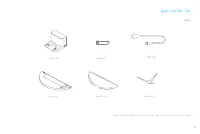
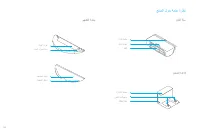
87 جتنملا لوح ةماع ةرظن تاقحلملا .يقيقحلا رهظملا لجأ نم يلعفلا جتنملا ىلإ عوجرلا ىجري ،طقف ةراشلإل يه ليلدلا اذه يف ةدراولا ةينايبلا موسرلا :ةظحلام نحشلا ةدعاق هايملا نازخ فيظنتلا ةادأ ةحسمملا ةحول ةقاطلا كلس ةيبناجلا ةاشرفلا
Page 90 - ةيئابرهكلا ةسنكملاو ةحسمملا
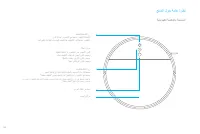
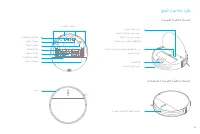
88 جتنملا لوح ةماع ةرظن ةيئابرهكلا ةسنكملاو ةحسمملا فيظنتلا/ليغشتلا رز ٍناوث 3 ةدمل رارمتسلاا عم طغضا :فاقيلإا/ليغشتلا ةيئابرهكلا ةسنكملاو ةحسمملا ليغشت دعب فيظنتلا ءدبل طغضا :فيظنتلا ءاطغلا جلازم يئرملا لقنتلا رعشتسم ةلاحلا رشؤم فيظنتلا لمتكا وأ ،فيظنتلا ٍراج :ضيبلأا نوللا اًتقؤم فيظنتلا فاقيإ مت :...
Page 92 - ريهطتلا ةدحو
90 جتنملا لوح ةماع ةرظن ريهطتلا ةدحو هايملا نازخ هايملا نازخ ةدادس ةحسمملا ةحول ةقطنملا قافرإ ةلسلا كبشمةلسلا ءاطغ رتلفلا ةراشلإا ةقطنم نحشلا تلاصوم ةقاطلا ذفنم رابغلا ةلس نحشلا ةدعاق
Page 93 - ريضحتلا
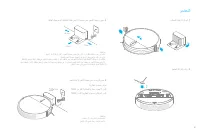
91 ريضحتلا :ةظحلام مادختسا لوأ لبق ئلتمت ىتح اهنحشا نحشلا ءانثأ حسملا ةدحو بيكرتب مقت لا هنحش ةداعلإ نحشلا ةصنم ىلع توبورلا عض . 4 ةيراطبلا ىوتسم رشؤم %15 نم رثكأ ةيراطبلا ىوتسم :ضيبلأا نوللا %15 نم لقأ ةيراطبلا ىوتسم :يلاقتربلا نوللا ≥6h ةقاطلا ليصوتب مقو طئاحلا لباقم ضرلأا ىوتسم ىلع نحشلا فيصر عض ...
Page 94 - Mi Home / Xiaomi Home قيبطتب لاصتلاا; ياف ياو ةكبش طبض ةداعإ
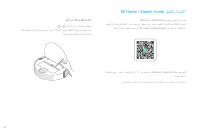
92 Mi Home / Xiaomi Home قيبطتب لاصتلاا ياف ياو ةكبش طبض ةداعإ و نيرزلا ىلع رارمتسلاا عم طغضا نوكي ،ءطبب ياف ياولا رشؤم ضيمو درجمب ¬""ةكبشلا نيوكت راظتناب"" لوقي اتوص عمست ىتح ¬حاجنب ياف ياولا طبض ةداعإ تمت دق * Mi Home / Xiaomi Home قيبطت عم جتنملا اذه لمعي قيبطتلا ناك لاح يف لاصتلا...
Page 95 - مادختسلاا ةقيرط
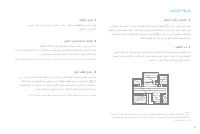
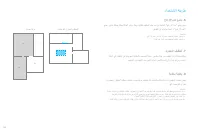
93 مادختسلاا ةقيرط فيظنتلا عضو . 3 عضولا نوكيو .وبرتلاو يوقلاو ،يسايقلاو ،ئداهلا : قيبطت يف فيظنتلل عاضوأ ةعبرأ رفوتت .يسايقلا وه يضارتفلاا نوكسلا عضو/تقؤملا فاقيلإا . 4 .فيظنتلا ءانثأ اًتقؤم ةيئابرهكلا ةسنكملاو ةحسمملا فاقيلإ رز يأ ىلع طغضا نم لك فقوتي مث ،طاشنلا مدع نم قئاقد 10 دعب نوكسلا عضو يف ا...
Page 97 - حسملا ةفيظو مادختسا.
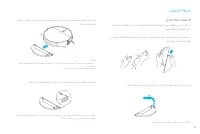
95 مادختسلاا ةقيرط حسملا ةفيظو مادختسا. 9 حسملا ةسلج لبق لقلأا ىلع تارم ثلاث ةيئابرهكلا ةسنكملاب تايضرلأا عيمج فيظنت متي نأ نسحتسملا نم .لضفأ فيظنت ريثأت قيقحتل ىلولأا نازخ ةحتف ىلإ لماكلاب ةحوللا كرح .ةدئازلا هايملا عازتناو ةحسمملا ةحول بيطرتب مق :ةحسمملا ةحول بيكرت .نامأب اهناكم يف رقتست ىتح هايمل...
Page 98 - ةعئاشلا ةلئسلأا
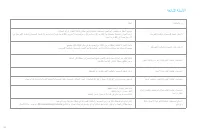
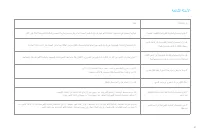
96 ةعئاشلا ةلئسلأا ةلكشملا عون ةيئابرهكلا ةسنكملاو ةحسمملا ليغشت نكمي لا ةيئابرهكلا ةسنكملاو ةحسمملا نحش نكمي لا نحشلا ةدعاق ىلإ دوعت لا ةيئابرهكلا ةسنكملاو ةحسمملا لمعت لا ةيئابرهكلا ةسنكملاو ةحسمملا اًبيرغ ا ًجيجض ردصت ةيئابرهكلا ةسنكملاو ةحسمملا كرتت وأ ةءافكب فظنت دعت مل ةيئابرهكلا ةسنكملاو ةحسم...
Page 100 - تافصاوملا
98 تافصاوملا زارطلا ردقملا لاخدلإا ردقملا جارخلإ زارطلا ردقملا دهجلا ةيراطبلا ةرّدقملا ةقاطلا يكلسلالا لاصتلاا ليغشتلا ددرت جرخلا ةقاطل ىصقلأا دحلا RVS5-WH0 14.4 V 5200 mAh)Rated Capacity( Wi-Fi IEEE 802.11b/g/n 2.4 GHz 40W 2400-2483.5 MHz RCS0 100-240 V ~ 50/60 Hz 0.5 A 19.8 V 1 A < 20 dBm 14.4V نح...
Page 101 - יתוחיטב עדימ; שומיש תולבגה
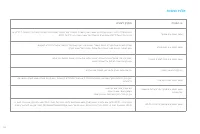
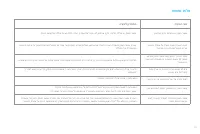
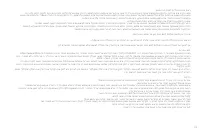
99 יתוחיטב עדימ שומיש תולבגה .תיתיישעת וא תירחסמ הביבסב וא הפצר םניאש םיחטשמ יבג לע ,חותפ םוקמב שומיש וב תושעל ןיא .דבלב תיתיב הביבסב הפצר יוקינל דעונ הז רצומ .הנגה םוסחמ אלל הפצרה הבוג לעמ יולתש חטשב קבאה באושב שומיש תושעל ןיא .םיקיבד םירמוח וא םילזונ םע הפצר לע וא 0°C -ל תחתמ וא 40°C לעמ הביבס תרו...
Page 102 - הניעטו תוללוס
100 הניעטו תוללוס .RCS0 םגד חוכ קפסב קר ושמתשה .ישילש דצ הניעט תדמעב וא ןעטמב ,הללוסב שומיש תושעל ןיא .םכמצעב הניעטה תדמעב וא הללוסב םייוניש עצבל וא ןקתל ,קרפלו תוסנל ןיא .םוח רוקמ תברקב הניעטה תדמע תא םקמל ןיא .הניעטה תדמע לש הניעטה יעגמ יוקינל וא בוגינל תובוטר םיידיב וא הבוטר תילטמב שומיש תושעל ןי...
Page 103 - רצומה תריקס; םירזבא
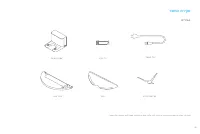
101 רצומה תריקס םירזבא .לעופב ולש הארמה יבגל לעופב רצומב ונייע אנא ,דבלב ןויעל ודעונ הז ךירדמב םיעיפומה םירויאה :בל ומיש הניעט תדמע םימ לכימ יוקינ ילכ בגמ למשח לבכ תידדצ תשרבמ
Page 104 - רצומ תריקס; קבא באוש
102 רצומ תריקס קבא באוש ןויקינ / יוביכ / הלעפה ןצחל .תוינש 3 ךשמב ןצחלה לע וצחל .קבאה באוש תלעפה רחאל ןויקינה תליחתל וצחל )תפטעמ( יוסיכ תינושל ילאוזיו טווינ ןשייח סוטטס יוויח .המייתסה ןויקינה תלועפש וא ןויקינ בצמב :ןבל .היהשהב ןויקינה תלועפ :בהבהמ ןבל .תרושקת תשרל רבחתמ :בהבהמ לחוכ .)הלקת( האיגש :בה...
Page 106 - בוגינ ביכר
104 רצומה תריקס בוגינ ביכר םימ לכימ םימה לכימ רוצעמ בגמ רוביח רוזא חפ קדהמ חפ יוסיכ ןנסמ תותיא רוזא הניעט יעגמ למשח עקש הפשא חפ הניעט
Page 107 - הנכה
105 הנכה :בל ומיש .הנושארה םעפב שומישה ינפל ףוסה דע וניעטה .הניעט ןמזב בוגינה ביכר תא ןיקתהל ןיא תרזוח הניעטל הניעטה תדמע לע טובורה תא ומקמ . 4 הללוסה הבוג יוויח 15%Orange: Battery לעמ הללוסה הבוג :ןבל 15% -ל תחתמ הללוסה הבוג :םותכ ≥6h למשח רוקמל התוא ורבחו ריקה דגנכ הרשי הפצר לע הניעטה תדמע תא ומקמ...
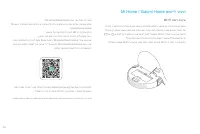
Page 108 - Mi Home / Xiaomi Home םושייל רוביח; תשר סופיא
106 Mi Home / Xiaomi Home םושייל רוביח .* Mi Home/Xiaomi Home םושיי םע לעופ הז רצומ Mi םושיי תרזעב םירחא םייתיב םירישכמ ןיבל וניב היצקארטניא ורצו ,םכלש רישכמב וטלש . Home/Xiaomi Home .םושייה לש הנקתהלו הדרוהל QR -ה דוק תא וקרס .ןקתוה רבכ םושייהו הדימב רוביחה תרדגה ףדל םכתא ונווכי וחתפ .ותנקתהלו הדרו...
Page 109 - קבאה באושב שומישה; יתדוקנ ןויקינ לש בצמ.
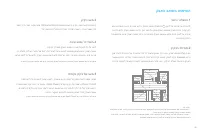
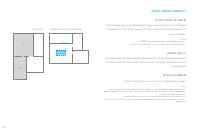
107 קבאה באושב שומישה ןויקינ בצמ. 3 בצמ ,ליגר בצמ ,טקש בצמ :Mi Home/Xiaomi Home םושייב ןויקינ יבצמ העברא םימייק .ליגר בצמ וניה לדחמ תרירבכ רדגומה בצמה .וברוט בצמו קזח הניש בצמ / הייהשה. 4 .ןויקינה ךלהמב קבאה באוש תייהשהל ןצחל לכ לע וצחל הז בלשב ,תוליעפ רסוח לש תוקד 10 רחאל הניש בצמל יטמוטוא ןפואב סנ...
Page 111 - בוגינ תייצקנופב שומיש.
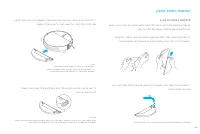
109 קבאה באושב שומישה בוגינ תייצקנופב שומיש. 9 ןושארה בוגינה ןויסינ םרט םימעפ שולש תוחפה לכל הפצרה יגוס לכ תא בואשל םיצילממ ונא .בגמה לע ךולכל לש תמזגומ תורבטצה םצמצל תנמ לע תאזו תא וקילחה .םיפדוע םימ וטחסו בגמה חטשמ תא וחלחל :בגמה חטשמ תא וניקתה. ① .החטבב ומוקמב בשייתמ אוהש דע םימה לכימבש ץירחה ךות...
Page 112 - תוצופנ תולא; היעבה גו
110 תוצופנ תולא היעבה גו לעפומ וניא קבאה באוש שדחמ ןעטנ וניא קבאה באוש הניעטה תדמעל רזוח וניא קבאה באוש קבאה באושב הלקת שי רזומ שער קיפמ קבאה באוש ריאשמ וא תוליעיב רתוי הקנמ וניא קבאה באוש רוחאמ קבא Wi-Fi -ה תשרל רבחתמ וניא קבאה באוש היעבל ןורתפ וא ) 0°C -ל תחתמ( ידמ הכומנ הביבסה תרוטרפמט .תינשב וסנ...
Page 113 - היעבה גוס
111 תוצופנ תולא היעבה גוס .ןמזותמ ןויקינ עצבמ וניא קבאה באוש הניעטה תדמע לע קבאה באוש תראשה םאה ?הנועט רבכ איה םא למשח תכרוצ ואולמב קבאה באוש תא ןיעטהל ךרוצ שי םאה השענ ןהב תונושארה םימעפב תועש 16 ךשמב ?שומיש וב תומכ קרש וא ,בוגינה ביכרמ םיאצוי אל םימ .םיאצוי םימ לש הנטק בוגינה ביכרמ תאצוי םימ לש יד...
Page 114 - ינכט טרפ
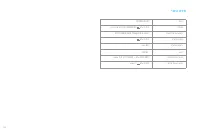
112 ינכט טרפ םגד הללוס )תגרודמ תלוביק( 5200mAh טלוו 14.4 תיטוחלא תוירושיק Wi-Fi IEEE 802.11b/g/n 2.4 GHz גרודמ חתמ טלוו 14.4 גרודמ קפסה טאוו 40 םגד RCS0 חתמ תסינכ גוויס רפמא 0.5 ץרה 50/60 ~ טלוו 100-240 חתמ תאיצי גוויס רפמא 1 טלוו 19.8 RVS5-WH0