Page 2 - Contents
Contents 1 Safety 1.1 Safety definitions................................................... 31.2 General safety instructions....................................31.3 Safety instructions for installation..........................41.4 Safety instructions for operation............................41.5 Sa...
Page 3 - Safety; Safety definitions
1 Safety 1.1 Safety definitions Warnings, cautions and notes are used to point out specially important parts of the manual. WARNING: Used if there is a risk of injury or death for the operator or bystanders if the instructions in the manual are not obeyed. CAUTION: Used if there is a risk of damage ...
Page 5 - How to lift and move the product
1.7 How to lift and move the product WARNING: The product must be switched off before lifting it. The product is disabled when the indicator lamp on the keypad is not lit. CAUTION: Do not lift the product when it is parked in the charging station. It can damage the charging station and/or the produc...
Page 6 - Introduction
2 Introduction 2.1 Introduction Serial number: Product number: PIN code: The serial number and the product number are on the product rating plate and on the product carton.• Register your product on www.husqvarna.com. Enter the serial number of the product, the product number and the date of purchas...
Page 7 - Product overview
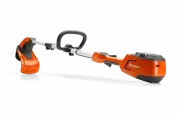
2.2 Product overview 6 8 9 11 16 19 17 18 15 13 7 14 24 26 25 27 28 29 30 10 20 23 22 21 12 4 3 2 5 1 1. Product body 2. Top cover 3. Hatch to display and keypad 4. STOP button 5. Rear wheels 6. Front wheels 7. Headlights 8. Blade disc 9. Skid plate 10. Contact plates11. LED indicator for operation ...
Page 13 - Installation; Main components for installation; To examine where to put the charging
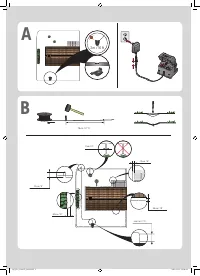
3 Installation 3.1 Introduction - Installation WARNING: Read and understand the safety chapter before you install the product. CAUTION: Use original spare parts and installation material. Note: Refer to www.husqvarna.com for more information about installation. 3.2 Main components for installation T...
Page 17 - wire; Installation of the product
B A • Put the boundary wire around the secondary area (B) to make an island. Refer to To make an island on page 16. Note: The boundary wire must be put as 1 loop around all of the work area (A + B). Note: When the product cuts grass in the secondary area, the Secondary area mode must be selected. Re...
Page 20 - After the installation of the product; To do a visual check of the charging
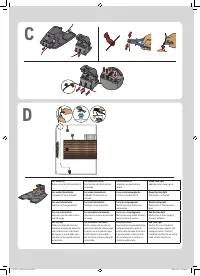
6. Push down the cover on the coupler with adjustable pliers to attach the wires in the coupler. 7. Put the boundary wire or the guide wire into position with stakes. 8. Connect the charging station to the power outlet. 3.9 After the installation of the product 3.9.1 To do a visual check of the char...
Page 21 - Product settings; Connect app; Connect
4 Product settings You can use the keypad and the display on the product or the Automower ® Connect app to do the settings for the functions of the product. The functions of the product have factory settings that are applicable for almost all work areas, but the settings can be adapted to the condit...
Page 22 - Download firmware over the air FOTA; Product settings with keypad and; display of the product
Note: With the AIM function you can set work areas and stay-out zones with a precision of approximately 1 m / 3.3 ft. The data collection for the map starts automatically. The product collects data while it operates and the map is completed in 1-2 weeks. Remove temporary obstacles on the lawn when t...
Page 31 - Operation; To start the product
5 Operation 5.1 To use the ON/OFF button WARNING: Read and understand the safety chapter before you use the product. • Push the ON/OFF button for 3 seconds to set the product to ON. Make sure that the LED indicator comes on. • The product is ON and in power save mode if the LED indicator flashes. Pu...
Page 33 - Maintenance; Clean the product; To clean the chassis and blade disc
6 Maintenance 6.1 Introduction - maintenance WARNING: The product must be switched off before any maintenance is done. WARNING: Wear protective gloves. For better operation and longer service life, make sure to clean the product regularly and replace worn parts. All maintenance and servicing must be...
Page 34 - Replacement of the blades
7. Carefully lift the body at the rear and fold it over to remove the body, do not remove the charging cable. Note: Make sure the that the grommets for the charging cable are correctly installed to seal against moisture after you remove the body of the product. 8. Clean the blade disc and chassis wi...
Page 36 - Troubleshooting
7 Troubleshooting 7.1 Introduction - troubleshooting In this chapter you can find information and help about faults and symptoms of the product. You can find more information and FAQ (Frequently Asked Questions) on www.husqvarna.com. 7.2 Fault messages The fault messages in the table below are shown...
Page 41 - Information and warning messages
7.3 Information and warning messages The information messages in the table below are shown in the display of the product. Speak to your Husqvarna representative if the same message shows frequently. Message Cause Action Limited cutting height The cutting height adjustment cannot move. Examine the cu...
Page 42 - Indicator lamp in the charging station
Message Cause Action Next start hh:mm The schedule setting prevents the product from operating. Change the schedule settings. Refer to Schedule on page 22. The product has reached its maximum cut- ting time for the day. This behavior is normal and no action is re- quired. The clock or date in the pr...
Page 44 - Find breaks in the loop wire
Symptoms Cause Action The product is parked for hours in the charging station. The product has operated the maximum cut- ting time for the day. No action. Refer to Schedule on page 22. The hatch is closed but the START button is not pushed. Push the STOP button to open the hatch. Enter the PIN code ...
Page 47 - Transportation, storage and disposal
8 Transportation, storage and disposal 8.1 Transportation The supplied Li-ion batteries obey the Dangerous Goods Legislation requirements.• Obey all applicable national regulations. • Obey the special requirement on package and labels for commercial transportations, including by third parties and fo...
Page 48 - Technical data
9 Technical data 9.1 Automower ® 405X/415X Dimensions Automower ® 405X Automower ® 415X Length, cm/in. 61/24.0 61/24.0 Width, cm/in. 45/17.7 45/17.7 Height, cm/in. 24/9.4 24/9.4 Weight, kg/lb 9.7/21.4 9.7/21.4 Electrical system Automower ® 405X Automower ® 415X Battery, Lithium-Ion 18 V/2.0 Ah Art. ...
Page 50 - Registered trademarks
Power Class Bluetooth ® Output power 8 dBM Automower ® Connect 2G Power Class 4 (GSM/E-GSM) 33 dBm Power Class 1 (DCS/PCS) 30 dBm Power Class E2 (GSM/E-GSM) 27 dBm Power Class E2 (DCS/PCS) 26 dBm Automower ® Connect 3G Power Class 3 24 dBm Automower ® Connect 4G Power Class 3 23 dBm Deviations from ...