Page 3 - INHALt
DE 3 INHALt einleitung . . . . . . . . . . . . . . . . . . . . . . . . . . . . . . . . . . . . . . . . . . . . . . . . . . 4 Bestimmungsgemäßer Gebrauch . . . . . . . . . . . . . . . . . . . . . . . . . . . . . . . . 5 Lieferumfang . . . . . . . . . . . . . . . . . . . . . . . . . . . . . . . . . . ...
Page 4 - eINLeItuNG
4 eINLeItuNG erklärung der Symbole und Signalworte, die in dieser Bedienungsanleitung und/oder am Gerät verwendet werden: Beachten Sie diese Bedienungsanleitung bei der Verwendung des Geräts. Lebens- und unfallgefahr für kinder! Beachten Sie Warn- und Sicherheitshinweise! entsorgen Sie Verpackung un...
Page 6 - SICHerHeIt
6 Technische Daten modell GF 30 Artikelnummer 97151 Abmessungen (H x B x t) 27 x 60 x 105 mm Gewicht 140 g Aufnahme-Auflösungen VGA / HD CmoS-Sensor 1,0 megapixel Videoformat AVI max. Bildauflösung (Fotos) 1280 x 720 Pixel Linse 120˚ Weitwinkelobjektiv (schwenkbar) Stromversorgung Li-Ion-Akku (3,6 V...
Page 9 - ProDuktÜBerSICHt
De 9 ProDuktÜBerSICHt 1. tFt-LCD Display2. Nacht-LeD3. HDmI-Anschluss4. PoWer-taste5. meNu-taste6. moDe-taste7. SD/mmC-karten-Slot8. Hebel an Saugnapfhalterung9. Saugnapfhalterung 10. rändelschrauben11. uSB-Anschluss12. Funktionstasten13. ok-taste14. uSB-Stecker15. mini-uSB-Stecker16. GPS empfänger1...
Page 10 - Vor Dem GeBrAuCH
10 Vor Dem GeBrAuCH Packen Sie das Gerät vorsichtig aus und entfernen Sie die Schutzfolien an objektiv und Display. Speicherkarte einsetzen Hinweis: Wird die SD/mmC-karte das erste mal für die Autokamera verwendet, muss diese formatiert werden. Achtung! Alle Daten auf der SD/mmC-karte werden gelösch...
Page 11 - BeDIeNuNG
De 11 Der Ladevorgang wird über die Ladezustandsanzeige im Display (1) angezeigt.Sobald die kamera über das Anschlusskabel mit einer Stromquelle verbunden ist, ist die kamera funktionsbereit (auch ohne aufgeladenen Akku). Montage der Saugnapfhalterung Achtung! Achten Sie bei der Befestigung der kame...
Page 17 - eINSteLLuNGeN
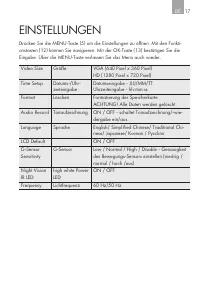
De 17 eINSteLLuNGeN Drücken Sie die meNu-taste (5) um die einstellungen zu öffnen. mit den Funkti-onstasten (12) können Sie navigieren. mit der ok-taste (13) bestätigen Sie die eingabe. Über die meNu-taste verlassen Sie das menü auch wieder. Video Size Größe VGA (640 Pixel x 360 Pixel)HD (1280 Pixel...
Page 19 - tABLe oF CoNteNtS
GB 19 tABLe oF CoNteNtS Introduction . . . . . . . . . . . . . . . . . . . . . . . . . . . . . . . . . . . . . . . . . . . . . . . . 20 Normal use. . . . . . . . . . . . . . . . . . . . . . . . . . . . . . . . . . . . . . . . . . . . . . 21 Contents . . . . . . . . . . . . . . . . . . . . . . . . . ...
Page 20 - INtroDuCtIoN
20 INtroDuCtIoN explanation of symbols and signal words used in these operating instructions and/or the device: Follow instructions when using the device. risk of injury or death for children! Please note warnings and safety notices! Dispose of packaging and unit, including battery, in an environmen...
Page 22 - SAFetY
22 Technical Data model GF 30 Item number 97151 Dimensions (h x w x d) 27 x 60 x 105 mm Weight 140 g recording resolutions VGA / HD CmoS sensor 1.0 megapixel Video format/Picture format AVI max. image resolution (pictures) 1280 x 720 pixel Lens 120˚ wide angle lens (pivoted) Power supply Li-ion rech...
Page 25 - ProDuCt oVerVIeW
GB 25 ProDuCt oVerVIeW 1. tFt LCD display2. Night LeD3. HDmI port4. PoWer button5. meNu button6. moDe button7. SD/mmC card slot8. Lever on suction cup bracket9. Suction cup bracket 10. knurled screws11. uSB port12. Function keys13. ok button14. uSB plug15. mini-uSB plug16. GPS receiver17. uSB/car ad...
Page 26 - BeFore uSe
26 BeFore uSe Carefully unpack the device and remove the protective film from lens and display. Inserting the memory card Note: When using the SD/mmC card with the cockpit camera for the first time, it must first be formatted. Attention! All data on the SD/mmC card will be erased. A memory card is r...
Page 27 - oPerAtIoN
GB 27 Mounting the suction cup bracket Caution! When mounting the camera please be sure not to obstruct your field of vision, the charging cable will not interfere with driving and the camera is mounted securely. Attention! Some automakers’ vehicles feature panes with reflective coating as standard ...
Page 32 - SettINGS
32 SettINGS Press the meNu button (5) to enter settings. Navigate the menu with the function keys (12). use the ok button (13) to confirm entries. use the meNu button to exit the menu. Video Size Size VGA (640 pixel x 360 pixel)HD (1280 pixel x 720 pixel) time Setup Date/time entry Date entry - YYYY...
Page 33 - NANCe
GB 33 CLeANING, CAre AND mAINte- NANCe minimal care will ensure your device remains functional for years. ▪ Carefully wind the cable when storing the device. this will help prevent acciden-tal damage to the cable and the device. ▪ Clean the product with a soft, dry cloth. ▪ Store the device in a cle...
Page 35 - tABLe DeS mAtIèreS
Fr 35 tABLe DeS mAtIèreS Introduction . . . . . . . . . . . . . . . . . . . . . . . . . . . . . . . . . . . . . . . . . . . . . . . . 36 utilisation conforme . . . . . . . . . . . . . . . . . . . . . . . . . . . . . . . . . . . . . . . . 37 Contenu de l‘emballage . . . . . . . . . . . . . . . . . . ...
Page 38 - SéCurIté
38 Caractéristiques techniques modèle GF 30 Numéro d’article 97151 Dimensions (h x l x p) 27 x 60 x 105 cm Poids 140 g résolutions des prises de vue VGA / HD Capteur CmoS 1,0 mégapixels Format vidéo / format d'image AVI max. résolution de l'image (photos) 1280 x 720 pixels Lentille objectif grand-an...
Page 41 - APerÇu Du ProDuIt
Fr 41 APerÇu Du ProDuIt 1. Afficheur tFt CL2. LeD nocturne3. Connexion HDmI4. touche PoWer5. touche meNu6. touche moDe7. Lecteur de cartes SD / mmC8. Levier sur le support à ventouse9. Support à ventouse10. Vis moletées 11. Connexion uSB12. touches de fonction13. touche ok14. Fiche uSB15. Fiche mini...
Page 42 - AVANt L‘utILISAtIoN
42 AVANt L‘utILISAtIoN Déballez avec précaution l‘appareil et retirez les films de protection de la lentille et de lentille. Insérer la carte mémoire remarque : Si la carte SD/mmC est utilisée pour la première fois avec la caméra pour voiture, elle doit être formatée. Attention ! toutes les données ...
Page 43 - utILISAtIoN
FR 43 4. Le processus de charge commence. La caméra s’allume automatiquement si elle est éteinte et commence la prise de vue. un signal sonore retentit. 5. Appuyez sur la touche ok (13) pour arrêter la prise de vue. Le processus de charge continue. Le processus de charge est indiqué via l’affichage ...
Page 49 - réGLAGeS
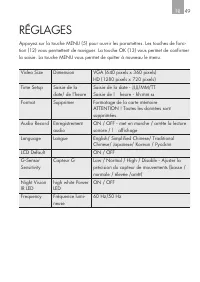
FR 49 réGLAGeS Appuyez sur la touche meNu (5) pour ouvrir les paramètres. Les touches de fonc-tion (12) vous permettent de naviguer. La touche ok (13) vous permet de confirmer la saisie. La touche meNu vous permet de quitter à nouveau le menu. Video Size Dimension VGA (640 pixels x 360 pixels)HD (12...
Page 51 - SommArIo
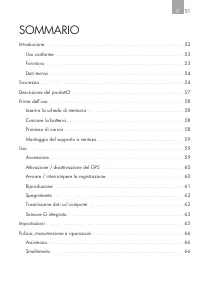
FR 51 SommArIo Introduzione . . . . . . . . . . . . . . . . . . . . . . . . . . . . . . . . . . . . . . . . . . . . . . . 52 uso conforme . . . . . . . . . . . . . . . . . . . . . . . . . . . . . . . . . . . . . . . . . . . . 53 Fornitura. . . . . . . . . . . . . . . . . . . . . . . . . . . . . . . ...
Page 52 - INtroDuZIoNe
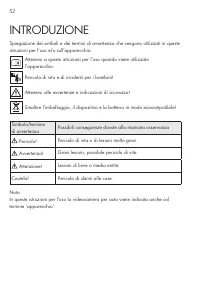
52 INtroDuZIoNe Spiegazione dei simboli e dei termini di avvertenza che vengono utilizzati in queste istruzioni per l’uso e/o sull’apparecchio: Attenersi a queste istruzioni per l’uso quando viene utilizzato l’apparecchio. Pericolo di vita e di incidenti per i bambini! Attenersi alle avvertenze e in...
Page 54 - SICureZZA
54 Dati tecnici modello GF 30 Codice articolo 97151 Dimensioni (A x L x P) 27 x 60 x 105 mm Peso 140 g risoluzioni registrazione VGA / HD Sensore CmoS 1,0 megapixel Formato video/immagine AVI max. risoluzione immagine (foto) 1280 x 720 Pixel Lente 120˚ obiettivo grandangolo (orientabile) Alimentazio...
Page 57 - DeSCrIZIoNe DeL ProDotto
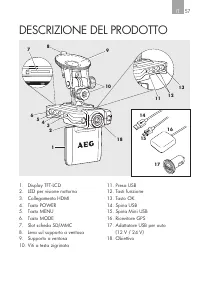
It 57 DeSCrIZIoNe DeL ProDotto 1. Display tFt-LCD2. LeD per visione notturna3. Collegamento HDmI4. tasto PoWer5. tasto meNu6. tasto moDe7. Slot scheda SD/mmC8. Leva sul supporto a ventosa9. Supporto a ventosa10. Viti a testa zigrinata 11. Presa uSB12. tasti funzione13. tasto ok14. Spina uSB15. Spina...
Page 58 - PrImA DeLL’uSo
58 PrImA DeLL’uSo Disimballare l’apparecchio con cautela e rimuovere le pellicole di protezione sulla lente e sul display. Inserire la scheda di memoria Avvertenza: se la scheda SD/mmC viene usata per la prima volta nella videocame-ra, è necessario formattarla. Attenzione! tutti i dati nella scheda ...
Page 59 - uSo
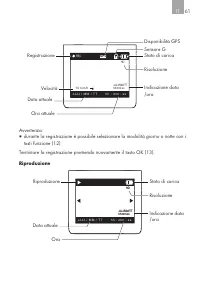
It 59 Il processo di carica viene segnalato dall’indicazione dello stato di carica visualiz-zata sul display (1).Non appena la fotocamera è collegata ad un cavo di collegamento con una fonte di corrente, essa è pronta per l’uso (anche senza batteria inserita). Montaggio del supporto a ventosa Attenz...
Page 65 - ImPoStAZIoNI
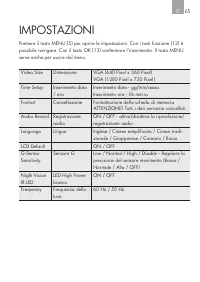
It 65 ImPoStAZIoNI Premere il tasto meNu (5) per aprire le impostazioni. Con i tasti funzione (12) è possibile navigare. Con il tasto ok (13) confermare l’inserimento. Il tasto meNu serve anche per uscire dal menu. Video Size Dimensione VGA (640 Pixel x 360 Pixel)VGA (1280 Pixel x 720 Pixel) time Se...
Page 66 - rAZIoNI
66 PuLIZIA, mANuteNZIoNe e rIPA- rAZIoNI Con una minima manutenzione il vostro apparecchio potrà funzionare per anni. ▪ Avvolgere con cura i cavi dell’apparecchio prima di riporlo. Ciò aiuta ad evitare danneggiamenti accidentali ai cavi dell’apparecchio. ▪ Pulire il prodotto con un panno morbido e a...
Page 67 - OBSAh
CZ 67 OBSAh Úvod. . . . . . . . . . . . . . . . . . . . . . . . . . . . . . . . . . . . . . . . . . . . . . . . . . . . . . 68 Použití ke stanovenému účelu. . . . . . . . . . . . . . . . . . . . . . . . . . . . . . . 69 Obsah dodávky . . . . . . . . . . . . . . . . . . . . . . . . . . . . . . . . . ...
Page 68 - ÚvOD
68 ÚvOD Vysvětlení symbolů a signální slov, použitých v tomto návodu k obsluze nebo na přístroji: Při používání přístroje dbejte vždy na tento návod k obsluze. Nebezpečí ohrožení života a zranění dětí! Dbejte výstražná a bezpečnostní upozornění! Přístroj, obalový materiál a baterie odstraňujte do od...
Page 70 - BEZPEČNOST
70 Technická data Model GF 30 Číslo artiklu 97151 Rozměry (V x Š x H) 27 x 60 x 105 mm Váha 140 g Rozlišení natáčení VGA / HD CMOS Senzor 1,0 Megapixel Video formát/Foto formát AvI maximálně Rozlišení obrazu (Foto) 1280 x 720 PixelČočka 120˚ širokoúhlý objektiv (výkyvný) Napájení proudem Li-Ion akum...
Page 73 - POPIS vÝROBKU
CZ 73 POPIS vÝROBKU 1. TFT LCD displej2. Noční LED3. HDMI přípojka4. Tlačítko POWER5. Tlačítko MENU6. Tlačítko MODE7. Slot pro paměťové karty SD/ MMC 8. Páka na držáku s přísavkou9. Držák s přísavkou 10. Vroubkované šrouby11. USB přípojka12. Funkční tlačítka13. Tlačítko OK14. USB zástrčka15. Mini US...
Page 74 - PřED POUžITÍM
74 PřED POUžITÍM Přístroj opatrně rozbalte a odstraňte ochranné fólie z čočky a displeje. Nasazení paměťové karty Poznámka: Před prvním použitím se musí paměťová karta SD nebo MMC formátovat. Pozor! Všechny soubory na paměťové kartě SD/MMC se smažou. Pro zaznamenání natáčeného filmu potřebujete pamě...
Page 75 - OBSLUhA
CZ 75 Kamera je funkční, jakmile se připojí příslušným kabelem na zdroj prou-du (i bez vloženého akumulátoru). Montáž držáku s přísavkou Pozor! Někteří výrobci vozidel vybavují sériové modely skly s povrcho- vou úpravou. V tomto případě instalujte GPS senzor na místě kde může dobře přijímat signály,...
Page 80 - NASTAvENÍ
80 NASTAvENÍ Stiskněte tlačítko MENU (5) pro otevření volby nastavení. Funkčními tlačítky (12) můžete navigovat. Tlačítkem OK (13) potvrdíte zadání. Stisk-nutím tlačítka MENU zase menu opustíte. Video Size Velikost VGA (640 Pixel x 360 Pixel)HD (1280 Pixel x 720 Pixel) Time Setup Zadání času a data ...
Page 87 - BEZPEČNOSŤ
Sk 87 BEZPEČNOSŤ Všeobecné bezpečnostné pokyny Prečítajte si bezpečnostné pokyny a pokyny pre použitie. nedodržanie bezpečnostných pokynov a pokynov pre použitie môže spôsobiť zásah elektrickým prúdom, vznik požiaru a/alebo vážne ublíženie na zdraví. Uschovajte všetky bezpečnostné pokyny a pokyny pr...
Page 89 - POPIS PRODUKTU
Sk 89 POPIS PRODUKTU 1. TFT-LCD displej2. Nočné LED3. HDMI-prípojka4. Tlačidlo POWER5. Tlačidlo MENU6. Tlačidlo MODE7. Otvor pre SD/MMC-karty8. Páčka na držiaku s prísavkou9. Držiak s prísavkou10. Závitová prípojka s ryhovanou skrutkou 11. USB-pripojenie12. Funkčné tlačidlá13. Tlačidlo OK14. USB-zás...
Page 90 - PRED POUžÍVANÍM
90 PRED POUžÍVANÍM Prístroj opatrne vyberte a odstráňte ochranné fólie na šošovke a displeji. Vložiť pamäťovú kartu Poznámka: Keď je SD/MMC-karta prvýkrát vložená do autokamery, musí byť nanovo formátovaná. Pozor! Všetky údaje na SD/MMC-karte budú vymazané. Pre uloženie snímkov pomocou kamery potreb...
Page 92 - OVLáDANIE
92 OVLáDANIE Poznámka: Dodržiavajte pokyny v „Nastaveniach“. Zapnutie Dlhším stlačením tlačidla POWER (4) zapnete kameru. Zaznie signál. Po zapnutí je kamera okamžite aktívna a začne proces snímania. Bliká modrá LED. Poznámka:Ak je autokamera permanentne spojená s automobilovou zásuvkou prostredníct...
Page 97 - NASTAvENIA
SK 97 NASTAvENIA Stlačte tlačidlo MENU (5) pre otvorenie nastavení. Pomocou funkčných tlačidiel (12) môžte navigovať. Tlačidlom OK (13) potvrdíte zadanie. Prostredníctvom tlačidla MODE znovu opustíte menu. Video Size Veľkosť VGA (640 pixlov x 360 pixlov)VGA (1280 pixlov x 720 pixlov) Time Setup Zobr...
















-User-Manual/webp/1.webp)