Shark ZU102 - User Manual
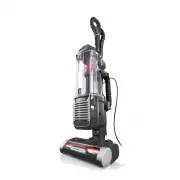
This user manual covers the Shark Rotator with PowerFins HairPro and Odor Neutralizer Technology upright vacuum cleaner (ZU100 Series), focusing on its operation, maintenance, and safety features. The document highlights essential topics like electrical safety, proper usage precautions, and cartridge maintenance–including odor neutralizer adjustments and disposal. Assembly instructions detail how to connect accessories such as the wand, hose, and handle, while cleaning modes address suction levels for different surfaces and brushroll care. Maintenance guides emphasize emptying the dust cup, filter replacements (pre-motor foam, felt, HEPA), and preventing obstructions in key components like the cord and detachable parts. Troubleshooting addresses common issues such as suction loss or brushroll malfunctions, alongside a list of available accessories like crevice tools and upholstery brushes. The manual also includes warranty details for SharkNinja products, though these are secondary to core operational guidance.


Table of Contents:
- Page 1 – Product Identification and Features
- Page 2 – Safety Instructions and Maintenance Warnings
- Page 3 – Vacuum Cleaner Assembly
- Page 4 – Odor Neutralizer Cartridge Management
- Page 5 – Whole-Home Cleaning Modes and Controls
- Page 6 – Vacuum Maintenance and Filter Replacement
- Page 7 – Brushroll Cleaning and Cord Safety
- Page 8 – Accessories and Troubleshooting
- Page 9 – Warranty and Product Specifications
- Page 10 – Product Overview and Legal Notices
Rotator
®
with PowerFins
®
HairPro
™
and Odor Neutralizer
Technology Upright Vacuum
ZU100 Series
OWNER’S GUIDE
"Loading the manual" means you need to wait until the file loads and becomes available for online reading. Some manuals are very large, and the time they take to appear depends on your internet speed.
Was this manual helpful?
About this manual
- Brand
- Shark
- Model
- ZU102
- Document type
- User Manual
- Category
- Vacuum
- Language(s)
- English
- Pages
- 10
- File size
- 3.2 MB
- Format
Summary
Identification of the Shark Rotator vacuum cleaner, model name, and key technologies like PowerFins HairPro and Odor Neutralizer Technology.
Safety precautions for operating the vacuum, electrical hazards, handling guidelines, specific warnings regarding odor neutralizer and fragrance cartridges, and first aid measures.
Instructions detailing how to attach the wand, handle, hose, and accessories to the main unit, and procedures for installing and adjusting the power cord.


