Philips AC2959/53 - Quick Guide
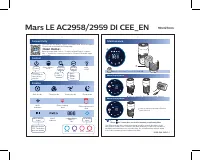
A user manual for the Philips Mars LE AC2958/2959 air purifier covers its core functionalities, including remote operation via a smartphone app or physical controls, real-time air quality monitoring (PM2.5 and IAI indicators), and smart connectivity features like Wi-Fi integration. The guide also addresses essential maintenance tasks–such as filter care for the NanoProtect Series 3–using visual alerts on the display to signal when cleaning or replacement is needed. Safety and operational modes, including automatic, turbo, eco, and sleep settings, are also addressed within its scope.


Table of Contents:
- Page 1 – Device Operation and Maintenance Controls
- Page 2 – Control Panel Functions and Filter Status
- Page 3 – Air Quality Modes and Filter Replacement
- Page 4 – Filter Management and Connectivity
- Page 5 – Full System Operation and Maintenance Overview
Mars LE AC2958/2959 DI CEE_EN 90x127mm
Connectivity
You can use the app to control the purifier and check air quality. Download and install the Philips app
Clean Home+
Open the app and click on "Connect a New Device" or press the "+" button to connect your device. Please follow the steps in the app.
Control
Power Filter status/ reset Display switch Mode switch Light on/off
Hold for 3 seconds to turn off the purifier
IAI PM2.5
Auto Turbo Gentle Sleep
Display
Auto mode Turbo mode Gentle mode Sleep mode
Wi-Fi indicator Filter cleaning alert Filter replacement alert
IAI PM2.5 888 Air quality light
Indoor allergen index PM2.5 indicator 3-digit display PM2.5 / IAI Air quality light
Allergen index 1-12, 1 indicates best air quality
Good Fair Poor Very poor
Maintenance
NanoProtect filter Series 3 (FY2180/30)
When display shows
10 Time to clean the NanoProtect filter Series 3
When display shows
10 Time to replace the NanoProtect filter Series 3
Press to check filter lifetime status.
Press for 3 seconds to reset after cleaning or replacing filter.
The filter may produce smell after being used for a while because of the absorption of indoor air. Remove the filter and place it where it has direct sunlight and ventilation for several hours. Re-install and try using it again. If the odor remains, please replace the filter.
3000 048 96041-1
"Loading the manual" means you need to wait until the file loads and becomes available for online reading. Some manuals are very large, and the time they take to appear depends on your internet speed.
Was this manual helpful?
About this manual
- Brand
- Philips
- Model
- AC2959/53
- Document type
- Quick Guide
- Language(s)
- English, Polish, Russian
- Pages
- 5
- File size
- 2.8 MB
- Format
Other Manuals for Philips AC2959/53
Summary
Instructions for operating the unit using physical buttons or the Clean Home+ app, interpreting display information including modes, Wi-Fi status, filter alerts, and air quality indicators (IAI and PM2.5), and performing filter maintenance based on visual alerts.
Guidance on operating the device via the control panel and display, managing Wi-Fi connectivity, monitoring filter status, and interpreting air quality indicators (IAI and PM2.5). Details on maintaining the filter and determining when to clean or replace the NanoProtect Series 3 filter.
Operation modes including automatic, turbo, and sleep, air quality indicators for PM2.5 and allergens, and procedures for checking filter lifespan and replacing the NanoProtect filter based on display indicators.
Tips
- Regularly check the filter status using the dedicated button to maintain optimal performance.
- If the filter develops an odor, place it in direct sunlight with good ventilation for several hours.
- Always reset the filter timer after cleaning or replacement by holding the button for 3 seconds.
- Use the Philips Clean Home+ app for remote control and real-time air quality monitoring.
Ask a question
Related manuals
Popular Philips Other


More Philips Other models
 Philips AC2882/10 User Manual
 Philips AC2887/10 User Manual
 Philips AC2889/10 User Manual
 Philips AC2936/33 Quick Guide
 Philips AC2939/10 Quick Guide
 Philips AC2958/53 Quick Guide
 Philips AC3021/10 User Manual
 Philips AC3033/10 Quick Guide
 Philips AC3033/30 Quick Guide
 Philips AC3036/10 Quick Guide
 Philips AC3039/10 User Manual
 Philips AC3055/50 Quick Guide