Philips AC3036/10 - Quick Guide
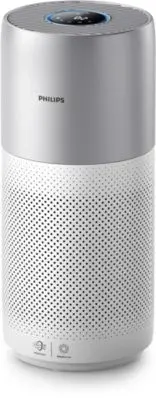
Philips AC3036/10 – Quick Guide, read for free online in PDF format. We hope this helps you resolve any issues you may have. If you have further questions, please contact us through the contact form.


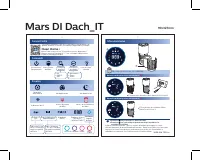

Table of Contents:
- Page 2 – Wenn das Display anzeigt; Wartung und Pflege; Drücken Sie , um den Status der Filterlebensdauer zu prüfen.; Verbindungen
- Page 3 – Lorsque l'affichage indique; Entretien
- Page 4 – Quando sul display viene visualizzato; Manutenzione; Premere per controllare lo stato del filtro.
- Page 5 – Wanneer het display weergeeft; Onderhoud; Druk op om de levensduurstatus van het filter te controleren.
Maintenance
2
1
NanoProtect filter Series 3 (FY3430/30)
Mars DI Dach_EN
90x127mm
When display shows
When display shows
Time to clean the NanoProtect filter Series 3
Time to replace the NanoProtect
filter Series 3
Press to check filter lifetime status.
!
Press for 3 seconds to reset after cleaning or replacing filter.
3000 038 71743-1
The filter may produce smell after being used for a while because of the
absorption of indoor air. Remove the filter and place it where it has direct
sunlight and ventilation for several hours. Re-install and try using it again.
If the odor remains, please replace the filter.
Connectivity
Auto mode
Display
Control
Turbo mode
Sleep mode
PM2.5
indicator
Air quality
light
Indoor allergen
index
Gas
indicator
Good
Poor Very poor
Fair
Allergen index
1-12, 1 indicates
best air quality
Gas index
from L1-L4,
L1 indicates
best air quality
Filter cleaning
alert
Filter replacement
alert
Wi-Fi
indicator
2
Power
Light
on/off
Display
switch
Mode
switch
Auto
Turbo
Sleep
IAI
PM2.5
Gas
3-digit display
IAI /
Gas / PM2.5
Filter status/
reset
Clean Home+
Open the app and click on "Connect a New Device" or press
the "+" button to connect your device
.
Please follow the steps
in the app.
You can use the app to control the purifier and check air quality
.
Download and install the Philips app
"Loading the manual" means you need to wait until the file loads and becomes available for online reading. Some manuals are very large, and the time they take to appear depends on your internet speed.
Was this manual helpful?
About this manual
- Brand
- Philips
- Model
- AC3036/10
- Document type
- Quick Guide
- Language(s)
- German, English, French, Italian, Dutch
- Pages
- 5
- File size
- 2.4 MB
- Format
Other Manuals for Philips AC3036/10
Summary
2 1 Mars DI Dach_DE 90x127mm 3000 038 71743-2 2 Steuerung Power Licht (ein/aus) Anzeige Programmschalter/ Programauswahl Automodus Turbomodus Ruhemodus IAI PM2.5 Gas Filterstatus/ Zurücksetzen Automodus Anzeige Turbomodus Ruhemodus Hinweis zur Reinigung des Filters Hinweis zum Austausch des Filters ...
2 1 Mars DI Dach_FR 90x127mm 3000 038 71743-3 2 Affichage à 3 chiffres IAI / Gaz / PM2.5 Connectivité Commande Alimentation Activer/désactiver la lumière Interrupteur de l'écran Sélecteur de mode Automatique Turbo Veille IAI PM2.5 Gaz État du filtre / réinitialiser Mode automatique Afficheur Mode Tu...
2 1 Mars DI Dach_IT 90x127mm ! 3000 038 71743-4 2 Display a 3 cifre del livello IAI/Gas/PM2.5 Connettività Comandi Accensione/ Spegnimento Luce accesa/ spenta Selettore display Selettore modalità Automatico Turbo Notte IAI PM2.5 Gas Stato/Reset del filtro Modalità automatica Display Modalità turbo M...
Ask a question
Related manuals
Popular Philips Other


More Philips Other models
 Philips AC2939/10 Quick Guide
 Philips AC2958/53 Quick Guide
 Philips AC2959/53 Quick Guide
 Philips AC3021/10 User Manual
 Philips AC3033/10 Quick Guide
 Philips AC3033/30 Quick Guide
 Philips AC3039/10 User Manual
 Philips AC3055/50 Quick Guide
 Philips AC3055/51 User Manual
 Philips AC3059/51 User Manual
 Philips AC3220/10 User Manual
 Philips AC3221/13 User Manual