Philips AC2958/2959 - User Manual
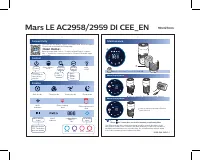
This user manual is for the Philips air purifier models Mars LE AC2958/2959. It covers connecting the purifier via the Philips Clean Home+ app, controlling the device (power, mode, light), understanding display indicators (air quality metrics like IAI and PM2.5, Wi-Fi status, filter alerts), and maintaining the NanoProtect Series 3 filter.
Step-by-step instructions are provided for cleaning and replacing the filter, resetting the filter timer, and troubleshooting filter odor.


Table of Contents:
- Page 1 – Connectivity, Control, Display, Maintenance
- Page 2 – Connectivity, Control, Display, Maintenance (Czech)
- Page 3 – Connectivity, Control, Display, Maintenance (Polish)
- Page 4 – Connectivity, Control, Display, Maintenance (Romanian)
- Page 5 – Connectivity, Control, Display, Maintenance (Russian)
Mars LE AC2958/2959 DI CEE_EN 90x127mm
Connectivity
You can use the app to control the purifier and check air quality. Download and install the Philips app
Clean Home+
Open the app and click on "Connect a New Device" or press the "+" button to connect your device. Please follow the steps in the app.
Control
Power Filter status/ reset Display switch Mode switch Light on/off
Hold for 3 seconds to turn off the purifier
IAI PM2.5
Auto Turbo Gentle Sleep
Display
Auto mode Turbo mode Gentle mode Sleep mode
Wi-Fi indicator Filter cleaning alert Filter replacement alert
IAI PM2.5 888 Air quality light
Indoor allergen index PM2.5 indicator 3-digit display PM2.5 / IAI Air quality light
Allergen index 1-12, 1 indicates best air quality
Good Fair Poor Very poor
Maintenance
NanoProtect filter Series 3 (FY2180/30)
When display shows
10 Time to clean the NanoProtect filter Series 3
When display shows
10 Time to replace the NanoProtect filter Series 3
Press to check filter lifetime status.
Press for 3 seconds to reset after cleaning or replacing filter.
The filter may produce smell after being used for a while because of the absorption of indoor air. Remove the filter and place it where it has direct sunlight and ventilation for several hours. Re-install and try using it again. If the odor remains, please replace the filter.
3000 048 96041-1
"Loading the manual" means you need to wait until the file loads and becomes available for online reading. Some manuals are very large, and the time they take to appear depends on your internet speed.
Summary
Overview of connecting to the Philips Clean Home+ app, using the control buttons (power, mode, light), understanding the display icons (Wi-Fi, filter status, air quality via IAI and PM2.5), and maintaining the NanoProtect Series 3 filter, including cleaning, replacement, and timer reset.
Step-by-step instructions for connecting to the app, using controls, interpreting display information, and performing filter maintenance, all provided in Czech.
Step-by-step instructions for connecting to the app, using controls, interpreting display information, and performing filter maintenance, all provided in Polish.
Tips
- Regularly check the filter status using the dedicated button to maintain optimal performance.
- If the filter develops an odor, place it in direct sunlight with good ventilation for several hours.
- Always reset the filter timer after cleaning or replacement by holding the button for 3 seconds.
- Use the Philips Clean Home+ app for remote control and real-time air quality monitoring.