Philips AC0820 / 10 - User Manual
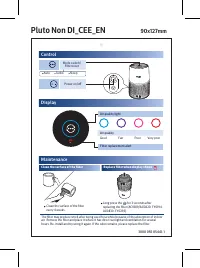
A user manual for a smart air purifier like the Pluto model covers its core operational and maintenance features. The guide highlights control functions–such as power, mode selection (auto, turbo, silent), and night modes–to adjust performance based on needs. Air quality is displayed via color-coded lights (good to very poor) and filter alerts trigger replacement reminders. Maintenance includes regular cleaning of the filter every four weeks and scheduled replacements when prompted by the device’s indicators.


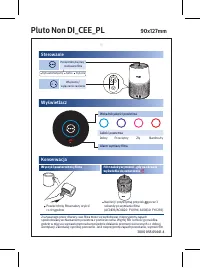

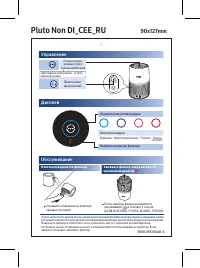
Table of Contents:
- Page 1 – Air Purifier Operation and Maintenance Overview
- Page 2 – Device Operation and Filter Maintenance Procedures
- Page 3 – Control Functions and Technical Service Information
- Page 4 – Air Quality Modes and Filter Management
- Page 5 – Detailed Control, Status Indicators, and Replacement Parts
- Page 6 – Filter Replacement Trigger and Maintenance Schedule
Pluto Non DI_CEE_EN 90x127mm
Control
Mode switch/ Filter reset
•Auto •Turbo •Sleep
Power on/off
Display
Air quality light
Air quality
Good Fair Poor Very poor
Filter replacement alert
Maintenance
Clean the surface of the filter
Replace filter when display shows
Clean the surface of the filter every 4 weeks.
Long press the for 3 seconds after replacing the filter (AC0819/AC0820: FY0194, AC0830: FY0293).
The filter may produce smell after being used for a while because of the absorption of indoor air. Remove the filter and place it where it has direct sunlight and ventilation for several hours. Re-install and try using it again. If the odor remains, please replace the filter.
3000 055 05441-1
"Loading the manual" means you need to wait until the file loads and becomes available for online reading. Some manuals are very large, and the time they take to appear depends on your internet speed.
Was this manual helpful?
About this manual
- Brand
- Philips
- Model
- AC0820 / 10
- Document type
- User Manual
- Category
- Air Purifier
- Language(s)
- English, Polish, Russian
- Pages
- 6
- File size
- 1.7 MB
- Format
Summary
Instructions for operating and maintaining the air purifier, detailing control functions, display indicators for air quality, filter replacement alerts, and cleaning procedures.
Guidance on device operation, control buttons, interpreting air quality status via indicators, and procedures for cleaning or replacing the filter.
Details regarding device control buttons, air quality display indicators, filter cleaning instructions, and technical service information for the unit.
Tips
- Clean the filter surface every 4 weeks to maintain optimal air quality.
- Replace the filter when the indicator alerts; after replacement, press and hold the mode button for 3 seconds to reset the filter life indicator.
- If a smell develops, remove the filter and place it in direct sunlight for several hours before reusing.
Ask a question
Related manuals
More Philips Air Purifiers models


Other Philips appliances
 Philips 1 Manual
 Philips 2 Manual
 Philips 2 Series Manual
 Philips 2.44E+03 Manual
 Philips 3 Manual
- Philips 4 Manual
 Philips 4CM6088 Manual
 Philips 5.1 Manual
- Philips 6 Manual
 Philips 7FF1CWO Manual
- Philips 7FF1M4 Manual
 Philips 8P6054C Manual
 Philips 9P5031C1, 9P5531C1, 9P6031C1, 9P5034C1, 9P5534C1, 9P6034C1 Manual
 Philips 10 Manual
- Philips 13 Manual
 Philips 13MT1532, 13MT1533 Manual