Page 3 - Contents
E ngl ish 3 EN Contents 1 Important 4 Safety 4 2 Your air purifier 7 Product Overview 7 Controls overview 8 3 Getting started 9 Install filters 9 4 Using the appliance 10 Understand the air quality light 10 Switch on 10 Change the fan speed 11 Child lock 12 Using the light On/Off function 13 5 Clean...
Page 4 - Important; Safety; Danger
4 EN 1 Important Safety Read this user manual carefully before you use the appliance, and save it for future reference. Danger • Do not let water or any other liquid or flammable detergent enter the appliance to avoid electric shock and/or a fire hazard. • Do not clean the appliance with water, any ...
Page 5 - Caution
E ngl ish 5 EN Caution • This appliance is not a substitute for proper ventilation, regular vacuum cleaning, or use of an extractor hood or fan while cooking. • If the power socket used to power the appliance has poor connections, the plug of the appliance becomes hot. Make sure that you plug the ap...
Page 7 - Your air purifier; Product Overview
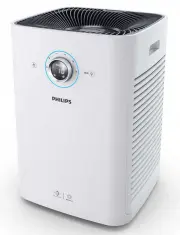
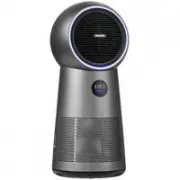
E ngl ish 7 EN 2 Your air purifier Congratulations on your purchase, and welcome to Philips!To fully benefit from the support that Philips offers, register your product at www.philips.com/welcome. This appliance works with an air filtration system. Read this user manual carefully before you use the ...
Page 8 - Controls overview
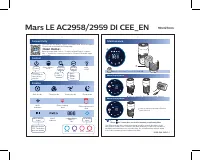
8 EN Controls overview Note • PM 2.5 is defined as fine dust particles of a diameter of 2.5 micrometers or less. : Power On/Off (filter reset) button : Speed 3 : Auto speed : Turbo speed : Silent speed : Pre-filter cleaning alert : Speed 1 : Air purification filter replacement alert : Speed 2 : Ligh...
Page 9 - Getting started; Install filters
E ngl ish 9 EN 3 Getting started Install filters Remove all packaging of the filters before using the appliance. Unpack them and place them into the appliance described as follows: Note • There is one set of filters on each side of the appliance. Each side is equipped with one pre-filter and two air...
Page 10 - Using the; Understand the air
10 EN 5 Put the pre-filter back into the appliance. Note • Make sure that the side with the two clips is pointing towards you, and that all hooks of the pre-filter are properly attached to the purifier. 6 To reattach the side panel, mount the panel onto the bottom of the appliance first (1). Then, g...
Page 11 - Change the fan speed
E ngl ish 11 EN 2 Press the power On/Off button to switch on the appliance. » The default fan speed is (AUTO). » After measuring the air quality for a short time, the air quality sensor automatically selects the color of the air quality light. » The running strips " " displays on the screen ...
Page 12 - Child lock; Manual
12 EN Child lock To keep children from using the appliance, or to avoid any misoperation, you can activate child lock. 1 Press and hold the light On/Off button for 3 seconds. » The child lock indicator lights up on the screen to show that the child lock has been activated. 3S Note • When the child l...
Page 13 - Using the light On/Off
E ngl ish 13 EN Using the light On/Off function With the light On/Off button, you can switch on or off the air quality light and the display screen if needed. 1 Touch the light On/Off button once, the air quality light and display screen will go out. 2 Touch the light On/Off button again. the fan sp...
Page 14 - Cleaning; Cleaning schedule; Clean the body of the
14 EN 5 Cleaning Note • Always unplug the appliance before you clean it. • Never immerse the appliance in water or any other liquid. • Never use abrasive, aggressive, or flammable cleaning agents such as bleach or alcohol to clean any part of the appliance. • Only the pre-filter is washable. The air...
Page 15 - Clean the air quality
E ngl ish 15 EN 3 To reattach the cover, mount it onto the top of the appliance first, and then push the side with the handle towards the appliance. Clean the air quality sensor Clean the air quality sensor every two months for optimal functioning of the appliance. Clean it more frequently if you us...
Page 17 - Replacing the; Understand the healthy
E ngl ish 17 EN 6 Replacing the air purification filters Understand the healthy air protect lock This appliance is equipped with the healthy air protect lock to make sure that the filters are in optimal condition when the appliance is operating. When the filters are almost expired, the air purificat...
Page 19 - Resetting the
E ngl ish 19 EN 7 Resetting the filter lifetime counter After you have cleaned the pre-filter, or replaced the air purification filters, it is important that you also reset the filter lifetime counter afterwards. This allows the appliance to be in sync with the filter lifetime. 1 Press and hold the ...
Page 20 - Troubleshooting
20 EN 8 Troubleshooting This chapter summarizes the most common problems you could encounter with the appliance. If you are unable to solve the problem with the information below, contact the Consumer Care Center in your country. Problem Possible solution The appliance does not work even though it i...
Page 22 - Electromagnetic fields; Compliance with EMF
22 EN 9 Guarantee and service If you need information or if you have a problem, please visit the Philips website at www.philips.com or contact the Philips Consumer Care Center in your country (you can find its phone number in the worldwide guarantee leaflet). If there is no Consumer Care Center in y...
Page 23 - Recycling
E ngl ish 23 EN Recycling Do not throw away the product with the normal household waste at the end of its life, but hand it in at an official collection point for recycling. By doing this, you help to preserve the environment.