Philips AC4550/50 - Quick Guide
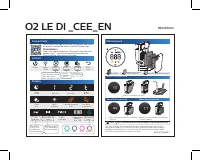
This manual covers all aspects of operating your Philips O2 LE DI air purifier. It explains how to connect via the Philips Clean Home+ app, use control buttons and modes (auto, sleep, fan speed, child lock), and interpret display indicators for PM2.5, gas, and IAI levels. Maintenance instructions include cleaning the pre-filter and replacing NanoProtect Series 3 and Active Carbon filters. Error codes F0, A5, and C7 indicate when maintenance is required.

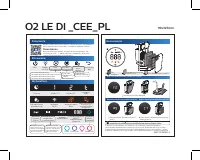

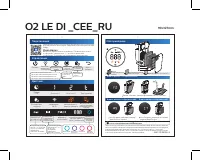
Table of Contents:
- Page 1 – App Connection, Operation, Display, and Maintenance
- Page 2 – Czech: Connectivity, Control, Display, Maintenance
- Page 3 – Polish: Connectivity, Control, Display, Maintenance
- Page 4 – Romanian: Connectivity, Control, Display, Maintenance
- Page 5 – Russian: Connectivity, Control, Display, Maintenance
O2 LE DI _CEE_EN 90x127mm
Connectivity
You can use the app to control the purifier and check air quality. Download and install the Philips app
Clean Home+
Open the app and click on "Connect a New Device" or press the "+" button to connect your device.
Please follow the steps in the app.
Control
Power Light on/off Auto mode Fan speed Child lock Filter reset
• Auto general mode
• Auto pollution mode
• Auto gas mode
• Auto allergen mode
• Sleep
Hold for 3 seconds
Speed 1-2
Turbo
Display
Sleep mode Speed 1 Speed 2 Turbo speed
Child lock WiFi indicator Filter replacement alert Pre-filter clean alert
Gas IAI PM2.5 888
Gas indicator Indoor allergen index PM2.5 indicator 3-digit display PM2.5 / Gas / IAI Air quality ring
Gas index from L1-L4, L1 indicates best air quality
Allergen index 1-12, 1 indicates best air quality
Good Fair Poor Very poor
Maintenance
1
Gas IAI PM2.5
888
2 Pre-filter 3 NanoProtect filter Active Carbon 4 NanoProtect filter Series 3
When display shows F0
• Time to clean the pre-filter
When display shows A5 When display shows C7
• Time to replace NanoProtect filter Series 3 • Time to replace NanoProtect filter Active Carbon
1 Press ↻ for 3 seconds to reset after cleaning or replacing accessory
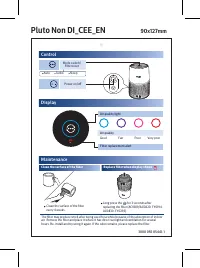
The filter may produce smell after being used for a while because of the absorption of indoor air. Remove the filter and place it where it has direct sunlight and ventilation for several hours. Re-install and try using it again. If the odor remains, please replace the filter.
4241 211 04782-1
"Loading the manual" means you need to wait until the file loads and becomes available for online reading. Some manuals are very large, and the time they take to appear depends on your internet speed.
Was this manual helpful?
About this manual
- Brand
- Philips
- Model
- AC4550/50
- Document type
- Quick Guide
- Category
- Air Purifier
- Language(s)
- English, Polish, Russian
- Pages
- 5
- File size
- 4.5 MB
- Format
Other Manuals for Philips AC4550/50
Summary
How to connect the purifier to the Philips Clean Home+ app, use control buttons and modes, interpret display indicators, and perform maintenance. Includes error codes F0, A5, C7 and reset instructions.
Czech version of the page, covering app connectivity, control modes, display information, and maintenance procedures with error codes F0, A5, C7.
Polish version detailing app setup, control functions, display readings, and maintenance tasks such as pre-filter cleaning and filter replacement. Error codes F0, A5, C7 are listed.
Tips
- Clean the pre-filter when error code F0 appears.
- Replace the NanoProtect filter when A5 appears and the Active Carbon filter when C7 appears.
- After cleaning or replacing, press and hold the reset button for 3 seconds.
- If the filter develops an odor, expose it to direct sunlight and ventilation for several hours; if the odor persists, replace the filter.
Ask a question
Related manuals
More Philips Air Purifiers models


Other Philips appliances
 Philips 1 Manual
 Philips 2 Manual
 Philips 2 Series Manual
 Philips 2.44E+03 Manual
 Philips 3 Manual
- Philips 4 Manual
 Philips 4CM6088 Manual
 Philips 5.1 Manual
- Philips 6 Manual
 Philips 7FF1CWO Manual
- Philips 7FF1M4 Manual
 Philips 8P6054C Manual
 Philips 9P5031C1, 9P5531C1, 9P6031C1, 9P5034C1, 9P5534C1, 9P6034C1 Manual
 Philips 10 Manual
- Philips 13 Manual
 Philips 13MT1532, 13MT1533 Manual