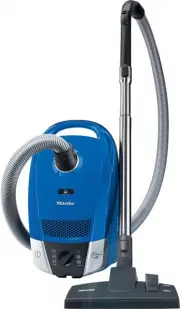
Page 2 - Contents
Caring for the environment Description of the appliance Warning and Safety instructions Preparing for use Using the accessories supplied Use Mains connection cable . . . . . . . . . . . . . . . . . . . . . . . . . . . . . . . . . . . . . . . . . . . . . 17 Switching on and off . . . . . . . . . . . ...
Page 3 - Disposal of packing material; Caring for the environment
Disposal of packing material The packing material protects thevacuum cleaner from transportdamage. The transport and protectivepacking has been selected frommaterials which are environmentallyfriendly for disposal and can normallybe recycled. Rather than just throwing thesematerials away, please ens...
Page 4 - Description of the appliance
Page 6 - Correct application; This vacuum cleaner is designed for domestic use; Warning and Safety instructions
This appliance conforms to current safetyrequirements. Improper use of the appliance can,however, present a risk of both personal injury andmaterial damage. To avoid the risk of accidents and damage to theappliance, please read these instructions carefullybefore installation and before using it for ...
Page 11 - Attaching the suction hose; Preparing for use
Attaching the suction hose ^ Insert the hose connector into thesuction socket until it clicks intoposition. To do this, line up theguides on the two pieces. To remove the suction hosefrom the vacuum cleaner ^ Press the release buttons at the sideof the hose connector, and lift thehose from the socke...
Page 14 - Fitting the standard floorhead
Fitting the standard floorhead ^ Push the telescopic wand into thefloorhead and turn it clockwise oranti-clockwise until it clicks intoposition. ^ To release the floorhead from thetelescopic wand, press the lockingbutton (see arrow) and pull thetelescopic wand away from thefloorhead. The floorhead c...
Page 15 - AirTeQ floorhead
Adjusting the standardfloorhead It is important to observe the flooringmanufacturer’s cleaning and careinstructions. The following symbols are found onyour vacuum cleaner's floorheaddepending on the model. – ö and ä – % and ) Vacuum carpets and rugs with thebrushes retracted: ^ Press either the ö or...
Page 16 - Dusting brush; Floorhead; Using the accessories supplied
The following accessories are supplied: a Dusting brush For cleaning skirting boards, ornate,carved or delicate articles, etc.The head of the dusting brush canbe swivelled to attain the bestcleaning position. b Upholstery nozzle For cleaning upholstery, mattresses,cushions, curtains, covers etc. c C...
Page 17 - Mains connection cable; Unwinding the cable; Rewinding the cable; Switching on and off; Use
Mains connection cable Unwinding the cable ^ Pull out the connection cable to therequired length (max. cable lengthapprox. 6.5 m). ^ Plug the connection cable into a wallsocket. , If vacuuming for longer than 30 minutes, the connection cablemust be pulled out to its fullestextent. Otherwise there is...
Page 18 - Selecting the suction power; Rotary selector
Selecting the suction power You can regulate the suction to suit thetype of flooring.The higher the wattage, the more power-ful the suction. Reducing the suctionpower reduces the amount of effortrequired to manoeuvre the floorhead. The symbols on the controls indicatethe type of use the settings are...
Page 19 - Vacuuming
Opening the air inlet valve onthe handle It is easy to reduce the suction powerfor a short time, e.g. to prevent rugs orother objects being sucked into thevacuum cleaner. ^ Open the air inlet valve far enough toreduce the suction power. The floorhead will be easier tomanoeuvre. Close the valve up ag...
Page 20 - ParkSystem for storage; Setting down, transportation and storage
ParkSystem for pauses invacuuming A parking system has been designedfor conveniently parking the vacuumcleaner during pauses. ^ Slot the floorhead into the parkingattachment at the back of thevacuum cleaner. If the vacuum cleaner is parked on asloped surface, e.g. on a ramp,retract all parts of the ...
Page 22 - Maintenance and care
, Always disconnect the vacuum cleaner from the electrical supply formaintenance work and for cleaning.Switch off at the wall socket andremove the plug. The Miele filter system consists of threefilters which must be replaced fromtime to time to ensure that your vacuumcleaner performs efficiently. – ...
Page 23 - When to change the dustbag
When to change the dustbag Change the dustbag when the colourmarker in the dustbag change indicatorfills the display, or sooner if it is nolonger effective. Miele dustbags are disposable.Dispose of full dustbags. Do notcontinue to use them once they arefull as blocked pores reduce theefficiency of t...
Page 24 - Replacing the dustbag
Replacing the dustbag ^ Press the release button for the dustcompartment lid and raise the lid asfar as it will go. The dustbag has a closing flap whichcloses automatically when the dustcompartment lid is raised to preventany dust escaping. ^ Pull the dustbag out by the grip nextto the self-closing ...
Page 27 - Please note
Replacing one type of exhaustfilter with another Depending on the model, your vacuumcleaner will be fitted as standard withone of the following exhaust filters: a Air Clean b Active Air Clean SF-AAC 50 (black) c Active HEPA SF-AH 50 (blue) Please note 1. If you wish to replace the Air Cleanfilter a ...
Page 29 - FiberTeQ and AirTeQ floorheads; Upholstery nozzle SPD 10
When to change the threadlifters The thread lifters on the suction inlet tothe floorhead and upholstery nozzleSPD 10 (standard accessory on somemodels) can be replaced.Check them from time to time andreplace them if the pile has worn down. Correctly replacing the threadlifters ^ Use a suitable tool ...
Page 30 - Cleaning the floorhead roller
Cleaning the floorhead roller (not possible on the FiberTeQ andAirTeQ floorheads) a Release the bearing (with bayonetfitting) using a coin. b Press the bearing out, and remove. c Remove the roller. ^ Remove any threads and hair,replace the roller and refit thebearing. Spare parts are available from ...
Page 31 - Vacuum cleaner with fabric covering; Dust compartment; Cleaning and care
, Always disconnect the vacuum cleaner from the electrical supply formaintenance work and for cleaning.Switch off at the wall socket andremove the plug. Vacuum cleaner with fabric covering This vacuum cleaner can be cleanedwith the dusting brush or wiped with aslightly damp cloth. Vacuum cleaner and...
Page 32 - Problem solving guide
The vacuum cleaner switches offautomatically. A temperature limiter switch switchesthe vacuum cleaner off automatically ifit gets too hot. This can occur if, for instance, largearticles block the suction tube or whenthe filter bag is full or contains particlesof fine dust. A heavily soiled exhaust o...
Page 33 - Electrical connection; After sales service / Electrical connection
In the event of a fault that you cannoteasily remedy, please contact – your Miele Vacuum Cleaner Specialist or or – Miele. The telephone number and addressfor Miele are given on the back page. Electrical connection All work should be carried out by asuitably qualified and competentperson in strict a...
Page 34 - Optional accessories
It is important to observe the flooringmanufacturer’s cleaning and careinstructions. The following products and more canbe ordered via the internet at: They can also be purchased from Mieleor your local Miele Vacuum CleanerSpecialist. Certain models are supplied as stan-dard with one or more of the ...
Page 35 - Other accessories; Hygiene cap with active charcoal; Filters; Active Air Clean SF-AAC 50; Active HEPA filter SF-AH 50
Other accessories MicroSet (SMC 10) This set is specially designed forcleaning small objects and difficult toreach areas (such as PC keyboards,stereo equipment, intricately carvedfurniture and ornaments, scale modelsetc). CarCare Set (SCC 10) The CarCare Set has been designed asan accessory for Miel...