Honeywell RTH4110U2000-2PK - User Manual
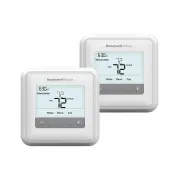
Honeywell RTH4110U2000-2PK Thermostat – User Manual, read for free online in PDF format. We hope this helps you resolve any issues you may have. If you have further questions, please contact us through the contact form.


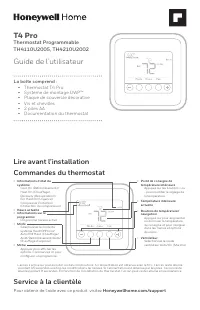
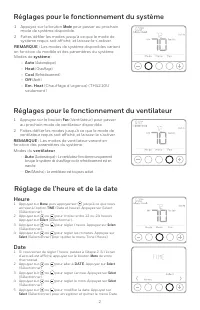
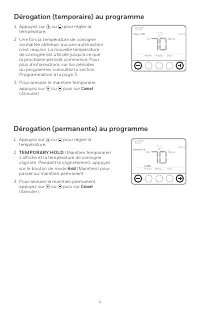
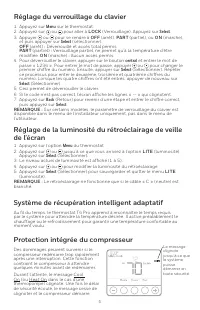
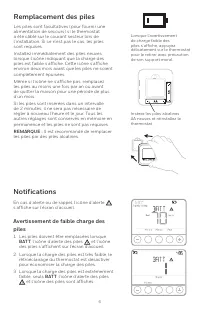
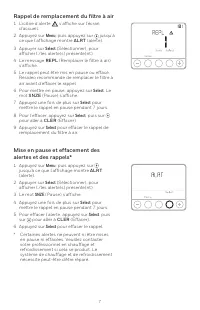
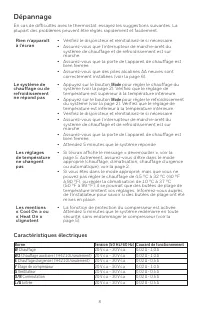





Table of Contents:
- Page 2 – Time; Fan operation settings; Fan runs only when the heating or cooling system is
- Page 5 – LOCK; Adjusting idle backlight display brightness; LITE
- Page 6 – Low Battery Warning; BAT T
- Page 7 – Air Filter Reminder
- Page 8 – Troubleshooting; Electrical Ratings; Terminal; Heating
- Page 9 – For warranty information go to; -year limited warranty
- Page 10 – damage, avoid cycling the compressor quickly.; CAUTION: ELECTRICAL HAZARD; beginning installation.; CAUTION: ELECTRONIC WASTE NOTICE
- Page 11 – Thermostat Programmable; Guide de l’utilisateur; Service à la clientèle
- Page 12 – Réglages pour le fonctionnement du système; Réglage de l’heure et de la date; Heure; Réglages pour le fonctionnement du ventilateur
- Page 15 – Réglage du verrouillage du clavier
- Page 17 – Rappel de remplacement du filtre à air
- Page 18 – Dépannage; Caractéristiques électriques; Borne; Chauffage
- Page 19 – Pour obtenir des renseignements à propos de la garantie, visitez; Garantie limitée de 5 ans
- Page 20 – MISE EN GARDE : AVIS RELATIF AU MERCURE; Si ce produit remplace un régulateur contenant du mercure dans un; MISE EN GARDE : RISQUE DE DOMMAGES DE L’ÉQUIPEMENT; d’endommager l’équipement, éviter d’actionner le compresseur trop; MISE EN GARDE : RISQUE DE CHOC ÉLECTRIQUE; l’alimentation électrique avant d’effectuer le raccordement.; MISE EN GARDE : AVIS DE DÉCHETS ÉLECTRONIQUES
- Page 21 – T4 Pro; Termostato Programable; Guía del usuario; Para obtener ayuda sobre este producto, visite; Asistencia al cliente
- Page 22 – Hora; Fecha; Configuraciones de funcionamiento del ventilador
- Page 24 – Cancel
- Page 25 – Ajustar el brillo de la pantalla para la luz de fondo
- Page 26 – Advertencia de batería con poca carga
- Page 27 – Recordatorio del filtro de aire
- Page 28 – Localización y solución de problemas; manera fácil y rápida.; Clasificaciones eléctricas; Calefacción
- Page 29 – Poliza de garantia
- Page 32 – al equipo, evite encender y apagar rápidamente el compresor.; PRECAUCIÓN: PELIGRO DE ELECTROCUCIÓN; suministro eléctrico antes de comenzar la instalación.; PRECAUCIÓN: AVISO SOBRE EL MERCURIO
Package Includes:
• T4 Pro Thermostat
• UWP™ Mounting System
• Decorative Cover Plate
• Screws and Anchors
• 2 AA Batteries
• Thermostat Literature
M37844
T4 Pro
Programmable Thermostat
TH4110U2005, TH4210U2002
User Guide
For assistance with this product, please visit
Honeywellhome.com/support
Customer assistance
Thermostat controls
•
System status
information
Cool On/Heat On/Em
Heat On, Recovery,
Compressor Protection
•
Actual time
•
Schedule information
Following time based
schedule
•
Mode
Select system mode
Heat/Off/Cool/Auto/
EM Heat (emergency
heat)
•
Menu
Press to display options.
Start here to set a
program schedule
•
Indoor temperature
setpoint
Press + or – to change
temperature setting
•
Actual indoor
temperature
•
Temperature/
Navigation buttons
Press to increase or
decrease temperature
setpoint and to
navigate menus and
menu options
•
Fan
Select Fan mode
Auto/On
The screen will wake up by pressing any of the five buttons. If powered by the C wire, the screen stays lit for 45 seconds
af ter you complete changes. If powered by batter y only, the screen stays lit for 8 seconds. Depending on how your
thermostat was installed, the screen light may always be on.
Read before installing
"Loading the manual" means you need to wait until the file loads and becomes available for online reading. Some manuals are very large, and the time they take to appear depends on your internet speed.
Summary
2 System operation settings 1 Press the Mode button to cycle to the next available System mode. 2 Cycle through the modes until the required System mode is displayed and leave it to activate. NOTE: Available System modes vary by model and system settings. System modes: ‒ Auto ‒ Heat ‒ Cool ‒ Off ‒ E...
5 Adaptive Intelligent Recovery Over time, the T4 Pro Thermostat “learns” how long it takes your system to reach the temperature you want. It turns on the heating or cooling system earlier to make sure you’re comfortable at the time you expect. Damage can occur if the compressor is restarted too soo...
6 Batteries are optional (to provide backup power) if your thermostat was wired to run on AC power when installed. If your thermostat was not wired to run on AC power, then batteries are required.Install fresh batteries immediately when the low battery icon appears. The icon appears about two months...


