Honeywell CT31A - Installation Manual
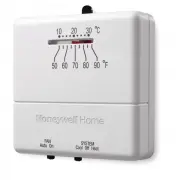
The Honeywell CT30/CT33 low-voltage thermostat is a user manual covering its installation, operation, compatibility checks, and basic setup procedures. This guide primarily focuses on essential topics like determining wiring compatibility before installation–counting connected wires to ensure the thermostat matches system requirements–and safely mounting it after labeling wires by letter designation (not color). It also includes instructions for adjusting temperature settings via a lever, aligning components post-installation, and handling limited warranty details. Safety warnings about power disconnection and mercury disposal are emphasized throughout.


Table of Contents:
- Page 1 – Getting Started and Package Contents
- Page 2 – Removing Old Thermostat and Compatibility Check
- Page 3 – Thermostat Installation Preparation
- Page 4 – Mounting Base and Wire Connections
- Page 5 – Final Thermostat Installation Steps
- Page 6 – Thermostat Operation and Display
- Page 7 – Limited Warranty and Defect Reporting
- Page 8 – Customer Support Information
- Page 9 – Pre-installation Checklist and Required Materials
- Page 10 – Wiring Compatibility and Power Disconnection
- Page 11 – Wire Labeling and Wall Marking
- Page 12 – Mounting and Wiring Connections
- Page 13 – Final Adjustments and Power Restoration
- Page 14 – Temperature Setting and System Control
- Page 15 – Product Warranty Details
- Page 16 – Corporate Contact and Recycling Information
CT30/CT33
Low-voltage Thermostat
Owner’s
Manual
Getting started
Before you begin, make sure you have:
•
Screwdriver
•
Hammer
•
Level (optional)
•
Pencil
•
Drill bit (3/16” for drywall, 7/32” for plaster)
Caution card
Wire labels
Wall anchors and
mounting screws
(2 each)
CT30/CT33 thermostat
Cover plate
Check to make sure your package includes the following items:
® U.S. Registered Trademark. Patents pending.
Copyright © 2005 Honeywell International Inc.
All rights reserved.
"Loading the manual" means you need to wait until the file loads and becomes available for online reading. Some manuals are very large, and the time they take to appear depends on your internet speed.
Was this manual helpful?
About this manual
- Brand
- Honeywell
- Model
- CT31A
- Document type
- Installation Manual
- Category
- Thermostat
- Language(s)
- English, Spanish
- Pages
- 16
- File size
- 610.3 KB
- Format
Other Manuals for Honeywell CT31A
Summary
Items included in the package, such as the thermostat, cover plate, wire labels, caution card, wall anchors, and mounting screws, along with required installation tools.
Procedure for safely removing an old thermostat, checking compatibility, power disconnection, removal of the cover and thermostat while leaving the wallplate, and mercury disposal warnings.
Instructions for installing the low-voltage thermostat, including wire labeling by letter designation and marking mounting positions using a level and marking screws.
Ask a question
Related manuals
Popular Honeywell Thermostats


More Honeywell Thermostats models
 Honeywell RTH8560D User Manual
 Honeywell RTH8560D1002 User Manual
 Honeywell RTH8800WF2022 User Manual
 Honeywell RTH9585WF Installation Manual
 Honeywell RTH9585WF1004/W User Manual
 Honeywell TH8321WF1001 Installation Manual
 Honeywell CT50K1028 User Manual
 Honeywell CT53K User Manual
 Honeywell CT87K User Manual
 Honeywell CT87N User Manual
 Honeywell CT410B Installation Manual
 Honeywell RLV4305A User Manual
 Honeywell RTH111B Installation Manual
 Honeywell RTH221B User Manual
 Honeywell RTH2300B User Manual