Page 2 - Read before installing.; Included in your box:
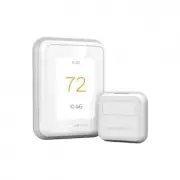
2 Read before installing. Included in your box: Tools you will need: You may need: Installation Guide Screws and anchors Phillips screwdriver Wire Stripper Home Wi-Fi Password T9 Wi-Fi Thermostat Small flat head screwdriver Needle-nose pliers C-Wire Adapter (optional) UWP Wallplate Pencil Drill and ...
Page 3 - Compatibility Section; OR
3 Compatibility Section For help, see: ONLINE GUIDES AND SUPPORT VIDEOS AT: honeywellhome.com/support SOCIAL Twitter: @Honeywell_Home, Facebook: Honeywell Home Or contact: EMAIL [email protected] PHONE 1-800-633-3991 • REQUIRED: A C-Wire (common wire) is needed for 24 VAC power. If you do not have a...
Page 4 - Removing your old thermostat; Turn off power; Check that your system is off; Remove your existing thermostat from
4 Removing your old thermostat You will need: Screwdriver, needle-nose pliers OFF ON 75 1 2 3 Turn off power To protect your equipment, turn off the power at the breaker box or switch that controls you heating and cooling equipment. Note: The thermostat off switch will not turn off the power to the ...
Page 5 - YES
5 5 6 7 4 Take a picture of your existing wall plate’s wiring In order to capture all of the letters next to the terminals, be sure to take multiple pictures from different angles.You may need to reference this image later. Remove any jumpers A jumper is used to connect two terminals. It may look li...
Page 6 - Disconnect the wires and remove
6 10 Do you have a C-Wire? Look at the thermostat wiring checklist from Step 8 , or the photo you took. Is the C-Terminal checked? This means you will not need to install the included C-Wire Adapter. Skip to Installing Your New Thermostat (page 9) . This means you don’t have a C-wire connected to yo...
Page 7 - Connecting Your Unused C-Wire
7 11 12 13 Do you have a zoning panel? You have a zoning panel if you have multiple thermostats and one furnace or heating system. C-Wire Adapter installation is more complicated on zoned systems. Call 1-855-733-5465 to find a pro-installer. Proceed to the next step. Do you have an unused wire? Look...
Page 9 - Installing Your New Thermostat
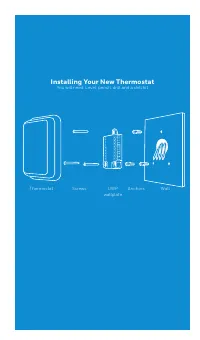
9 Installing Your New Thermostat You will need: Level, pencil, drill and a drill bit Thermostat Screws UWP wallplate Wall Anchors
Page 12 - Close the door and mount the wall plate; Attach your thermostat
12 22 23 24 25 Close the door and mount the wall plate Mount the wall plate using the provided screws. Install all three screws for a secure fit on your wall. Tip: Prior to tightening the screws, use a level to ensure the wall plate is level. Attach your thermostat Align the thermostat on the wall p...
Page 13 - Getting the most from the T9 Wi-Fi Thermostat; Control on the Go
13 Getting the most from the T9 Wi-Fi Thermostat Prioritize Rooms (Requires optional Wireless Room Sensor accessory) Prioritize a specific room or multiple rooms, or let comfort follow your move using built-in motion detection. Control on the Go Adjust your thermostat from anywhere using your tablet...
Page 14 - Using your thermostat
14 Using your thermostat The screen will wake up by pressing the center area of the displayed temperature. 74 2 18% Indoor Temperature Displays the current indoor temperature. Adjust Temperature Touch the up and down arrows to set your desired temperature. Current Priority Displays the type of prior...
Page 16 - Troubleshooting; negative consequences for the environment and human health.
16 Troubleshooting If you have difficulty with your thermostat, please try the following suggestions. Most problems can be corrected quickly and easily. Display is blank • Check circuit breaker and reset if necessary.• Make sure power switch for heating & cooling system is on.• Make sure furnace...
Page 17 - -year limited warranty
17 Resideo warrants this product, excluding battery, to be free from defects in workmanship or materials, under normal use and service, for a period of two (2) years from the date of first purchase by the original purchaser. If at any time during the warranty period the product is determined to be d...
Page 19 - THERMOSTAT INTELLIGENT T9; Guide d’installation
Recherchez des rabais dans votre région : HoneywellHome.com/Rebates Guides en ligne honeywellhome.com THERMOSTAT INTELLIGENT T9 RCHT9610WFW2004 Guide d’installation
Page 20 - Lire avant l’installation.; Contenu de l’emballage :
2 Lire avant l’installation. Contenu de l’emballage : Outils nécessaires : Vous pourriez avoir besoin de ces outils : Guide d’installation Vis et ancrages Tournevis cruciforme Pinces à dénuder Mot de passe Wi-Fi du réseau domestique Thermostat Wi-Fi T9 Petit tournevis à tête plate Pinces à bec long ...
Page 21 - Section sur la compatibilité; n’avez pas de fil C, un adaptateur pour fil C est fourni.
3 Section sur la compatibilité Pour obtenir de l’aide, consultez : GUIDES EN LIGNE ET VIDÉOS DE SOUTIEN À L’ADRESSE : honeywellhome.com/support RÉSEAUX SOCIAUX Twitter: @Honeywell_Home, Facebook: Honeywell Home Ou contactez : COURRIEL [email protected] TÉLÉPHONE 1-800-633-3991 • REQUIS : Un fil C (f...
Page 22 - Comment retirer votre ancien thermostat; Mettez l’alimentation hors tension.; Assurez-vous que votre système est; Retirez l’ancien thermostat de la plaque
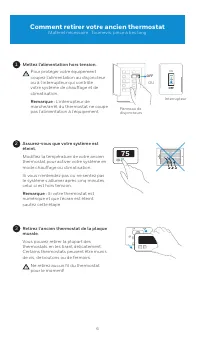
4 Comment retirer votre ancien thermostat Matériel nécessaire : Tournevis, pince à bec long OFF ON 75 1 2 3 Mettez l’alimentation hors tension. Pour protéger votre équipement, coupez l’alimentation au disjoncteur ou à l’interrupteur qui contrôle votre système de chauffage et de climatisation. Remarq...
Page 23 - Vérification de compatibilité; OUI
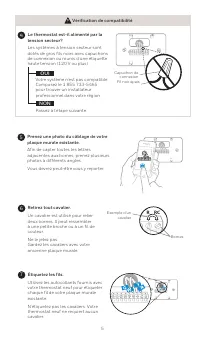
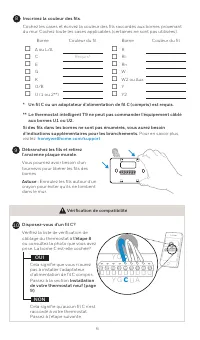
5 5 6 7 4 Prenez une photo du câblage de votre plaque murale existante. Afin de capter toutes les lettres adjacentes aux bornes, prenez plusieurs photos à différents angles.Vous devrez peut-être vous y reporter. Retirez tout cavalier. Un cavalier est utilisé pour relier deux bornes. Il peut ressembl...
Page 25 - Non; Raccordement de votre fil C inutilisé; Rendez-vous à votre chaudière ou système de chauffage.
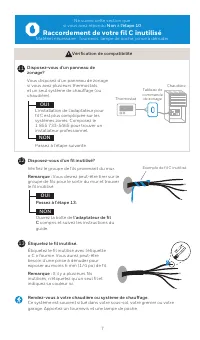
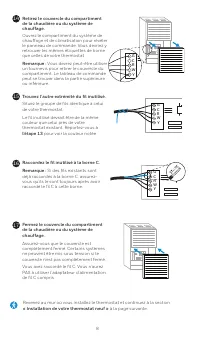
7 11 12 13 Disposez-vous d’un panneau de zonage? Vous disposez d’un panneau de zonage si vous avez plusieurs thermostats et un seul système de chauffage (ou chaudière). L’installation de l’adaptateur pour fil C est plus compliquée sur les systèmes zonés. Composez le 1 855 733-5465 pour trouver un in...
Page 27 - Installation de votre thermostat neuf
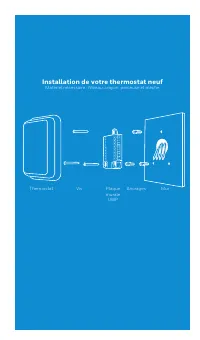
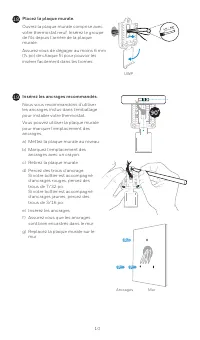
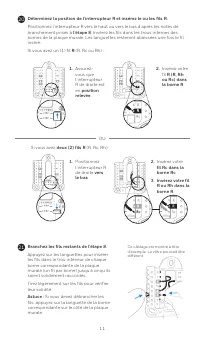
9 Installation de votre thermostat neuf Matériel nécessaire : Niveau, crayon, perceuse et mèche Thermostat Vis Plaque murale UWP Mur Ancrages
Page 30 - Fermez le cache et posez la plaque; Fixez votre thermostat.
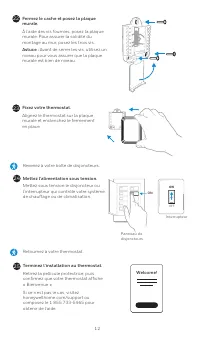
12 22 23 24 25 Fermez le cache et posez la plaque murale. À l’aide des vis fournies, posez la plaque murale. Pour assurer la solidité du montage au mur, posez les trois vis. Astuce : Avant de serrer les vis, utilisez un niveau pour vous assurer que la plaque murale est bien de niveau. Fixez votre th...
Page 31 - Tirer le maximum du thermostat Wi-Fi T9; Contrôle à distance
13 Tirer le maximum du thermostat Wi-Fi T9 Prioriser des pièces (exige le détecteur de pièce sans fil en option) Priorisez une ou plusieurs pièces, ou laissez le soin au système d’assurer votre confort grâce à la détection de mouvement intégrée. Contrôle à distance Réglez votre thermostat depuis n’i...
Page 32 - Utilisation de votre thermostat
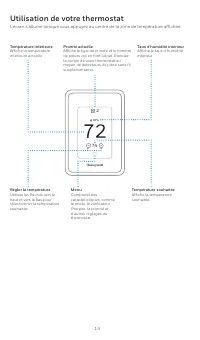
14 Utilisation de votre thermostat L’écran s’allume lorsque vous appuyez au centre de la zone de température affichée. 74 2 18% Température intérieure Affiche la température intérieure actuelle. Régler la température Utilisez les flèches vers le haut et vers le bas pour sélectionner la température s...
Page 34 - Dépannage; négatives potentielles sur l’environnement et la santé.
16 Dépannage Si vous rencontrez des difficultés avec votre thermostat, veuillez essayer les suggestions suivantes. La plupart des problèmes peuvent être corrigés rapidement et simplement. L’écran est vide • Vérifiez le disjoncteur et réinitialisez-le si nécessaire. • Veillez à ce que l’interrupteur ...
Page 35 - Garantie limitée à deux ans
17 Resideo garantit ce produit, à l’exception des piles, contre tout défaut de pièce ou de main-d’œuvre, durant une période pour deux (2) ans à partir de la date d’achat par le consommateur d’origine si le produit est utilisé et entretenu convenablement. En cas de défaillance ou de mauvais fonctionn...