LG LGUX300 - Manuals
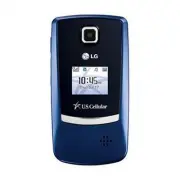
User Manual LG LGUX300


Summary
Getting to Know Your Phone Volume Up/Down Headset Jack Camera Camera Key USB/ Charging Port Power/ End Key Clear & Back Key Right Soft Key OK Key Space Key Left Soft Key Speakerphone Key Talk Key Voicemail Key Navigation Key Bluetooth Messaging easy edge SM Calendar Speaker
Bluetooth ® Pairing Cut the cords and go wireless! The UX300 enhances your experience with the convenience of Bluetooth technology. 1. Set your Bluetooth accessory into pairing mode.*2. Press up on the Navigation Key , then select Paired Devices ( 1 ). 3. Press the Left Soft Key for Search . When pr...
Taking a Picture Capture the moment! The UX300’s VGA camera is so easy to use that you won’t miss a thing. Flip Open 1. Press and hold the side Key . 2. Press up or down on the Navigation Key to zoom.* Press left or right to adjust the brightness. To adjust other camera options, press the Right Soft...
LG Cell Phones Manuals
-
 LG A7110
User Manual
LG A7110
User Manual
-
 LG AX5000
User Manual
LG AX5000
User Manual
-
 LG C1300
User Manual
LG C1300
User Manual
-
 LG C1300A
User Manual
LG C1300A
User Manual
-
 LG C1300I
User Manual
LG C1300I
User Manual
-
 LG C1500
User Manual
LG C1500
User Manual
-
 LG C2000
User Manual
LG C2000
User Manual
-
 LG CB630
User Manual
LG CB630
User Manual
-
 LG CE500
User Manual
LG CE500
User Manual
-
 LG CF360
User Manual
LG CF360
User Manual
-
 LG CF360A
User Manual
LG CF360A
User Manual
-
 LG CG180
User Manual
LG CG180
User Manual
-
 LG CG225
User Manual
LG CG225
User Manual
-
 LG CG300
User Manual
LG CG300
User Manual
-
 LG CP150
User Manual
LG CP150
User Manual
-
 LG CU320
User Manual
LG CU320
User Manual
-
 LG CU400
User Manual
LG CU400
User Manual
-
 LG CU405
User Manual
LG CU405
User Manual
-
 LG CU500
User Manual
LG CU500
User Manual
-
LG CU500
Manual