Page 2 - In the box you will find
69-2718EF—01 ii In the box you will find • Thermostat • Wallplate (attached to thermostat) • Screws and anchors • Quick Start Guide • Thermostat ID Card • Wire labels • User Guide • Quick Reference Card
Page 3 - Welcome
Welcome Congratulations on your purchase of a Honeywell Wi-Fi programmable thermostat. When registered to Honeywell’s Total Connect Comfort Solutions, you can remotely monitor and control the heating and cooling system in your home or business—you can stay connected to your comfort system wherever y...
Page 4 - Do not place your old thermostat in the trash if it contains
69-2718EF—01 2 This thermostat works with common 24 volt systems such as forced air, hydronic, heat pump, oil, gas, and electric. It will not work with millivolt systems, such as a gas fireplace, or with 120/240 volt systems such as baseboard electric heat. MERCURY NOTICE: Do not place your old ther...
Page 5 - About your new thermostat; Installation; Table of contents
69-2718EF—01 3 About your new thermostat Controls and Home screen quick reference ............................................ 5Preset energy-saving schedules ................. 6 Installation Installing your thermostat ............................ 8Connecting to your Wi-Fi network ............. 26Re...
Page 6 - Features of your Wi-Fi thermostat; Your new thermostat provides:
69-2718EF—01 4 Features of your Wi-Fi thermostat With your new thermostat, you can: • Connect to the Internet to monitor and control your heating/cooling system • View and change your heating/cooling system settings • View and set temperature and schedules • Receive alerts via email and get automati...
Page 7 - Controls and home screen quick reference
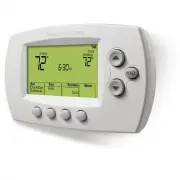
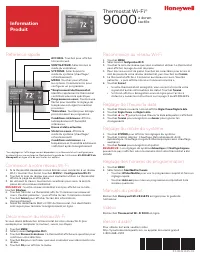
5 69-2718EF—01 M31586 HOLD Controls and home screen quick reference Once your Wi-Fi thermostat is installed, it will display the home screen. Portions of this display will change depending on how you are viewing it. The screen lights when you press any button. It stays lit for 8 seconds after you co...
Page 8 - Preset energy-saving schedules; Default Heat Settings
69-2718EF—01 6 Preset energy-saving schedules This thermostat is pre-set with energy-saving program settings for four time periods. Using the default settings can reduce your heating/cooling expenses by as much as 33% if used as directed. Savings may vary depending on geographic region and usage. To...
Page 9 - Setting up your thermostat; you may want to watch a brief installation video. Use
7 69-2718EF—01 Setting up your thermostat Setting up your Wi-Fi programmable thermostat is easy. It is preprogrammed and ready to go as soon as it is installed and registered. Install your thermostat.Connect your home Wi-Fi network.Register online for remote access. Before you begin, you may want to...
Page 10 - Installing your thermostat
69-2718EF—01 8 Installing your thermostat You might need the following tools to install this thermostat: • No. 2 Phillips screwdriver • Small pocket screwdriver • Pencil • Level (optional) • Drill and bits (3/16” for drywall, 7/32” for plaster) (optional) • Hammer (optional) • Electrical tape (optio...
Page 11 - Remove old thermostat faceplate; C wire is required and
9 69-2718EF—01 C C MCR33823 If you have an older thermostat with a sealed mercury tube, turn to page 2 for proper disposal instructions. Installing your thermostat 2 Remove old thermostat faceplate and leave wires connected.2a Take a picture of the wire connections for later reference. 2b If no wire...
Page 12 - Do not label by wire color.; If no tag matches a wire
69-2718EF—01 10 Installing your thermostat 3 Label wires. Do not label by wire color. Use the supplied sticky tags to label each wire as you disconnect it. Label wires according to the old thermostat terminal designations, not by wire color. Note: If no tag matches a wire terminal label, write the t...
Page 13 - Separate Wi-Fi thermostat and its
11 69-2718EF—01 Installing your thermostat 5 Separate Wi-Fi thermostat and its wallplate. On your new thermostat, grasp the finger holds on the top and bottom of the wallplate with one hand and the thermostat (front) with the other hand. Pull pieces apart. Thermostat Wallplate (back view) Finger hol...
Page 14 - You may be able to use your existing
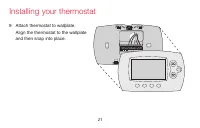
69-2718EF—01 12 Installing your thermostat 6 Mount wallplate for Wi-Fi thermostat. Mount your new wallplate using screws and anchors included with the thermostat. If necessary: Drill 3/16-in holes for drywall. Drill 7/32-in holes for plaster. Note: You may be able to use your existing wall anchors. ...
Page 15 - Wiring; For; conventional; system, see page 15. See “Glossary” on page 64 for further
13 69-2718EF—01 Important! The Wi-Fi thermostat requires a C wire to operate. The C, or common, wire brings 24 VAC power to the thermostat. Many older mechanical or battery operated thermostats do not require a C wire. If you don’t have a C wire, try: • Looking for an unused wire that is pushed into...
Page 16 - only
69-2718EF—01 14 Installing your thermostat Wiring (conventional system) 7A Wire the Wi-Fi thermostat to your conventional system. a Starting with the C Wire, match the sticky tag on the wire to the terminal labels. You must have a C wire. See page 13. b Loosen screw, insert wire on inside edge of te...
Page 17 - AUX
15 69-2718EF—01 Installing your thermostat Wiring (heat pump system only) 7B Wire Wi-Fi thermostat to your heat pump. a Starting with the C Wire, match the sticky tag on the wire to the terminal labels. You must have a C wire. See page 13. b Loosen screw, insert wire on inside edge of terminal, then...
Page 18 - Use this if your wire labels don’t match the terminal labels.
69-2718EF—01 16 Installing your thermostat Alternate wiring (conventional system) Use this if your wire labels don’t match the terminal labels. Note: You must have a C wire or equivalent. See page 13. See key to 1 – 3 on page 17. Y2 R 4 M V RH Y1 H W1 F R Y W G RC W2 W2 G W Y R RC Y2 C MCR33885 CONV...
Page 19 - Alternate wiring key (conventional system)
17 69-2718EF—01 Installing your thermostat Do not use K terminal. For future use. If your old thermostat had both R and RH wires, remove metal jumper. Connect the R wire to the RC terminal, and the RH wire to the R terminal. Remove metal jumper connecting R and RC only if you must connect both R and...
Page 21 - Alternate wiring key (heat pump system only)
19 69-2718EF—01 Installing your thermostat Alternate wiring key (heat pump system only) Do not use K terminal. For future use. If old thermostat has separate wires on AUX and E , place both wires into the E/AUX terminal. If old thermostat has wire on AUX with a jumper to E , place wire on E/AUX term...
Page 22 - Insert quick reference card.
69-2718EF—01 20 Installing your thermostat 8 Insert quick reference card. Fold quick reference card along score lines, and slide it into the slot on the back of the thermostat. Back of thermostat Quick reference card MCR33916 MCR33858
Page 25 - 1 Set clock to current day and time.; Set Day; or; Done
23 69-2718EF—01 Installing your thermostat 11 Set clock to current day and time. 11a Press s or t to set clock. 11b Press Set Day . 11c Press s or t to select the day of week. 11d Press Done to save. (Press and hold a st button to quickly change a setting.) MCR33908 HOLD MCR33909 HOLD
Page 26 - 2 Determine your heating/cooling system type.; If your system type
69-2718EF—01 24 Installing your thermostat 12 Determine your heating/cooling system type. Important! Heating/cooling system type must be set so that your thermostat operates properly and does not damage your system. 12a If your system type is conventional single stage (natural gas-powered single sta...
Page 27 - 3a Press the
25 69-2718EF—01 Installing your thermostat MCR33880 Congratulations! Your thermostat is operational.13 Test your thermostat 13a Press the System button to change to heating or cooling and begin operation. 13b For remote access to your thermostat, continue to “Connecting to your Wi-Fi network” on pag...
Page 28 - Connecting to your Wi-Fi network; Smartphone
69-2718EF—01 26 Connecting to your Wi-Fi network To complete this process, you must have a wireless device connected to your home wireless network. Any of these device types will work: • Tablet (recommended) • Laptop (recommended) • Smartphone If you get stuck... at any point in this procedure, rest...
Page 29 - Home Network
27 69-2718EF—01 1 Connect to your thermostat. 1a Make sure the thermostat displays Wi-Fi Setup . 1b On the wireless device (laptop, tablet, smartphone), view the list of available Wi-Fi networks. 1c Connect to the network called NewThermostat_123456 (the number will vary). Note: If you are asked to ...
Page 30 - Connect
69-2718EF—01 28 Connecting to your Wi-Fi network 2 Join your home network. 2a Open your web browser to access the Thermostat Wi-Fi Setup page. The browser should automatically direct you to the correct page; if it does not, go to http://192.168.1.1 2b Find the name of your home network on this page ...
Page 32 - Wait
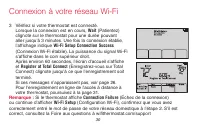
69-2718EF—01 30 Connecting to your Wi-Fi network 3 Make sure your thermostat is connected. While the connection is in process, your thermostat will flash Wait for up to 3 minutes. When the connection is complete, the display will show Wi-Fi Setup Connection Success . The Wi-Fi signal strength will a...
Page 33 - Registering your thermostat online
31 69-2718EF—01 Registering your thermostat online M31570 To view and set your Wi-Fi thermostat remotely, you must have a Total Connect Comfort account. Use the following steps.1 Open the Total Connect Comfort web site. Go to mytotalconnectcomfort.com View the Wi-Fi Thermostat Registration video at ...
Page 34 - Login or create an account.; Check your email; for an activation; Follow activation instructions; in the
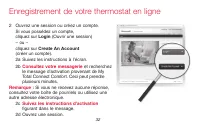
69-2718EF—01 32 Registering your thermostat online 2 Login or create an account. If you have an account, click Login – or –click Create An Account . 2a Follow the instructions on the screen.2b Check your email for an activation message from My Total Connect Comfort. This may take several minutes. No...
Page 35 - a Follow the instructions on the; MAC ID
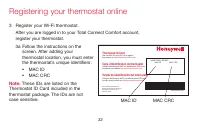
33 69-2718EF—01 Registering your thermostat online 3 Register your Wi-Fi thermostat. After you are logged in to your Total Connect Comfort account, register your thermostat. 3a Follow the instructions on the screen. After adding your thermostat location, you must enter the thermostat’s unique identi...
Page 36 - b When the thermostat is
69-2718EF—01 34 Registering your thermostat online 3b When the thermostat is successfully registered, the Total Connect Comfort registration screen will display a SUCCESS message. In the thermostat display, you will see Setup Complete for about 90 seconds.
Page 37 - iTunes
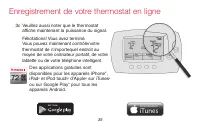
35 69-2718EF—01 Registering your thermostat online 3c Also notice that your thermostat displays its signal strength. Congratulations! You’re done. You can now control your thermostat from anywhere through your tablet, laptop, or smartphone Total Connect Comfort free app is available for Apple ® iPho...
Page 38 - Setting the time and day
69-2718EF—01 36 1 Press Set Clock/Day/Schedule , then press s or t to set clock. 2 Press Set Day , then press s or t to select the day of week. 3 Press Done to save. Note: If the Set Clock/Day/Schedule option is not displayed, press Done . Note: If the display flashes Set Clock , the thermostat will...
Page 39 - Press; Fan; to select; Auto; On; Setting the fan
37 69-2718EF—01 Press Fan to select On or Auto (toggle to re-select). Auto : Fan runs only when the heating or cooling system is on. Auto is the most commonly used setting. On : Fan is always on. Note: Options may vary depending on your heating/cooling equipment. Setting the fan MCR33895
Page 40 - Selecting system mode; Depending on how; System; Heat; Cool; Off; Em Heat
69-2718EF—01 38 Selecting system mode Note: Depending on how your thermostat was installed, you may not see all system settings. Press System to select: Heat : Controls only the heating system. Cool : Controls only the cooling system. Off : Heating/cooling systems are off. Auto : Selects heating or ...
Page 41 - Adjusting program schedules; Set Schedule
39 69-2718EF—01 Adjusting program schedules 1 Press Set Clock/Day/Schedule , then Set Schedule . 2 Press s or t to set your Monday (Mon) Wake time, then press Next . 3 Press s or t to set the temperature for this period, then press Next . 4 Set time and temperature for the next time period (Leave). ...
Page 42 - Overriding schedules temporarily; Cancel; . The program schedule will
69-2718EF—01 40 Overriding schedules temporarily Press s or t to immediately adjust the temperature.The new temperature will be maintained only until the next programmed time period begins.To cancel the temporary setting at any time, press Cancel . The program schedule will resume. MCR33896 HOLD
Page 43 - Overriding schedules permanently
41 69-2718EF—01 Overriding schedules permanently 1 Press HOLD to permanently adjust the temperature. This will turn off the program schedule. 2 Press s or t to adjust the temperature setting. The temperature you set will be maintained 24 hours a day until you manually change it or press Cancel to re...
Page 44 - Unregistering thermostat; Register at Total Connect; until it is
69-2718EF—01 42 Unregistering thermostat If you remove the thermostat from your Total Connect Comfort website account (for example, you’re moving and leaving the thermostat behind), the thermostat will display Register at Total Connect until it is re-registered. M33876
Page 45 - Replacing your router; Re-connect to a Wi-Fi network by following the steps on page 26.
43 69-2718EF—01 Disconnecting Wi-Fi Replacing your router If you disconnect the thermostat from your Wi-Fi network:1 Enter system setup (see page 48).2 Change setting 39 to 0 (see page 54).The screen will display Wi-Fi Setup . Re-connect to a Wi-Fi network by following the steps on page 26. Turning ...
Page 46 - Software updates; Updating; and shows the percentage of the update
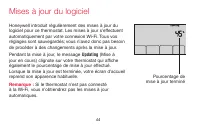
69-2718EF—01 44 Software updates Honeywell periodically issues updates to the software for this thermostat. The updates occur automatically through your Wi-Fi connection. All your settings are saved, so you will not need to make any changes after the update occurs.While the update is taking place, y...
Page 47 - Smart Response Technology; before; Recovery
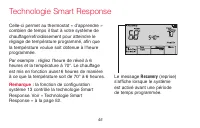
45 69-2718EF—01 M33881 Smart Response Technology This feature allows the thermostat to “learn” how long the heating/cooling system takes to reach programmed temperature settings, so the temperature is reached at the time you set.For example: Set the Wake time to 6:00 am, and the temperature to 70°. ...
Page 48 - Compressor protection; The message; Cool On
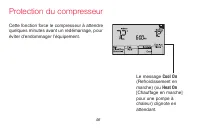
69-2718EF—01 46 Compressor protection This feature forces the compressor to wait a few minutes before restarting, to prevent equipment damage. The message Cool On (or Heat On for a heat pump) will flash during the wait time. M33882
Page 49 - Auto changeover; System setting function 12 controls
47 69-2718EF—01 Auto changeover This feature is used in climates where both air conditioning and heating are used on the same day.When the system is set to Auto , the thermostat automatically selects heating or cooling depending on the indoor temperature.Heat and cool settings must be at least 3 deg...
Page 50 - Setting functions and options
69-2718EF—01 48 Setting functions and options You can change options for a number of system functions. Available functions depend on the type of system you have. The functions, along with available options are described on pages 50–54.This thermostat is pre-set for a single-stage heating/cooling sys...
Page 52 - System setup; Function
69-2718EF—01 50 System setup (See page 48 for instructions.) Function Settings & Options 1 Select System Type If you are not sure of your heating/ cooling system type or have other questions, go to wifithermostat.com 0 Heat/cool: Gas, oil or electric heating with central air conditioning. 1 Heat...
Page 57 - Frequently asked questions
55 69-2718EF—01 Frequently asked questions : Q Will my thermostat still work if I lose my Wi-Fi connection? : A Yes, the thermostat will operate your heating and/or cooling system with or without Wi-Fi. : Q How do I find the password to my router? : A Contact the manufacturer of the router or check ...
Page 60 - Troubleshooting; Lost Signal
69-2718EF—01 58 Troubleshooting Lost Signal If the no-Wi-Fi indicator displays in place of the Wi-Fi strength indicator in the upper right hand corner of the home screen: • Check another device to be sure Wi-Fi is working in your home; if not, call your Internet Service Provider. • Move the router. ...
Page 61 - Error Code; Error Codes
59 69-2718EF—01 Troubleshooting Error Code Action E01 During Wi-Fi Setup, the router lost power. • Ensure your router has power. • If trying to connect to a hidden or manually added network, confirm the router has power and is working. E02 Invalid Wi-Fi password. This code displays for 30 seconds, t...
Page 66 - Glossary
69-2718EF—01 64 Glossary C wire The “C” or common wire brings 24 VAC power to the thermostat from the heating/cooling system. Some older mechanical or battery operated thermostats may not have this wire connection. It is necessary for establishing a Wi-Fi connection to your home network. Heat Pump h...
Page 67 - Regulatory information
65 69-2718EF—01 Regulatory information FCC Compliance Statement (Part 15.19) (USA only) This device complies with Part 15 of the FCC Rules. Operation is subject to the following two conditions:1 This device may not cause harmful interference, and2 This device must accept any interference received, i...
Page 69 - -year limited warranty
67 69-2718EF—01 1-year limited warranty Honeywell warrants this product, excluding battery, to be free from defects in the workmanship or materials, under normal use and service, for a period of one (1) year from the date of purchase by the consumer. If at any time during the warranty period the pro...
Page 70 - Automation and Control Systems
Automation and Control Systems Honeywell International Inc. 1985 Douglas Drive North Golden Valley, MN 55422 wifithermostat.com ® U.S. Registered Trademark.Apple, iPhone, iPad, iPod touch and iTunes are trademarks of Apple Inc. All other trademarks are the property of their respective owners.© 2012 ...
Page 72 - Vous trouverez dans la boîte
69-2718EF—01 ii Vous trouverez dans la boîte • Thermostat • Plaque murale (fixée au thermostat) • Vis et ancres • Guide de démarrage rapide • Carte d’identification de thermostat • Étiquettes de fils • Guide de l’utilisateur • Carte de référence rapide
Page 73 - Bienvenue
Bienvenue Nous vous félicitons de l’achat d’un thermostat programmable Wi-Fi Honeywell. Après vous être enregistré auprès du service Total Connect Comfort de Honeywell, vous pouvez surveiller et contrôler à distance le système de chauffage et de refroidissement de votre domicile ou de votre entrepri...
Page 74 - AVIS RELATIF AU MERCURE :; Ne jetez pas l’ancien thermostat dans la poubelle
69-2718EF—01 2 Ce thermostat fonctionne sur les systèmes de 24 V commun tels que les systèmes à air pulsé, eau chaude, thermopompe, mazout, gaz et électriques.Il ne fonctionne pas avec les systèmes à mV, tels que les cheminées à gaz, ou avec les systèmes de 120/240 V tels que les chauffages de plint...
Page 75 - Table des matières
69-2718EF—01 3 À propos du nouveau thermostat Aide-mémoire sur les commandes et l’écran d’accueil ...................................... 5Programmes d’économie d’énergie préconfigurés .............................. 6 Installation Installation de votre thermostat ................... 8Connexion à votr...
Page 76 - Caractéristiques de votre thermostat Wi-Fi; Avec votre nouveau thermostat, vous pouvez :; Consulter et régler la température et les programmes; Votre nouveau thermostat procure :; La technologie Smart Response
69-2718EF—01 4 Caractéristiques de votre thermostat Wi-Fi Avec votre nouveau thermostat, vous pouvez : • Vous connecter à Internet pour surveiller et contrôler votre système de chauffage/refroidissement • Consulter et modifier vos réglages du système de chauffage/refroidissement • Consulter et régle...
Page 77 - Aide-mémoire sur les commandes et l’écran d’accueil
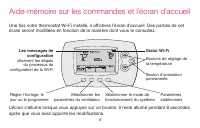
5 69-2718EF—01 Aide-mémoire sur les commandes et l’écran d’accueil Une fois votre thermostat Wi-Fi installé, il affichera l’écran d’accueil. Des parties de cet écran seront modifiées en fonction de la manière dont vous le consultez. L’écran s’allume lorsque vous appuyez sur un bouton. Il reste allum...
Page 78 - Programmes d’économie d’énergie préconfigurés
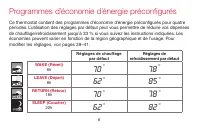
69-2718EF—01 6 Programmes d’économie d’énergie préconfigurés Ce thermostat contient des programmes d’économie d’énergie préconfigurés pour quatre périodes. L’utilisation des réglages par défaut peut vous permettre de réduire vos dépenses de chauffage/refroidissement jusqu’à 33 % si vous suivez les i...
Page 79 - Configuration de votre thermostat; vous désirerez peut-être visionner une courte
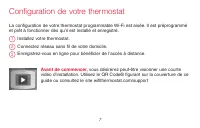
7 69-2718EF—01 Configuration de votre thermostat La configuration de votre thermostat programmable Wi-Fi est aisée. Il est préprogrammé et prêt à fonctionner dès qu’il est installé et enregistré. Installez votre thermostat.Connectez réseau sans fil de votre domicile.Enregistrez-vous en ligne pour bé...
Page 80 - Installation de votre thermostat
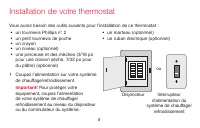
69-2718EF—01 8 Installation de votre thermostat Vous aurez besoin des outils suivants pour l’installation de ce thermostat : • un tournevis Phillips n° 2 • un petit tournevis de poche • un crayon • un niveau (optionnel) • une perceuse et des mèches (3/16 po pour une cloison sèche, 7/32 po pour du pl...
Page 81 - Retirez la plaque de l’ancien
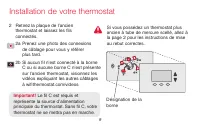
9 69-2718EF—01 Installation de votre thermostat C C MCR33823 Si vous possédez un thermostat plus ancien à tube de mercure scellé, allez à la page 2 pour les instructions de mise au rebut correctes. Désignation de la borne 2 Retirez la plaque de l’ancien thermostat et laissez les fils connectés.2a Pr...
Page 82 - Étiquetez les fils.; si aucune étiquette ne
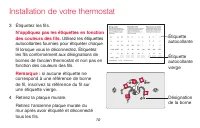
69-2718EF—01 10 Installation de votre thermostat 3 Étiquetez les fils. N’appliquez pas les étiquettes en fonction des couleurs des fils. Utilisez les étiquettes autocollantes fournies pour étiqueter chaque fil lorsque vous le déconnectez. Étiquetez les fils conformément aux désignations de bornes de...
Page 83 - Séparez le thermostat Wi-Fi de sa
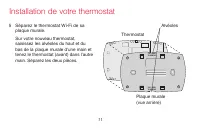
11 69-2718EF—01 Installation de votre thermostat 5 Séparez le thermostat Wi-Fi de sa plaque murale. Sur votre nouveau thermostat, saisissez les alvéoles du haut et du bas de la plaque murale d’une main et tenez le thermostat (avant) dans l’autre main. Séparez les deux pièces. Thermostat Plaque mural...
Page 84 - Montez la plaque murale du thermostat
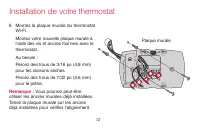
69-2718EF—01 12 Installation de votre thermostat 6 Montez la plaque murale du thermostat Wi-Fi. Montez votre nouvelle plaque murale à l’aide des vis et ancres fournies avec le thermostat. Au besoin : Percez des trous de 3/16 po (4,8 mm) pour les cloisons sèches. Percez des trous de 7/32 po (5,6 mm) ...
Page 85 - avec le fabricant afin d’identifier la borne 24 V c.a. commune.; Câblage; Pour les systèmes de chauffage/refroidissement; conventionnels; , voir page 15. Voir « Glossaire » à la page 64
13 69-2718EF—01 Installation de votre thermostat Important! le fonctionnement du thermostat Wi-Fi requiert l’utilisation d’un fil neutre (C). Le fil C, ou neutre, amène l’alimentation 24 V ca au thermostat. De nombreux thermostats mécaniques ou à piles plus anciens n’ont pas besoin d’un fil C. Si vo...
Page 86 - A Branchez le thermostat Wi-Fi sur votre système conventionnel.; sont tous; vous au code de câblage alternatif des pages 16–17.
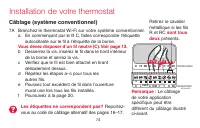
69-2718EF—01 14 MFCR33878 THERMOPOMPE CONVENTIONNEL W2 G W Y R RC K Y2 C Y AUX/E G O/B Y R RC K L C C G W R Installation de votre thermostat Câblage (système conventionnel) 7A Branchez le thermostat Wi-Fi sur votre système conventionnel. a En commençant par le fil C, faites correspondre l’étiquette ...
Page 87 - Câblage (système à thermopompe uniquement)
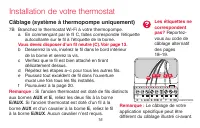
15 69-2718EF—01 Installation de votre thermostat Câblage (système à thermopompe uniquement) 7B Branchez le thermostat Wi-Fi à votre thermopompe. a En commençant par le fil C, faites correspondre l’étiquette autocollante sur le fil à l’étiquette de la borne. Vous devez disposer d’un fil neutre (C). V...
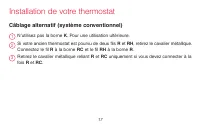
Page 88 - Câblage alternatif (système conventionnel); vous devez
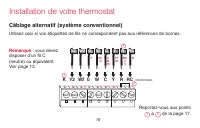
69-2718EF—01 16 Installation de votre thermostat Câblage alternatif (système conventionnel) Utilisez ceci si vos étiquettes de fils ne correspondent pas aux références de bornes. Remarque : vous devez disposer d’un fil C (neutre) ou équivalent. Voir page 13. Reportez-vous aux points 1 à 3 de la page...
Page 90 - Câblage alternatif (système à thermopompe uniquement)
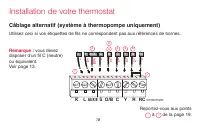
69-2718EF—01 18 Installation de votre thermostat Câblage alternatif (système à thermopompe uniquement) Utilisez ceci si vos étiquettes de fils ne correspondent pas aux références de bornes. Remarque : vous devez disposer d’un fil C (neutre) ou équivalent. Voir page 13. Reportez-vous aux points 1 à 7...
Page 91 - Code de câblage alternatif (système à thermopompe uniquement)
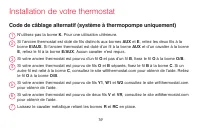
19 69-2718EF—01 Installation de votre thermostat Code de câblage alternatif (système à thermopompe uniquement) N’utilisez pas la borne K . Pour une utilisation ultérieure. Si l’ancien thermostat est doté de fils distincts aux bornes AUX et E , reliez les deux fils à la borne E/AUX . Si l’ancien ther...
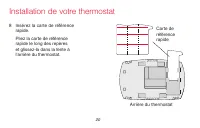
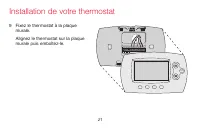
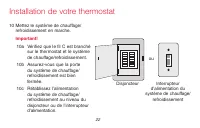
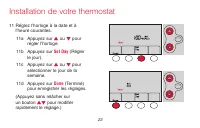
Page 92 - Insérez la carte de référence
69-2718EF—01 20 Installation de votre thermostat 8 Insérez la carte de référence rapide. Pliez la carte de référence rapide le long des repères et glissez-la dans la fente à l’arrière du thermostat. Arrière du thermostat Carte de référence rapide MCR33858 MCR33916
Page 96 - Si votre système est de type; Si le système est de type :
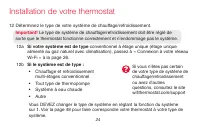
69-2718EF—01 24 Installation de votre thermostat 12 Déterminez le type de votre système de chauffage/refroidissement. Important! Le type de système de chauffage/refroidissement doit être réglé de sorte que le thermostat fonctionne correctement et n’endommage pas le système. 12a Si votre système est ...
Page 97 - 3a Appuyez sur le bouton
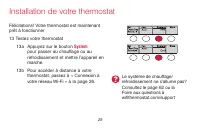
25 69-2718EF—01 Installation de votre thermostat Le système de chauffage/refroidissement ne s’allume pas? Consultez le page 62 ou la Foire aux questions à wifithermostat.com/support MCR33880 Félicitations! Votre thermostat est maintenant prêt à fonctionner13 Testez votre thermostat 13a Appuyez sur l...
Page 98 - Connexion à votre réseau Wi-Fi
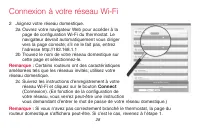
69-2718EF—01 26 Pour exécuter cette étape, vous devez avoir un appareil sans fil connecté à votre réseau sans fil. Tous ces types d’appareils sont valables : • Tablette (recommandé) • Ordinateur portatif (recommandé) • Téléphone intelligent Si vous êtes bloqué... à tout moment dans cette procédure, ...
Page 99 - Setup; b Sur votre appareil sans fil (tablette, ordinateur; Réseau domestique
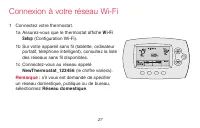
27 69-2718EF—01 1 Connectez votre thermostat. 1a Assurez-vous que le thermostat affiche Wi-Fi Setup (Configuration Wi-Fi). 1b Sur votre appareil sans fil (tablette, ordinateur portatif, téléphone intelligent), consultez la liste des réseaux sans fil disponibles. 1c Connectez-vous au réseau appelé Ne...
Page 101 - Si votre réseau Wi-Fi n’apparaît pas dans la liste de la page de
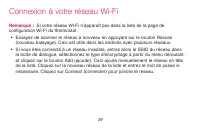
29 69-2718EF—01 Remarque : Si votre réseau Wi-Fi n’apparaît pas dans la liste de la page de configuration Wi-Fi du thermostat : • Essayez de scanner le réseau à nouveau en appuyant sur le bouton Rescan (nouveau balayage). Ceci est utile dans les endroits avec plusieurs réseaux. • Si vous êtes connec...
Page 103 - Enregistrement de votre thermostat en ligne
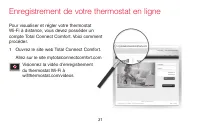
31 69-2718EF—01 M31570 Pour visualiser et régler votre thermostat Wi-Fi à distance, vous devez posséder un compte Total Connect Comfort. Voici comment procéder.1 Ouvrez le site web Total Connect Comfort. Allez sur le site mytotalconnectcomfort.com Visionnez la vidéo d’enregistrement du thermostat Wi...
Page 104 - Login; Consultez votre messagerie
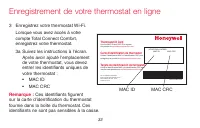
69-2718EF—01 32 2 Ouvrez une session ou créez un compte. Si vous possédez un compte, cliquez sur Login (Ouvrir une session) – ou –cliquez sur Create An Account (créer un compte). 2a Suivez les instructions à l’écran.2b Consultez votre messagerie et recherchez le message d’activation provenant de My ...
Page 106 - b Lorsque le thermostat est; Setup Complete
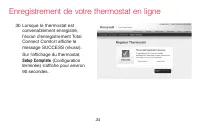
69-2718EF—01 34 3b Lorsque le thermostat est convenablement enregistré, l’écran d’enregistrement Total Connect Comfort affiche le message SUCCESS (réussi). Sur l’affichage du thermostat, Setup Complete (Configuration terminée) s’affiche pour environ 90 secondes. Enregistrement de votre thermostat en...
Page 108 - Réglage de l’heure et du jour
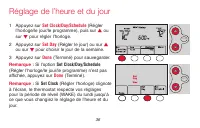
69-2718EF—01 36 1 Appuyez sur Set Clock/Day/Schedule (Régler l’horloge/le jour/le programme), puis sur s ou sur t pour régler l’horloge. 2 Appuyez sur Set Day (Régler le jour) ou sur s ou sur t pour choisir le jour de la semaine. 3 Appuyez sur Done (Terminé) pour sauvegarder. Remarque : Si l’option ...
Page 109 - Appuyez; pour sélectionner; ou; Les options peuvent varier; Réglage du ventilateur
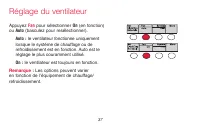
37 69-2718EF—01 Appuyez Fan pour sélectionner On (en fonction) ou Auto (basculez pour resélectionner). Auto : le ventilateur fonctionne uniquement lorsque le système de chauffage ou de refroidissement est en fonction. Auto est le réglage le plus couramment utilisé. On : le ventilateur est toujours e...
Page 110 - Appuyez sur; Sélection du mode de fonctionnement du système; Selon la façon dont
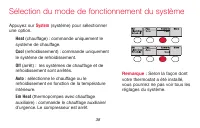
69-2718EF—01 38 Appuyez sur System (système) pour sélectionner une option. Heat (chauffage) : commande uniquement le système de chauffage. Cool (refroidissement) : commande uniquement le système de refroidissement. Off (arrêt) : les systèmes de chauffage et de refroidissement sont arrêtés. Auto : sé...
Page 111 - Réglage des programmes
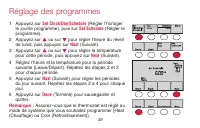
39 69-2718EF—01 1 Appuyez sur Set Clock/Day/Schedule (Régler l’horloge/ le jour/le programme), puis sur Set Schedule (Régler le programme). 2 Appuyez sur s ou sur t pour régler l’heure du réveil de lundi, puis appuyez sur Next (Suivant). 3 Appuyez sur s ou sur t pour régler la température pour cette...
Page 112 - Dérogation temporaire de la programmation
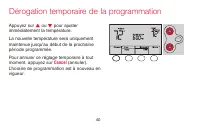
69-2718EF—01 40 Appuyez sur s ou t pour ajuster immédiatement la température.La nouvelle température sera uniquement maintenue jusqu’au début de la prochaine période programmée.Pour annuler ce réglage temporaire à tout moment, appuyez sur Cancel (annuler). L’horaire de programmation est à nouveau en...
Page 113 - Appuyez sur; Dérogation permanente de la programmation
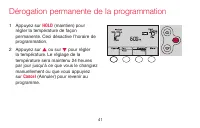
41 69-2718EF—01 1 Appuyez sur HOLD (maintien) pour régler la température de façon permanente. Ceci désactive l’horaire de programmation. 2 Appuyez sur s ou sur t pour régler la température. Le réglage de la température sera maintenu 24 heures par jour jusqu’à ce que vous le changiez manuellement ou ...
Page 114 - Annulation de l’enregistrement du thermostat
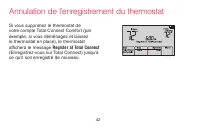
69-2718EF—01 42 Si vous supprimez le thermostat de votre compte Total Connect Comfort (par exemple, si vous déménagez et laissez le thermostat en place), le thermostat affichera le message Register at Total Connect (Enregistrez-vous sur Total Connect) jusqu’à ce qu’il soit enregistré de nouveau. Ann...
Page 116 - Mises à jour du logiciel; Si le thermostat n’est pas connecté
69-2718EF—01 44 Mises à jour du logiciel Honeywell introduit régulièrement des mises à jour du logiciel pour ce thermostat. Les mises à jour s’effectuent automatiquement par votre connexion Wi-Fi. Tous vos réglages sont sauvegardés; vous n’avez donc pas besoin de procéder à des changements après la ...
Page 117 - Technologie Smart Response
45 69-2718EF—01 M33881 Celle-ci permet au thermostat « d’apprendre » combien de temps il faut à votre système de chauffage/refroidissement pour atteindre le réglage de température programmé, afin que la température voulue soit obtenue à l’heure programmée.Par exemple : réglez l’heure de réveil à 6 h...
Page 118 - Le message; Protection du compresseur
69-2718EF—01 46 Cette fonction force le compresseur à attendre quelques minutes avant un redémarrage, pour éviter d’endommager l’équipement. Le message Cool On (Refroidissement en marche) (ou Heat On [Chauffage en marche] pour une pompe à chaleur) clignote en attendant. Protection du compresseur M33...
Page 119 - Commutation automatique; la fonction de configuration système
47 69-2718EF—01 Celle-ci est utilisée dans les climats où le conditionnement d’air et le chauffage sont utilisés le même jour.Lorsque le système est réglé sur Auto , le thermostat sélectionne automatiquement le chauffage ou le refroidissement en fonction de la température intérieure.L’écart entre le...
Page 120 - Fonctions et options de configuration
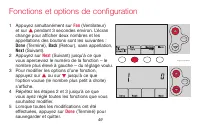
69-2718EF—01 48 Vous pouvez modifier des options pour plusieurs fonctions du système. Les fonctions disponibles dépendent de votre type de système. Les fonctions ainsi que les options disponibles sont décrites aux pages 50–54.Ce thermostat est préréglé pour un système de chauffage/refroidissement à ...
Page 122 - Configuration du système; Fonction
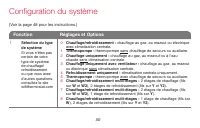
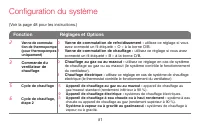
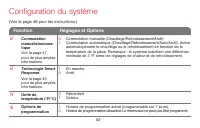
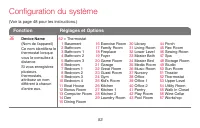
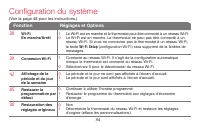
69-2718EF—01 50 Configuration du système (Voir la page 48 pour les instructions.) Fonction Réglages et Options 1 Sélection du type de système Si vous n’êtes pas certain de votre type de système de chauffage/ refroidissement ou que vous avez d’autres questions, consultez le site wifithermostat.com 0 ...
Page 127 - Questions fréquemment posées
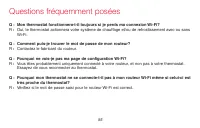
55 69-2718EF—01 : Q Mon thermostat fonctionnera-t-il toujours si je perds ma connexion Wi-Fi? : R Oui, le thermostat actionnera votre système de chauffage et/ou de refroidissement avec ou sans Wi-Fi. : Q Comment puis-je trouver le mot de passe de mon routeur? : R Contactez le fabricant du routeur. :...
Page 130 - Dépannage; Perte du signal
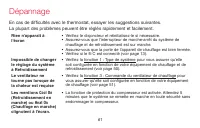
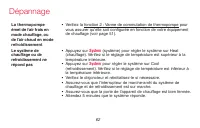
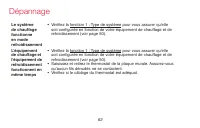
69-2718EF—01 58 Dépannage Perte du signal Si l’indicateur no-Wi-Fi (pas de Wi-Fi) s’affiche à la place de l’indicateur de puissance du signal Wi-Fi dans le coin supérieur droit de l’écran d’accueil : • Assurez-vous que la Wi-Fi fonctionne chez vous en la vérifiant sur un autre appareil; si elle ne f...
Page 131 - Codes d’erreur
59 69-2718EF—01 Dépannage Codes d’erreur Dans le cas de certains problèmes, l’écran du thermostat affiche un code qui désigne la nature du problème. Tout d’abord, les codes d’erreur sont affichés seuls dans la zone de l’heure de l’écran; après quelques minutes, l’écran d’accueil s’affiche et le code...
Page 132 - Code d’erreur
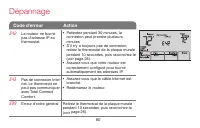
69-2718EF—01 60 Dépannage M33998 Code d’erreur Action E42 Le routeur ne fournit pas d’adresse IP au thermostat. • Patientez pendant 30 minutes, la connexion peut prendre plusieurs minutes. • S’il n’y a toujours pas de connexion, retirez le thermostat de la plaque murale pendant 10 secondes, puis rac...
Page 136 - Glossaire
69-2718EF—01 64 Glossaire Fil C Le fil « C », ou neutre, amène l’alimentation 24 V ca au thermostat à partir du système de chauffage/ refroidissement. Certains anciens thermostats mécaniques ou à pile peuvent ne pas être dotés de ce fil. Il est nécessaire à l’établissement d’une connexion Wi-Fi à vo...
Page 137 - Informations réglementaires
65 69-2718EF—01 Informations réglementaires Déclaration de conformité à la FCC (partie 15.19) (États-Unis uniquement) Cet appareil est conforme à la partie 15 du règlement de la FCC. Son fonctionnement est soumis aux deux conditions suivantes :1 Ce dispositif ne doit pas causer d’interférences nuisi...
Page 139 - Garantie limitée d’un an
67 69-2718EF—01 Garantie limitée d’un an Honeywell garantit ce produit, à l’exception des piles, contre tout défaut de pièce ou de main-d’œuvre, durant une période d’un (1) an à partir de la date d’achat par le consommateur si le produit est utilisé et entretenu convenablement. En cas de défectuosit...
Page 140 - Systèmes d’automatisation et de régulation
69-2718EF-01 ® Marque de commerce déposée américaine.Apple, iPhone, iPad, iPod touch et iTunes sont des marques de commerce de Apple Inc. Toutes les autres marques de commerce sont propriété de leurs propriétaires respectifs.© 2012 Honeywell International Inc.69-2718EF— 01 M.S. 08-12Imprimé aux État...












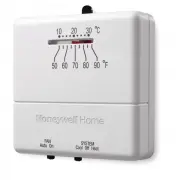 Honeywell CT31A
User Manual
Honeywell CT31A
User Manual
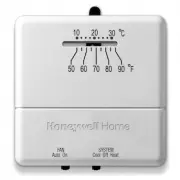 Honeywell CT31A1003/E1
Manual
Honeywell CT31A1003/E1
Manual
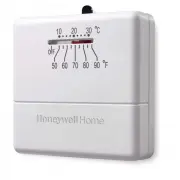 Honeywell CT33A
User Manual
Honeywell CT33A
User Manual
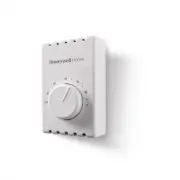 Honeywell CT410B
User Manual
Honeywell CT410B
User Manual
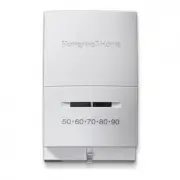 Honeywell CT50K1002
User Manual
Honeywell CT50K1002
User Manual
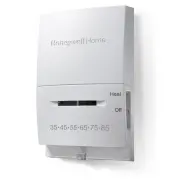 Honeywell CT50K1028
User Manual
Honeywell CT50K1028
User Manual
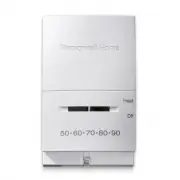 Honeywell CT53K
User Manual
Honeywell CT53K
User Manual
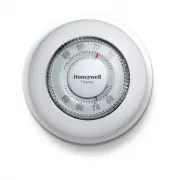 Honeywell CT87K
User Manual
Honeywell CT87K
User Manual
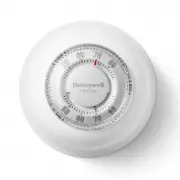 Honeywell CT87K1004/E1
User Manual
Honeywell CT87K1004/E1
User Manual
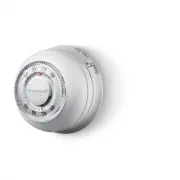 Honeywell CT87N
User Manual
Honeywell CT87N
User Manual
 Honeywell RCHTSENSOR-2PK/E
Installation Manual
Honeywell RCHTSENSOR-2PK/E
Installation Manual
 Honeywell RLV4305A
User Manual
Honeywell RLV4305A
User Manual
 Honeywell RTH111B
User Manual
Honeywell RTH111B
User Manual