SteelSeries 62599 - User Manual
SteelSeries 62599 Computer Mouse – User Manual, read for free online in PDF format. We hope this helps you resolve any issues you may have. If you have further questions, please contact us through the contact form.

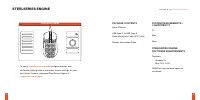
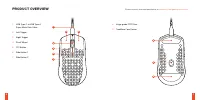

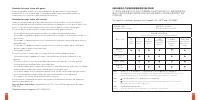

Table of Contents:
- Page 2 – CONTENTS; WELCOME TO AEROX 3
- Page 3 – STEELSERIES ENGINE; PACKAGE CONTENTS
- Page 4 – PRODUCT OVERVIEW
- Page 5 – SETUP; ESPAÑOL
- Page 6 – 繁體中文
- Page 7 – 日本語; 한국어
- Page 8 – DEUTSCH; РУССКИЙ
- Page 9 – FRANÇAIS; ITALIANO
- Page 10 – PORTUGUÊS; POLSKIE
- Page 11 – REGULATORY
- Page 12 – SteelSeries Products and Australian Consumer Law
PRODUCT
INFORMATION
GUIDE
AEROX 3
"Loading the manual" means you need to wait until the file loads and becomes available for online reading. Some manuals are very large, and the time they take to appear depends on your internet speed.
Summary
3 CONTENTS WELCOME TO AEROX 3 Your new mouse is the result of our unyielding pursuit of perfection for over 20 years. We poured our hearts into creating the best possible ultra lightweight gaming mouse, optimizing it for speed and performance. The SteelSeries Aerox 3 is engineered to get the fastest...
STEELSERIES ENGINE 4 5 STEELSERIES ENGINE To enjoy GameSense integration , program macros, and customize lighting effects and other mouse settings on your new Aerox 3 mouse, download SteelSeries Engine at steelseries.com/engine find help at support.steelseries.com PACKAGE CONTENTS Aerox 3 Mouse USB ...
1 2 3 4 6 7 5 8 8 9 1 2 3 4 6 7 5 8 8 9 6 7 PRODUCT OVERVIEW Find accessories and replacement parts at steelseries.com/gaming-accessories 1 USB Type-C to USB Type-A Super Mesh Data Cable 2 Left Trigger 3 Right Trigger 4 Scroll Wheel 5 CPI Button 6 Side Button 1 7 Side Button 2 8 Virgin-grade PTFE Fe...