Page 2 - CONTENTS; Product overview; Regulatory
CONTENTS Product overview 6–7 Setup 8 Connecting via 2.4 GHz wirelessConnecting via cable Battery level indicator 9 Translations Español 11 简体中文 12 繁體中文 14 日本語 15 한국어 17 Deutsch 19 Русский 20 Français 22 Italiano 24 Português 26 Polskie 28 Regulatory 30
Page 3 - PRIMED FOR VICTORY
3 PRIMED FOR VICTORY Your new mouse is the result of our unyielding pursuit of perfection for over 15 years. We poured our hearts into creating the best possible gaming mouse by pushing the boundaries of performance through precision, comfort, and durability. The Prime Wireless is our glory; now go ...
Page 4 - STEELSERIES ENGINE; To enjoy
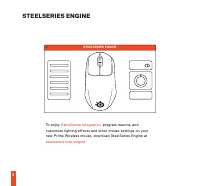
STEELSERIES ENGINE 4 STEELSERIES ENGINE To enjoy GameSense integration , program macros, and customize lighting effects and other mouse settings on your new Prime Wireless mouse, download SteelSeries Engine at steelseries.com/engine
Page 5 - PACKAGE CONTENTS
5 find help at support.steelseries.com PACKAGE CONTENTS Prime Wireless Mouse USB Type-C to USB Type-A Cable (6'10" / 2.08 m) Extension Adapter USB Type-C Dongle Product Information Guide SYSTEM REQUIREMENTS / COMPATIBILITY PC Mac Xbox STEELSERIES ENGINE SOFTWARE REQUIREMENTS Platforms Windows 7+...
Page 6 - PRODUCT OVERVIEW; Scroll Wheel
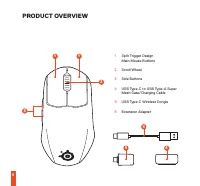
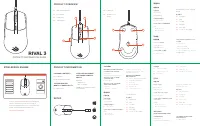
1 1 3 7 10 7 7 8 2 9 5 6 4 6 PRODUCT OVERVIEW 1 Split Trigger Design Main Mouse Buttons 2 Scroll Wheel 3 Side Buttons 4 USB Type-C to USB Type-A Super Mesh Data/Charging Cable 5 USB Type-C Wireless Dongle 6 Extension Adapter
Page 7 - Virgin Grade PTFE Mouse Feet
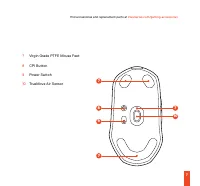
1 1 3 7 10 7 7 8 2 9 5 6 4 7 find accessories and replacement parts at steelseries.com/gaming-accessories 7 Virgin Grade PTFE Mouse Feet 8 CPI Button 9 Power Switch 10 TrueMove Air Sensor
Page 8 - , download SteelSeries; SETUP; CONNECTING VIA
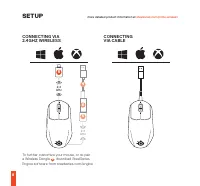
4 6 5 5 2.4 GHz 2.4 GHz To further customize your mouse, or re-pair a Wireless Dongle 5 , download SteelSeries Engine software from steelseries.com/engine 8 SETUP more detailed product information at steelseries.com/prime-wireless CONNECTING VIA 2.4 GHZ WIRELESS CONNECTING VIA CABLE
Page 9 - CPI BUTTON FUNCTIONS; CPI VALUE
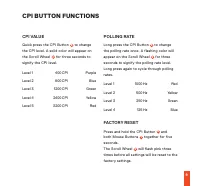
9 CPI BUTTON FUNCTIONS CPI VALUE Quick press the CPI Button 8 to change the CPI level. A solid color will appear on the Scroll Wheel 2 for three seconds to signify the CPI level. Level 1 400 CPI Purple Level 2 800 CPI Blue Level 3 1200 CPI Green Level 4 2400 CPI Yellow Level 5 3200 CPI Red POLLING R...
Page 10 - BATTERY LEVEL INDICATOR; Red
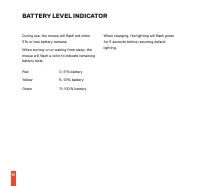
10 BATTERY LEVEL INDICATOR During use, the mouse will flash red when 5 % or less battery remains. When turning on or waking from sleep, the mouse will flash a color to indicate remaining battery level: Red 0–5 % battery Yellow 6–10 % battery Green 11–100 % battery When charging, the lighting will fl...
Page 11 - ESPAÑOL; CONTENIDO DE LA CAJA; CONFIGURACIÓN; CONEXIÓN VÍA INALÁMBRICA 2,4 GHZ; FUNCIONES DEL BOTÓN CPI; VALOR CPI
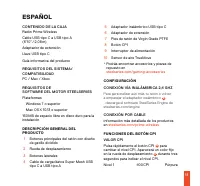
11 ESPAÑOL CONTENIDO DE LA CAJA Ratón Prime WirelessCable USB tipo C a USB tipo A (6’10” / 2,08 m)Adaptador de extensiónLlave USB tipo C Guía informativa del producto REQUISITOS DEL SISTEMA/ COMPATIBILIDAD PC / Mac / Xbox REQUISITOS DE SOFTWARE DEL MOTOR STEELSERIES Plataformas Windows 7 o superior ...
Page 12 - INDICADOR DE NIVEL DE BATERÍA; 包装内容
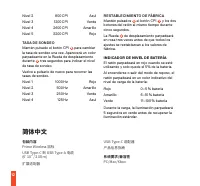
12 Nivel 2 800 CPI Azul Nivel 3 1200 CPI Verde Nivel 4 2400 CPI Amarillo Nivel 5 3200 CPI Rojo TASA DE SONDEO Mantén pulsado el botón CPI 8 para cambiar la tasa de sondeo una vez. Aparecerá un color parpadeante en la Rueda de desplazamiento durante 2 tres segundos para indicar el nivel de tasa de so...
Page 13 - 通过电缆连接
13 STEELSERIES ENGINE 软件要求 平台 Windows 7+ Mac OS X 10.13+160 MB 可用硬盘空间供安装使用 产品概览 1 分裂触发设计主鼠标按钮 2 滚轮 3 侧部侧键 4 USB Type-C 到 USB Type-A 超级网格数 据/充电线 5 USB Type-C 无线适配器 6 扩展适配器 7 Virgin Grade PTFE 鼠标支脚 8 CPI 按钮 9 电源开关 10 TrueMove 空气传感器 * 如需配件和更换部件,请访问 steelseries.com/gaming-accessories 设置 连接 VIA 2.4 GHZ 无...
Page 14 - 繁體中文; 包裝內含; 透過連接線連接
14 色,指示剩余的电量:红色 0–5 % 电量 黄色 6–10 % 电量 绿色 11–100 % 电量 在充电时,灯光将闪烁绿色5秒,然后,恢复默 认灯光。 繁體中文 包裝內含 Prime Wireless 滑鼠USB Type-C 轉 USB Type-A 連接線 (6 呎 10 吋 / 2.08 米) 擴充轉接器USB Type-C 無線接收器 產品資訊指南 系統要求 /相容性 個人電腦 / Mac / Xbox STEELSERIES ENGINE 軟體要求 平台 Windows 7+ Mac OS X 10.13+160 MB 可用於安裝的硬碟空間 產品概覽 1 分離觸發式設計滑鼠按...
Page 15 - 日本語; パッケージの内容
15 CPI 值 快速按下 CPI 按鍵 8 以更改 CPI 級別。 滾輪 2 上會亮起一種顏色三秒鐘,以表示 CPI 級別。第 1 級 400 CPI 紫色 第 2 級 800 CPI 藍色 第 3 級 1200 CPI 綠色 第 4 級 2400 CPI 黃色 第 5 級 3200 CPI 紅色 回報率 長按 CPI 鍵 8 更改回報率。 滾輪 2 上會閃爍一 種顏色三秒鐘,以表示回報率水平。 再次長按即可依照循環更改回報率。 第 1 級 1000 Hz 紅色 第 2 級 500 Hz 黃色 第 3 級 250 Hz 綠色 第 4 級 125 Hz 藍色 恢復原廠設定 同時按住 CPI 按...
Page 16 - VIAケーブルの接続
16 容量が必要です 製品概要 1 スプリットトリガーデザイン メインマウス ボタン 2 スクロールホイール 3 サイドボタン 4 USB Type-C → USB Type-A スーパーメッ シュデータ/充電ケーブル 5 USB Type - Cワイヤレスドングル 6 拡張アダプタ 7 Virgin Grade PTFEマウスフィート 8 CPI ボタン 9 電源スイッチ 10 TrueMoveエアセンサー * アクセサリおよび交換部品は、 steelseries.com/gaming-accessories をご覧 ください セットアップ VIA 2.4 GHZワイヤレスの接続 さらにマウ...
Page 17 - バッテリーレベルインジケータ; 한국어; 패키지 내용물
17 バッテリーレベルインジケータ 使用中、バッテリー残量が5%以下になるとマウ スが赤く点滅します。 電源を入れたり、スリープから復帰したりすると、 マウスはバッテリー残量を示す色で点滅します。 赤 0–5 % バッテリー 黄色 6–10 % バッテリー 緑 11–100 %バッテリー 充電中、照明は5秒間緑色に点滅してから、デフォ ルトのライトに戻ります。 한국어 패키지 내용물 Prime Wireless 마우스USB-C to USB-A 케이블 (6’10”/2.08m)연장 어댑터USB-C 동글 제품 정보 가이드 시스템 요구 사항/호환성 PC/Mac/Xbox STEEL...
Page 18 - DEUTSCH; PACKUNGSINHALT
18 케이블로 연결 제품에 대한 자세한 정보는 steelseries. com/ prime-wireless 에서 확인하세요 CPI 버튼 기능 CPI 값 CPI 버튼을 빠르게 눌러 8 CPI 레벨을 변경하십시오. 스크롤 휠에 CPI 레벨을 나타내는 단색이 2 3초 동안 표시됩니다. 레벨 1 400CPI 자주색 레벨 2 800CPI 청색 레벨 3 1200CPI 녹색 레벨 4 2400CPI 노란색 레벨 5 3200CPI 적색 폴링 레이트 CPI 버튼을 길게 눌러 8 폴링 레이트를 한 번 변경하십시오. 스크롤 휠에 폴링 레이트 레벨을 나타내...
Page 19 - ANSCHLUSS VIA 2,4 GHZ DRAHTLOS; erneut zu koppeln, laden; ANSCHLUSS VIA KABEL
19 SYSTEMVORAUSSETZUNGEN/ KOMPATIBILITÄT PC / Mac / Xbox STEELSERIES ENGINE SOFTWARE-VORAUSSETZUNGEN Plattformen Windows 7+ Mac OS X 10.13+160 MB freier Festplattenspeicher für die Installation PRODUKTÜBERSICHT 1 Split-Trigger-Design Maustasten 2 Scrollrad 3 Seitliche Taste 4 USB Typ-C zu USB Typ-A ...
Page 20 - BATTERIESTANDSANZEIGE; РУССКИЙ; ОБЗОР ИЗДЕЛИЯ
20 Stufe 2 500 Hz Gelb Stufe 3 250 Hz Grün Stufe 4 125 Hz Blau AUF WERKSEINSTELLUNGEN ZURÜCKSETZEN Halten Sie die CPI-Taste und beide 8 Maustasten fünf Sekunden 1 lang gedrückt. Das Scroll-Rad 2 blinkt dreimal rosa, bevor alle Einstellungen auf die Werkseinstellungen zurückgesetzt werden. BATTERIEST...
Page 21 - ПОДКЛЮЧЕНИЕ С ПОМОЩЬЮ КАБЕЛЯ
21 конструкцией Split Trigger 2 Колесо прокрутки 3 Боковые кнопки 4 Кабель Super Mesh USB Type-C — USB Type-A для зарядки/передачи данных 5 Беспроводной ключ USB Type-C 6 Переходник удлинителя 7 Фторопластовые опорные накладки 8 Кнопка CPI 9 Выключатель питания 10 Пневмодатчик TrueMove * Принадлежно...
Page 22 - ИНДИКАТОР УРОВНЯ ЗАРЯДА; FRANÇAIS; CONTENU DE L’EMBALLAGE; PRÉSENTATION DES PRODUITS
22 кнопку CPI 8 и обе кнопки мыши 1 в течение пяти секунд.Колесо прокрутки 2 трижды мигнет розовым цветом, после чего все настройки будут сброшены до заводских. ИНДИКАТОР УРОВНЯ ЗАРЯДА Во время использования при заряде батареи 5% или менее индикатор мыши мигает красным цветом.При включении или выход...
Page 23 - CONFIGURATION; CONNEXION VIA 2,4 GHZ SANS FIL; FONCTIONS DU BOUTON CPI; VALEUR CPI; INDICATEUR DE NIVEAU DE BATTERIE
23 7 Pieds de souris en Virgin Grade PTFE 8 Bouton CPI 9 Interrupteur d’alimentation 10 Capteur d’air TrueMove * Trouvez des accessoires et des pièces de rechange sur steelseries.com/gaming-accessories CONFIGURATION CONNEXION VIA 2,4 GHZ SANS FIL Pour personnaliser davantage votre souris ou appairer...
Page 24 - ITALIANO; CONTENUTO DELLA CONFEZIONE; PANORAMICA DEL PRODOTTO; COLLEGAMENTO WIRELESS A 2,4 GHZ; Per personalizzare ulteriormente il mouse, o
24 souris fait clignoter une couleur pour indiquer le niveau de batterie restant : Rouge 0–5 % de batterie Jaune 6–10 % de batterie Vert 11–100 % de batterie Lors de la mise en charge, le voyant clignote en vert pendant 5 secondes avant de revenir au voyant par défaut. ITALIANO CONTENUTO DELLA CONFE...
Page 25 - associare nuovamente un dongle wireless; CONNESSIONE VIA CAVO; FUNZIONI DEL PULSANTE CPI; VALORE CPI
25 associare nuovamente un dongle wireless 5 , scaricare il software SteelSeries Engine da steelseries.com/engine CONNESSIONE VIA CAVO Informazioni più dettagliate sul prodotto sono disponibili su steelseries. com/prime-wireless FUNZIONI DEL PULSANTE CPI VALORE CPI Premere rapidamente il pulsante CP...
Page 26 - PORTUGUÊS; CONTEÚDO DA EMBALAGEM; DESCRIÇÃO GERAL DO PRODUTO; LIGAÇÃO SEM FIOS DE 2,4 GHZ; FUNÇÕES DO BOTÃO CPI
26 PORTUGUÊS CONTEÚDO DA EMBALAGEM Rato Prime WirelessCabo USB tipo C para USB tipo A (6’10”/2,08 m)Adaptador de extensãoDongle USB tipo C Guia de informações do produto REQUISITOS DO SISTEMA/ COMPATIBILIDADE PC / Mac / Xbox REQUISITOS DO SOFTWARE DO MOTOR STEELSERIES Plataformas Windows 7+ Mac OS X...
Page 27 - INDICADOR DE NÍVEL DA BATERIA; POLSKIE; ZAWARTOŚĆ OPAKOWANIA
27 segundos para indicar o nível de CPI.Nível 1 400 CPI Roxo Nível 2 800 CPI Azul Nível 3 1200 CPI Verde Nível 4 2400 CPI Amarelo Nível 5 3200 CPI Vermelho TAXA DE AMOSTRAGEM Prima continuamente o botão CPI 8 para alterar a taxa de amostragem uma vez. Aparecerá uma cor intermitente na roda de desloc...
Page 28 - PODŁĄCZANIE KABLA VIA; FUNKCJE PRZYCISKU CPI; WARTOŚĆ CPI
28 PC / Mac / Xbox WYMAGANIA OPROGRAMOWANIA STEELSERIES ENGINE Platformy Windows 7+ Mac OS X 10.13+160 MB wolnego miejsca na dysku do instalacji PRZEGLĄD PRODUKTU 1 Rozdzielone główne przyciski myszy 2 Kółko przewijania 3 Przyciski boczne 4 Kabel USB typu-C do USB typu-A super Mesh do transmisji dan...
Page 30 - REGULATORY; Europe – EU Declaration of Conformity
30 REGULATORY Europe – EU Declaration of Conformity Hereby, SteelSeries ApS. declares that the equipment which is compliance with directive RoHS 2.0 (2015/863/EU), R.E.D (2014/53/EU), EMC Directive (2014/30/EU), and LVD (2014/35/EU) which are issued by the Commission of the European Community.The fu...
Page 31 - Federal Communication Commission Interference Statement; Radiation Exposure Statement:
31 compliance with the local regulations or contact your local city office, your household waste disposal service or the shop where you purchased the product. Federal Communication Commission Interference Statement This device complies with Part 15 of the FCC Rules. Operation is subject to the follo...
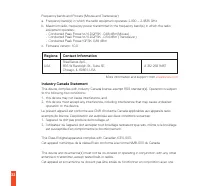
Page 32 - Regions; Industry Canada Statement
32 Frequency bands and Powers (Mouse and Transceiver)a. Frequency band(s) in which the radio equipment operates: 2.400 – 2.4835 GHzb. Maximum radio-frequency power transmitted in the frequency band(s) in which the radio equipment operates:• Conducted Peak Power/ л /4-DQPSK: -0.88 dBm(Mouse) • Conduc...
Page 35 - 低功率電波輻射性電機管理辦法
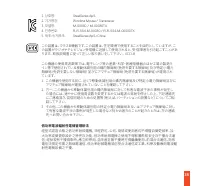
35 1. 상호명: SteelSeries ApS. 2. 기기명칭: Wireless Mouse / Transceiver 3. 모델명: M-00030 / M-00030TX 4. 인증번호: R-R-SS4-M-00030 / R-R-SS4-M-00030TX 5. 제조사/제조국: SteelSeries ApS./China この装置は、クラスB機器です。この装置は、住宅環境で使用することを目的とし ていますが、こ の装置がラジオやテレビジョン受信機に近接して使用されると、受 信障害を引き起こすことがあ ります。 取扱説明書に従って正しい取り扱いをして下さい。 VCCI-B...
Page 39 - Restriction on Hazardous Substances statement (India)
39 • You would not have engaged the service if you had known the nature and extent of the problem. • The service does not meet the reasonable expectations for that type of service, and the problem cannot be rectified within a reasonable time. • You told the supplier that you wanted the service for a...
Page 44 - learn more at