Page 2 - Logitech® HD Pro Webcam C920; Contents; English 3
2 Logitech® HD Pro Webcam C920 Contents English 3 Español 13 Français 23 Português 33 www.logitech.com/support 43
Page 3 - Features; Carl Zeiss® autofocus HD 1080p lens
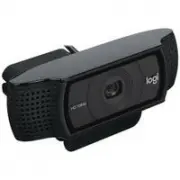
English 3 Logitech® HD Pro Webcam C920 Features 1. Carl Zeiss® autofocus HD 1080p lens 2. Microphone 3. Activity light 4. Flexible clip/base 5. Tripod attachment 6. Product documentation Setup Guide Logitech® HD Pro Webcam C920 5 6 1 4 3 2
Page 4 - Thank you for buying your C920!; For placement on a monitor
4 English Getting started with Thank you for buying your C920! Use this guide to set up your Logitech webcam and to begin making video calls. If you have questions before you start, please visit the websites listed below to learn more about Logitech webcams and video calling. www.logitech.com/su...
Page 5 - Install the software; For Windows XP, Windows Vista; Getting started with video calling; Your webcam comes with Logitech
English 5 Logitech® HD Pro Webcam C920 2 Install the software To get started, you will need to download and install the Logitech Webcam Software. Make sure your computer has access to the internet. For Windows XP, Windows Vista or Window 7: Visit www.logitech.com/LWS to download your webcam soft...
Page 6 - Setting up Logitech Vid HD; Install Logitech Vid HD
6 English Getting started with Setting up Logitech Vid HD 1 Install Logitech Vid HD Tip: If you prefer another video-calling application, you will need to download and install third- party software.Learn more: http://www.logitech.com/webcam_howto 2 Create an account Follow the on-screen instru...
Page 8 - Navigating the Logitech Webcam Software
8 English Getting started with Navigating the Logitech Webcam Software 4 5 6 7 9 8 3 1 2 10 11 1. Capture pictures and videos 2. View captured images and share via e-mail, Facebook,® or YouTube®. Registration may be required. 3. An area for easy access to your installed webcam related applicatio...
Page 9 - Capturing video and
English 9 Logitech® HD Pro Webcam C920 Capturing video and snapping pictures Quick Capture allows you to take photos or record videos easily. You have easy access to webcam controls and settings as well as video effects to personalize your images and recordings. 1. Preview window 2. Capture mode:...
Page 10 - Getting started with; Using motion detection
10 English Getting started with Using motion detection • Set up your webcam to record video when it detects movement. • Adjust captured video duration and detection sensitivity. • Captured video is automatically saved to your computer. • View content in the Gallery or upload it using the One-tou...
Page 11 - Fine tuning your webcam during; Follow my face; Get more applications
English 11 Logitech® HD Pro Webcam C920 Fine tuning your webcam during a video call 1. Launch the webcam controller when on a video call. 2. Hide your video image with a photo while your webcam stays connected. 3. Use pan and tilt to find the best angle. 4. Zoom in or out to include/exclude your ...
Page 12 - Getting help; Click on the help icon to access a complete
12 English Getting started with Getting help Click on the help icon to access a complete user manual, or watch how-to videos that show you how to get the most out of your Logitech webcam and software. Tip: If you are not sure about a feature, click the help icon, and our manual will open to the ...
Page 13 - Características
Español 13 Logitech® HD Pro Webcam C920 Características 1. Objetivo Carl Zeiss® con enfoque automático, alta definición y 1080p 2. Micrófono 3. Diodo de actividad 4. Clip/base versátil 5. Acoplamiento de trípode 6. Documentación del producto Setup Guide Logitech® HD Pro Webcam C920 5 6 1 4 3 2
Page 14 - Utilización; Gracias por la compra de C920.; Para la colocación en un monitor
14 Español Utilización Gracias por la compra de C920. Usa esta guía para configurar la cámara Web Logitech y comenzar a realizar videoconferencias. Si tienes alguna pregunta antes de comenzar, visita los sitios Web que aparecen abajo para obtener más información sobre las cámaras Web Logitech y vid...
Page 15 - Instala el software; Para Windows XP, Windows Vista; Introducción a videoconferencias; La cámara Web se entrega
Español 15 Logitech® HD Pro Webcam C920 2 Instala el software Para empezar, tendrás que descargar e instalar Logitech Webcam Software. Asegúrate de que tu computadora tiene acceso a Internet. Para Windows XP, Windows Vista o Window 7: Visita www.logitech.com/LWS para descargar el software de cámar...
Page 16 - Configuración de Logitech Vid HD; Instala Logitech Vid HD
16 Español Utilización Configuración de Logitech Vid HD 1 Instala Logitech Vid HD Se recomienda la instalación de la cámara Web Logitech y del software Logitech Vid HD. Consejo: si prefieres otra aplicación de video- conferencias, deberás descargar e instalar el software de otro fabricante.Más inf...
Page 18 - Navegación por el software de la cámara Web Logitech
18 Español Utilización Navegación por el software de la cámara Web Logitech 4 5 6 7 9 8 3 1 2 10 11 1. Captura imágenes y videos 2. Ve las imágenes capturadas y compártelas por correo electrónico, Facebook® o YouTube®. Es posible que sea necesario registrarse. 3. Un área de acceso rápido a las apli...
Page 19 - Capturar fotografías y videos
Español 19 Logitech® HD Pro Webcam C920 Capturar fotografías y videos QuickCapture permite hacer fotografías y grabar video fácilmente. Ofrece acceso fácil a controles y parámetros de la cámara Web, así como a efectos de video para personalizar imágenes y grabaciones. 1. Ventana de vista previa 2. ...
Page 20 - Uso de la detección de movimiento
20 Español Utilización Uso de la detección de movimiento • Configura la cámara Web para que grabe video cuando detecte movimiento. • Ajusta la duración del video capturado y la sensibilidad de detección. • El video capturado se guarda automáticamente en la computadora. • Ve contenido en la Galería ...
Page 21 - Ajuste de la cámara Web durante; Seguir mi cara; Obtén más aplicaciones para
Español 21 Logitech® HD Pro Webcam C920 Ajuste de la cámara Web durante una videoconferencia 1. Inicia el controlador de cámara Web cuando te encuentres en una videoconferencia. 2. Oculta tu imagen de video con una foto mientras la cámara está conectada. 3. Usa panorámico e inclinación para obtener...
Page 22 - Obtener ayuda
22 Español Utilización Obtener ayuda Haz click en el icono de ayuda para acceder a un manual de usuario o ver videos demostrativos y aprender a obtener el máximo de la cámara Web y el software Logitech. Consejo: si tienes dudas sobre una función, haz click en el icono de ayuda y nuestro manual se a...
Page 23 - Fonctionnalités; Lentille HD 1080p avec mise au point
Français 23 Logitech® HD Pro Webcam C920 Fonctionnalités 1. Lentille HD 1080p avec mise au point automatique Carl Zeiss® 2. Microphone 3. Témoin d'activité 4. Clip/base flexible 5. Fixation pour trépied 6. Documentation sur le produit Setup Guide Logitech® HD Pro Webcam C920 5 6 1 4 3 2
Page 24 - Première utilisation; Merci d'avoir acheté la caméra; Installation sur un écran d'ordinateur
24 Français Première utilisation Merci d'avoir acheté la caméra Web C920 ! Utilisez ce guide pour configurer votre caméra Web Logitech et passer des appels vidéo. Si vous avez des questions avant de commencer, veuillez consulter les sites Web répertoriés ci- dessous pour en savoir plus sur les camé...
Page 25 - Installer le logiciel; Pour Windows XP, Windows Vista; Logitech VidTM HD est fourni avec
Français 25 Logitech® HD Pro Webcam C920 2 Installer le logiciel Pour commencer, téléchargez et installez le logiciel Logitech Webcam Software. Assurez-vous que votre ordinateur est connecté à Internet. Pour Windows XP, Windows Vista ou Window 7: Pour télécharger le logiciel de caméra Web, rendez-...
Page 26 - Vid; Installez Logitech Vid HD
26 Français Première utilisation Installation du logiciel Logitech Vid HD 1 Installez Logitech Vid HD Nous vous recommandons d'installer le logiciel de caméra Web Logitech ainsi que le logiciel Logitech Vid HD. Remarque: si vous préférez utiliser une autre application d'appels vidéo, vous deve...
Page 28 - Utilisation du logiciel Logitech Webcam Software
28 Français Première utilisation Utilisation du logiciel Logitech Webcam Software 4 5 6 7 9 8 3 1 2 10 11 1. Prenez des photos et réalisez des vidéos. 2. Visualisez vos images et partagez-les par courrier électronique, sur Facebook® ou sur YouTube®. Une inscription peut être requise. 3. Accédez fac...
Page 29 - Réalisation de photos et de vidéos
Français 29 Logitech® HD Pro Webcam C920 Réalisation de photos et de vidéos Quick Capture vous permet de prendre des photos ou d'enregistrer des vidéos facilement. L'application vous permet d'accéder facilement aux commandes, aux paramètres et aux effets vidéo de la caméra pour personnaliser vos im...
Page 30 - Mode de détection
30 Français Première utilisation Mode de détection des mouvements • Configurez votre caméra Web pour lancer l'enregistrement vidéo à la détection de mouvements. • Ajustez la durée de l'enregistrement et la sensibilité de la détection. • Les vidéos capturées sont automatiquement enregistrées sur vot...
Page 31 - Personnalisation de votre caméra; Suivre mon visage; Applications supplémentaires
Français 31 Logitech® HD Pro Webcam C920 Personnalisation de votre caméra Web lors d'un appel vidéo 1. Lancez le contrôleur de caméra Web lors d'un appel vidéo. 2. Masquez votre image vidéo avec une photo pendant que la caméra est connectée. 3. Utilisez les fonctions d'inclinaison et de zoom pour d...
Page 32 - Aide
32 Français Première utilisation Aide Cliquez sur l'icône d'aide pour accéder au guide de l'utilisateur complet ou visionner des vidéos de démonstration expliquant comment exploiter au mieux le logiciel et la caméra Web Logitech. Remarque: si vous avez des doutes concernant une fonction, cliquez su...
Page 33 - Recursos; Lente com foco automático Carl Zeiss®
Português 33 Logitech® HD Pro Webcam C920 Recursos 1. Lente com foco automático Carl Zeiss® HD 1080 p 2. Microfone 3. Luz de atividade 4. Base/clipe flexível 5. Ligação do tripé 6. Documentação do produto Setup Guide Logitech® HD Pro Webcam C920 5 6 1 4 3 2
Page 34 - Obrigado por ter adquirido a C920!; Para posicionamento em um monitor
34 Português Introdução ao Obrigado por ter adquirido a C920! Use este guia para configurar a câmara Web da Logitech e começar a fazer videochamadas. Se tiver dúvidas antes de começar, visite os sites listados abaixo para saber mais sobre câmaras Web da Logitech e videochamada. www.logitech.com/sup...
Page 35 - Instalar o software; Introdução a videochamada; A câmara Web inclui
Português 35 Logitech® HD Pro Webcam C920 2 Instalar o software Para poder começar, será necessário fazer o download e instalar o software da câmara Web da Logitech. Verifique se o computador tem acesso à Internet. Para Windows XP, Windows Vista ou Windows 7: Visite www.logitech.com/LWS para fazer...
Page 36 - Configurar o Logitech Vid HD; Instalar o Logitech Vid HD
36 Português Introdução ao Configurar o Logitech Vid HD 1 Instalar o Logitech Vid HD Recomendamos que instale o software da câmara Web da Logitech e o Logitech Vid HD. Dica: se preferir outro aplicativo de videochamada, será necessário descarregar e instalar software de outro fabricante.Saiba mais...
Page 38 - Navegar o software da câmara Web da Logitech
38 Português Introdução ao Navegar o software da câmara Web da Logitech 4 5 6 7 9 8 3 1 2 10 11 1. Capturar fotos e vídeos 2. Exibir imagens capturadas e compartilhar através de e-mail, Facebook® ou YouTube® Pode ser necessário registrar-se. 3. Uma área para fácil acesso a aplicativos instalados re...
Page 39 - Capturar vídeo e tirar fotos
Português 39 Logitech® HD Pro Webcam C920 Capturar vídeo e tirar fotos O Quick Capture permite que você tire fotos ou grave vídeos facilmente. Você tem fácil acesso aos controles e às configurações da câmara Web, assim como a efeitos de vídeo, para personalizar imagens e gravações. 1. Janela de vis...
Page 40 - Usar detecção de movimentos
40 Português Introdução ao Usar detecção de movimentos • Configure a câmara Web para gravar vídeo quando movimentos forem detectados. • Ajuste a duração de vídeo capturado e a sensibilidade de detecção. • O vídeo capturado é salvo automaticamente no computador. • Exiba conteúdo na galeria ou carreg...
Page 41 - Ajustar a câmara Web durante; Siga meu rosto; Obter mais aplicativos para
Português 41 Logitech® HD Pro Webcam C920 Ajustar a câmara Web durante uma videochamada 1. Inicie o controle da câmara Web quando estiver em uma videochamada. 2. Oculte uma imagem de vídeo com uma foto enquanto a câmara Web estiver conectada. 3. Use panorâmica e inclinação para obter o melhor ângul...
Page 42 - Obter ajuda; Clique no ícone da Ajuda para acessar
42 Português Introdução ao Obter ajuda Clique no ícone da Ajuda para acessar um manual de usuário completo ou ver vídeos "como fazer" que mostram como aproveitar ao máximo o software e a câmara Web da Logitech. Dica: se não tiver certeza quanto a um recurso, clique no ícone da Ajuda e o man...