Page 2 - Languages
2 Languages English 3Français 12Español 21Português 30
Page 4 - See alignment
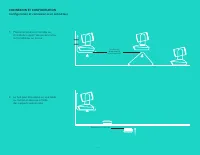
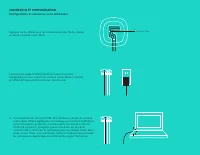
English — 4 CONNECTION AND SETUPSetup and connection to a computer 1 Set the camera on the table, or using the included camera mount on the table or a wall 2 The hub can be on placed on a table or mounted underneath using the included hook and loop pads See alignment pin for position Hub velcro moun...
Page 6 - Cable slots
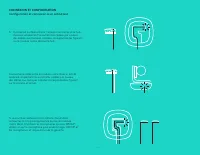
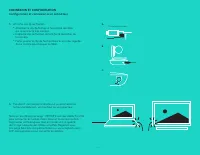
English — 6 CONNECTION AND SETUPSetup and connection to a computer Press the cables into the slots on the bottom of the speakerphone Connect the power cable to the hub and plug in the power adapter The display on the speakerphone will turn on and show the Logitech logo when powered 4 Connect the hub...
Page 7 - Flat side up
English — 7 CONNECTION AND SETUPSetup and connection to a computer 5 Attaching cable lock • Attach Cable Lock to cable end that connects to the camera • Plug Cable Lock into the slot of the housing of the camera • Rotate the Cable Lock clockwise to lock the cable 6 Optional: connect computer to exte...
Page 8 - CONNECTING TO BLUETOOTH; DEVICE; Bluetooth; USING LOGITECH GROUP; Video and audio; Audio only with Bluetooth
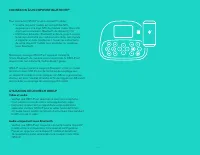
English — 8 CONNECTING TO BLUETOOTH ® DEVICE To connect GROUP to your mobile device: • If your device is NFC enabled, touch the mobile device to the NFC icon on the speakerphone, which should enable Bluetooth acceptance on the mobile device OR • Hold down the Bluetooth button until the Activity ligh...
Page 9 - REMOTE and EXPANSION MICROPHONES
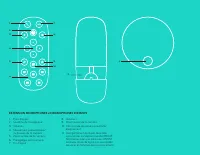
English — 9 2. 1. 7. 8. 9. 10. 3. 4. 5. 6. 11. 2. 1 Call answer 2 Microphone mute 3 Volume down 4 Camera pan/tilt 5 Camera zoom out 6 Camera presets 7 Call end 8 Volume up 9 Camera zoom in 10 Near/Far camera control 11 Remote battery door The GROUP remote control runs on a Li-ion CR2032 battery Batt...
Page 10 - SPEAKERPHONE
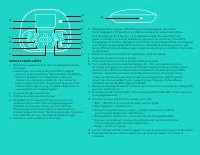
English — 10 15. 9. 6. 3. 2. 14. 13. 12. 1. 7. 11. 8. 10. 5. 4. SPEAKERPHONE 1 Answers incoming calls in supported applications • Note: Call Answer and End buttons may not work in some applications so simply use your video application to answer and end calls To enable answer and end buttons for Skyp...
Page 11 - VISIT PRODUCT CENTRAL; Troubleshooting tips
English — 11 VISIT PRODUCT CENTRAL Discover your product’s full potential Get valuable information and usage tips by browsing easy-to-use FAQs Find answers to product questions and get help setting up your product See if there’s software available for download that can enhance your product experienc...
Page 13 - Placez la caméra sur la table ou,; Voir broche
Français — 13 CONNEXION ET CONFIGURATIONConfiguration et connexion à un ordinateur 1 Placez la caméra sur la table ou, à l'aide du support de caméra inclus, sur la table ou sur le mur 2 Le hub peut être placé sur une table ou monté en dessous à l'aide des supports velcro inclus Voir broche d'alignem...
Page 15 - Fentes de câble
Français — 15 CONNEXION ET CONFIGURATIONConfiguration et connexion à un ordinateur Appuyez sur les câbles pour les introduire dans les fentes situées au bas du module mains libres Connectez le câble d'alimentation au hub et branchez l'adaptateur secteur L'écran du module mains libres est activé et a...
Page 16 - Côté plat vers le haut
Français — 16 CONNEXION ET CONFIGURATIONConfiguration et connexion à un ordinateur 5 Attache du clip de fixation • Attachez le clip de fixation à l'extrémité de câble qui se connecte à la caméra • Insérez le clip de fixation dans la fente du boîtier de la caméra • Faites pivoter le clip de fixation ...
Page 17 - CONNEXION À UN DISPOSITIF BLUETOOTH; UTILISATION DE LOGITECH GROUP; Vidéo et audio; Audio uniquement avec Bluetooth
Français — 17 CONNEXION À UN DISPOSITIF BLUETOOTH ® Pour connecter GROUP à votre dispositif mobile : • Si votre dispositif mobile est compatible NFC, apposez-le sur le logo NFC du module mains libres afin d'activer la connexion Bluetooth du dispositif, OU • Maintenez le bouton Bluetooth enfoncé jusq...
Page 18 - EXTENSION MICROPHONES et MICROPHONES DISTANTS
Français — 18 2. 1. 7. 8. 9. 10. 3. 4. 5. 6. 11. 2. 1 Prise d'appel 2 Sourdine du microphone 3 Volume - 4 Mouvement panoramique/ inclinaison de la caméra 5 Zoom arrière de la caméra 6 Préréglages de la caméra 7 Fin d'appel 8 Volume + 9 Zoom avant de la caméra 10 Commande de caméra proximité/ éloigne...
Page 19 - MODULE MAINS LIBRES
Français — 19 15. 9. 6. 3. 2. 14. 13. 12. 1. 7. 11. 8. 10. 5. 4. MODULE MAINS LIBRES 1 Répond aux appels entrants dans les applications prises en charge • Remarque : Les boutons de prise et de fin d'appel pouvant ne pas fonctionner dans certaines applications, utilisez simplement votre application v...
Page 20 - VISITE DES PAGES PRODUIT; Conseils de dépannage
Français — 20 VISITE DES PAGES PRODUIT Profitez de tout le potentiel offert par votre produit Bénéficiez d'informations précieuses et de conseils d'utilisation en consultant les questions fréquentes Trouvez les réponses à vos questions et obtenez de l'aide pour la configuration de votre produit Véri...
Page 22 - Fíjate en el pin
Español — 22 CONEXIÓN Y CONFIGURACIÓNConfiguración y conexión a una computadora 1 Coloca la cámara sobre la mesa o, mediante el soporte de cámara incluido, sobre la mesa o en una pared 2 El hub se puede colocar sobre una mesa o montar por debajo mediante el gancho incluido y las almohadillas adhesiv...
Page 24 - Ranuras para cables
Español — 24 CONEXIÓN Y CONFIGURACIÓNConfiguración y conexión a una computadora Ejerce presión sobre los cables para introducirlos en las ranuras de la parte inferior del sistema manos libres Conecta el cable de alimentación al hub y enchufa el adaptador de corriente Cuando reciba alimentación, la p...
Page 25 - Lado plano hacia arriba
Español — 25 CONEXIÓN Y CONFIGURACIÓNConfiguración y conexión a una computadora 5 Acoplamiento del seguro del cable • Acopla el seguro del cable al extremo que se conecta a la cámara • Conecta el seguro del cable a la ranura de la carcasa de la cámara • Gira el seguro del cable en la dirección de la...
Page 26 - CONEXIÓN A UN DISPOSITIVO BLUETOOTH; USO DE LOGITECH GROUP; Video y audio; Sólo audio con Bluetooth
Español — 26 CONEXIÓN A UN DISPOSITIVO BLUETOOTH ® Para conectar GROUP a un dispositivo móvil: • Si el dispositivo es compatible con NFC, toca con él el icono NFC del sistema manos libres para activar la recepción Bluetooth en el dispositivo móvil O • Mantén pulsado el botón de Bluetooth hasta que e...
Page 27 - REMOTO y MICRÓFONOS DE EXPANSIÓN
Español — 27 2. 1. 7. 8. 9. 10. 3. 4. 5. 6. 11. 2. 1 Responder llamada 2 Silenciamiento de micrófono 3 Bajar volumen 4 Panorámico/inclinación de cámara 5 Zoom de cámara para alejar 6 Valores predeterminados de cámara 7 Finalizar llamada 8 Subir volumen 9 Zoom de cámara para acercar 10 Control remoto...
Page 28 - SISTEMA MANOS LIBRES
Español — 28 15. 9. 6. 3. 2. 14. 13. 12. 1. 7. 11. 8. 10. 5. 4. SISTEMA MANOS LIBRES 1 Contesta llamadas entrantes en aplicaciones compatibles • Nota: Es posible que los botones Responder llamada y Finalizar llamada no funcionen en algunas aplicaciones En tales casos, usa la aplicación de video para...
Page 29 - VISITA A CENTRAL DE PRODUCTOS; Consejos para resolver problemas
Español — 29 VISITA A CENTRAL DE PRODUCTOS Descubre todo el potencial de tu producto En nuestra sección de preguntas frecuentes encontrarás valiosa información y consejos de uso Obtén las respuestas a preguntas sobre productos y ayuda para configurar tu producto Comprueba si hay software disponible ...
Page 31 - Verificar
Português — 31 CONEXÃO E CONFIGURAÇÃOConfiguração e conexão com um computador 1 Coloque a câmera na mesa ou, usando o suporte de câmera incluso, na parede 2 O concentrador pode ser colocado em uma mesa ou em baixio da mesa usando os ganchos e alças inclusos Verificar alinhamento do pino para posição...
Page 33 - Ranhuras para cabos
Português — 33 CONEXÃO E CONFIGURAÇÃOConfiguração e conexão com um computador Pressione os cabos às ranhuras na parte inferior do viva-voz Conecte o cabo de energia ao concentrador e conecte o adaptador de energia A tela do viva-voz será ativada e exibirá o logotipo da Logitech quando estiver ligado...
Page 34 - Parte plana para cima
Português — 34 CONEXÃO E CONFIGURAÇÃOConfiguração e conexão com um computador 5 Conectando os cabos • Conecte a trava de cabo à ponta do cabo que é conectado à câmera • Conecte a trava de cabo à ranhura na carcaça da câmera • Gire a trave de cabo no sentido horário para travar o cabo 6 Opcional: con...
Page 35 - CONECTANDO-SE A UM DISPOSITIVO BLUETOOTH; USANDO O GROUP LOGITECH; Vídeo e áudio; Somente áudio com Bluetooth
Português — 35 CONECTANDO-SE A UM DISPOSITIVO BLUETOOTH ® Para conectar o GROUP ao dispositivo móvel: • Se o dispositivo estiver habilitado para NFC, encoste o dispositivo móvel ao ícone NFC do viva voz Isso fará com que a aceitação de Bluetooth no dispositivo móvel seja ativada OU • Mantenha pressi...
Page 36 - CONTROLE REMOTO e MICROFONES DE EXPANSÃO
Português — 36 2. 1. 7. 8. 9. 10. 3. 4. 5. 6. 11. 2. 1 Atender chamada 2 Microfone sem áudio 3 Menos volume 4 Panorâmica e inclinação da câmera 5 Menos zoom da câmera 6 Pré-configurações da câmera 7 Encerrar chamada 8 Mais volume 9 Mais zoom da câmera 10 Controles da câmera próximo/longe 11 Porta do...
Page 38 - VISITAR A CENTRAL DE PRODUTOS; Dicas para solução de problemas
Português — 38 VISITAR A CENTRAL DE PRODUTOS Descubra todo o potencial do produto Obtenha informações valiosas e dicas de uso consultado as Perguntas frequentes Encontre as respostas das dúvidas sobre o produto e obtenha ajuda na configuração do produto Veja se há software disponível para download q...