Logitech C615 - Manual
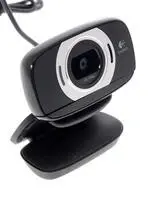
Logitech C615 Web Camera – Manual, read for free online in PDF format. We hope this helps you resolve any issues you may have. If you have further questions, please contact us through the contact form.


Table of Contents:
- Page 2 – Contents; Thank you for buying a Logitech webcam!
- Page 3 – Setting up your webcam; Place your webcam; • A computer with speakers (or a; Getting started with video calling; Your Logitech HD Webcam c615 provides Fluid HD 720p video calling.; Folding up the camera for travel or storage
- Page 4 – Using your webcam with Windows 8
- Page 5 – Understanding the Logitech Webcam Software; Capture pictures and videos; Using your webcam with Windows 7 and Windows Vista; Sharing your photos and videos; In the Camera app, scroll to the photo or video you want to share
- Page 6 – Capturing video and snapping pictures
- Page 7 – Microphone; Merci d'avoir acheté une webcam Logitech.; Installation de la webcam; Positionnez la webcam
- Page 8 – Premiers pas avec les appels vidéo; Votre webcam Logitech HD Webcam c615 permet des appels; Replier la caméra pour la ranger ou pour les déplacements; Application Camera pas à pas
- Page 9 – Réglage des paramètres de Camera; Profitez de conversations claires sans bruit de fond; Partage de vos photos et vidéos; Sélectionnez Partager dans la barre Icônes (ou appuyez sur
- Page 10 – Logiciel Logitech Webcam Software pas à pas; Utilisation de la webcam sur Windows 7 et Windows Vista; Capture vidéo et prise photo
- Page 11 – Utilisation du détecteur de mouvement; Gracias por la compra de una cámara Web Logitech.
- Page 12 – • Una computadora con altavoces; Introducción a videoconferencias; Configuración de la cámara Web; Coloca la cámara Web
- Page 13 – Ajuste de la configuración de la cámara; Acerca o aleja para incluir/excluir el entorno; Uso de la cámara Web con Windows 8; Ajusta la configuración de la cámara
- Page 14 – Software de cámara Web Logitech; Uso de la cámara Web con Windows 7 y Windows Vista; Compartir fotos y videos
- Page 15 – Uso de la detección de movimiento
- Page 16 – Obrigado por ter adquirido uma câmara Web da Logitech!; Configurar a câmara Web; Posicione a câmara Web
- Page 17 – • Um computador com alto-falantes; Introdução a videochamada; A Logitech HD Webcam c615 oferece videochamada Fluid HD 720p.; Dobrando a câmara para transporte ou armazenamento; Entender o aplicativo Camera; Ajuste as configurações da câmara
- Page 18 – Ajustar as configurações de Camera; Efetue mais ou menos zoom para incluir/excluir áreas contíguas; Compartilhar fotos e vídeos; Selecione Compartilhar na barra Charms (ou pressione
- Page 19 – Entender o Logitech Webcam Software; Capturar fotos e vídeos; Usar a câmara Web com Windows 7 e Windows Vista; do mouse no ícone da câmara na barra de tarefas do Windows; Capturar vídeo e tirar fotos; Botão de captura; A galeria: exibir e compartilhar
Getting started with
Première utilisation
Logitech® HD Webcam C615
"Loading the manual" means you need to wait until the file loads and becomes available for online reading. Some manuals are very large, and the time they take to appear depends on your internet speed.
Was this manual helpful?
About this manual
- Brand
- Logitech
- Model
- C615
- Document type
- Manual
- Category
- Web Camera
- Language(s)
- English, Spanish, French
- Pages
- 21
- File size
- 3.6 MB
- Format
Summary
English 3 Logitech® HD Webcam C615 2 Logitech® HD Webcam C615 Contents English 3 Français 12 Español 21 Português 30 www logitech com/support 39 Impo rtant infor matio n Safety , comp liance, and warr anty Getting started with Première utilisation Logitech® HD Webcam C615 7 1 2 4 3 5 6 1. Microphone...
4 English English 5 Getting started with Logitech® HD Webcam C615 USB Setting up your webcam Place your webcam 2 3 Connect your webcam 1 Unfold your webcam If you’re using your webcam with Windows® 8, the software required is downloaded automatically when you connect your webcam for the first time, ...
6 English English 7 Getting started with Logitech® HD Webcam C615 Using your webcam with Windows 8 The Logitech software optimizes the settings for your environment automatically To adjust any of your settings choose Camera options This is available from the Camera app (see the previous page) and fr...