Page 2 - Contents
2 Logitech ® HD Webcam C270 Contents www.logitech.com/support . . . . . . . . . . . . . . . . . . . . . . . . . . . . . 39 English . . . . . . . . . . . . . . . . . . . . . . . . . . . . . . . . . . . . . 3 Español . . . . . . . . . . . . . . . . . . . . . . . . . . . . . . . . . . . . 12 Français ....
Page 3 - Microphone
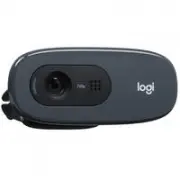
English 3 Logitech ® HD Webcam C270 Features1. Microphone 2. Lens 3. Activity light 4. Flexible clip/base 5. Logitech® Webcam Software 6. Product documentation Impo rtant infor matio n Safety, compliance, and warrant y Getting started with Première utilisation Logitech ® HD Webcam C270
Page 4 - Thank you for buying a Logitech webcam!; Place your webcam
4 English Getting started with Thank you for buying a Logitech webcam! Use this guide to set up your Logitech webcam and to begin making video calls. If you have questions before you start, please visit the websites listed below to learn more about Logitech webcams and video calling. Setting up your...
Page 5 - Install the software; Getting started with video calling; Your webcam comes with; • Create an account
English 5 Logitech ® HD Webcam C270 USB 2 3 Install the software When prompted, connect your webcam Getting started with video calling Your webcam comes with Logitech Vid ™ H D With Logitech Vid HD, video calling live over the Internet takes only a few, easy steps:• Install Logitech Vid HD • Create...
Page 6 - Setting up Logitech Vid HD; Install Logitech Vid HD
6 English Getting started with 1 2 Setting up Logitech Vid HD Install Logitech Vid HD We recommend that you install both the Logitech Webcam and Logitech Vid HD software. Tip: If you prefer another video-calling application, you will need to download and install third-party software. Learn more: htt...
Page 7 - Tip; : The Practice Call tile is always available; Add a friend or make a practice call; Accessing account settings and starting applications; Double-click the icons to launch your applications.
English 7 Logitech ® HD Webcam C270 3 Click on the Practice Call tile to test your settings. Tip : The Practice Call tile is always available on your Contact List so you can test your settings. To add a friend, click on the Add a Friend tile and enter your friend’s e-mail when prompted. After your f...
Page 8 - Navigating the Logitech Webcam Software
8 English Getting started with Navigating the Logitech Webcam Software 1. Capture pictures and videos 2. View captured images and share via e-mail, Facebook,® or YouTube®. 3. An area for easy access to your installed webcam- related applications 4. Launch Logitech Vid HD (if installed) 5. Capture vi...
Page 9 - Capturing video and snapping pictures
English 9 Logitech ® HD Webcam C270 Capturing video and snapping pictures Quick Capture allows you to take photos or record videos easily. You have easy access to webcam controls and settings as well as video effects to personalize your images and recordings. 1. Preview window 2. Capture mode: photo...
Page 10 - Using motion detection; Follow my face
10 English Getting started with Using motion detection • Set up your webcam to record video when it detects movement. • Adjust captured video duration and detection sensitivity. • Captured video is automatically saved to your computer. • View content in the Gallery or upload it using the One-touch U...
Page 11 - Get more applications for your webcam
English 11 Logitech ® HD Webcam C270 Get more applications for your webcam Download and install additional applications for your webcam, like video calling, photo and video editing, and other value-added programs. Getting help Click on the help icon to access a complete user manual, or watch how-to ...
Page 12 - Micrófono
12 Español Utilización Funciones1. Micrófono 2. Objetivo 3. Indicador luminoso de actividad 4. Clip/base versátil 5. Software de cámara Web Logitech® 6. Documentación del producto Impo rtant infor matio n Safety, compliance, and warrant y Getting started with Première utilisation Logitech ® HD Webca...
Page 13 - Gracias por la compra de una cámara Web Logitech.; Coloca la cámara Web
Español 13 Logitech ® HD Webcam C270 Gracias por la compra de una cámara Web Logitech. Usa esta guía para configurar la cámara Web Logitech y comenzar a realizar videoconferencias. Si tienes alguna pregunta antes de comenzar, visita los sitios Web que aparecen abajo para obtener más información sobr...
Page 14 - Instala el software; Introducción a videoconferencias; Logitech Vid; • Crea una cuenta
14 Español Utilización USB 2 3 Instala el software Cuando se te solicite, conecta la cámara Web Introducción a videoconferencias La cámara Web se entrega con Logitech Vid ™ H D Con Logitech Vid HD, para realizar video- conferencias en directo por Internet sólo se requieren unos escasos y sencillos ...
Page 15 - Configuración de Logitech Vid HD; Instala Logitech Vid HD
Español 15 Logitech ® HD Webcam C270 1 2 Configuración de Logitech Vid HD Instala Logitech Vid HD Se recomienda la instalación de la cámara Web Logitech y del software Logitech Vid HD. Consejo: si prefieres otra aplicación de video- conferencias, deberás descargar e instalar el software de otro fabr...
Page 16 - Consejo; : la ficha Llamada de práctica estará; Agrega un amigo o realiza una llamada de práctica; Acceso a la configuración de la cuenta e inicio de aplicaciones; Haz doble click en los iconos para iniciar las aplicaciones.
16 Español Utilización 3 Haz click en la ficha Llamada de práctica para probar la configuración. Consejo : la ficha Llamada de práctica estará siempre disponible en la lista de contactos para que pruebes la configuración. Para agregar un amigo, haz click en la ficha Agregar un amigo e introduce la d...
Page 17 - Navegación por el software de la cámara Web Logitech; Captura imágenes y videos
Español 17 Logitech ® HD Webcam C270 Navegación por el software de la cámara Web Logitech 1. Captura imágenes y videos 2. Ve las imágenes capturadas y compártelas por correo electrónico, Facebook® o YouTube®. 3. Un área de acceso rápido a las aplicaciones relacionadas con la cámara Web que hayas ins...
Page 18 - Capturar fotografías y videos
18 Español Utilización Capturar fotografías y videos QuickCapture permite hacer fotografías y grabar video fácilmente. Ofrece acceso fácil a controles y parámetros de la cámara Web, así como a efectos de video para personalizar imágenes y grabaciones. 1. Ventana de vista previa 2. Modo de captura: f...
Page 19 - Uso de la detección de movimiento
Español 19 Logitech ® HD Webcam C270 Uso de la detección de movimiento • Configura la cámara Web para que grabe video cuando detecte movimiento. • Ajusta la duración del video capturado y la sensibilidad de detección. • El video capturado se guarda automáticamente en la computadora. • Ve contenido e...
Page 20 - Obtén más aplicaciones para la cámara Web; : si tienes dudas sobre una función, haz
20 Español Utilización Obtén más aplicaciones para la cámara Web Descargar e instalar aplicaciones adicionales para la cámara Web, como videoconferencias, edición de fotografías y videos, y otros programas de valor añadido. Obtener ayuda Haz click en el icono de ayuda para acceder a un manual de usu...
Page 22 - Configuration de votre caméra Web; Positionner votre caméra Web
22 Français Première utilisation Vous venez d'acheter une caméra Web Logitech et nous vous en félicitons! Utilisez ce guide pour configurer votre caméra Web Logitech et commencer à passer des appels vidéo. Avant de commencer, si vous avez des questions, veuillez consulter les sites Web répertoriés d...
Page 23 - Installation du logiciel; Premiers pas avec les appels vidéo; • Création d'un compte
Français 23 Logitech ® HD Webcam C270 Vous venez d'acheter une caméra Web Logitech et nous vous en félicitons! USB 2 3 Installation du logiciel Branchez votre caméra Web lorsque vous y êtes invité. Premiers pas avec les appels vidéo Votre caméra Web est livrée avec Logitech Vid ™ H D Grâce à Logite...
Page 24 - Configuration de Logitech Vid HD; Installation de Logitech Vid HD
24 Français Première utilisation 1 2 Configuration de Logitech Vid HD Installation de Logitech Vid HD Il est recommandé d'installer à la fois le logiciel de caméra Web Logitech et Logitech Vid HD. Conseil: Si vous souhaitez utiliser une autre application d'appels vidéo, vous devez télécharger et ins...
Page 25 - Conseil; Accès aux paramètres du compte et aux applications de démarrage; Double-cliquez sur les icônes pour lancer vos applications.
Français 25 Logitech ® HD Webcam C270 3 Cliquer sur l'image d'appel d'essai pour tester vos paramètres. Conseil : L'image d'appel d'essai apparaît toujours dans votre liste de contacts de sorte que vous puissiez tester vos paramètres. Pour ajouter un ami, cliquez sur Ajouter un ami, puis saisissez l...
Page 26 - Navigation au sein du logiciel de la caméra Web Logitech
26 Français Première utilisation Navigation au sein du logiciel de la caméra Web Logitech 1. Capture de photos et de vidéos 2. Visionnez des captures et partagez-les par message électronique, sur Facebook® ou sur YouTube®. 3. Une zone qui permet d'accéder facilement à votre caméra Web installée et a...
Page 27 - Capture vidéo et prise photo
Français 27 Logitech ® HD Webcam C270 Capture vidéo et prise photo Quick Capture vous permet de prendre des photos ou d'enregistrer des vidéos facilement. Vous pouvez accéder facilement aux commandes de la caméra, à ses paramètres ainsi qu'à des effets vidéo qui vous permettent de personnaliser vos ...
Page 28 - Utilisation du détecteur de mouvement
28 Français Première utilisation Utilisation du détecteur de mouvement • Configurer votre caméra Web pour l'enregistrement vidéo lors d'une détection de mouvement. • Modifier la durée de capture vidéo et la sensibilité de la détection. • Les vidéos capturées sont automatiquement enregistrées sur vot...
Page 29 - Obtenir plus d'applications pour votre caméra Web; : Si vous avez des doutes concernant
Français 29 Logitech ® HD Webcam C270 Obtenir plus d'applications pour votre caméra Web Téléchargez et installez des applications supplémentaires pour votre caméra Web, comme des modules d'appel vidéo, de modification de photos / vidéos, ainsi que d'autres programmes à valeur ajoutée. Assistance Cli...
Page 30 - Microfone
30 Português Introdução ao Recursos1. Microfone 2. Lente 3. Luz de atividade 4. Base/clipe flexível 5. Software da câmara Web da Logitech® 6. Documentação do produto Impo rtant infor matio n Safety, compliance, and warrant y Getting started with Première utilisation Logitech ® HD Webcam C270
Page 31 - Obrigado por ter adquirido uma câmara Web da Logitech!; Posicione a câmara Web
Português 31 Logitech ® HD Webcam C270 Obrigado por ter adquirido uma câmara Web da Logitech! Use este guia para configurar a câmara Web da Logitech e começar a fazer videochamadas. Se tiver dúvidas antes de começar, visite os sites listados abaixo para saber mais sobre câmaras Web da Logitech e vid...
Page 32 - Instale o software; Introdução a videochamada; A câmara Web inclui o; • Criar uma conta
32 Português Introdução ao USB 2 3 Instale o software Quando solicitado, conecte a câmara Web Introdução a videochamada A câmara Web inclui o Logitech Vid ™ H D Com o Logitech Vid HD, a videochamada ao vivo pela Internet requer apenas algumas etapas fáceis:• Instalar o Logitech Vid HD • Criar uma c...
Page 33 - Configurar o Logitech Vid HD; Instalar o Logitech Vid HD
Português 33 Logitech ® HD Webcam C270 1 2 Configurar o Logitech Vid HD Instalar o Logitech Vid HD Recomendamos que instale o software da câmara Web da Logitech e o Logitech Vid HD. Dica: Se preferir outro aplicativo de videochamada, será necessário descarregar e instalar software de terceiros. Saib...
Page 34 - Dica; : O botão de prática de chamada; Adicionar um amigo ou praticar chamada; Acessar configurações da conta e iniciar aplicativos; Clique duas vezes nos ícones para iniciar aplicativos.
34 Português Introdução ao 3 Para testar as configurações, clique no botão de prática de chamada. Dica : O botão de prática de chamada está sempre disponível na lista de contatos para você poder testar as configurações. Para adicionar um amigo, clique no botão Adicionar um amigo e, quando solicitado...
Page 35 - Navegar o software da câmara Web da Logitech; Capturar fotos e vídeos
Português 35 Logitech ® HD Webcam C270 Navegar o software da câmara Web da Logitech 1. Capturar fotos e vídeos 2. Exibir imagens capturadas e compartilhar através de e-mail, Facebook® ou YouTube® 3. Uma área para fácil acesso a aplicativos instalados relacionados à câmara Web 4. Iniciar o Logitech V...
Page 36 - Capturar vídeo e tirar fotos
36 Português Introdução ao Capturar vídeo e tirar fotos O Quick Capture permite que você tire fotos ou grave vídeos facilmente. Você tem fácil acesso aos controles e às configurações da câmara Web, assim como a efeitos de vídeo, para personalizar imagens e gravações. 1. Janela de visualização 2. Mod...
Page 37 - Usar detecção de movimentos
Português 37 Logitech ® HD Webcam C270 Usar detecção de movimentos • Configure a câmara Web para gravar vídeo quando movimentos forem detectados. • Ajuste a duração de vídeo capturado e sensibilidade de detecção. • O vídeo capturado é salvo automaticamente no computador. • Exiba conteúdo na galeria ...
Page 38 - Obter mais aplicativos para a câmara Web; : Se não tiver certeza quanto a um recurso,
38 Português Introdução ao Obter mais aplicativos para a câmara Web Descarregue e instale aplicativos adicionais para a câmara Web, como videochamada, edição de foto e vídeo, e outros programas de valor agregado. Obter ajuda Clique no ícone da Ajuda para acessar um manual de usuário completo ou ver ...
Page 39 - United States
39 Logitech ® HD Webcam C270 United States +1 646-454-3200 Argentina +00800-555-3284 Canada +1 866-934-5644 Brasil +0 800-891-4173 Chile 1230 020 5484 Latin America +1 800-578-9619 Mexico 001 800 578 9619 www.logitech.com/support