Page 2 - Visit our website for:; CUSTOMER CARE AND SERVICE
CONTENTS 1. SAFETY INFORMATION . . . . . . . . . . . . . . . . . . . . . . . . . . . . . . . . . . . . . . . . . . . . . . . . . . . 3 2. SAFETY INSTRUCTIONS . . . . . . . . . . . . . . . . . . . . . . . . . . . . . . . . . . . . . . . . . . . . . . . . . . 5 3. PRODUCT DESCRIPTION . . . . . . . . ....
Page 5 - SAFETY INSTRUCTIONS; Installation
• The appliance should be cleaned regularly and any food deposits removed. • Failure to maintain the appliance in a clean condition could lead to deterioration of the surface that could ad-versely affect the life of the appliance and possibly re-sult in a hazardous situation. • Do not use harsh abra...
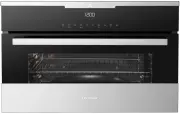
Page 7 - PRODUCT DESCRIPTION
2.3 Care and Cleaning WARNING! Risk of injury, fire or damage tothe appliance. • Before maintenance, deactivate the ap- pliance and disconnect the mains plugfrom the mains socket. • Make sure the appliance is cold. There is the risk that the glass panels canbreak. • Replace immediately the door glas...
Page 8 - Accessories; Wire shelf; BEFORE FIRST USE; Initial Cleaning; OK; CONTROL PANEL; Electronic programmer
3.1 Accessories Wire shelf For cookware, cake tins and roasts. Baking tray For cakes and biscuits. 4. BEFORE FIRST USE WARNING! Refer to the Safety chapters. 4.1 Initial Cleaning • Remove all parts from the appliance.• Clean the appliance before first use. Refer to chapter "Care and Clean-ing�...
Page 10 - Display; DAILY USE; Navigating the menus; Operation of the menus:
Num- ber Sensor field Function Comment 11 - Display It shows the settings of the appli-ance. Display A D E B C A) Heating or microwave function B) Current time C) Heat-up indicator D) Temperature or power of the micro-wave E) Duration time or end time of a function Other indicators in the display Sy...
Page 11 - The menus in overview
6.2 The menus in overview Main menu Symbol Menu item Application Heating Functions Contains a list of heating functions. Assisted Cooking Contains a list of automatic cooking pro-grammes. Favourite Programme Contains a list of favourite cooking pro-grammes made by the user. Basic Settings Contains a...
Page 13 - Cooking with the lamp off; MICROWAVE MODE; Microwave
Fast Heat Up Indicator This function decreases the heat-up time.To activate the function, hold for 3 seconds. You will see the heat-up indica-tor alternates. Residual heat When you deactivate the appliance, thedisplay shows the residual heat. You canuse the heat to keep the food warm. 6.6 Energy sav...
Page 14 - Suitable cookware and materials
• Turn the food after half the defrosting time. If possible, divide and then re-move the pieces that have started todefrost. Defrosting butter, portions of gateau,quark: • Do not fully defrost in the appliance, but let them defrost at room temperature.This gives a more even result. Fully re-move all...
Page 15 - Other things to think about...; Microwave functions; Functions; Setting the Microwave
1) With no silver, gold, platinum or metal plating / decorations 2) Without quartz or metal components, or glazes which contain metals 3) You must follow the manufacturer’s instructions about the maximum temperatures. X suitable-- not suitable Other things to think about… • Food items have different...
Page 16 - Power setting; process
2. Activate a heating function. Refer to“Activating a heating function”. 3. Touch and do the same steps as when you set the Microwave function. The functions End Time , Set +Go and Heat + Hold are not avail-able for the Combi function. 7.5 Setting the Quick Start function 1. If necessary, touch to d...
Page 17 - CLOCK FUNCTIONS; Clock functions; Symbol; Minute Minder; Duration; Extra Time; Activating the function:
8. CLOCK FUNCTIONS 8.1 Clock functions Symbol Function Description Minute Minder To set a countdown (maximum: 2 hours, 30 mi-nutes). This function has no effect on the operationof the appliance. You can also activate it when theappliance is deactivated. Touch to activate thefunction. Touch or to set...
Page 18 - AUTOMATIC PROGRAMMES; Assisted Cooking with; USING THE ACCESSORIES
2. The display shows the message forExtra Time for one minute. 3. Press to activate (or to cancel). 4. Set the Extra Time period. Press OK to confirm. 9. AUTOMATIC PROGRAMMES WARNING! Refer to the Safety chapters. 9.1 Assisted Cooking with Recipe Automatic This appliance has a set of recipes youcan ...
Page 19 - Inserting the accessories; Wire shelf and baking tray together:
10.1 Inserting the accessories Baking tray: Push the baking tray between the guidebars of the shelf support. Wire shelf: Push the shelf between the guide bars ofthe shelf support and make sure that thefeet point down. Wire shelf and baking tray together: Push the baking try between the guidebars of ...
Page 20 - ADDITIONAL FUNCTIONS; Favourite Programme
11. ADDITIONAL FUNCTIONS 11.1 Favourite Programme menu You can save your favourite settings, likeduration, temperature or heating function.They are available in the Favourite Pro-gramme menu. You can save 20 pro-grammes. Saving a programme 1. Activate the appliance. 2. Set a heating function or an A...
Page 21 - Oven temperature; Cooling fan; HELPFUL HINTS AND TIPS; Inner side of door; Advice for special heating; Keep Warm; Baking; General instructions
11.5 Automatic switch-off For safety reasons the appliance deacti-vates after some time: • If a heating function operates.• If you do not change the oven tempera- ture. Oven temperature Switch-off time 30 °C - 115 °C 12.5 h 120 °C - 195 °C 8.5 h 200 °C - 230 °C 5.5 h The automatic switch-off workswi...
Page 22 - How to use the Baking Tables; Baking on one oven level; Baking in tins
How to use the Baking Tables • We recommend to use the lower tem- perature the first time. • If you cannot find the settings for a spe- cial recipe, look for the one that is al-most the same. • Baking time can be extended by 10 - 15 minutes, if you bake cakes on morethan one level. • Cakes and pastr...
Page 25 - Roasting; Roasting dishes; Roasting tables
Food Shelf position Temperature (°C) Time (min) Potato gratin 2 180 - 200 40 - 50 1) Preheat oven. Ready made frozen food table Food Heating Function Shelf posi- tion Temperature (°C) Time (min) Frozen pizza True Fan Cooking 3 as per manufactur- er's instructions as per manu- facturer's in- structio...
Page 27 - Slow Cook; Cooking with Slow Cook function:
Poultry Food Weight (g) Shelf position Temperature (°C) Time(min) Chicken, spring chicken 1000 - 1500 1 190 - 210 45 - 75 Chicken half per 400 - 500 1 200 - 220 35 - 50 Poultry pieces per 200 - 250 1 200 - 220 35 - 50 Duck 1500 - 2000 1 180 - 200 75 - 105 Game Food Weight (g) Shelf position Temperat...
Page 28 - Grilling; Turbo Grilling
Food to be cooked Weight (g) Searing each side (min) Tempera- ture (°C) Shelf position Time(min) Loin, in onepiece 1000 - 1500 4 80 - 90 1 120 - 150 Nierstück 1000 - 1500 4 80 - 90 1 120 - 150 Pork Food to be cooked Weight (g) Searing each side (min) Tempera- ture (°C) Shelf position Time(min) Filet...
Page 29 - Defrosting; Drying
Food Tempera- ture (°C) Shelf position Time(min) turn af- ter (min) Deep pan Wire shelf Chicken (900 - 1000g) 180 - 200 1 2 50 - 60 25 - 30 Stuffed rolled porkroast (2000 g) 180 - 200 1 2 90 - 95 45 Pasta bake 180 --- 2 30 --- Potato bake au gratin 200 --- 2 20 - 23 --- Gnocchi, au gratin 180 --- 2 ...
Page 30 - Making preserves
Food Temperature (°C) Shelf position Time (h) 1 position 2 posi- tions Herbs 40 - 50 2 2 / 3 2 - 4 Plums 75 2 2 / 3 8 - 12 Apricots 75 2 2 / 3 8 - 12 Apple slices 75 2 2 / 3 6 - 9 Pears 75 2 2 / 3 9 - 13 12.14 Making preserves Heating function: Preserving • Use only preserve jars of the same di- men...
Page 31 - Microwave Cooking Table
Preserve Temperature (°C) Cooking time until simmering (min) Cooking time at 100 °C (min) Kohlrabi, peas, asparagus 160 - 170 50 - 60 15 - 20 1) Keep in the oven after you stop the oven Microwave Cooking Table Defrosting meat Food Microwave Weight (g) Power (Watts) Time(min) Standing time (min) Comm...
Page 36 - Tips for the microwave
Food Baking / roasting dishes Tem p. (°C) Micro- wave (Watt) Shel f po- si- tion Time(min) Comments Apple cake Crostino plate on bottom glass. with pastry max. 5 min. / preheat 1000 Watt, turn 1 x 220 400 - 25 Turn in be- tween Cheesecake, frozen(2 x 70 g) Crostino plate on bottom glass. Max. 4 min....
Page 37 - CARE AND CLEANING; Removing the shelf; Before you change the lamp:; Replacing the oven lamp
13. CARE AND CLEANING WARNING! Refer to the Safety chapters. Notes on cleaning: • Clean the front of the appliance with a soft cloth with warm water and a clean-ing agent. • To clean metal surfaces, use a usual cleaning agent. • Clean the oven interior after each use. Then you can remove dirt more e...
Page 38 - WHAT TO DO IF...; Problem; INSTALLATION
14. WHAT TO DO IF… WARNING! Refer to the Safety chapters. Problem Possible cause Remedy The appliance doesnot heat up. The appliance is deactiva-ted. Activate the appliance. The appliance doesnot heat up. The clock is not set. Set the clock. The appliance doesnot heat up. The necessary settings aren...
Page 43 - WARRANTY
13 20 2x3,5x25 16. WARRANTY FOR SALES IN AUSTRALIA AND NEWZEALANDAPPLIANCE: BUILT-IN OVEN, COOKTOPAND FREESTANDING COOKER This document sets out the terms andconditions of the product warrantiesfor Electrolux Appliances. It is an im-portant document. Please keep it withyour proof of purchase documen...
Page 45 - Important Notice; FOR SERVICE; ENVIRONMENT CONCERNS
10. For Appliances and services providedby Electrolux in Australia, the Applian-ces come with a guarantee by Elec-trolux that cannot be excluded underthe Australian Consumer Law. Youare entitled to a replacement or re-fund for a major failure and for com-pensation for any other reasonablyforeseeable...