Page 2 - General instructions; INSTRUCTIONS FOR USE
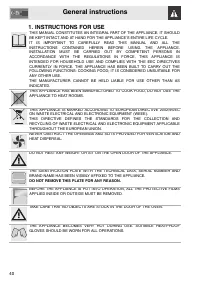
General instructions 40 1. INSTRUCTIONS FOR USE THIS MANUAL CONSTITUTES AN INTEGRAL PART OF THE APPLIANCE. IT SHOULDBE KEPT INTACT AND AT HAND FOR THE APPLIANCE’S ENTIRE LIFE CYCLE.IT IS IMPORTANT TO CAREFULLY READ THIS MANUAL AND ALL THEINSTRUCTIONS CONTAINED HEREIN BEFORE USING THE APPLIANCE.INSTA...
Page 4 - SAFETY PRECAUTIONS
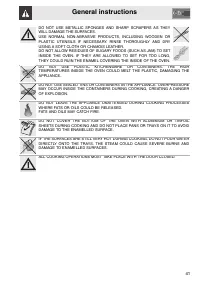
General instructions 42 2. SAFETY PRECAUTIONS REFER TO THE INSTALLATION INSTRUCTIONS FOR THE SAFETY REGULATIONSFOR ELECTRIC OR GAS APPLIANCES AND VENTILATION FUNCTIONS.IN YOUR INTERESTS AND FOR YOUR SAFETY THE LAW REQUIRES THAT THEINSTALLATION AND SERVICING OF ALL ELECTRICAL APPLIANCES ARE CARRIEDOU...
Page 6 - Instructions for disposal; ENVIRONMENTAL RESPONSIBILITY; Our environmental responsibility; Your old appliance also needs to be disposed of correctly.; Important; : hand over your appliance to the local agency authorised for the
Instructions for disposal 44 3. ENVIRONMENTAL RESPONSIBILITY 3.1 Our environmental responsibility Pursuant to Directives 2002/95/EC, 2002/96/EC and 2003/108/EC relating tothe reduction of the use of hazardous substances in electrical and electronicappliances, as well as to the disposal of refuse, th...
Page 7 - Instructions for the user; GET TO KNOW YOUR OVEN; CONTROL PANEL
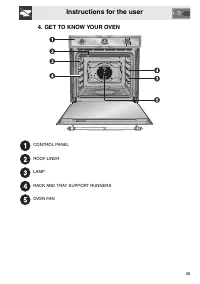
Instructions for the user 45 4. GET TO KNOW YOUR OVEN CONTROL PANEL ROOF LINER LAMP RACK AND TRAY SUPPORT RUNNERS OVEN FAN
Page 8 - AVAILABLE ACCESSORIES
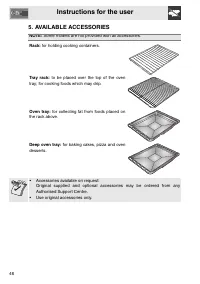
Instructions for the user 46 5. AVAILABLE ACCESSORIES NOTE: Some models are not provided with all accessories. Rack: for holding cooking containers. Tray rack: to be placed over the top of the oven tray; for cooking foods which may drip. Oven tray: for collecting fat from foods placed on the rack ab...
Page 9 - Using the rack; Insert racks and trays fully into the oven until they come to a stop.; Using the support rack
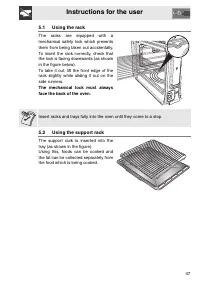
Instructions for the user 47 5.1 Using the rack The racks are equipped with amechanical safety lock which preventsthem from being taken out accidentally.To insert the rack correctly, check thatthe lock is facing downwards (as shownin the figure below).To take it out, lift the front edge of therack s...
Page 10 - Before using the appliance; pans and the cooking compartment.; Heat the empty appliance to the maximum temperature; in order to remove; General Description; Oven runners; The oven features; runners; for positioning trays; Cooling system
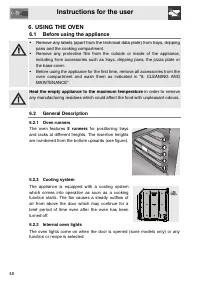
Instructions for the user 48 6. USING THE OVEN 6.1 Before using the appliance • Remove any labels (apart from the technical data plate) from trays, dripping pans and the cooking compartment. • Remove any protective film from the outside or inside of the appliance, including from accessories such as ...
Page 11 - Warnings and general advice for usage; All cooking operations must be carried out with the door closed.
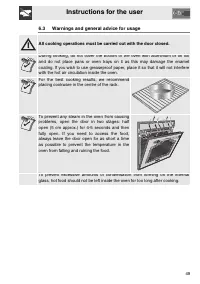
Instructions for the user 49 6.3 Warnings and general advice for usage All cooking operations must be carried out with the door closed. During cooking, do not cover the bottom of the oven with aluminium or tin foiland do not place pans or oven trays on it as this may damage the enamelcoating. If you...
Page 12 - Description of the controls on the front panel; OVEN THERMOSTAT KNOB; This knob can also be used to select the; THERMOSTAT LIGHT
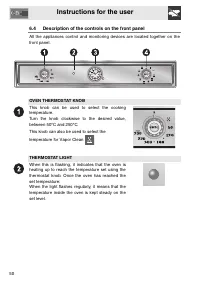
Instructions for the user 50 6.4 Description of the controls on the front panel All the appliances control and monitoring devices are located together on thefront panel. OVEN THERMOSTAT KNOB This knob can be used to select the cookingtemperature.Turn the knob clockwise to the desired value,between 5...
Page 13 - PROGRAMMING CLOCK
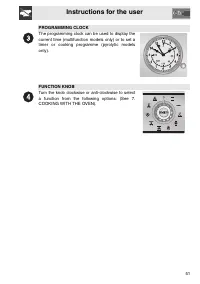
Instructions for the user 51 PROGRAMMING CLOCK The programming clock can be used to display thecurrent time (multifunction models only) or to set atimer or cooking programme (pyrolytic modelsonly). FUNCTION KNOB Turn the knob clockwise or anti-clockwise to selecta function from the following options...
Page 14 - Programming clock; Setting the time
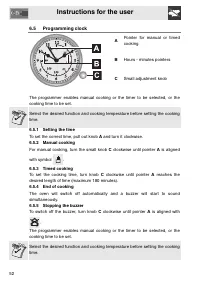
Instructions for the user 52 6.5 Programming clock A Pointer for manual or timedcooking B Hours - minutes pointers C Small adjustment knob The programmer enables manual cooking or the timer to be selected, or thecooking time to be set. Select the desired function and cooking temperature before setti...
Page 15 - COOKING WITH THE OVEN
Instructions for the user 53 7. COOKING WITH THE OVEN STATIC: As the heat comes from above and below at the same time, thissystem is particularly suitable for certain types of food.Traditional cooking, also known as static or thermal radiationcooking, is suitable for cooking just one dish at a time....
Page 17 - Cooking advice and instructions; We recommend preheating the oven before putting the food in.; to achieve uniform cooking at all heights.; Advice for cooking desserts and biscuits; consistency of the dough.
Instructions for the user 55 7.1 Cooking advice and instructions 7.1.1 General advice We recommend preheating the oven before putting the food in. • For cooking on several levels, we recommend using a fan-assisted function ( ) to achieve uniform cooking at all heights. • In general, it is not possib...
Page 18 - Advice for defrosting and proving; • Using the Grill function
Instructions for the user 56 7.1.4 Advice for defrosting and proving • We recommend positioning frozen foods in a lidless container on the first runner of the oven. • The food must be defrosted without its wrapping.• Lay out the foodstuffs to be defrosted evenly, not overlapping.• When defrosting me...
Page 19 - To save energy; defrosted. To start defrosting, turn the oven function knob to
Instructions for the user 57 7.2 To save energy To save energy during use of the appliance, the following instructions may befollowed: • Stop cooking a few minutes before the time normally used. Cooking will continue for the remaining minutes with the heat which has accumulatedinside the oven. • Red...
Page 20 - DISHES; FIRST COURSES
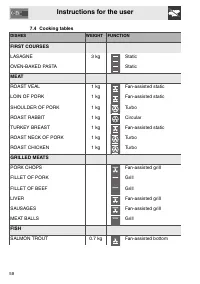
Instructions for the user 58 7.4 Cooking tables DISHES WEIGHT FUNCTION FIRST COURSES LASAGNE 3 kg Static OVEN-BAKED PASTA Static MEAT ROAST VEAL 1 kg Fan-assisted static LOIN OF PORK 1 kg Fan-assisted static SHOULDER OF PORK 1 kg Turbo ROAST RABBIT 1 kg Circular TURKEY BREAST 1 kg Fan-assisted stati...
Page 21 - RUNNER POSITION; ST SURFACE 2ND SURFACE
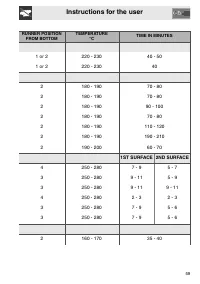
Instructions for the user 59 RUNNER POSITION FROM BOTTOM TEMPERATURE °C TIME IN MINUTES 1 or 2 220 - 230 40 - 50 1 or 2 220 - 230 40 2 180 - 190 70 - 80 2 180 - 190 70 - 80 2 180 - 190 90 - 100 2 180 - 190 70 - 80 2 180 - 190 110 - 120 2 180 - 190 190 - 210 2 190 - 200 60 - 70 1ST SURFACE 2ND SURFAC...
Page 22 - PIZZA
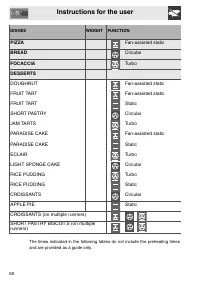
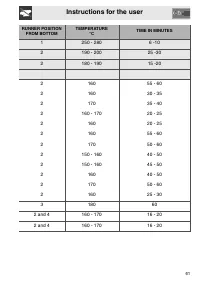
Instructions for the user 60 DISHES WEIGHT FUNCTION PIZZA Fan-assisted static BREAD Circular FOCACCIA Turbo DESSERTS DOUGHNUT Fan-assisted static FRUIT TART Fan-assisted static FRUIT TART Static SHORT PASTRY Circular JAM TARTS Turbo PARADISE CAKE Fan-assisted static PARADISE CAKE Static ECLAIR Turbo...
Page 24 - CLEANING AND MAINTENANCE; NEVER USE A STEAM JET FOR CLEANING THE APPLIANCE.; Cleaning stainless steel; To clean and preserve the stainless steel surfaces, always use; only; specific; Food stains or residues
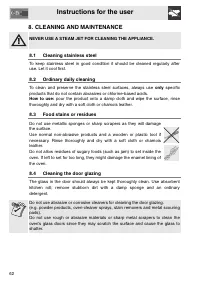
Instructions for the user 62 8. CLEANING AND MAINTENANCE NEVER USE A STEAM JET FOR CLEANING THE APPLIANCE. 8.1 Cleaning stainless steel To keep stainless steel in good condition it should be cleaned regularly afteruse. Let it cool first. 8.2 Ordinary daily cleaning To clean and preserve the stainles...
Page 25 - Cleaning the inside of the oven; • For easier cleaning, the door can be removed (see “9.2 Removing the
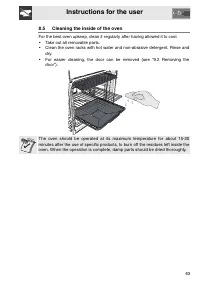
Instructions for the user 63 8.5 Cleaning the inside of the oven For the best oven upkeep, clean it regularly after having allowed it to cool. • Take out all removable parts.• Clean the oven racks with hot water and non-abrasive detergent. Rinse and dry. • For easier cleaning, the door can be remove...
Page 26 - Removing guide frames; • To remove the guide frames, pull the; Vapor Clean: assisted cleaning
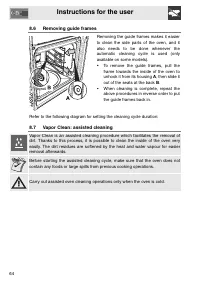
Instructions for the user 64 8.6 Removing guide frames Removing the guide frames makes it easierto clean the side parts of the oven, and italso needs to be done whenever theautomatic cleaning cycle is used (onlyavailable on some models). • To remove the guide frames, pull the frame towards the insid...
Page 27 - Before starting the assisted cleaning cycle; • Completely remove all accessories
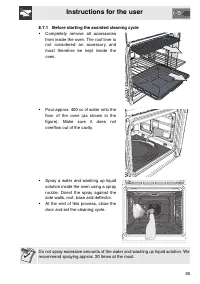
Instructions for the user 65 8.7.1 Before starting the assisted cleaning cycle • Completely remove all accessories from inside the oven. The roof liner isnot considered an accessory andmust therefore be kept inside theoven. • Pour approx. 400 cc of water onto the floor of the oven (as shown in thefi...
Page 28 - Setting the assisted cleaning cycle
Instructions for the user 66 8.7.2 Setting the assisted cleaning cycle Once the preparations have been made for the assisted cleaning cycle, proceedas follows. Models with programmer clock: • turn the oven function knob and the oven thermostat knob to for the Vapor Clean function; • set a cooking ti...
Page 29 - EXTRAORDINARY MAINTENANCE; Replacing the light bulb; the bulbs are; do not touch them; wrap them in
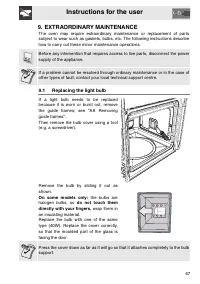
Instructions for the user 67 9. EXTRAORDINARY MAINTENANCE The oven may require extraordinary maintenance or replacement of partssubject to wear such as gaskets, bulbs, etc. The following instructions describehow to carry out these minor maintenance operations. Before any intervention that requires a...
Page 30 - Removing the door; With pins; are resting
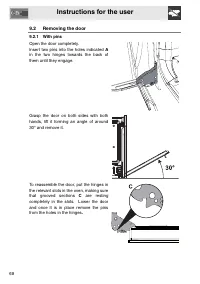
Instructions for the user 68 9.2 Removing the door 9.2.1 With pins Open the door completely.Insert two pins into the holes indicated A in the two hinges towards the back ofthem until they engage. Grasp the door on both sides with bothhands, lift it forming an angle of around30° and remove it. To rea...
Page 31 - Removing the door seal; For multifunction models only:; Removing the internal glass panels
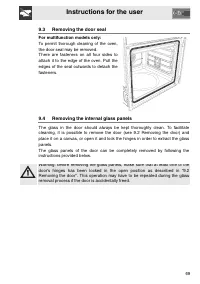
Instructions for the user 69 9.3 Removing the door seal For multifunction models only: To permit thorough cleaning of the oven,the door seal may be removed.There are fasteners on all four sides toattach it to the edge of the oven. Pull theedges of the seal outwards to detach thefasteners. 9.4 Removi...
Page 32 - Removing the internal glass panel:
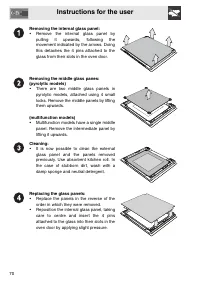
Instructions for the user 70 Removing the internal glass panel: • Remove the internal glass panel by pulling it upwards, following themovement indicated by the arrows. Doingthis detaches the 4 pins attached to theglass from their slots in the oven door. Removing the middle glass panes:(pyrolytic mod...
Page 33 - Instructions for the installer; INSTALLING THE APPLIANCE; Electrical connection
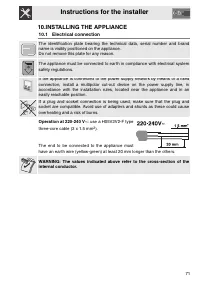
Instructions for the installer 71 10.INSTALLING THE APPLIANCE 10.1 Electrical connection The identification plate bearing the technical data, serial number and brandname is visibly positioned on the appliance.Do not remove this plate for any reason. The appliance must be connected to earth in compli...
Page 34 - Cable replacement; The tightening torque of the screws of the terminal supply wires; Positioning the oven; We recommend installing the oven with the help of a second person.
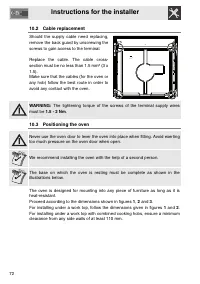
Instructions for the installer 72 10.2 Cable replacement Should the supply cable need replacing,remove the back guard by unscrewing thescrews to gain access to the terminal. Replace the cable. The cable cross-section must be no less than 1.5 mm² (3 x1.5).Make sure that the cables (for the oven orany...
Page 35 - and; Measurement
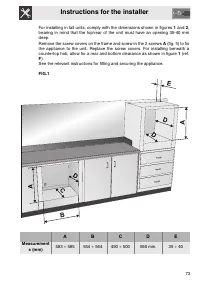
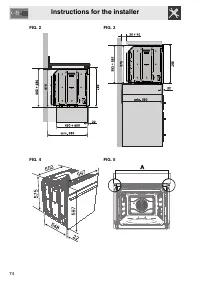
Instructions for the installer 73 For installing in tall units, comply with the dimensions shown in figures 1 and 2 , bearing in mind that the top/rear of the unit must have an opening 35-40 mmdeep. Remove the screw covers on the frame and screw in the 2 screws A (fig. 5) to fix the appliance to the...