Page 2 - Instructions; General safety instructions
Instructions 4 1 Instructions 1.1 General safety instructions Risk of personal injury • During use the appliance becomes hot. Care should be taken to avoid touching heating elements inside the oven. • Protect your hands by wearing oven gloves when handling food inside the oven cavity. • Never try to...
Page 4 - Risk of damaging the appliance
Instructions 6 yourself or without the intervention of authorised persons. • Do not pull the cable to remove the plug. • If the power supply cable is damaged, contact technical support immediately and they will replace it. Risk of damaging the appliance • Do not use abrasive or corrosive detergents ...
Page 5 - Installation
Instructions 7 EN cooktop. • Take care not to spill acidic substances such as lemon juice or vinegar onto the cooktop. • Do not put empty pans or frying pans on switched on cooking zones. • Do not use rough or abrasive materials or sharp metal scrapers. • Do not use cleaning products containing chlo...
Page 6 - For this appliance
Instructions 8 • Have the electrical connection performed by authorised persons. • The appliance must be connected to earth in compliance with electrical system safety standards. • If the electrical supply is restricted, means of allpole disconnection must be accessible and incorporated in the fixed...
Page 7 - Appliance purpose
Instructions 9 EN 1.4 Appliance purpose • This appliance is intended for cooking food in the home environment. Every other use is considered improper. • The appliance is not designed to operate with external timers or with remote-control systems. 1.5 This user manual This user manual is an integral ...
Page 8 - How to read the user manual
Instructions 10 1.7 How to read the user manual This user manual uses the following reading conventions: 1. Sequence of instructions for use.• Standalone instruction. Instructions General information on this user manual, on safety and final disposal. Description Description of the appliance and its ...
Page 9 - Description; General Description; Backguard
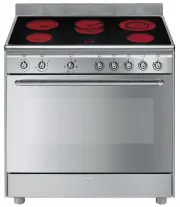
Description 11 EN 2 Description 2.1 General Description 1 Backguard 2 Cooktop 3 Control panel 4 Oven light 5 Seal 6 Door 7 Fan 8 Toe skirt (on some models only) Rack/tray support frame shelf
Page 10 - Minute minder timer knob
Description 12 2.2 Cooking hob * Power levels are approximate and can vary according to the pan used or the settings made. 2.3 Control panel 1 Minute minder timer knob Allows you to set manual cooking or a timer with automatic oven switch off at the end of cooking. 2 Temperature knob This knob allow...
Page 11 - Function knob
Description 13 EN 4 Function knob The oven's various functions are suitable for different cooking modes. After selecting the required function, set the cooking temperature using the temperature knob. 5 Cooking zone control knobs Useful for switching on and adjusting the cooking zones of the cooktop....
Page 12 - Available accessories; Rack
Description 14 2.5 Available accessories Rack Useful for supporting containers with food during cooking. Tray rack To be placed over the top of the oven tray; for cooking foods which may drip. Deep tray Useful for collecting fat from foods placed on the rack above and for cooking sweets, biscuits, e...
Page 13 - Use; Danger of burns
Use 15 EN 3 Use 3.1 Instructions High temperature inside the oven during use Danger of burns • Keep the oven door closed during cooking. • Protect your hands wearing heat resistant gloves when moving food inside the oven. • Do not touch the heating elements inside the oven. • Do not pour water direc...
Page 14 - Using the accessories; Racks and trays
Use 16 3.2 First use 1. Remove any protective film from the outside or inside of the appliance, including accessories. 2. Remove any labels (apart from the technical data plate) from the accessories and from the oven cavity. 3. Remove all the accessories from the appliance and clean them (see 4 Clea...
Page 15 - Using the cooktop; Improper use
Use 17 EN Tray rack The tray rack has to be inserted into the tray. In this way fat can be collected separately from the food which is being cooked. 3.4 Using the cooktop Residual heat The indicator lights located between the cooking zones come on when the temperature of one or more of the radiant z...
Page 16 - Practical advice for using the cooktop
Use 18 Practical advice for using the cooktop • The diameter of the base of the pan must correspond to the diameter of the cooking zone. • When buying a saucepan, check whether the diameter indicated is that of the base or the top of the container, as the top is almost always larger than the base. •...
Page 17 - Functions list; and
Use 19 EN Functions list Fan forced The combination of the fan and the circular heating element (incorporated in the rear of the oven) allows you to cook different foods on several levels, as long as they need the same temperatures and same type of cooking. Hot air circulation ensures instant and ev...
Page 18 - General advice
Use 20 3.6 Cooking advice General advice • Use a fan assisted function to achieve consistent cooking at several levels. • It is not possible to shorten cooking times by increasing the temperature (the food could be overcooked on the outside and undercooked on the inside). Advice for cooking meat • C...
Page 19 - Cooking information table
Use 21 EN Cooking information table Food Weight (Kg) Function Runner posi-tion from the bottom Temperature (°C) Time (minutes) Lasagne 3 - 4 Convection 1 220 - 230 45 - 50 Pasta bake 3 - 4 Convection 1 220 - 230 45 - 50 Roast veal 2 Fan assisted/Fan forced 2 180 - 190 90 - 100 Pork 2 Fan assisted/Fa...
Page 20 - Cleaning and maintenance; Cleaning the appliance; Cleaning the cooktop
Cleaning and maintenance 22 4 Cleaning and maintenance 4.1 Instructions 4.2 Cleaning the appliance Recommendations for cleaning the cooktop To keep the surfaces in good condition, they should be cleaned regularly after use. Let them cool first. Cleaning the cooktop Smudges from aluminium-based pans ...
Page 21 - Weekly cleaning; Removing the door; Grasp the door on both sides with both
Cleaning and maintenance 23 EN Weekly cleaning Clean and maintain the cooktop once a week using an ordinary glass ceramic cleaning product. Always follow the manufacturer’s instructions. The silicon in these products creates a protective, water-repellent membrane which also resists dirt. All marks s...
Page 22 - To reassemble the door, put the hinges in; Cleaning the door glazing; Some models have an intermediate glass
Cleaning and maintenance 24 3. To reassemble the door, put the hinges in the relevant slots in the oven, making sure that grooved sections A are resting completely in the slots. Lower the door and once it is in place remove the pins from the holes in the hinges. 4.4 Cleaning the door glazing The gla...
Page 23 - Removing racks/trays support frames
Cleaning and maintenance 25 EN 4. Clean the external glass pane and the panes previously removed. Use absorbent kitchen roll. In case of stubborn dirt, wash with a damp sponge and neutral detergent. 5. Refit the panes in the reverse order in which they were removed. 6. Reposition the internal glass ...
Page 24 - Preliminary operations
Cleaning and maintenance 26 4.6 Vapour Clean Preliminary operations Before starting the Vapour Clean function:• Completely remove all accessories from inside the oven. • Pour approximately 40 cc of water into the tray. Make sure it does not overflow out of the cavity. • Spray a water and washing up ...
Page 25 - Vapour Clean setting; Extraordinary maintenance; Replacing the oven light bulb
Cleaning and maintenance 27 EN Vapour Clean setting 1. Turn the function knob to the symbol and the temperature knob to the symbol . 2. Set a cooking time of 18 minutes using minute minder timer knob. The Vapour Clean cycle starts.3. At the end of the Vapour Clean cycle, the timer will deactivate th...
Page 26 - Refit the cover. Ensure the moulded part
Cleaning and maintenance 28 4. Slide out and remove the light bulb. 5. Fit the new light bulb. 6. Refit the cover. Ensure the moulded part of the glass (A) is facing the door. 7. Press the cover completely down so that it attaches perfectly to the bulb support. Removing and installing the oven seal ...
Page 27 - The appliance does not work.
Cleaning and maintenance 29 EN What to do if... The appliance does not work. • The circuit breaker is faulty: look in the fuse box and check that the circuit breaker is in working order. • Power cut: check whether the kitchen light works. The oven does not heat up. • Faulty fuse: check and, if requi...
Page 28 - Installation; General information
Installation 30 5 Installation 5.1 Positioning General information This appliance may be installed next to walls, one of which must be higher than the worktop, at a minimum distance of 50 mm from the side of the appliance, as shown in figures A and C relative to the installation classes.Any wall uni...
Page 29 - Positioning and levelling
Installation 31 EN B - Class 2 subclass 1 (Built-in appliance) C - Class 2 subclass 1 (Built-in appliance) Positioning and levelling • After making the gas and electrical connections, screw on the four feet supplied with the appliance. The appliance must sit level on the floor to ensure stability.• ...
Page 30 - Fastening to the wall
Installation 32 Fastening to the wall 1. Screw the wall fastening plate to the rear of the appliance. 2. Adjust the height of the 4 feet. 3. Assemble the fastening bracket. 4. Align the base of the hook on the fastening bracket with the base of the slot on the wall fastening plate. The anti-tip devi...
Page 32 - Wall fixing
Installation 34 Wall fixing 1. Turn the screw placed behind the cooktop near the gas connection. 2. Attach the chain to the cooker with the screw just removed. 3. Stretch it out horizontally so that the other end of the chain touches the wall. 4. Mark the wall in the position where the hole is to be...
Page 33 - Assembling the upstand
Installation 35 EN Assembling the upstand The upstand must always be positioned and secured correctly on the appliance.1. Unscrew the 2 nuts B on the back of the worktop. 2. Position the upstand above the worktop, taking care to align the pins C with the holes D . 3. Secure the upstand to the workto...
Page 34 - Electrical connection
Installation 36 5.2 Electrical connection General information Check the grid characteristics against the data indicated on the plate.The identification plate bearing the technical data, serial number and brand name is visibly positioned on the appliance.Do not remove this plate for any reason.Perfor...
Page 35 - Fixed connection; For the installer
Installation 37 EN Fixed connection Fit the power line with an all-pole circuit breaker with a contact separation distance sufficient to provide complete disconnection in category III overvoltage conditions, pursuant to installation regulations. The disconnection incorporated in the fixed wiring mus...