Page 2 - Instructions; How to read the user manual; • Read this user manual carefully before
Instructions 4 1 Instructions 1.1 How to read the user manual This user manual uses the following reading conventions: 1. Use instruction sequence.• Single use instruction. 1.2 This user manual This user manual is an integral part of the appliance and must therefore be kept in its entirety and in an...
Page 3 - For this appliance; Manufacturer liability; Power voltage
Instructions 5 EN For this appliance • Do not obstruct ventilation openings and heat dispersal slots. • Do not insert pointed metal objects (cutlery or utensils) into the slots in the appliance. • Do not rest any weight or sit on the open door of the appliance. • Take care that no objects are stuck ...
Page 4 - Description; General Description; Control panel
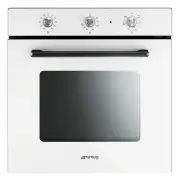
Description 6 2 Description 2.1 General Description 1 Control panel 2 Oven light 3 Seal 4 Door 5 Fan 6 Rack/tray support frames 7 Pizza plate Frame shelf 2.2 Control panel Timer knob (1) It allows you to use the timer or to perform manual cooking. For timed cooking, turn the knob clockwise to the re...
Page 5 - Oven shelves
Description 7 EN Thermostat indicator light (3) When the indicator light is flashing, it indicates that the oven is heating up to reach the set temperature. Once the temperature has been reached, the light remains lit until the oven is switched off. Function knob (4) The oven's various functions are...
Page 6 - Available accessories; Rack
Description 8 2.4 Available accessories Rack useful for holding cooking containers. Deep tray useful for collecting fat from foods placed on the rack above and for cooking pies, pizzas and baked desserts. Some models are not provided with all accessories. The oven accessories intended to come into c...
Page 7 - Use; Using the accessories; Racks and trays
Use 9 EN 3 Use 3.1 Instructions 3.2 First use 1. Remove any protective film from the outside or inside of the appliance, including accessories. 2. Remove any labels (apart from the technical data plate) from trays, dripping pans and the cooking compartment. 3. Remove and wash all the appliance acces...
Page 8 - and towards the oven back.
Use 10 and towards the oven back. 3.4 Using the oven Switching on the oven To switch the oven on:1. Select the cooking function using the function knob. 2. Select the temperature using the temperature knob. 3. Select cooking with the timer or manual cooking using the timer knob. Turn the knob clockw...
Page 9 - General advice
Use 11 EN 3.5 Cooking advice General advice • Use a fan-assisted function to achieve uniform cooking at several levels. • It is not possible to shorten cooking times by increasing the temperature (the food could be overcooked on the outside and undercooked on the inside). Advice for cooking meat • C...
Page 10 - Advice for cooking desserts and biscuits
Use 12 Advice for cooking desserts and biscuits • Use dark metal moulds: they help to absorb the heat better. • The temperature and the cooking time depend on the quality and consistency of the dough. • To check whether the dessert is cooked right through: at the end of the cooking time, put a tooth...
Page 11 - Cooking information table
Use 13 EN Cooking information table Food Weight (Kg) Function Runner position from the bottom Temperature (°C) Time (minutes) Lasagne 3 - 4 Static 1 220 - 230 45 - 50 Pasta bake 3 - 4 Static 1 220 - 230 45 - 50 Roast veal 2 Fan-assisted static 2 180 - 190 90 - 100 Pork 2 Fan-assisted static 2 180 - ...
Page 12 - Cleaning and maintenance; Cleaning the surfaces; Improper use
Cleaning and maintenance 14 4 Cleaning and maintenance 4.1 Instructions 4.2 Cleaning the surfaces To keep the oven surfaces in good condition, they should be cleaned regularly after use. Let them cool first. 4.3 Ordinary daily cleaning Always use only specific products that do not contain abrasives ...
Page 13 - Cleaning the door glazing
Cleaning and maintenance 15 EN 2. Grasp the door on both sides with both hands, lift it forming an angle of around 30° and remove it. 3. To reassemble the door, put the hinges in the relevant slots in the oven, making sure that grooved sections A are resting completely in the slots. Lower the door a...
Page 14 - Reposition the internal glass panel. Take; Cleaning the inside of the oven; Removing racks/trays support frames
Cleaning and maintenance 16 5. Reposition the internal glass panel. Take care to centre and insert the 4 pins into their housings in the oven door by applying slight pressure. 4.8 Cleaning the inside of the oven For the best oven upkeep, clean it regularly after having allowed it to cool. Take out a...
Page 15 - Extraordinary maintenance; Replacing the internal light bulb
Cleaning and maintenance 17 EN 4.9 Extraordinary maintenance Replacing the internal light bulb 1. Completely remove all accessories from inside the oven. 2. Remove the racks/trays support frames. 3. Remove the bulb cover using a tool (e.g. a screwdriver). 4. Unscrew and remove the lamp. 5. Replace t...
Page 16 - Installation; Electrical connection; General information; Cable replacement
Installation 18 5 Installation 5.1 Electrical connection General information Check the grid characteristics against the data indicated on the plate.The identification plate bearing the technical data, serial number and brand name is visibly positioned on the appliance.Do not remove this plate for an...
Page 17 - Fastening bushings
Installation 19 EN 5.3 Positioning Fastening bushings Remove the bushing covers inserted on the oven front. Mount the appliance into the recess.Secure the appliance to the piece of furniture using screws. Cover the bushings with the covers removed previously. Appliance overall dimensions (mm) Heavy ...