Autel EVO Lite (102000687) - User Manual
Autel EVO Lite (102000687) Quadcopter – User Manual, read for free online in PDF format. We hope this helps you resolve any issues you may have. If you have further questions, please contact us through the contact form.
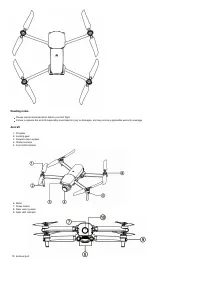
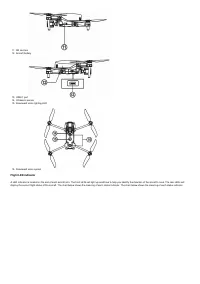
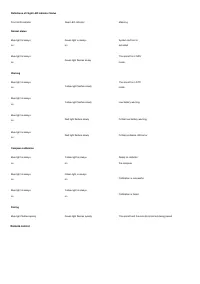
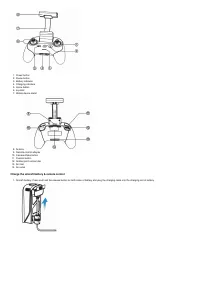
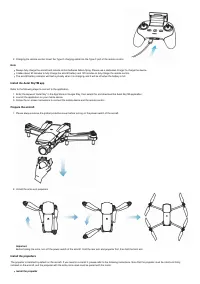
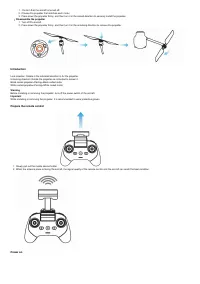
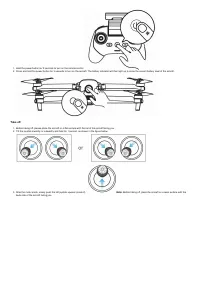
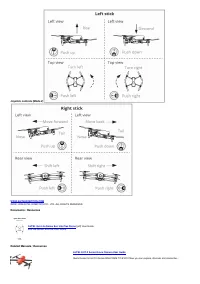

Table of Contents:
- Page 3 – Downward vision system; Flight LED indicator
- Page 4 – Remote control
- Page 5 – Charge the aircraft battery & remote control
- Page 6 – Note; Install the Autel SkyTM app; Refer to the following steps to connect to the application.; Prepare the aircraft; Install the propeller
- Page 7 – Disassemble the propeller; Introduction
- Page 8 – Take off; back side of the aircraft facing you.
- Page 9 – AUTEL EVO II Series Drone Camera User Guide; Documents / Resources; AUTEL Evo Lite Series Evo Lite Plus Drone; Related Manuals / Resources
User Manuals Simplified.
AUTEL Evo Lite Series Evo Lite Plus Drone User Guide
February 5, 2022 February 5, 2022
» AUTEL Evo Lite Series Evo Lite Plus Drone User Guide
Contents
[
hide
1 AUTEL Evo Lite Series Evo Lite Plus Drone
2 Reading notes
3 Aircraft
4 Flight LED indicator
5 Remote control
6 Charge the aircraft battery & remote
control
7 Install the Autel SkyTM app
8 Prepare the aircraft
9 Install the propellers
10 Introduction
11 Prepare the remote control
12 Power on
13 Take off
14 Joystick controls (Mode 2)
15 Documents / Resources
15.1 Related Manuals / Resources
AUTEL Evo Lite Series Evo Lite Plus Drone
"Loading the manual" means you need to wait until the file loads and becomes available for online reading. Some manuals are very large, and the time they take to appear depends on your internet speed.
Summary
11. SD card slot12. Aircraft battery 13. USB-C port14. Ultrasonic sensor15. Downward vision lighting LED 16. Downward vision system Flight LED indicator A LED indicator is located on the end of each aircraft arm. The front LEDs will light up solid blue to help you identify the direction of the aircr...
Definitions of Flight LED Indicator Status Front LED indicator Rear LED indicator Meaning Normal status Blue light is always on Green light is always on System self-test is activated Blue light is always on Green light flashes slowly The aircraft is in GPS mode Warning Blue light is always on Yellow l...
1. Power button2. Pause button3. Battery indicator4. Charging interface5. Home button6. Joystick7. Mobile device stand 8. Antenna9. Remote control adapter 10. Camera/Video button11. Custom button12. Gimbal pitch control dial13. Air inlet14. Air outlet Charge the aircraft battery & remote control...