Page 2 - Terms for Usage; Autel Robotics; Trademark Information; and Autel; Copyright
Terms for Usage Thank you for your interest in the industry aircraft products provided by Autel Robotics Co.,Ltd (hereinafter referred to as “ Autel Robotics ” ). Please read the following terms carefully and acknowledge that you have understood and agreed the following terms, conditions andsafe ope...
Page 3 - Data Storage and Use
Data Storage and Use The backup service function of this product is disabled by default, so user and flightinformation will not be uploaded or propagated through mobile device. When Autel Sky APPis connected with an aircraft, the flight log including the flight remote sensing data will beuploaded an...
Page 4 - Table of contents
Table of contents Chapter 1 Read Instructions ....................................................................................................... 5 1.1 Legend keys .................................................................................................................. 5 1.2 Product doc...
Page 6 - Chapter 1 Read Instructions; Please pay attention to the legend keys in this Manual.; Warning
Chapter 1 Read Instructions Thank you for your purchase of EVO Lite series and welcome your experience in AutelRobotics products. With this Manual, you can understand the features of EVO Lite series andlearn to operate this aircraft and remote controller optimally. Before first use of EVO Liteseries...
Page 7 - Download Autel Sky App; Search for; Autel Sky; in the App Store or Google Play, and click; INSTALL
1.3 Download Autel Sky App Autel Sky App can provide real-time image transmission, senior flight and camera controlmethods for your mobile device. App supports Android 6.0 , iOS 13.0 and above systems. Youcan download in the following two ways: Method one: Search for Autel Sky in the App Store or Go...
Page 8 - Chapter 2 Aircraft; Remark
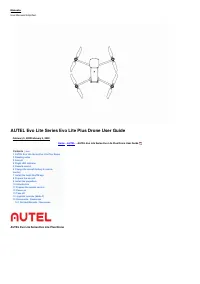
Chapter 2 Aircraft EVO Lite series are the four-rotor UAVs with folding body. EVO Lite series UAVs cannotonly have indoor and outdoor steady hovering, intelligent flight and other advanced functionsbut also have powerful flight performance with the maximum flight speed up to 68km/h andthe longest fl...
Page 9 - Components description
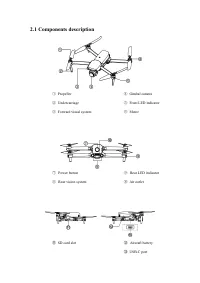
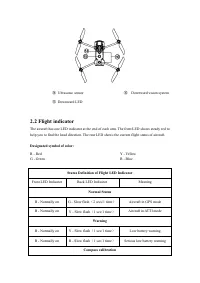
2.1 Components description ① Propeller ④ Gimbal camera ② Undercarriage ⑤ Front LED indicator ③ Forward visual system ⑥ Motor ⑦ Power button ⑨ Rear LED indicator ⑧ Rear vision system ⑩ Air outlet ⑪ SD card slot ⑫ Aircraft battery ⑬ USB-C port
Page 13 - Install aircraft battery; Turn off the battery power switch before installing battery.; Disassemble aircraft battery
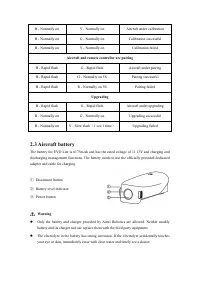
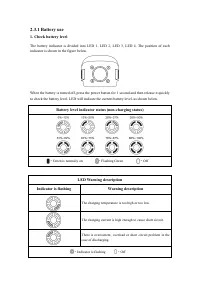
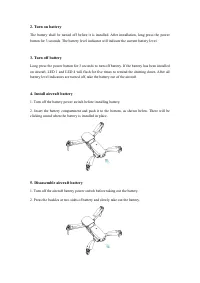
2. Turn on battery The battery shall be turned off before it is installed. After installation, long press the powerbutton for 3 seconds. The battery level indicator will indicate the current battery level. 3. Turn off battery Long press the power button for 3 seconds to turn off battery. If the batt...
Page 14 - Charge aircraft battery; the charging cable to the charging slot of the aircraft battery.
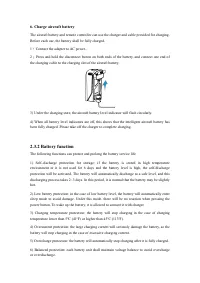
6. Charge aircraft battery The aircraft battery and remote controller can use the charger and cable provided for charging.Before each use, the battery shall be fully charged. 1 ) Connect the adapter to AC power.. 2 ) Press and hold the disconnect button on both ends of the battery, and connect one e...
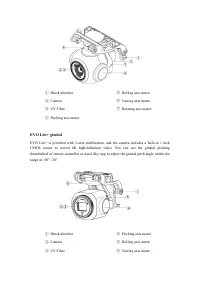
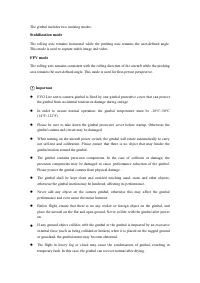
Page 17 - Storage and transportation; The battery shall be kept out of the reach of children and pets.; Gimbal and camera; EVO Lite gimbal; to adjust the gimbal pitch angle within the range of -90
Autel Robotics will assume no responsibility for any consequence due to the use ofnon-official standard charger. 3. Storage and transportation The battery shall be protected from close contact with water source or heat source whenstorage. The battery shall be stored in a dry and well-ventilated ...
Page 19 - The gimbal includes two working modes:; Stabilization mode; Important
The gimbal includes two working modes: Stabilization mode The rolling axis remains horizontal while the pitching axis remains the user-defined angle.This mode is used to capture stable image and video. FPV mode The rolling axis remains consistent with the rolling direction of the aircraft while the ...
Page 23 - Intelligent flight control system; Intelligent flight control system module
It is always necessary to take down the propeller before motor test. Please use the special propeller for Lite series provided by Autel Robotics. Do not usethe propellers of different models. In the case of blade replacement, use the two blades in the same package. Never mixwith the blades in ...
Page 25 - ) on the remote controller or click
The aircraft will enter the attitude (ATTI) mode when the GPS signal is poor, the compass isdisturbed and the vision positioning conditions fail to be met. Under the ATTI mode, theaircraft will drift horizontally, and the intelligent flight function and the return function willnot be available. Ther...
Page 26 - ) Communication outage; Sky App to recover the control on the aircraft.; ) Low battery of aircraft
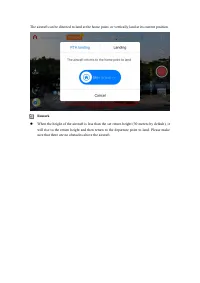
when your aircraft is lower than the altitude, the aircraft will rise to 30m and then return. If you enable the function within a radius of 10m around the return point, the aircraft willautomatically land on the spot. EVO Lite series can use its forward vision system to detect and avoid the obst...
Page 27 - In emergency, you can press the pause button (; ) Landing protection
When the aircraft battery level reaches 25% (low battery alarm), if the horizontaldistance between the aircraft and the return point is less than 50m, the aircraft will notcarry out the auto return process. If there is no available GPS in the case of low battery alarm, the aircraft will not carr...
Page 28 - Select an open outdoor area.; Calibration procedure:
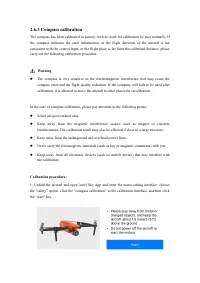
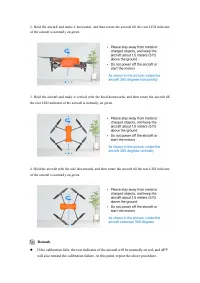
2.6.3 Compass calibration The compass has been calibrated in factory, with no need for calibration by user normally. Ifthe compass indicates the error information, or the flight direction of the aircraft is notconsistent with the control input, or the flight place is far from the calibrated distance...
Page 30 - Binocular vision system; System; Forward
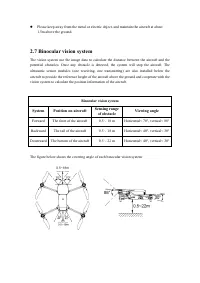
Please keep away from the metal or electric object, and maintain the aircraft at about1.5m above the ground. 2.7 Binocular vision system The vision system use the image data to calculate the distance between the aircraft and thepotential obstacles. Once any obstacle is detected, the system will st...
Page 31 - Ensure that the aircraft is in GPS or vision positioning mode.
Remark The vision system has dead zone outside its covering range. It is necessary to payattention to the ambient environment and App notice during flight to ensure safety. Do not operate the aircraft in a complex environment where there is insufficient light,small object (such as twig, line, ne...
Page 32 - Remove the surface film, sticker and other covers.
– Remove the surface film, sticker and other covers. – Clean of water drop, fingerprint, dirt, etc. (by non-dust cloth instead of alcohol and other organic solvents). – Return to repair if the surface has shedding, crack, scratch or wear, etc. 7. In order to avoid disturbing the ultrasonic system, d...
Page 33 - Chapter 3 Remote controller; Components description; Power button
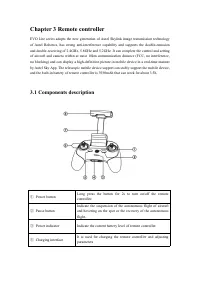
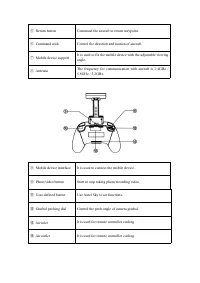
Chapter 3 Remote controller EVO Lite series adopts the new generation of Autel Skylink image transmission technologyof Autel Robotics, has strong anti-interference capability and supports the double-emissionand double-receiving of 2.4GHz, 5.8GHz and 5.2GHz. It can complete the control and settingof ...
Page 35 - Use remote controller; Press the power button (
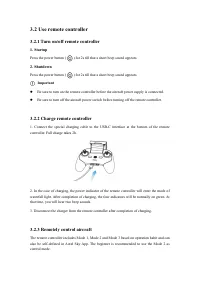
3.2 Use remote controller 3.2.1 Turn on/off remote controller 1. Startup Press the power button ( ) for 2s till that a short beep sound appears. 2. Shutdown Press the power button ( ) for 2s till that a short beep sound appears. Important Be sure to turn on the remote controller before the aircraf...
Page 37 - Remote controller calibration; Please turn off the aircraft power supply before operation.
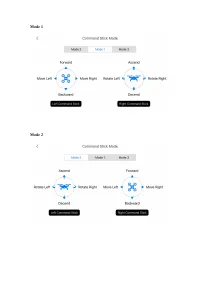
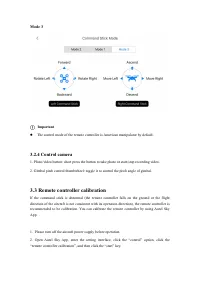
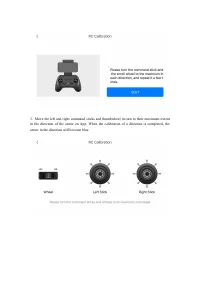
Mode 3 Important The control mode of the remote controller is American manipulator by default. 3.2.4 Control camera 1. Photo/video button: short press the button to take photo or start/stop recording video. 2. Gimbal pitch control thumbwheel: toggle it to control the pitch angle of gimbal. 3.3 Rem...
Page 39 - Remote controller pairing; Method 1
3.4 Remote controller pairing The remote controller and the aircraft have been paired in the factory. If the remote controllerneeds to be paired again after replacement, please follow these steps: Method 1 1. Turn on the aircraft and the remote controller, double-click the aircraft battery button. T...
Page 40 - Optimum communication range
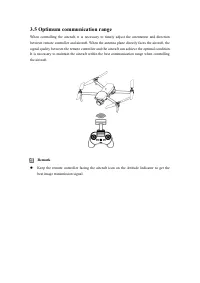
3.5 Optimum communication range When controlling the aircraft, it is necessary to timely adjust the orientation and directionbetween remote controller and aircraft. When the antenna plane directly faces the aircraft, thesignal quality between the remote controller and the aircraft can achieve the op...
Page 41 - Chapter 4 Autel Sky App
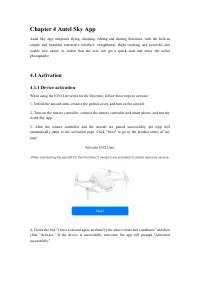
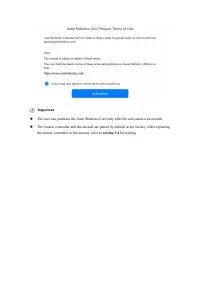
Chapter 4 Autel Sky App Autel Sky App integrates flying, shooting, editing and sharing functions, with the built-insimple and beautiful interactive interface, straightaway flight teaching and powerful andusable new editor, to enable that the user can get a quick start and enjoy the aerialphotography...
Page 43 - Interface introduction
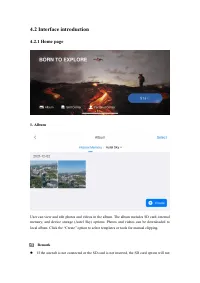
4.2 Interface introduction 4.2.1 Home page 1. Album User can view and edit photos and videos in the album. The album includes SD card, internalmemory, and device storage (Autel Sky) options. Photos and videos can be downloaded tolocal album. Click the “Create” option to select templates or tools for...
Page 44 - be displayed. The device storage is the default option.
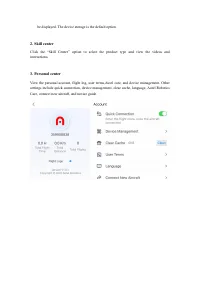
be displayed. The device storage is the default option. 2. Skill center Click the “Skill Center” option to select the product type and view the videos andinstructions. 3. Personal center View the personal account, flight log, user terms,Autel care, and device management. Othersettings include quick ...
Page 45 - Click it to return to homepage.
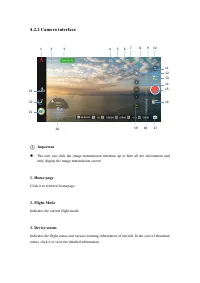
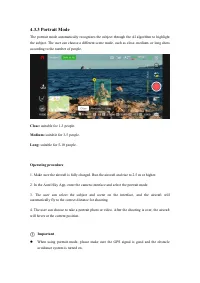
4.2.2 Camera interface Important The user can slide the image transmission interface up to hide all the information andonly display the image transmission screen. 1. Home page Click it to return to homepage. 2. Flight Mode Indicates the current flight mode. 3. Device status Indicates the flight st...
Page 47 - ) Image transmission
- Battery information: view battery temperature, battery health value, and the number ofdischarges. Set low battery alarm, serious low battery alarm threshold, and turn on/off batteryprotection mode (discharge every 3 days by default). - Locate my drone: start the flashing light and beeping mode to ...
Page 49 - Only the EVO Lite+ supports aperture adjustments.; Attitude Indicator
above parameters. Important Only the EVO Lite+ supports aperture adjustments. 18. Shooting mode Photo: set shooting mode between (single/burst/AEB/timer), resolution, white balance, HDR, etc. Video: set shooting while recording, video frame rate, resolution, HDR, etc. Quick shot: select from four ...
Page 50 - Display the pitch angle of gimbal.
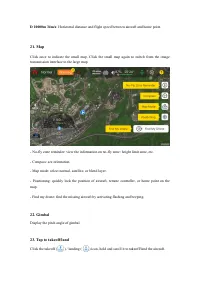
D 10000m 34m/s : Horizontal distance and flight speed between aircraft and home point. 21. Map Click once to indicate the small map. Click the small map again to switch from the imagetransmission interface to the large map. - No-fly zone reminder: view the information on no-fly zone: height limit zo...
Page 53 - Operating procedure
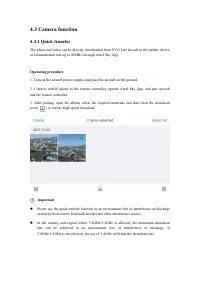
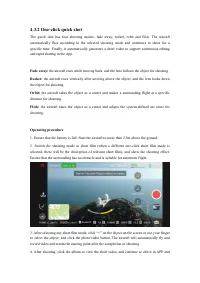
4.3.2 One-click quick shot The quick shot has four shooting modes: fade away, rocket, orbit and flick. The aircraftautomatically flies according to the selected shooting mode and continues to shoot for aspecific time. Finally, it automatically generates a short video to support continuous editingand...
Page 54 - share it to social platforms.; When the object being shot is more than 50m from the aircraft
share it to social platforms. 5. After user clicks the photo/video button on APP camera interface, uses the command stickof remote controller or short presses the remote controller pause button ( ) to quit the short film shooting, the aircraft will brake and hover at current position, and the materi...
Page 57 - The shooting effect is the same as the normal shooting mode.; Pro parameters can only be adjusted in Super Night Mode.
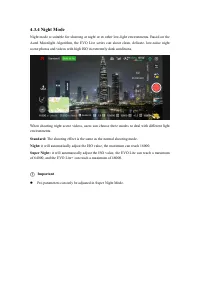
4.3.4 Night Mode Night mode is suitable for shooting at night or in other low-light environments. Based on theAutel Moonlight Algorithm, the EVO Lite series can shoot clean, delicate, low-noise nightscene photos and videos with high ISO in extremely dark conditions. When shooting night scene videos,...
Page 58 - Chapter 5 Flight; Safe operation guide; Please fly in the area where the altitude is 4000m below.
Chapter 5 Flight EVO Lite series adopts the unique portable design and has been assembled in factory. In orderto ensure safe operation of UAV, please read the following instructions and warnings beforefirst flight. 5.1 Safe operation guide 5.1.1 Flight environment Please abide by the local laws an...
Page 60 - Flight preparation; Install aircraft battery
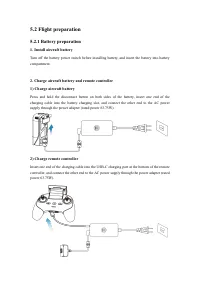
5.2 Flight preparation 5.2.1 Battery preparation 1. Install aircraft battery Turn off the battery power switch before installing battery, and insert the battery into batterycompartment. 2. Charge aircraft battery and remote controller 1) Charge aircraft battery Press and hold the disconnect button o...
Page 61 - Please extend the front arm and then the rear arm.
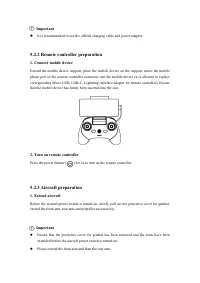
Important It is recommended to use the official charging cable and power adapter. 5.2.2 Remote controller preparation 1. Connect mobile device Extend the mobile device support, place the mobile device on the support, insert the mobilephone port of the remote controller connector into the mobile de...
Page 62 - Pair aircraft and remote controller; Refer to the paragraph 3.4 for this operation procedure.
Be sure to turn off the aircraft power switch before turning off the remote controller. Turnoff the aircraft power switch before the arms are folded. First extend the rear arm andpropeller and then the front arm. 2. Turn on aircraft Press the power button for 3s to turn on the aircraft. The power ...
Page 63 - The aircraft cannot fly when the battery level is 15% or below.; or
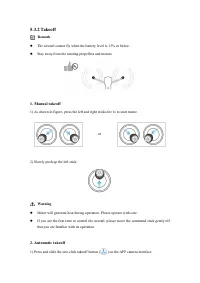
5.3.2 Takeoff Remark The aircraft cannot fly when the battery level is 15% or below. Stay away from the rotating propellers and motors. 1. Manual takeoff 1) As shown in figure, press the left and right sticks for 1s to start motor. 2) Slowly push up the left stick. Warning Motor will generate ...
Page 64 - Never take off on moving object, such as moving ship and vehicle.; Always land on a flat and open surface.
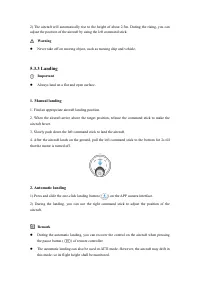
2) The aircraft will automatically rise to the height of about 2.5m. During the rising, you canadjust the position of the aircraft by using the left command stick. Warning Never take off on moving object, such as moving ship and vehicle. 5.3.3 Landing Important Always land on a flat and open sur...
Page 65 - Flight restrictions; The restricted area is classified into two.; Class I: main airport & low-altitude area for manned aircraft; A circular area centered on this area and with a radius of 1km
In the case of low battery alarm, the rear LED of the aircraft will flash red. At this time, itis necessary to return the safe landing point as soon as possible. 5.4 Flight restrictions According to the controlled airspace and UAV management regulations of the ICAO and theair traffic management au...
Page 67 - Chapter 6 Maintenance and service; Before firmware update, please ensure that:
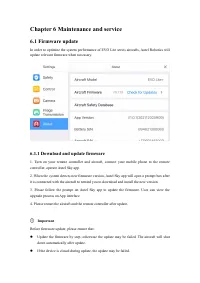
Chapter 6 Maintenance and service 6.1 Firmware update In order to optimize the system performance of EVO Lite series aircrafts, Autel Robotics willupdate relevant firmware when necessary. 6.1.1 Download and update firmware 1. Turn on your remote controller and aircraft, connect your mobile phone to ...
Page 68 - Storage and maintenance; Protect the aircraft from direct sunlight when it is not used.
In the case of network outage during update, the update may be failed. The whole update process will take more than ten minutes. The following situations mayoccur in the aircraft during update: it is normal that the gimbal is weak, the statusindicator flashes abnormally, or the aircraft restarts...
Page 72 - Chapter 7 Technical Specification
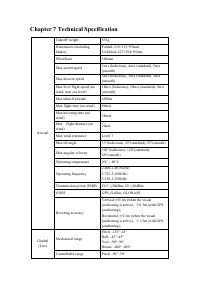
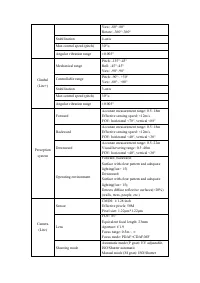
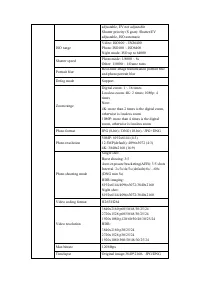
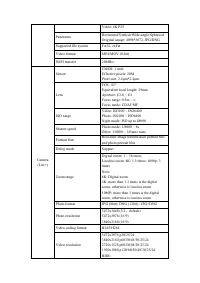
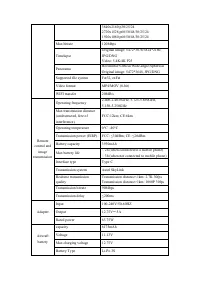
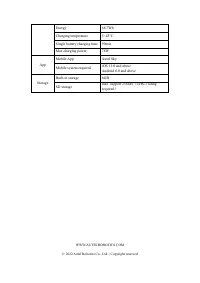
Chapter 7 Technical Specification Aircraft Takeoff weight 835g Dimensions (includingblades) Folded: 210×123×95mmUnfolded: 427×384×95mm Wheelbase 368mm Max ascent speed 5m/s (ludicrous), 4m/s (standard), 3m/s(smooth) Max descent speed 4m/s (ludicrous), 3m/s (standard), 2m/s(smooth) Max level flight s...


 Autel EVO II Dual 640T Enterprisegged Bundle V3e (102001509)
User Manual
Autel EVO II Dual 640T Enterprisegged Bundle V3e (102001509)
User Manual
 Autel EVO II Dualgged Bundle (640T) RTK V3 (102001511)
User Manual
Autel EVO II Dualgged Bundle (640T) RTK V3 (102001511)
User Manual
 Autel EVO II Dualgged Bundle (640T) V3 (102001518)
User Manual
Autel EVO II Dualgged Bundle (640T) V3 (102001518)
User Manual
 Autel EVO II Enterprisegged Bundle V3 (102001510)
User Manual
Autel EVO II Enterprisegged Bundle V3 (102001510)
User Manual
 Autel EVO IIgged Bundle V2 (102001026)
User Manual
Autel EVO IIgged Bundle V2 (102001026)
User Manual
 Autel EVO Lite (102000687)
User Manual
Autel EVO Lite (102000687)
User Manual