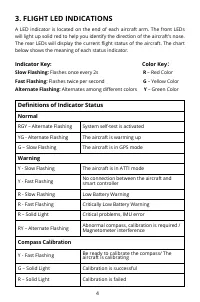
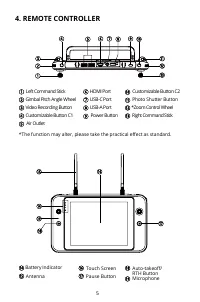
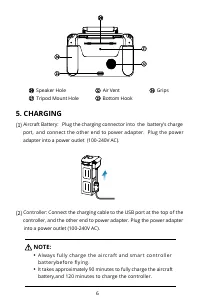
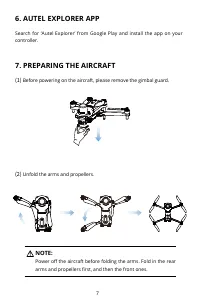
Page 5 - FLIGHT LED INDICATIONS; Color Key; Definitions of Indicator Status; Normal
4 3. FLIGHT LED INDICATIONS A LED indicator is located on the end of each aircraft arm. The front LEDs will light up solid red to help you identify the direction of the aircraft's nose. The rear LEDs will display the current flight status of the aircraft. The chart below shows the meaning of each st...
Page 9 - LEGEND; Attaching the Propellers
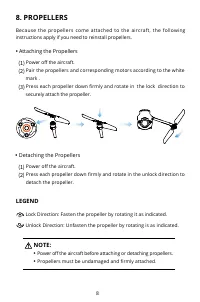
8 8. PROPELLERS Because the propellers come attached to the aircraft, the following instructions apply if you need to reinstall propellers. Lock Direction: Fasten the propeller by rotating it as indicated. Unlock Direction: Unfasten the propeller by rotating is as indicated. LEGEND • Attaching the P...
Page 10 - PREPARING THE CONTROLLER
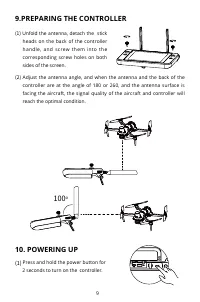
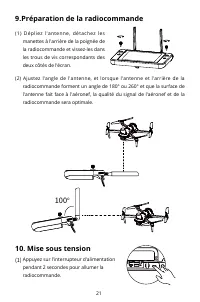
9 9.PREPARING THE CONTROLLER (1) Unfold the antenna, detach the stick heads on the back of the controller handle, and screw them into the corresponding screw holes on both sides of the screen. (2) Adjust the antenna angle, and when the antenna and the back of the controller are at the angle of 180 o...
Page 11 - or
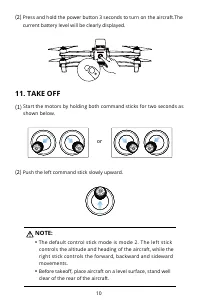
10 (2) Press and hold the power button 3 seconds to turn on the aircraft.The current battery level will be clearly displayed. (1) Start the motors by holding both command sticks for two seconds as shown below. (2) Push the left command stick slowly upward. 11. TAKE OFF or NOTE: • The default control...
Page 13 - Aircraft; Remote Controller
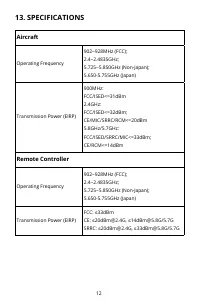
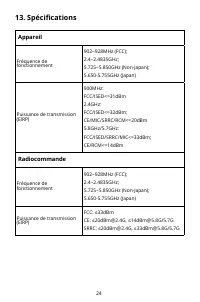
12 13. SPECIFICATIONS Aircraft Operating Frequency 902~928MHz (FCC); 2.4~2.4835GHz; 5.725~5.850GHz (Non-Japan);5.650-5.755GHz (Japan) Transmission Power (EIRP) 900MHz: FCC/ISED<=31dBm 2.4GHz: FCC/ISED<=32dBm;CE/MIC/SRRC/RCM<=20dBm5.8GHz/5.7GHz: FCC/ISED/SRRC/MIC<=33dBm;CE/RCM<=14dBm R...
Page 17 - Voyants LED de vol; Couleur; Clignotement rapide:; État des voyants LED de vol; État normal
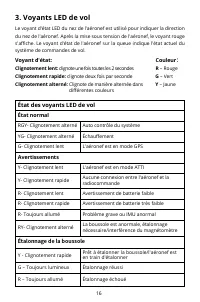
16 3. Voyants LED de vol Le voyant d'état LED du nez de l'aéronef est utilisé pour indiquer la direction du nez de l'aéronef. Après la mise sous tension de l'aéronef, le voyant rouge s'affiche. Le voyant d'état de l'aéronef sur la queue indique l'état actuel du système de commandes de vol. Voyant d'...
Page 20 - Autel Explorer app
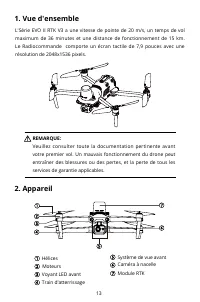
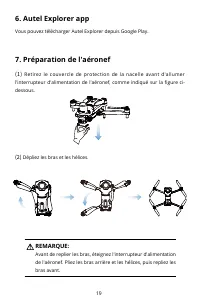
19 6. Autel Explorer app 7. Préparation de l'aéronef Vous pouvez télécharger Autel Explorer depuis Google Play. REMARQUE: Avant de replier les bras, éteignez l'interrupteur d'alimentation de l'aéronef. Pliez les bras arrière et les hélices, puis repliez les bras avant. (1) Retirez le couvercle de pr...
Page 21 - Description; Installation des hélices; Démontage des hélices
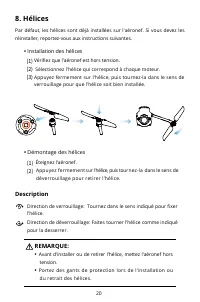
20 8. Hélices Par défaut, les hélices sont déjà installées sur l'aéronef. Si vous devez les réinstaller, reportez-vous aux instructions suivantes. Description REMARQUE: • Avant d'installer ou de retirer l'hélice, mettez l'aéronef hors tension. • Portez des gants de protection lors de l'installation ...
Page 23 - ou
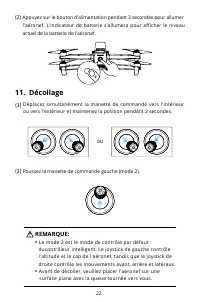
22 (2) Appuyez sur le bouton d'alimentation pendant 3 secondes pour allumer l'aéronef. L'indicateur de batterie s'allumera pour afficher le niveau actuel de la batterie de l'aéronef. Déplacez simultanément la manette de commande vers l'intérieur ou vers l'extérieur et maintenez la position pendant 2...
Page 29 - Farbe; Abwechselndes Blinken:; Status-LEDs des Fluggeräts; Normaler Status
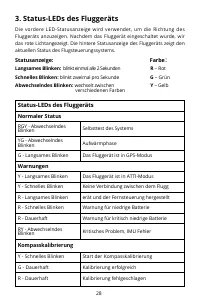
28 3. Status-LEDs des Fluggeräts Die vordere LED-Statusanzeige wird verwendet, um die Richtung des Fluggeräts anzuzeigen. Nachdem das Fluggerät eingeschaltet wurde, wir das rote Lichtangezeigt. Die hintere Statusanzeige des Fluggeräts zeigt den aktuellen Status des Flugsteuerungssystems. Statusanzei...
Page 32 - Autel Explorer App
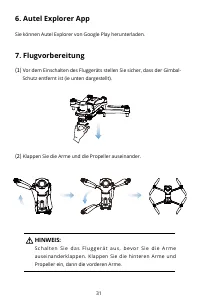
31 6. Autel Explorer App 7. Flugvorbereitung Sie können Autel Explorer von Google Play herunterladen. HINWEIS: S c h a l t e n S i e d a s F l u g g e r ä t a u s , b e v o r S i e d i e A r m e auseinanderklappen. Klappen Sie die hinteren Arme und Propeller ein, dann die vorderen Arme. (1) Vor dem ...
Page 33 - Beschreibung; Montage der Propeller
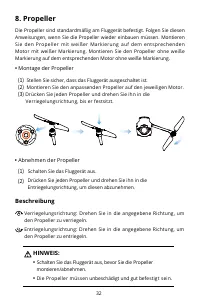
32 8. Propeller Die Propeller sind standardmäßig am Fluggerät befestigt. Folgen Sie diesen Anweisungen, wenn Sie die Propeller wieder einbauen müssen. Montieren Sie den Propeller mit weißer Markierung auf dem entsprechenden Motor mit weißer Markierung. Montieren Sie den Propeller ohne weiße Markieru...
Page 34 - Vorbereitung der Fernsteuerung
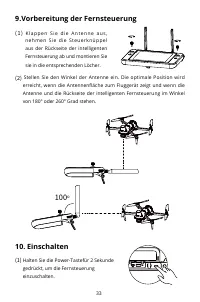
33 9.Vorbereitung der Fernsteuerung 10. Einschalten ( 1 ) K l a p p e n S i e d i e A n t e n n e a u s , n e h m e n S i e d i e S t e u e r k n ü p p e l aus der Rückseite der intelligenten Fernsteuerung ab und montieren Sie sie in die entsprechenden Löcher. (2) Stellen Sie den Winkel der Antenne ...
Page 35 - oder
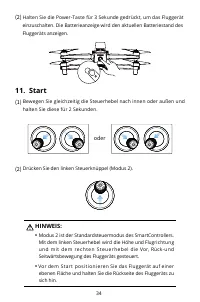
34 (2) Halten Sie die Power-Taste für 3 Sekunde gedrückt, um das Fluggerät einzuschalten. Die Batterieanzeige wird den aktuellen Batteriestand des Fluggeräts anzeigen. (1) Bewegen Sie gleichzeitig die Steuerhebel nach innen oder außen und halten Sie diese für 2 Sekunden. (2) Drücken Sie den linken S...
Page 37 - Fluggerät; Fernsteuerung
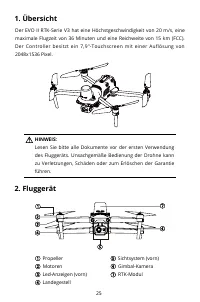
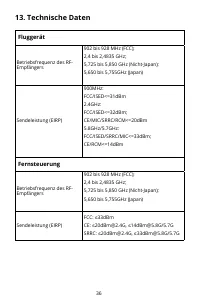
36 13. Technische Daten Fluggerät Betriebsfrequenz des RF- Empfängers 902 bis 928 MHz (FCC); 2,4 bis 2,4835 GHz; 5,725 bis 5,850 GHz (Nicht-Japan);5,650 bis 5,755GHz (Japan) Sendeleistung (EIRP) 900MHz: FCC/ISED<=31dBm 2.4GHz: FCC/ISED<=32dBm;CE/MIC/SRRC/RCM<=20dBm5.8GHz/5.7GHz: FCC/ISED/SR...
Page 38 - FCC and ISED Canada Compliance
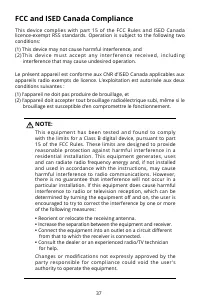
37 NOTE: This equipment has been tested and found to comply with the limits for a Class B digital device, pursuant to part 15 of the FCC Rules. These limits are designed to provide reasonable protection against harmful interference in a residential installation. This equipment generates, uses and ca...
Page 39 - RF Exposure Information; FCC Specific Absorption Rate (SAR) information; ISED Specific Absorption Rate (SAR) information
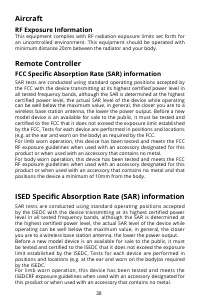
38 Aircraft RF Exposure Information This equipment complies with RF radiation exposure limits set forth for an uncontrolled environment. This equipment should be operated with minimum distance 20cm between the radiator and your body. Remote Controller FCC Specific Absorption Rate (SAR) information S...