Philips WAS7000/05 - Quick Guide
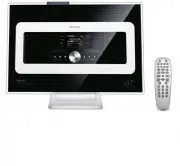
Philips WAS7000/05 – Quick Guide, read for free online in PDF format. We hope this helps you resolve any issues you may have. If you have further questions, please contact us through the contact form.


Table of Contents:
- Page 2 – What’s in the box; Before using the remote control:
- Page 4 – Play music library of the Center on the Station; Enjoy; You can play the music library (; ) of the Center on a connected Station
- Page 5 – Search by keywords; Search for your desired tracks/albums
- Page 6 – As you move around at home, let music move with you, either from the; to; or from; to; Center
- Page 7 – Stream music between the Center and Station; MUSIC BROADCAST; allows you to broadcast music from the; Stations
- Page 8 – Play music from USB devices
- Page 9 – Use UPnP
- Page 10 – Listen to FM Radio
- Page 11 – About the Environment; FAQ; Most Frequently Asked Questions; About Music Management
A
B
C
Connect/Setup
Enjoy
FAQ
Quick star t guide
Read Me First!
EN
Wireless Music Station
WAS7000
"Loading the manual" means you need to wait until the file loads and becomes available for online reading. Some manuals are very large, and the time they take to appear depends on your internet speed.
Was this manual helpful?
About this manual
- Brand
- Philips
- Model
- WAS7000/05
- Document type
- Quick Guide
- Language(s)
- English
- Pages
- 12
- File size
- 666.5 KB
- Format
Summary
WAS7000 Wireless Music Station User manual Manuel d'utilisation Manual del usuario ABC p u t e S / t c e n n o C y o j n E s n o i t s e u Q d e k s A y l t n e u q e r F Wireless Music Station WAS7000 e d i u g t r a t s k c i u Q Read Me First! Wireless Music Station WAS7000 What’s in the box User...
1 2 4 5 6 B 3 1 REC MENU PROGRAM INCR.SURR. SLEEP MUSIC BROADCAST SMART EQ MUSIC FOLLOWS ME DIM RDS/NEWS SCROLL VOL VIEW OK 1 0 6 mno 9 wxyz 7 pqrs 8 tuv MARK/UNMARK DBB SEARCH CD/MP3-CD HD SOURCE REPEAT SHUFFLE 2 abc 3 SAME GENRE SAME ARTIST 5 jkl 4 ghi OK OK OK Play music library of the Center on ...
B 2 1 3 2 4 REC MENU VIEW OK MARK/UNMARK DBB SEARCH CD/MP3-CD HD SOURCE OK SEARCH Search by keywords The keyword should be the first letter or word of the title of the track you wishto search for. By inputting a keyword, you can quickly find all the items containing the word (note that it is case se...
Ask a question
Related manuals
Popular Philips Other


More Philips Other models
 Philips WAC7500/05 User Manual
 Philips WACS700 Manual
 Philips WACS700/05 User Manual
 Philips WACS7000, WACS7005 Manual
 Philips WACS7000/05 Quick Guide
 Philips WACS7500 Manual
 Philips WAS7500/05 Quick Guide
 Philips Wireless Equipment Box Manual
 Philips wk10295 Manual
 Philips WP3811 Manual
 Philips WP3812 Manual
 Philips WP3821 Manual