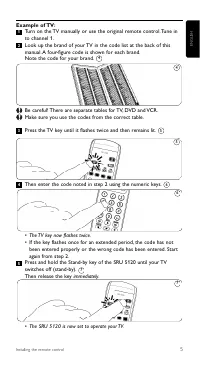
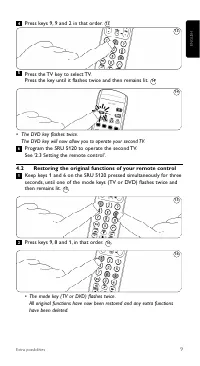
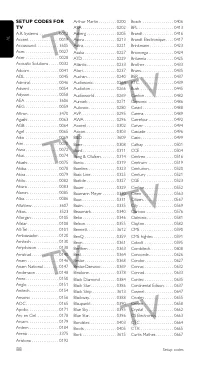
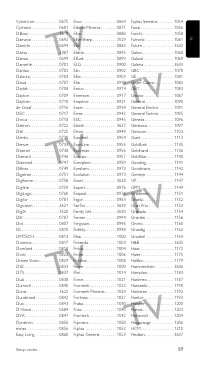
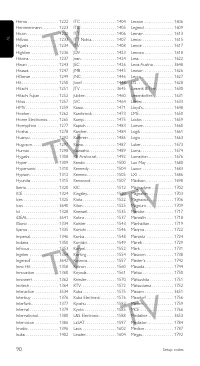
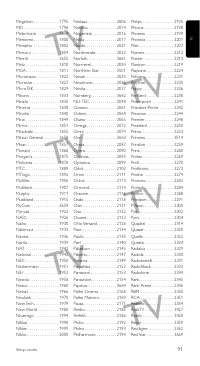
Page 5 - Press the TV key until it flashes twice and then remains lit.
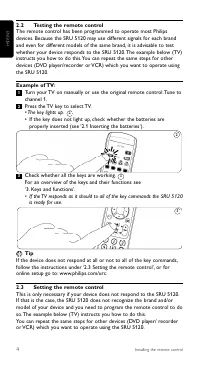
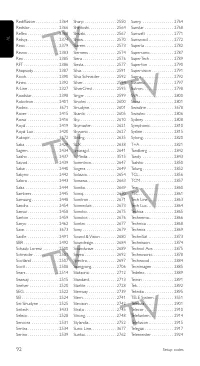
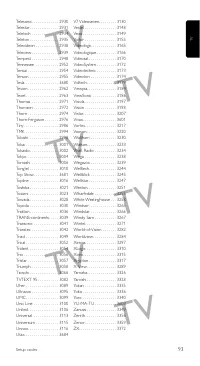
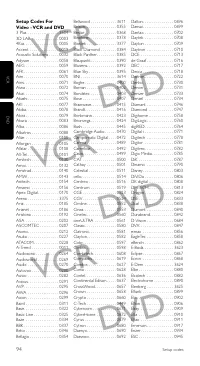
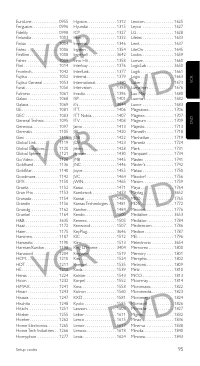
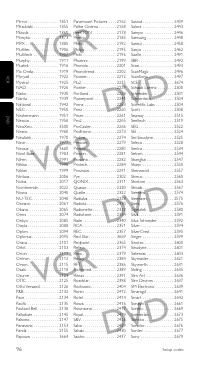
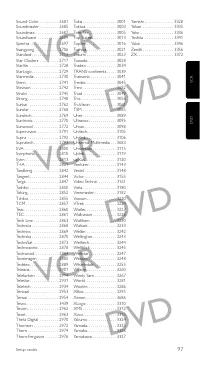
ENGLISH 5 Installing the remote control Example of TV: Turn on the TV manually or use the original remote control. Tune into channel 1.Look up the brand of your TV in the code list at the back of thismanual. A four-figure code is shown for each brand.Note the code for your brand. Be careful! There a...
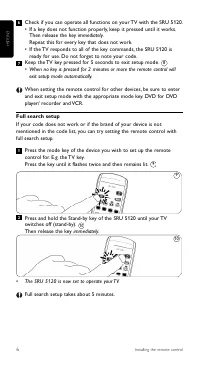
Page 6 - Full search setup; The SRU 5120 is now set to operate your TV.
Check if you can operate all functions on your TV with the SRU 5120.• If a key does not function properly, keep it pressed until it works. Then release the key immediately.Repeat this for every key that does not work. • If the TV responds to all of the key commands, the SRU 5120 is ready for use. Do...
Page 7 - Keys and functions; K J
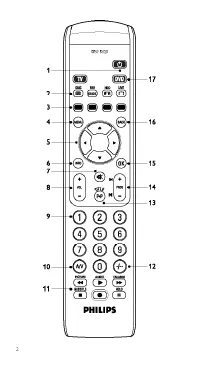
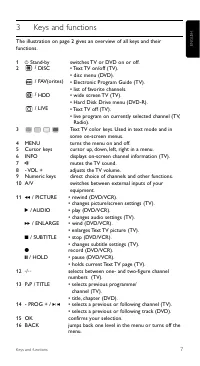
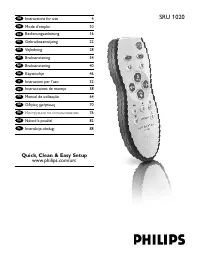
7 ENGLISH Keys and functions 3 Keys and functions The illustration on page 2 gives an overview of all keys and theirfunctions. 1 y Stand-by switches TV or DVD on or off. 2 / DISC • Text TV on/off (TV).• disc menu (DVD). / FAV(orites) • Electronic Program Guide (TV).• list of favorite channels. / HDD...
Page 8 - Note
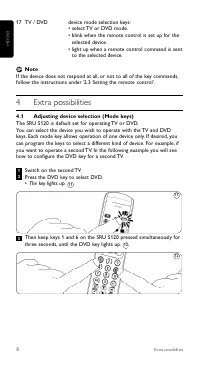
17 TV / DVD device mode selection keys:• select TV or DVD mode.• blink when the remote control is set up for the selected device. • light up when a remote control command is sent to the selected device. Note If the device does not respond at all, or not to all of the key commands,follow the instruct...
Page 9 - • The DVD key flashes twice.; Restoring the original functions of your remote control
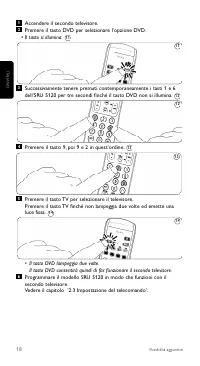
9 ENGLISH Extra possibilities Press keys 9, 9 and 2 in that order. Press the TV key to select TV.Press the key until it flashes twice and then remains lit. • The DVD key flashes twice. The DVD key will now allow you to operate your second TV. Program the SRU 5120 to operate the second TV.See ‘2.3 Se...
Page 10 - Frequently asked questions; the device. Call our helpline for details.
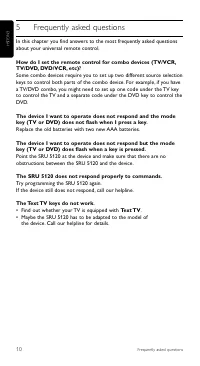
10 Frequently asked questions ENGLISH 5 Frequently asked questions In this chapter you find answers to the most frequently asked questionsabout your universal remote control. How do I set the remote control for combo devices (TV/VCR,TV/DVD, DVD/VCR, etc)?Some combo devices require you to set up two ...
Page 13 - il modello SRU 5120 è pronto per l’uso.; Suggerimento
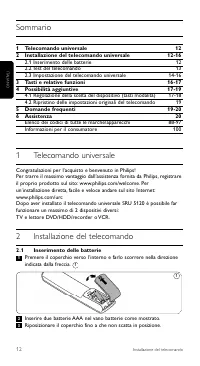
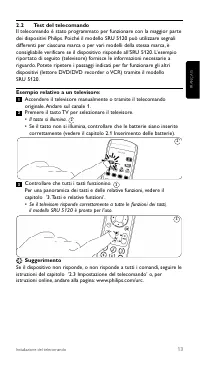
2.2 Test del telecomando Il telecomando è stato programmato per funzionare con la maggior partedei dispositivi Philips. Poiché il modello SRU 5120 può utilizzare segnalidifferenti per ciascuna marca o per vari modelli della stessa marca, èconsigliabile verificare se il dispositivo risponde all’SRU 5...
Page 14 - Esempio relativo a un televisore:
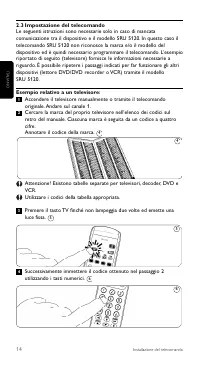
2.3 Impostazione del telecomandoLe seguenti istruzioni sono necessarie solo in caso di mancatacomunicazione tra il dispositivo e il modello SRU 5120. In questo caso iltelecomando SRU 5120 non riconosce la marca e/o il modello deldispositivo ed è quindi necessario programmare il telecomando. L’esempi...
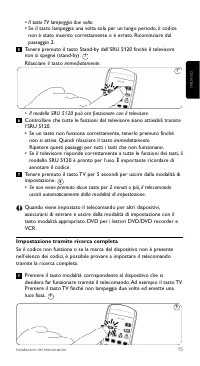
Page 15 - uscirà automaticamente dalla modalità di impostazione.; Impostazione tramite ricerca completa
• Il tasto TV lampeggia due volte.• Se il tasto lampeggia una volta sola per un lungo periodo, il codice non è stato inserito correttamente o è errato. Ricominciare dalpassaggio 2. Tenere premuto il tasto Stand-by dell’SRU 5120 finché il televisorenon si spegne (stand-by).Rilasciare il tasto immedia...
Page 16 - • Il modello SRU 5120 può ora funzionare con il televisore.
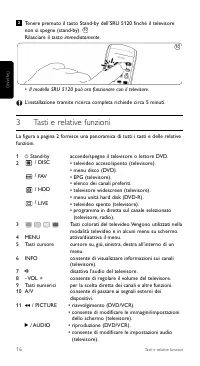
Tenere premuto il tasto Stand-by dell’SRU 5120 finché il televisorenon si spegne (stand-by).Rilasciare il tasto immediatamente. • Il modello SRU 5120 può ora funzionare con il televisore. L’installazione tramite ricerca completa richiede circa 5 minuti. 3 Tasti e relative funzioni La figura a pagina...
Page 17 - Nota; Regolazione della scelta del dispositivo (tasti modalità)
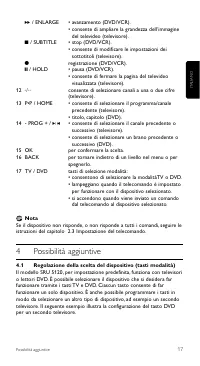
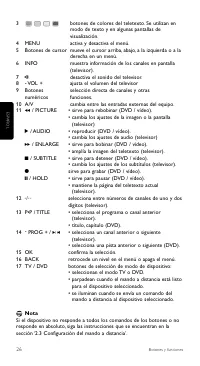
17 6 / ENLARGE • avanzamento (DVD/VCR).• consente di ampliare la grandezza dell’immagine del televideo (televisore). 9 / SUBTITLE • stop (DVD/VCR).• consente di modificare le impostazioni dei sottotitoli (televisore). 0 registrazione (DVD/VCR). ; / HOLD • pausa (DVD/VCR).• consente di fermare la pag...
Page 19 - Ripristino delle funzioni originali del telecomando; Premere il tasto 9, poi 8 e 1 in quest’ordine.
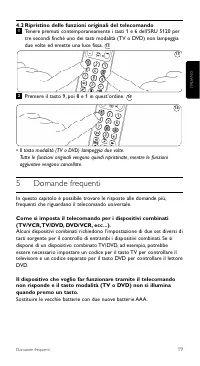
4.2 Ripristino delle funzioni originali del telecomando Tenere premuti contemporaneamente i tasti 1 e 6 dell’SRU 5120 pertre secondi finché uno dei tasti modalità (TV o DVD) non lampeggiadue volte ed emette una luce fissa. Premere il tasto 9, poi 8 e 1 in quest’ordine. • Il tasto modalità (TV o DVD)...
Page 20 - Assistenza
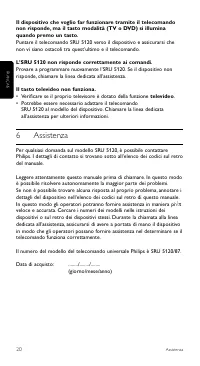
20 Assistenza Il dispositivo che voglio far funzionare tramite il telecomandonon risponde, ma il tasto modalità (TV o DVD) si illuminaquando premo un tasto.Puntare il telecomando SRU 5120 verso il dispositivo e assicurarsi chenon vi siano ostacoli tra quest’ultimo e il telecomando. L’SRU 5120 non ri...
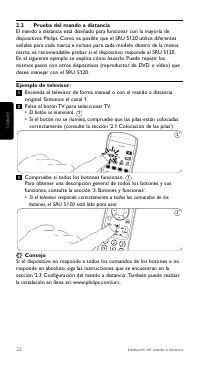
Page 22 - botones, el SRU 5120 está listo para usar.; Consejo
2.2 Prueba del mando a distancia El mando a distancia está diseñado para funcionar con la mayoría dedispositivos Philips. Como es posible que el SRU 5120 utilice diferentesseñales para cada marca e incluso para cada modelo dentro de la mismamarca, es recomendable probar si el dispositivo responde al...
Page 23 - Ejemplo de televisor:
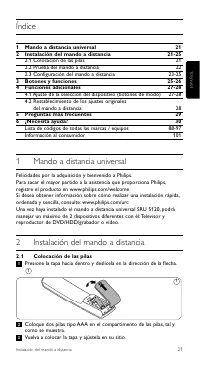
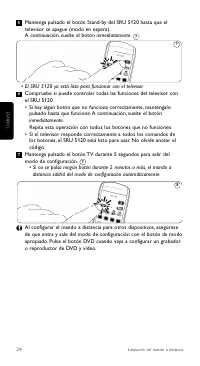
2.3 Configuración del mando a distanciaEstos pasos sólo son necesarios si el dispositivo no responde al SRU5120. Si se da este caso, significa que el SRU 5120 no reconoce la marcay/o el modelo del dispositivo y es necesario programar el mando adistancia para que lo reconozca. En el siguiente ejemplo...
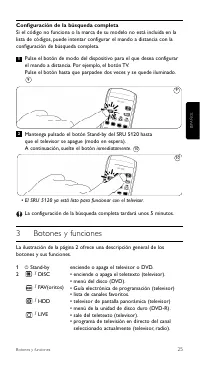
Page 25 - Configuración de la búsqueda completa; • El SRU 5120 ya está listo para funcionar con el televisor.; enciende o apaga el televisor o DVD.
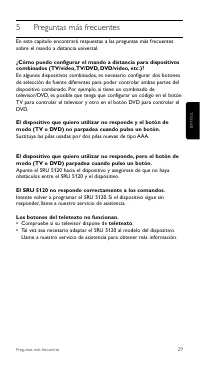
Configuración de la búsqueda completa Si el código no funciona o la marca de su modelo no está incluida en lalista de códigos, puede intentar configurar el mando a distancia con laconfiguración de búsqueda completa. Pulse el botón de modo del dispositivo para el que desea configurarel mando a distan...
Page 27 - Ajuste de la selección del dispositivo (botones de modo)
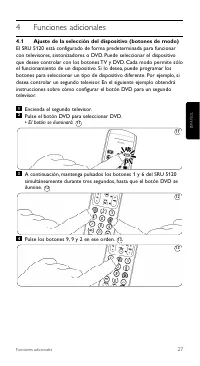
27 4 Funciones adicionales 4.1 Ajuste de la selección del dispositivo (botones de modo) El SRU 5120 está configurado de forma predeterminada para funcionarcon televisores, sintonizadores o DVD. Puede seleccionar el dispositivoque desee controlar con los botones TV y DVD. Cada modo permite sóloel fun...
Page 28 - Restauración de las funciones originales del mando a
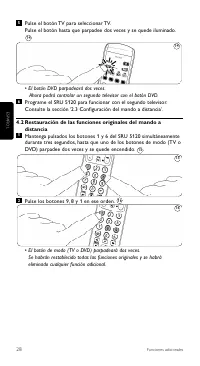
Pulse el botón TV para seleccionar TV.Pulse el botón hasta que parpadee dos veces y se quede iluminado. • El botón DVD parpadeará dos veces. Ahora podrá controlar un segundo televisor con el botón DVD. Programe el SRU 5120 para funcionar con el segundo televisor.Consulte la sección ‘2.3 Configuració...
Page 32 - o SRU 5120 está pronto a utilizar.; Sugestão
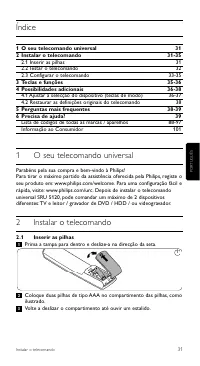
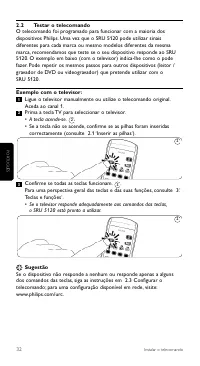
2.2 Testar o telecomando O telecomando foi programado para funcionar com a maioria dosdispositivos Philips. Uma vez que o SRU 5120 pode utilizar sinaisdiferentes para cada marca ou mesmo modelos diferentes da mesmamarca, recomendamos que teste se o seu dispositivo responde ao SRU5120. O exemplo em b...
Page 33 - Exemplo com o televisor:; Prima a tecla TV até que pisque duas vezes e se mantenha acesa.
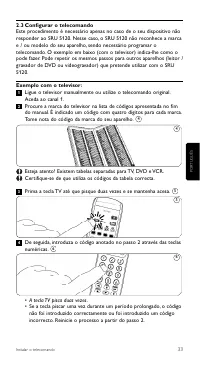
2.3 Configurar o telecomandoEste procedimento é necessário apenas no caso de o seu dispositivo nãoresponder ao SRU 5120. Nesse caso, o SRU 5120 não reconhece a marcae / ou modelo do seu aparelho, sendo necessário programar otelecomando. O exemplo em baixo (com o televisor) indica-lhe como opode faze...
Page 34 - Configuração com pesquisa completa
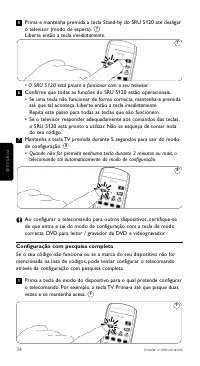
Prima e mantenha premida a tecla Stand-by do SRU 5120 até desligaro televisor (modo de espera).Liberte então a tecla imediatamente. • O SRU 5120 está pronto a funcionar com o seu televisor.Confirme que todas as funções do SRU 5120 estão operacionais.• Se uma tecla não funcionar de forma correcta, ma...
Page 35 - • O SRU 5120 está pronto a funcionar com o seu televisor.; Teclas e funções
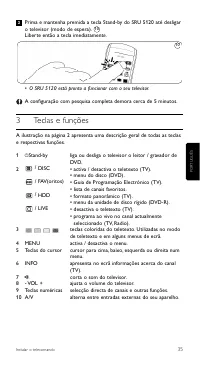
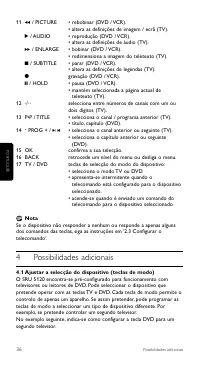
Prima e mantenha premida a tecla Stand-by do SRU 5120 até desligaro televisor (modo de espera).Liberte então a tecla imediatamente. • O SRU 5120 está pronto a funcionar com o seu televisor. A configuração com pesquisa completa demora cerca de 5 minutos. 3 Teclas e funções A ilustração na página 2 ap...
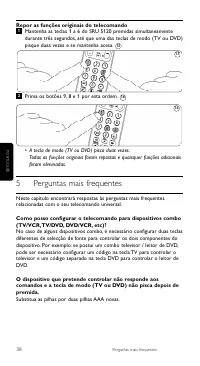
Page 38 - Repor as funções originais do telecomando
Repor as funções originais do telecomando Mantenha as teclas 1 a 6 do SRU 5120 premidas simultaneamentedurante três segundos, até que uma das teclas de modo (TV ou DVD)pisque duas vezes e se mantenha acesa. Prima os botões 9, 8 e 1 por esta ordem. • A tecla de modo (TV ou DVD) pisca duas vezes. Toda...
Page 39 - O número de modelo do telecomando universal Philips é SRU 5120/87.
O dispositivo que pretende controlar não responde aoscomandos e a tecla de modo (TV ou DVD) apresenta-seintermitente quando a premi.Aponte o SRU 5120 na direcção do dispositivo, certificando-se de quenão existem obstruções entre o telecomando e o aparelho. O SRU 5120 não responde adequadamente aos c...
Page 40 - ¶›Ó·Î· ̃ ÂÚÈ ̄Ô̤ӈÓ
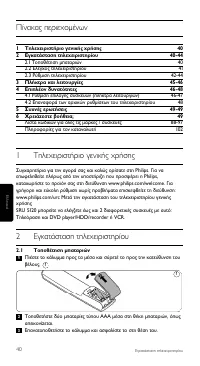
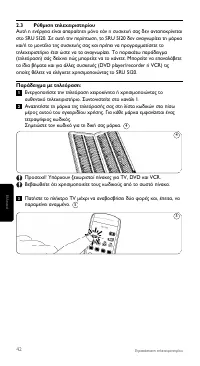
40 ∂ÁηٿÛÙ·ÛË ÙËϯÂÈÚÈÛÙËÚ›Ô˘ ¶›Ó·Î·˜ ÂÚȯÔÌ¤ÓˆÓ 1 ∆ËϯÂÈÚÈÛÙ‹ÚÈÔ ÁÂÓÈ΋˜ ¯Ú‹Û˘ 40 2 ∂ÁηٿÛÙ·ÛË ÙËϯÂÈÚÈÛÙËÚ›Ô˘ 40-44 2.1 ∆ÔÔı¤ÙËÛË Ì·Ù·ÚÈÒÓ 40 2.2 ŒÏÂÁ¯Ô˜ ÙËϯÂÈÚÈÛÙËÚ›Ô˘ 41 2.3 ƒ‡ıÌÈÛË ÙËϯÂÈÚÈÛÙËÚ›Ô˘ 42-44 3 ¶Ï‹ÎÙÚ· Î·È ÏÂÈÙÔ˘ÚÁ›Â˜ 45-46 4 ∂ÈϤÔÓ ‰˘Ó·ÙfiÙËÙ˜ 46-48 4.1 ƒ‡ıÌÈÛË ÂÈÏÔÁ...
Page 41 - ∂¿Ó Ë ÙËÏÂfiÚ·ÛË ·ÓÙ·ÔÎÚÈı› fiˆ ̃ Ú¤ÂÈ Û fiÏ ̃ ÙÈ ̃ ÂÓÙÔϤ ̃ ÙˆÓ; TM ̆Ì‚Ô ̆Ï‹
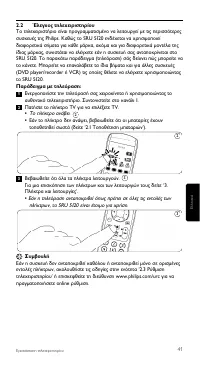
2.2 ŒÏÂÁ¯Ô˜ ÙËϯÂÈÚÈÛÙËÚ›Ô˘ ∆Ô ÙËϯÂÈÚÈÛÙ‹ÚÈÔ Â›Ó·È ÚÔÁÚ·ÌÌ·ÙÈṲ̂ÓÔ Ó· ÏÂÈÙÔ˘ÚÁ› Ì ÙȘ ÂÚÈÛÛfiÙÂÚÂ˜Û˘Û΢¤˜ Ù˘ Philips. ∫·ıÒ˜ ÙÔ SRU 5120 ÂÓ‰¤¯ÂÙ·È Ó· ¯ÚËÛÈÌÔÔÈ›‰È·ÊÔÚÂÙÈο Û‹Ì·Ù· ÁÈ· οı ̿Úη, ·ÎfiÌ· Î·È ÁÈ· ‰È·ÊÔÚÂÙÈο ÌÔÓ٤Ϸ Ù˘›‰È·˜ Ì¿Úη˜, Û˘ÓÈÛÙ¿Ù·È Ó· ÂϤÁ¯ÂÙÂ Â¿Ó Ë Û˘Û΢‹ Û·˜ ·ÓÙ·...
Page 44 - ƒ‡ıÌÈÛË Ì ϋÚË ·Ó· ̇‹ÙËÛË; ∆Ô SRU 5120 ¤ ̄ÂÈ ÙÒÚ· Ú ̆ıÌÈÛÙ› ÁÈ· ¤ÏÂÁ ̄Ô ÙË ̃ ÙËÏÂfiÚ·Û‹ ̃ Û· ̃.
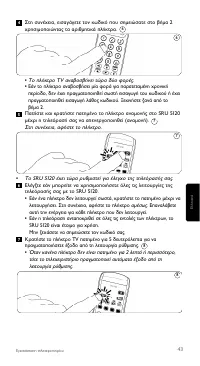
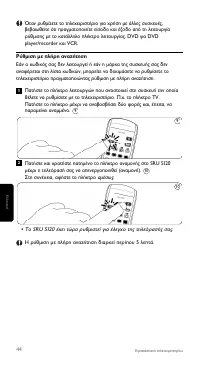
ŸÙ·Ó Ú˘ıÌ›˙ÂÙ ÙÔ ÙËϯÂÈÚÈÛÙ‹ÚÈÔ ÁÈ· ¯Ú‹ÛË Ì ¿ÏϘ Û˘Û΢¤˜,‚‚·Èˆı›Ù fiÙÈ Ú·ÁÌ·ÙÔÔț٠›ÛÔ‰Ô Î·È ¤ÍÔ‰Ô ·fi ÙË ÏÂÈÙÔ˘ÚÁ›·Ú‡ıÌÈÛ˘ Ì ÙÔ Î·Ù¿ÏÏËÏÔ Ï‹ÎÙÚÔ ÏÂÈÙÔ˘ÚÁ›·˜. DVD ÁÈ· DVDplayer/recorder Î·È VCR. ƒ‡ıÌÈÛË Ì ϋÚË ·Ó·˙‹ÙËÛË ∂¿Ó Ô Îˆ‰ÈÎfi˜ Û·˜ ‰ÂÓ ÏÂÈÙÔ˘ÚÁ› ‹ Â¿Ó Ë Ì¿Úη Ù˘ Û˘Û΢‹˜ Û·˜...
Page 46 - TMËÌ›ˆÛË; ƒ‡ıÌÈÛË ÂÈÏÔÁ‹ ̃ Û ̆ÛΠ̆ÒÓ (Ï‹ÎÙÚ· ÏÂÈÙÔ ̆ÚÁÈÒÓ)
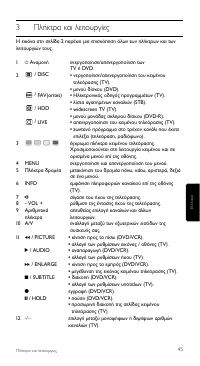
13 P 1 P / TITLE • ÂÈÏÔÁ‹ ÚÔËÁÔ‡ÌÂÓÔ˘ ÚÔÁÚ¿ÌÌ·ÙÔ˜ / ηӷÏÈÔ‡(TV). • Ù›ÙÏÔ˜, ÎÂÊ¿Ï·ÈÔ (DVD). 14 - PROG + / K J • ÂÈÏÔÁ‹ ÚÔËÁÔ‡ÌÂÓÔ˘ ‹ ÂfiÌÂÓÔ˘ ηӷÏÈÔ‡ (TV). • ÂÈÏÔÁ‹ ÚÔËÁÔ‡ÌÂÓÔ˘ ‹ ÂfiÌÂÓÔ˘ ÎÔÌÌ·ÙÈÔ‡(DVD). 15 OK ÂȂ‚·›ˆÛË ÂÈÏÔÁ‹˜. 16 BACK ÌÂٷΛÓËÛË ÛÙÔ ÌÂÓÔ‡ ηٿ ¤Ó· Â›Â‰Ô ›Ûˆ ‹·ÂÓÂÚÁÔ...
Page 47 - ¶·Ù‹ÛÙ ٷ Ï‹ÎÙÚ· 9, 9 Î·È 2 Ì ÙË ÛÂÈÚ¿ Ô ̆ ·Ó·Ê¤ÚÂÙ·È.
∂ÓÂÚÁÔÔ›ËÛË ‰Â‡ÙÂÚ˘ ÙËÏÂfiÚ·Û˘.¶·Ù‹ÛÙ ÙÔ ÏËÎÙÚÔ DVD ÁÈ· Ó· ÂÈϤÍÂÙ DVD. • ∆Ô Ï‹ÎÙÚÔ ·Ó¿‚ÂÈ. ™ÙË Û˘Ó¤¯ÂÈ·, ÎÚ·Ù‹ÛÙ ·ÙË̤ӷ Ù· Ï‹ÎÙÚ· 1 Î·È 6 ÙÔ˘ SRU 5120Ù·˘Ùfi¯ÚÔÓ· ÁÈ· ÙÚ›· ‰Â˘ÙÂÚfiÏÂÙ·, ̤¯ÚÈ Ó· ·Ó¿„ÂÈ ÙÔ Ï‹ÎÙÚÔ DVD. ¶·Ù‹ÛÙ ٷ Ï‹ÎÙÚ· 9, 9 Î·È 2 Ì ÙË ÛÂÈÚ¿ Ô˘ ·Ó·Ê¤ÚÂÙ·È. ¶·Ù‹ÛÙ ÙÔ Ï‹...
Page 48 - ∂·Ó·ÊÔÚ¿ ÙˆÓ ·Ú ̄ÈÎÒÓ ÏÂÈÙÔ ̆ÚÁÈÒÓ ÙÔ ̆ ÙËÏ ̄ÂÈÚÈÛÙËÚ›Ô ̆; ¶·Ù‹ÛÙ ٷ Ï‹ÎÙÚ· 9, 8 Î·È 1 Ì ÙË ÛÂÈÚ¿ Ô ̆ ·Ó·Ê¤ÚÂÙ·È.; TM ̆ ̄Ó¤ ̃ ÂÚˆÙ‹ÛÂÈ ̃; ∞ÓÙÈηٷÛÙ‹ÛÙ ÙÈ ̃ ·ÏȤ ̃ ̷ٷڛ ̃ Ì ‰‡Ô Ӥ ̃ ̷ٷڛ ̃ ∞∞∞.
48 ™˘¯Ó¤˜ ÂÚˆÙ‹ÛÂȘ 4.2 ∂·Ó·ÊÔÚ¿ ÙˆÓ ·Ú¯ÈÎÒÓ ÏÂÈÙÔ˘ÚÁÈÒÓ ÙÔ˘ ÙËϯÂÈÚÈÛÙËÚ›Ô˘ ∫Ú·Ù‹ÛÙ ·ÙË̤ӷ Ù· Ï‹ÎÙÚ· 1 Î·È 6 ÙÔ˘ SRU 5120 Ù·˘Ùfi¯ÚÔÓ· ÁÈ· ÙÚ›·‰Â˘ÙÂÚfiÏÂÙ·, ̤¯ÚÈ ¤Ó· ·fi Ù· Ï‹ÎÙÚ· ÏÂÈÙÔ˘ÚÁÈÒÓ (TV ‹ DVD) Ó··Ó·‚ÔÛ‚‹ÛÂÈ ‰‡Ô ÊÔÚ¤˜ ηÈ, ¤ÂÈÙ·, Ó· ·Ú·Ì›ÓÂÈ ·Ó·Ì̤ÓÔ. ¶·Ù‹ÛÙ ٷ Ï‹ÎÙÚ· 9, 8 Î·È 1...
Page 49 - μ‚·Èˆı›Ù fiÙÈ Ë ÙËÏÂfiÚ·Û‹ Û· ̃ ‰È·ı¤ÙÂÈ ÏÂÈÙÔ ̆ÚÁ›·; ÎÂÈ̤ÓÔ ̆
¶Ô˘ı¤ÏˆÓ· ÏÂÈÙÔ˘ÚÁ‹Ûˆ ‰ÂÓ ·ÓÙ·ÔÎÚ›ÓÂÙ·È Î·È ÙÔ Ï‹ÎÙÚÔÏÂÈÙÔ˘ÚÁÈÒÓ (TV ‹ DVD) ·Ó·‚ÔÛ‚‹ÓÂÈ fiÙ·Ó ·Ù¿ˆ οÔÈÔ Ï‹ÎÙÚÔ. ™ÙÚ¤„Ù ÙÔ SRU 5120 ÚÔ˜ ÙË Û˘Û΢‹ Î·È ‚‚·Èˆı›Ù fiÙÈ ‰ÂÓ ˘¿Ú¯Ô˘ÓÂÌfi‰È· ÌÂٷ͇ ÙÔ˘ SRU 5120 Î·È Ù˘ Û˘Û΢‹˜. ∆Ô SRU 5120 ‰ÂÓ ·ÓÙ·ÔÎÚ›ÓÂÙ·È ÛˆÛÙ¿ ÛÙȘ ÂÓÙÔϤ˜. ¢ÔÎÈÌ¿ÛÙ ӷ ÚÔÁÚ...
Page 52 - Uzaktan kumandanın ayarlanması; TV tuşu şimdi iki kez yanıp söner.
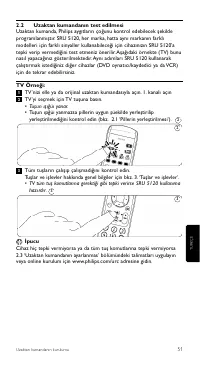
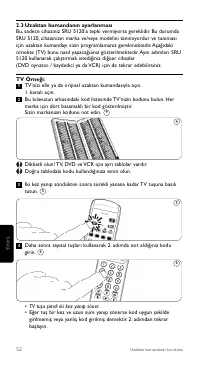
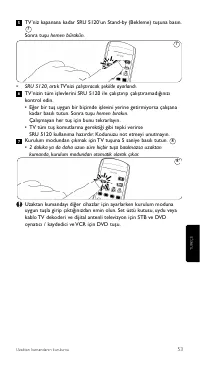
2.3 Uzaktan kumandanın ayarlanması Bu, sadece cihazınız SRU 5120’a tepki vermiyorsa gereklidir. Bu durumdaSRU 5120, cihazınızın marka ve/veya modelini tanımıyordur ve tanımasıiçin uzaktan kumandayı sizin programlamanız gerekmektedir. Aşağıdakiörnekte (TV) bunu nasıl yapacağüınız gösterilmektedir. Ay...
Page 54 - Tam arama kurulumu; hemen
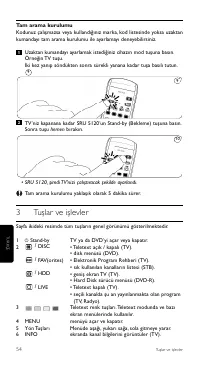
Tam arama kurulumu Kodunuz çalışmazsa veya kullandığınız marka, kod listesinde yoksa uzaktankumandayı tam arama kurulumu ile ayarlamayı deneyebilirsiniz. Uzaktan kumandayı ayarlamak istediğiniz cihazı n mod tuşuna bası n.Örneğin TV tuşu.İki kez yanıp söndükten sonra sürekli yanana kadar tuşa basılı ...
Page 55 - Not
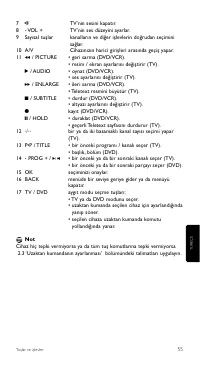
55 7 s TV’nin sesini kapatır. 8 - VOL + TV’nin ses düzeyini ayarlar. 9 Sayısal tuşlar kanalların ve diğer işlevlerin doğrudan seçiminisağlar. 10 A/V Cihazınızın harici girişleri arasında geçiş yapar. 11 5 / PICTURE • geri sarma (DVD/VCR).• resim / ekran ayarlarını değiştirir (TV). 2 / AUDIO • oynat ...
Page 56 - Aygıt seçiminin ayarlanması (Mod Tuşları)
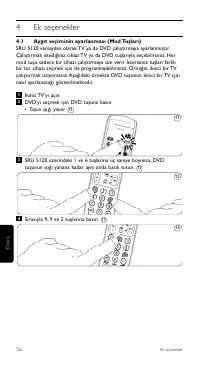
4 Ek seçenekler 4.1 Aygıt seçiminin ayarlanması (Mod Tuşları) SRU 5120 varsayılan olarak TV ya da DVD çalı ştı rmaya ayarlanmı ştı r.Çalı ştı rmak istediğiniz cihazı TV ya da DVD tuşlarıyla seçebilirsiniz. Hermod tuşu sadece bir cihazı çalıştırmaya izin verir. İsterseniz tuşları farklıbir tür cihazı...
Page 57 - Uzaktan kumanda orijinal fonksiyonlarının geri yüklenmesi.
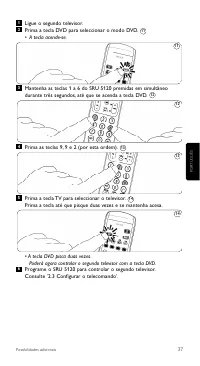
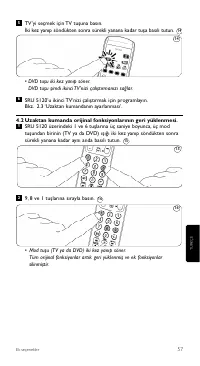
TV’yi seçmek için TV tuşuna basın.İki kez yanıp söndükten sonra sürekli yanana kadar tuşa basılı tutun. • DVD tuşu iki kez yanıp söner.DVD tuşu şimdi ikinci TV'nizi çalıştırmanızı sağlar. SRU 5120’u ikinci TV’nizi çalıştırmak için programlayın.Bkz. 2.3 ‘Uzaktan kumandanın ayarlanması’. 4.2 Uzaktan k...
Page 58 - Sıkça sorulan sorular; bilgi için yardım hattımızı arayın.
58 Sıkça sorulan sorular 5 Sıkça sorulan sorular Bu bölümde evrensel uzaktan kumandanız hakkında en sık sorulansoruların cevaplarını bulacaksınız. Uzaktan kumandamı combo cihazlar için nasıl ayarlayabilirim(TV/VCR, TV/DVD, DVD/VCR, vs.)?Bazı combo cihazlarda, iki bölümü de kontrol edebilmeniz için i...
Page 59 - Philips evrensel uzaktan kumandanızın model numarası SRU 5120/
6 Yardıma mı ihtiyacınız var? SRU 5120 ile ilgili herhangi bir sorunuz varsa, her zaman bizimle iletişimegeçebilirsiniz. İletişim bilgilerimizi bu kılavuzun arkasında, kod listesindensonra bulabilirsiniz. Bizi aramadan önce bu kılavuzu dikkatlice okuyun. Sorunlarınızın çoğunukendiniz çözebilirsiniz....
Page 60 - Содержание
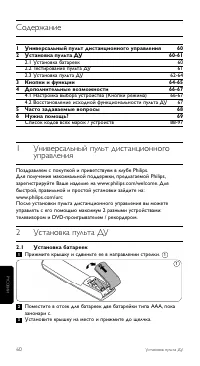
Установка пульта ДУ Содержание 1 Универсальный пульт дистанционного управления 60 2 Установка пульта ДУ 60-61 2.1 Установка батареек 60 2.2 Тестирование пульта ДУ 61 2.3 Установка пульта ДУ 62-64 3 Кнопки и функции 64-65 4 Дополнительные возможности 66-67 4.1 Настройка выбора устройства (Кнопки режи...
Page 61 - Тестирование пульта ДУ; • Загорится подсветка кнопки.; Совет
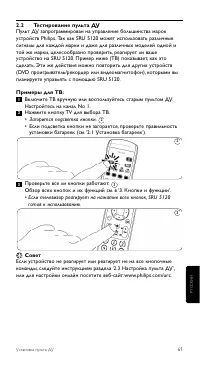
2.2 Тестирование пульта ДУ Пульт ДУ запрограммирован на управление большинства марокустройств Philips. Так как SRU 5120 может использовать различныесигналы для каждой марки и даже для различных моделей одной итой же марки, целесообразно проверить, реагирует ли вашеустройство на SRU 5120. Пример ниже...
Page 62 - Настройка пульта ДУ
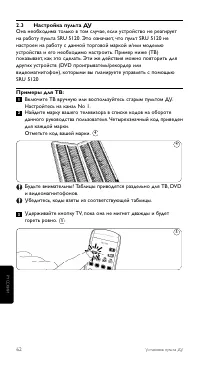
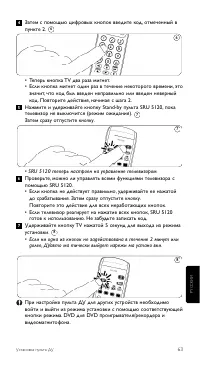
2.3 Настройка пульта ДУ Она необходима только в том случае, если устройство не реагируетна работу пульта SRU 5120. Это означает, что пульт SRU 5120 ненастроен на работу с данной торговой маркой и/или модельюустройства и его необходимо настроить. Пример ниже (ТВ)показывает, как это сделать. Эти же де...
Page 64 - Установка с помощью полного поиска; Затем сразу отпустите; На странице 2 вы найдете обзор всех кнопок и их функций.
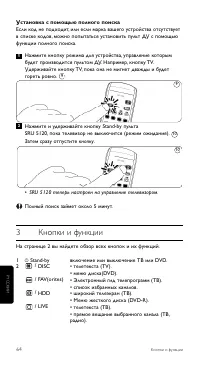
Установка с помощью полного поиска Если код не подходит, или если марка вашего устройства отсутствуетв списке кодов, можно попытаться установить пульт ДУ с помощьюфункции полного поиска. Нажмите кнопку режима для устройства, управление которымбудет производится пультом ДУ. Например, кнопку TV.Удержи...
Page 65 - Примечание
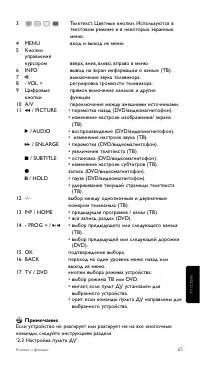
65 3 Телетекст. Цветные кнопки. Используются втекстовом режиме и в некоторых экранныхменю. 4 MENU вход и выход из меню. 5 Кнопки управлениякурсором вверх, вниз, влево, вправо в меню. 6 INFO вывод на экран информации о канале (ТВ). 7 s выключение звука телевизора. 8 - VOL + регулировка громкости теле...
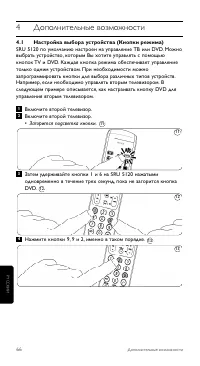
Page 66 - Настройка выбора устройства (Кнопки режима); Загорится подсветка кнопки.
4 Дополнительные возможности 4.1 Настройка выбора устройства (Кнопки режима) SRU 5120 по умолчанию настроен на управление ТВ или DVD. Можновыбрать устройство, которым Вы хотите управлять с помощьюкнопок TV и DVD. Каждая кнопка режима обеспечивает управлениетолько одним устройством. При необходимости...
Page 67 - Восстановление исходной функциональности пульта ДУ
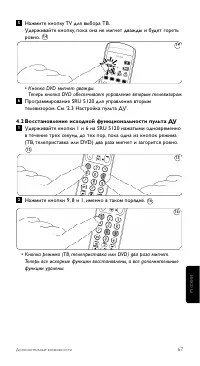
Нажмите кнопку TV для выбора ТВ.Удерживайте кнопку, пока она не мигнет дважды и будет горетьровно. • Кнопка DVD мигнет дважды. Теперь кнопка DVD обеспечивает управление вторым телевизором. Программирование SRU 5120 для управления вторымтелевизором. См. ‘2.3 Настройка пульта ДУ’. 4.2 Восстановление и...
Page 68 - Часто задаваемые вопросы
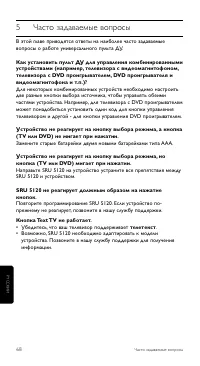
68 Часто задаваемые вопросы 5 Часто задаваемые вопросы В этой главе приводятся ответы на наиболее часто задаваемыевопросы о работе универсального пульта ДУ. Как установить пульт ДУ для управления комбинированнымиустройствами (например, телевизора с видеомагнитофоном,телевизора с DVD проигрывателем, ...
Page 69 - Номер модели универсального пульта ДУ Philips - SRU 5120/
6 Нужна помощь? Если у Вас возникли вопросы по SRU 5120, Вы можете обратится кнам. Контактные данные приведены после списка кодов на оборотеданного руководства пользователя. Прежде чем звонить, внимательно прочтите руководствопользователя. Большинство проблем можно решить самостоятельно.Если Вы все ...
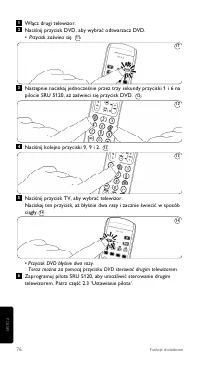
Page 72 - Naciśnij przycisk TV, aż błyśnie dwa razy i zacznie świecić.
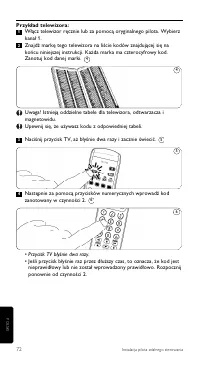
Przykład telewizora: Włącz telewizor ręcznie lub za pomocą oryginalnego pilota. Wybierzkanał 1.Znajdź markę tego telewizora na liście kodów znajdującej się nakońcu niniejszej instrukcji. Każda marka ma czterocyfrowy kod.Zanotuj kod danej marki. Uwaga! Istnieją oddzielne tabele dla telewizora, odtwar...
Page 73 - Ustawianie pełnego wyszukiwania
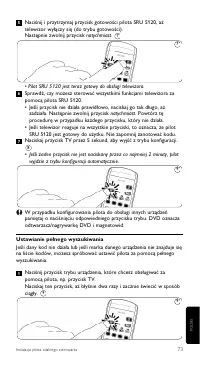
Naciśnij i przytrzymaj przycisk gotowości pilota SRU 5120, ażtelewizor wyłączy się (do trybu gotowości).Następnie zwolnij przycisk natychmiast. • Pilot SRU 5120 jest teraz gotowy do obsługi telewizora.Sprawdź, czy możesz sterować wszystkimi funkcjami telewizora zapomocą pilota SRU 5120.• Jeśli przyc...
Page 74 - • Pilot SRU 5120 jest teraz gotowy do obsługi telewizora.
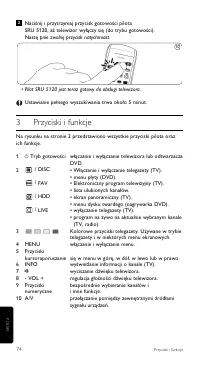
Naciśnij i przytrzymaj przycisk gotowości pilotaSRU 5120, aż telewizor wyłączy się (do trybu gotowości).Nastę pnie zwolnij przycisk natychmiast. • Pilot SRU 5120 jest teraz gotowy do obsługi telewizora. Ustawianie pełnego wyszukiwania trwa około 5 minut. 3 Przyciski i funkcje Na rysunku na stronie 2...
Page 75 - Uwaga
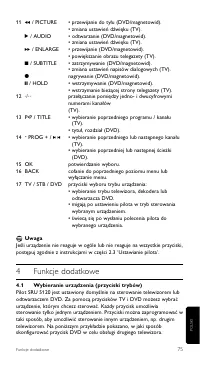
75 11 5 / PICTURE • przewijanie do tyłu (DVD/magnetowid).• zmiana ustawień dźwięku (TV). 2 / AUDIO • odtwarzanie (DVD/magnetowid).• zmiana ustawień dźwięku (TV). 6 / ENLARGE • przewijanie (DVD/magnetowid).• powiększanie obrazu telegazety (TV). 9 / SUBTITLE • zatrzymywanie (DVD/magnetowid).• zmiana u...
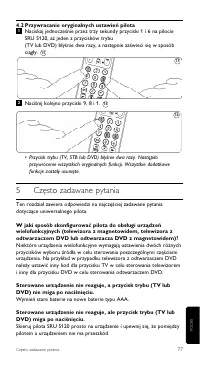
Page 78 - Numer modelu uniwersalnego pilota firmy Philips to SRU 5120/87.
78 Potrzebna pomoc? Pilot SRU 5120 nie reaguje prawidłowo na polecenia.Zaprogramuj pilota SRU 5120 ponownie. Jeśli urządzenie nadal niereaguje, zadzwoń pod numer naszej infolinii. Przyciski telegazety nie działają.• Sprawdź, czy telewizor jest wyposażony w funkcję telegazety.• Być może pilota SRU 51...
Page 80 - tlačítek, je dálkové ovládání SRU 5120 připraveno k použití.; Tip
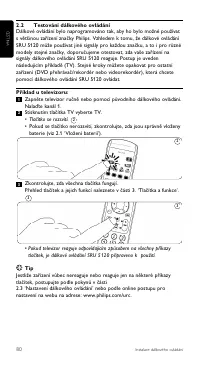
2.2 Testování dálkového ovládání Dálkové ovládání bylo naprogramováno tak, aby ho bylo možné používats většinou zařízení značky Philips. Vzhledem k tomu, že dálkové ovládáníSRU 5120 může používat jiné signály pro každou značku, a to i pro různémodely stejné značky, doporučujeme otestovat, zda vaše z...
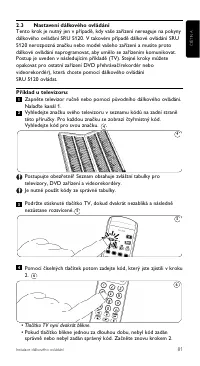
Page 81 - správně nebo nebyl zadán správný kód. Začněte znovu krokem 2.
2.3 Nastavení dálkového ovládání Tento krok je nutný jen v případě, kdy vaše zařízení nereaguje na pokynydálkového ovládání SRU 5120. V takovém případě dálkové ovládání SRU5120 nerozpozná značku nebo model vašeho zařízení a musíte protodálkové ovládání naprogramovat, aby umělo se zařízením komunikov...
Page 82 - Pak tlačítko ihned uvolněte.
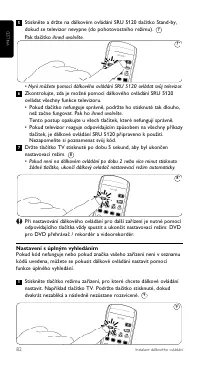
Stiskněte a držte na dálkovém ovládání SRU 5120 tlačítko Stand-by,dokud se televizor nevypne (do pohotovostního režimu). Pak tlačítko ihned uvolněte. • Nyní můžete pomocí dálkového ovládání SRU 5120 ovládat svůj televizor.Zkontrolujte, zda je možné pomocí dálkového ovládání SRU 5120ovládat všechny f...
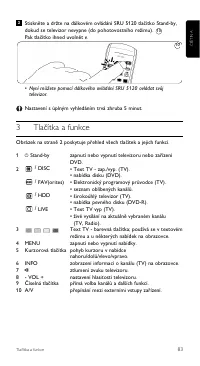
Page 83 - • Nyní můžete pomocí dálkového ovládání SRU 5120 ovládat svůj
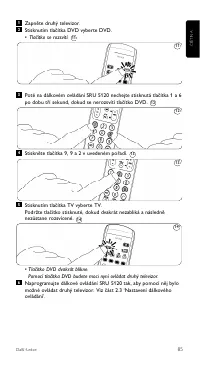
Stiskněte a držte na dálkovém ovládání SRU 5120 tlačítko Stand-by,dokud se televizor nevypne (do pohotovostního režimu).Pak tlačítko ihned uvolnět e. • Nyní můžete pomocí dálkového ovládání SRU 5120 ovládat svůj televizor. Nastavení s úplným vyhledáním trvá zhruba 5 minut. 3 Tlačítka a funkce Obráze...
Page 84 - POZNÁMKA; Další funkce
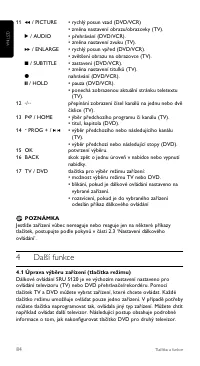
11 5 / PICTURE • rychlý posun vzad (DVD/VCR)• změna nastavení obrazu/obrazovky (TV). 2 / AUDIO • přehrávání (DVD/VCR).• změna nastavení zvuku (TV). 6 / ENLARGE • rychlý posun vpřed (DVD/VCR).• zvětšení obrazu na obrazovce (TV). 9 / SUBTITLE • zastavení (DVD/VCR).• změna nastavení titulků (TV). 0 nah...
Page 86 - Stiskněte tlačítka 9, 8 a 1 v uvedeném pořadí.
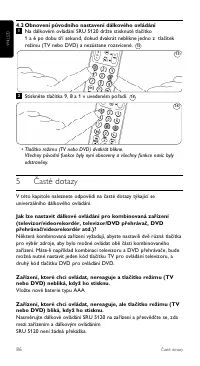
4.2 Obnovení původního nastavení dálkového ovládáníNa dálkovém ovládání SRU 5120 držte stisknuté tlačítko1 a 6 po dobu tří sekund, dokud dvakrát neblikne jedno z tlačítekrežimu (TV nebo DVD) a nezůstane rozsvícené. Stiskněte tlačítka 9, 8 a 1 v uvedeném pořadí. • Tlačítko režimu (TV nebo DVD) dvakrá...
Page 87 - modelu zařízení. Podrobnosti zjistíte na naší lince podpory.
Dálkové ovládání SRU 5120 nereaguje správně na příkazy.Zkuste dálkové ovládání SRU 5120 znovu naprogramovat. Pokud zařízeníani potom nebude na příkazy správně reagovat, zavolejte na naší linkupodpory. Nefungují tlačítka Text TV.• Zjistěte, zda je televizor vybaven teletextem.• Je možné, že dálkové o...
Page 99 - Helpline; Country; ŒÏÏËÓa ̃
99 HELPLINE Helpline Helpline Country Phone number Tariff Australia 1300 363 391 Local tariff België/Belgique 070 253 011 € 0,17 Danmark 35258758 Local tariff France 08 9165 0007 € 0,23 Deutschland 0180 5 007 533 € 0,12 España 902 889 343 € 0,15 ŒÏÏËÓa˜ 00800 3122 1219 Local tariff Ireland 01 601115...
Page 102 - ∞fiÚÚÈwË aÏÈÔ‡ ÚÔ ̊fiÓÙÔ ̃; Tüketicinin Bilgisine; 02/96/EC sayılı Avrupa Yönergesi kapsamına alınması
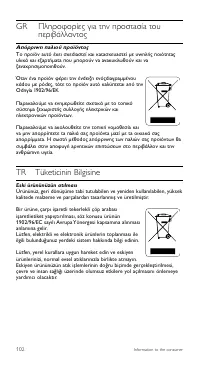
GR ¶ÏËÚÔÊÔڛ˜ ÁÈa ÙËÓ ÚÔÛÙaÛ›a ÙÔ˘ÂÚÈ‚¿ÏÏÔÓÙÔ˜ ∞fiÚÚÈwË aÏÈÔ‡ ÚÔ˚fiÓÙÔ˜ ∆Ô ÚÔ˚fiÓ a˘Ùfi ¤¯ÂÈ Û¯ÂdÈaÛÙ› ÎaÈ ÎaÙaÛ΢aÛÙ› Ì ˘wËÏ‹˜ ÔÈfiÙËÙa˜˘ÏÈο ÎaÈ ÂÍaÚÙ‹ÌaÙa Ô˘ ÌÔÚÔ‡Ó Óa aÓa΢ÎψıÔ‡Ó ÎaÈ ÓaÍaÓa¯ÚËÛÈÌÔÔÈËıÔ‡Ó. ŸÙaÓ ¤Óa ÚÔ˚fiÓ Ê¤ÚÂÈ ÙËÓ ¤ÓdÂÈÍË ÂÓfi˜dÈaÁÚaÌ̤ÓÔ˘ οdÔ˘ Ì Úfid˜, ÙfiÙ ÙÔ ÚÔ˚fi...
Page 104 - Printed in Portugal
© 2007 Koninklijke Philips Electronics N.V.All rights reserved. Reproduction in whole or in part is prohibited withoutthe prior written consent of the copyright owner. The information presentedin this document does not form part of any quotation or contract,is believedto be accurate and reliable and...