Page 2 - Contents
2 Contents Contents .................................................................................... 2Introduction .............................................................................. 3Important Safety Information .................................................. 41. Overview ...........
Page 3 - Introduction
3 EN Introduction Thank you for purchasing the OMRON M3 Intellisense Upper Arm Blood Pressure Monitor. The OMRON M3 Intellisense is a fully automatic blood pressure monitor, operating on the oscillometric principle. It measures your blood pressure and pulse rate simply and quickly. For comfortable c...
Page 4 - Important Safety Information; AA
4 Important Safety Information Consult your doctor during pregnancy, arrhythmia and arteriosclerosis.You should never change the dosage of medication prescribed by your doctor.Use the M3 Intellisense only for yourself. Caution: • Do not leave the unit unattended with infants or persons who cannot ex...
Page 5 - Main unit
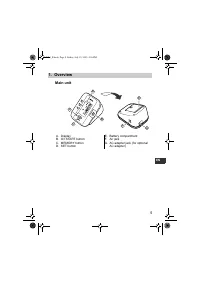
5 1.Overview EN 1. Overview Main unit A. DisplayB. O/I START buttonC. MEMORY buttonD. SET button E. Battery compartmentF. Air jackG. AC adapter jack (for optional AC adapter) B D A C E G F 7051_E.book Page 5 Friday, July 15, 2005 4:36 PM
Page 6 - Arm Cuff; Air Tube
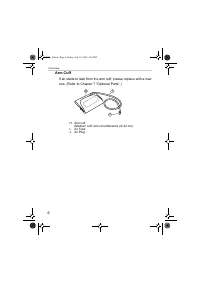
6 1.Overview Arm Cuff If air starts to leak from the arm cuff, please replace with a new one. (Refer to Chapter 7 “Optional Parts”.) H. Arm cuff (Medium cuff: arm circumference 22-32 cm) I. Air Tube J. Air Plug I H J 7051_E.book Page 6 Friday, July 15, 2005 4:36 PM
Page 7 - N. Average value symbol
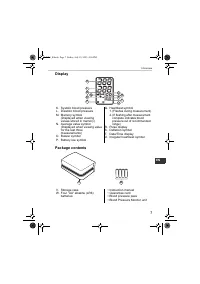
7 1.Overview EN Display Package contents K. Systolic blood pressureL. Diastolic blood pressureM. Memory symbol (Displayed when viewing values stored in memory) N. Average value symbol (Displayed when viewing value for the last three measurements) O. Buzzer symbolP. Battery low symbol Q. Heartbeat sy...
Page 8 - Installing/Replacing the Batteries; Turn the main unit upside down.
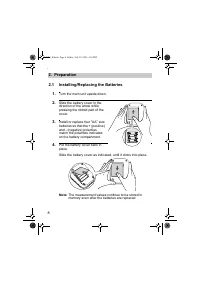
8 2.Preparation 2. Preparation 2.1 Installing/Replacing the Batteries 1. Turn the main unit upside down. 2. Slide the battery cover in the direction of the arrow while pressing the ribbed part of the cover. 3. Install or replace four “ AA ” size batteries so that the + (positive) and - (negative) po...
Page 9 - Battery Life & Replacement
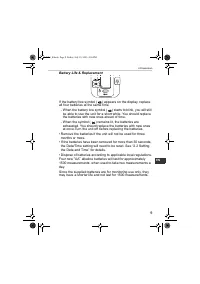
9 2.Preparation EN Battery Life & Replacement If the battery low symbol ( ) appears on the display, replace all four batteries at the same time. - When the battery low symbol ( ) starts to blink, you will still be able to use the unit for a short while. You should replace the batteries with new ...
Page 10 - Setting the Date and Time; measurement for the first time.
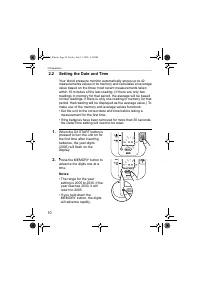
10 2.Preparation 2.2 Setting the Date and Time Your blood pressure monitor automatically stores up to 42 measurements values in its memory and calculates an average value based on the three most recent measurements taken within 10 minutes of the last reading. (If there are only two readings in memor...
Page 11 - The year is set and the month digits flash on the display.
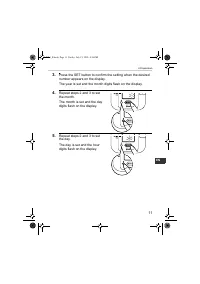
11 2.Preparation EN 3. Press the SET button to confirm the setting when the desired number appears on the display. The year is set and the month digits flash on the display. 4. Repeat steps 2 and 3 to set the month. The month is set and the day digits flash on the display. 5. Repeat steps 2 and 3 to...
Page 12 - The minutes settings is set.
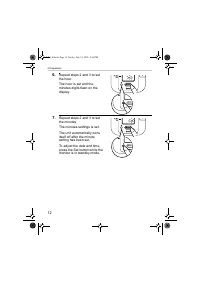
12 2.Preparation 6. Repeat steps 2 and 3 to set the hour. The hour is set and the minutes digits flash on the display. 7. Repeat steps 2 and 3 to set the minutes. The minutes settings is set. The unit automatically turns itself off after the minute setting has been set. To adjust the date and time, ...
Page 13 - Adjusting the Settings Modes; Buzzer Mode
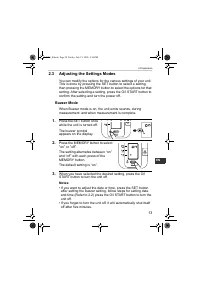
13 2.Preparation EN 2.3 Adjusting the Settings Modes You can modify the options for the various settings of your unit. This is done by pressing the SET button to select a setting, then pressing the MEMORY button to select the options for that setting. After selecting a setting, press the O/I START b...
Page 14 - How to Sit Correctly When Taking a Measurement; You can take a measurement on either your left or right arm.
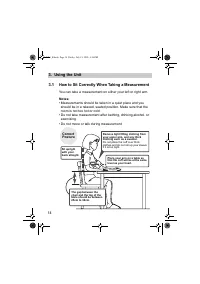
14 3.Using the Unit 3. Using the Unit 3.1 How to Sit Correctly When Taking a Measurement You can take a measurement on either your left or right arm. Notes: • Measurements should be taken in a quiet place and you should be in a relaxed, seated position. Make sure that the room is not too hot or cold...
Page 15 - Incorrect Posture
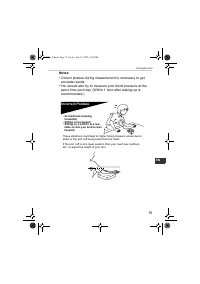
15 3.Using the Unit EN Notes: • Correct posture during measurement is necessary to get accurate results. • You should also try to measure your blood pressure at the same time each day. (Within 1 hour after waking up is recommended.) Incorrect Posture These situations could lead to higher blood press...
Page 16 - Applying the Arm Cuff
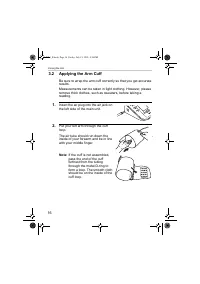
16 3.Using the Unit 3.2 Applying the Arm Cuff Be sure to wrap the arm cuff correctly so that you get accurate results.Measurements can be taken in light clothing. However, please remove thick clothes, such as sweaters, before taking a reading. 1. Insert the air plug into the air jack on the left sid...
Page 17 - Position the arm correctly.; Taking measurements on the right arm; • The cuff should be 1 to 2; ) The air tube should run
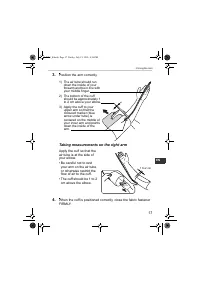
17 3.Using the Unit EN 3. Position the arm correctly. Taking measurements on the right arm Apply the cuff so that the air tube is at the side of your elbow.• Be careful not to rest your arm on the air tube, or otherwise restrict the flow of air to the cuff. • The cuff should be 1 to 2 cm above the e...
Page 18 - Taking a Reading; Press the O/I START button to turn on the unit.; Common Causes of Inaccurate Results
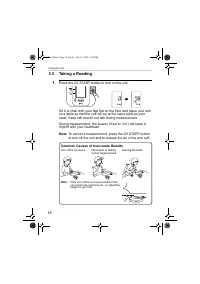
18 3.Using the Unit 3.3 Taking a Reading 1. Press the O/I START button to turn on the unit. Sit in a chair with your feet flat on the floor and place your arm on a table so that the cuff will be at the same level as your heart. Keep still and do not talk during measurement. During measurement, the b...
Page 20 - What is Irregular Heartbeat?; Normal Heartbeat
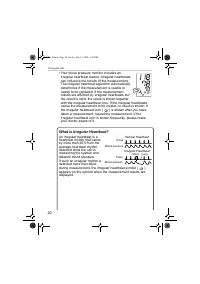
20 3.Using the Unit • Your blood pressure monitor includes an irregular heartbeat feature. Irregular heartbeats can influence the results of the measurement. The irregular heartbeat algorithm automatically determines if the measurement is usable or needs to be repeated. If the measurement results ar...
Page 22 - Instructions for special conditions; The cuff starts to deflate and measurement starts.
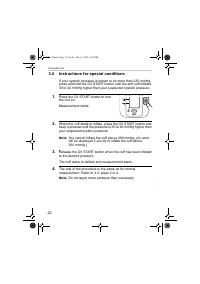
22 3.Using the Unit 3.4 Instructions for special conditions If your systolic pressure is known to be more than 220 mmHg, press and hold the O/I START button until the arm cuff inflates 30 to 40 mmHg higher than your suspected systolic pressure. 1. Press the O/I START button to turn the unit on. Meas...
Page 23 - Using the Memory Function; Press the MEMORY button.
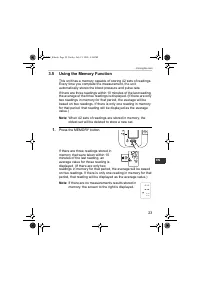
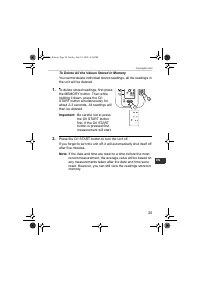
23 3.Using the Unit EN 3.5 Using the Memory Function This unit has a memory capable of storing 42 sets of readings. Every time you complete the measurement, the unit automatically stores the blood pressure and pulse rate. If there are three readings within 10 minutes of the last reading, the average...
Page 24 - Press the O/I START button to turn the unit off.
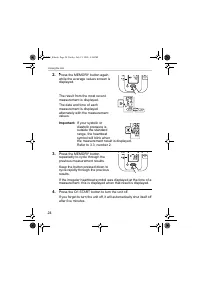
24 3.Using the Unit 2. Press the MEMORY button again, while the average values screen is displayed. The result from the most recent measurement is displayed. The date and time of each measurement is displayed alternately with the measurement values. Important: If your systolic or diastolic pressure ...
Page 26 - Quick Reference Guide; Remove any tight-fitting clothing from your upper arm.
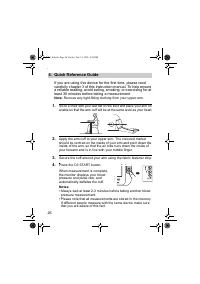
26 4.Quick Reference Guide 4. Quick Reference Guide If you are using this device for the first time, please read carefully chapter 3 of this instruction manual. To help ensure a reliable reading, avoid eating, smoking, or exercising for at least 30 minutes before taking a measurement. Note: Remove a...
Page 27 - Handling Errors and Problems
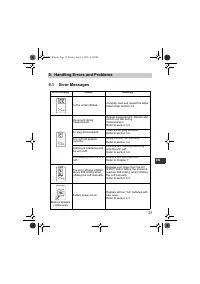
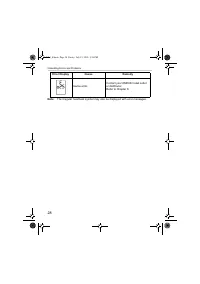
27 5.Handling Errors and Problems EN 5. Handling Errors and Problems 5.1 Error Messages Error Display Cause Remedy Cuff is under inflated. Carefully read and repeat the steps listed under section 3.4. Movement during measurement Repeat measurement. Remain still and do not talk during measurement.Ref...
Page 29 - Troubleshooting
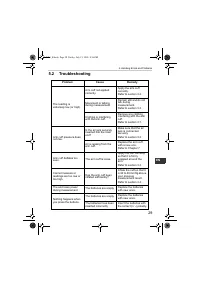
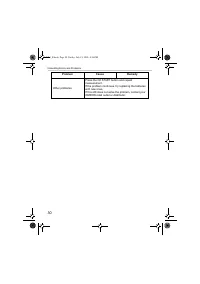
29 5.Handling Errors and Problems EN 5.2 Troubleshooting Problem Cause Remedy The reading is extremely low (or high). Arm cuff not applied correctly. Apply the arm cuff correctly. Refer to section 3.2. Movement or talking during measurement. Remain still and do not talk during measurement.Refer to s...
Page 31 - Maintenance and Storage; Maintenance; • Do not subject the main unit and cuff to extreme temperatures,; • Do not carry out repairs of any kind by yourself. If a defect
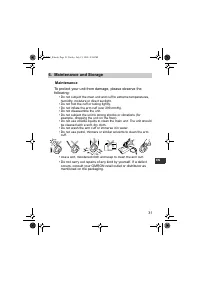
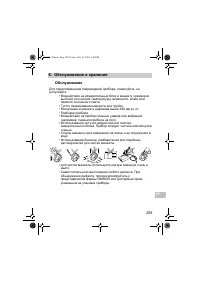
31 6.Maintenance and Storage EN 6. Maintenance and Storage Maintenance To protect your unit from damage, please observe the following: • Do not subject the main unit and cuff to extreme temperatures, humidity, moisture or direct sunlight. • Do not fold the cuff or tubing tightly.• Do not inflate the...
Page 32 - Calibration and Service; • The accuracy of this blood pressure monitor has been
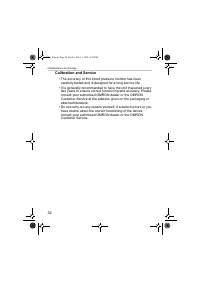
32 6.Maintenance and Storage Calibration and Service • The accuracy of this blood pressure monitor has been carefully tested and is designed for a long service life. • It is generally recommended to have the unit inspected every two years to ensure correct functioning and accuracy. Please consult yo...
Page 33 - Storage; Keep the unit in its storage case when not in use.
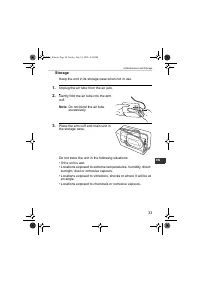
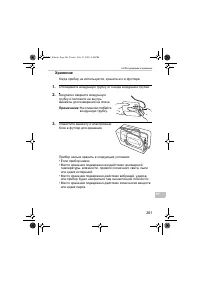
33 6.Maintenance and Storage EN Storage Keep the unit in its storage case when not in use. 1. Unplug the air tube from the air jack. 2. Gently fold the air tube into the arm cuff. Note: Do not bend the air tube excessively. 3. Place the arm cuff and main unit in the storage case. Do not store the un...
Page 34 - Using the Optional AC Adapter; unsupported adapters may damage the unit.; Large Arm Cuff; AC Adapter “Q”
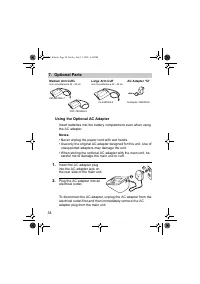
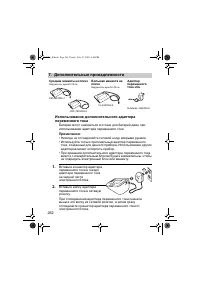
34 7.Optional Parts 7. Optional Parts Using the Optional AC Adapter Insert batteries into the battery compartment even when using the AC adapter. Notes: • Never unplug the power cord with wet hands.• Use only the original AC adapter designed for this unit. Use of unsupported adapters may damage the ...
Page 35 - Caution: Please read the instruction manual carefully
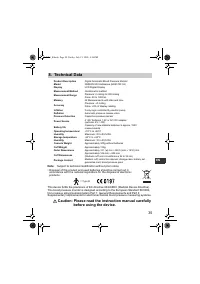
35 8.Technical Data EN 8. Technical Data Note: Subject to technical modification without prior notice • Disposal of this product and used batteries should be carried out in accordance with the national regulations for the disposal of electronic products. This device fulfils the previsions of EC dire...
Page 37 - Some Useful Information about Blood Pressure; What is Blood Pressure?
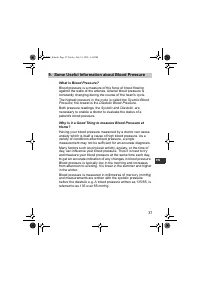
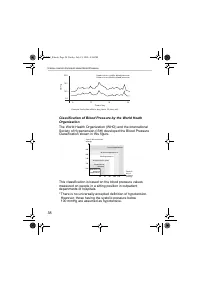
37 9.Some Useful Information about Blood Pressure EN 9. Some Useful Information about Blood Pressure What is Blood Pressure? Blood pressure is a measure of the force of blood flowing against the walls of the arteries. Arterial blood pressure is constantly changing during the course of the heart's cy...
Page 39 - Tensiomètre numérique automatique; Modèle M3 Intellisense; РУКОВОДСТВО
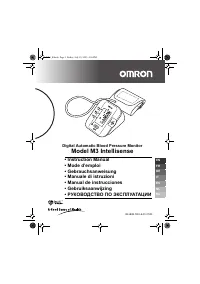
Tensiomètre numérique automatique Modèle M3 Intellisense • Instruction Manual• Mode d’emploi• Gebrauchsanweisung• Manuale di istruzioni• Manual de instrucciones• Gebruiksaanwijzing• РУКОВОДСТВО ПО ЭКСПЛУАТАЦИИ EN FR DE IT ES NL RU IM-HEM-7051-E-01-07/05 7051_E.book Page 39 Friday, July 15, 2005 4:36...
Page 40 - Table des matières; Position assise correcte lors de la réalisation d’une
40 Table des matières Table des matières ................................................................. 40Introduction ............................................................................ 41Informations importantes sur la sécurité ............................ 421. Présentation générale .....
Page 42 - Informations importantes sur la sécurité; - Lorsque l’appareil ne doit pas être utilisé pendant une longue
42 Informations importantes sur la sécurité Consulter votre médecin si vous êtes enceinte, souffrez d’arythmie ou d’artériosclérose.Vous ne devez jamais changer la dose de médicament prescrite par votre médecin.Utiliser le M3 Intellisense uniquement sur vous-même. Attention : • Ne pas laisser l’appa...
Page 43 - Présentation générale; Unité principale
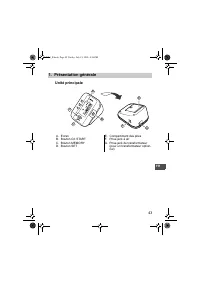
43 1.Présentation générale FR 1. Présentation générale Unité principale A. EcranB. Bouton O/I STARTC. Bouton MEMORYD. Bouton SET E. Compartiment des pilesF. Prise jack à airG. Prise jack de transformateur (pour un transformateur option-nel) B D A C E G F 7051_E.book Page 43 Friday, July 15, 2005 4:3...
Page 44 - Brassard; Tuyau à air
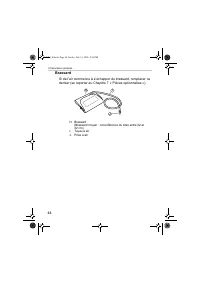
44 1.Présentation générale Brassard Si de l’air commence à s’échapper du brassard, remplacer ce dernier (se reporter au Chapitre 7 « Pièces optionnelles »). H. Brassard (Brassard moyen : circonférence du bras entre 22 et 32 cm) I. Tuyau à air J. Prise à air I H J 7051_E.book Page 44 Friday, July 15,...
Page 45 - Ecran
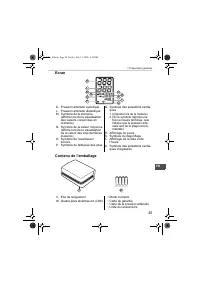
45 1.Présentation générale FR Ecran Contenu de l’emballage K. Pression artérielle systoliqueL. Pression artérielle diastoliqueM. Symbole de la mémoire (affiché lors de la visualisation des valeurs conservées en mémoire) N. Symbole de la valeur moyenne (affiché lors de la visualisation de la valeur d...
Page 46 - Installation/Remplacement des piles; Retourner l’appareil.
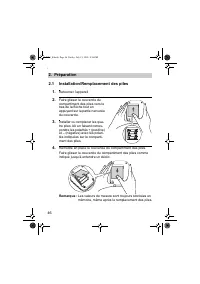
46 2.Préparation 2. Préparation 2.1 Installation/Remplacement des piles 1. Retourner l’appareil. 2. Faire glisser le couvercle du compartiment des piles vers le bas de la flèche tout en appuyant sur la partie nervurée du couvercle. 3. Installer ou remplacer les qua-tre piles AA en faisant corres-pon...
Page 47 - Durée de vie des piles et remplacement
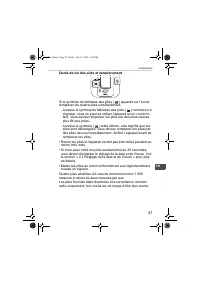
47 2.Préparation FR Durée de vie des piles et remplacement Si le symbole de faiblesse des piles ( ) apparaît sur l’écran, remplacer les quatre piles simultanément. - Lorsque le symbole de faiblesse des piles ( ) commence à clignoter, vous ne pourrez utiliser l’appareil qu’un court ins-tant. Vous dev...
Page 48 - Réglage de la date et de l’heure; prendre une mesure pour la première fois.
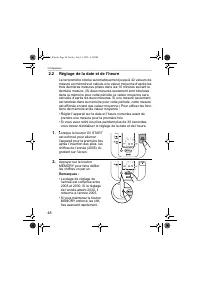
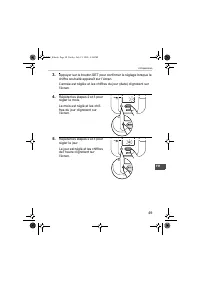
48 2.Préparation 2.2 Réglage de la date et de l’heure Le tensiomètre stocke automatiquement jusqu’à 42 valeurs de mesure en mémoire et calcule une valeur moyenne d’après les trois dernières mesures prises dans les 10 minutes suivant la dernière mesure. (Si deux mesures seulement sont stockées dans l...
Page 50 - Les minutes sont réglées.
50 2.Préparation 6. Répéter les étapes 2 et 3 pour régler l’heure. L’heure est réglée et les chif-fres des minutes clignotent sur l’écran. 7. Répéter les étapes 2 et 3 pour régler les minutes. Les minutes sont réglées. L’appareil commute automati-quement en mode veille lors-que les minutes sont régl...
Page 51 - Réglage des modes de réglage; Mode avertisseur sonore
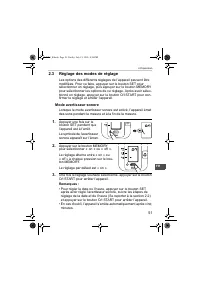
51 2.Préparation FR 2.3 Réglage des modes de réglage Les options des différents réglages de l’appareil peuvent être modifiées. Pour ce faire, appuyer sur le bouton SET pour sélectionner un réglage, puis appuyer sur le bouton MEMORY pour sélectionner les options de ce réglage. Après avoir sélec-tionn...
Page 52 - Utilisation de l’appareil; La mesure peut être réalisée sur le bras gauche ou droit.
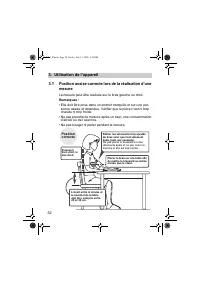
52 3.Utilisation de l’appareil 3. Utilisation de l’appareil 3.1 Position assise correcte lors de la réalisation d’une mesure La mesure peut être réalisée sur le bras gauche ou droit. Remarques : • Elle doit être prise dans un endroit tranquille et sur une per- sonne assise et détendue. Vérifier que ...
Page 53 - • Avoir une position correcte lors de la mesure est indispensa-
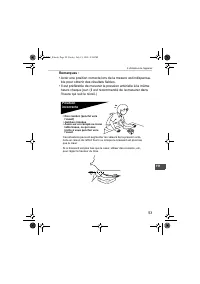
53 3.Utilisation de l’appareil FR Remarques : • Avoir une position correcte lors de la mesure est indispensa- ble pour obtenir des résultats fiables. • Il est préférable de mesurer la pression artérielle à la même heure chaque jour. (Il est recommandé de la mesurer dans l’heure qui suit le réveil.) ...
Page 54 - Application du brassard
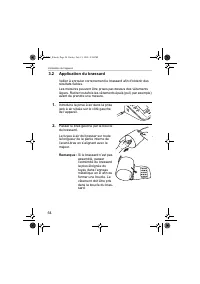
54 3.Utilisation de l’appareil 3.2 Application du brassard Veiller à enrouler correctement le brassard afin d’obtenir des résultats fiables.Les mesures peuvent être prises par-dessus des vêtements légers. Retirer toutefois les vêtements épais (pull, par exemple) avant de prendre une mesure. 1. Intro...
Page 55 - Positionner le bras correctement.; Réalisation de mesures au bras droit; • Le brassard doit être; ) Le tuyau à air doit passer
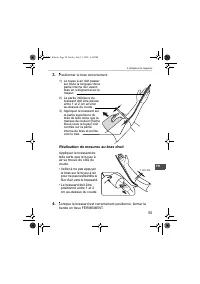
55 3.Utilisation de l’appareil FR 3. Positionner le bras correctement. Réalisation de mesures au bras droit Appliquer le brassard de telle sorte que le tuyau à air se trouve du côté du coude.• Veiller à ne pas appuyer le bras sur le tuyau à air pour ne pas restreindre le flux d’air vers le brassard....
Page 56 - Réalisation d’une mesure; Appuyer sur le bouton O/I START pour allumer l’appareil.; Causes fréquentes de l’inexactitude des résultats
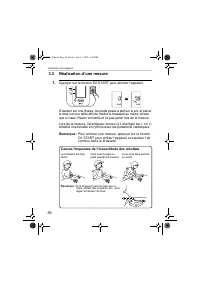
56 3.Utilisation de l’appareil 3.3 Réalisation d’une mesure 1. Appuyer sur le bouton O/I START pour allumer l’appareil. S’asseoir sur une chaise, les pieds posés à plat sur le sol, et placer le bras sur une table afin de mettre le brassard au même niveau que le cœur. Rester immobile et ne pas parler...
Page 57 - Vérifier les résultats de la mesure.
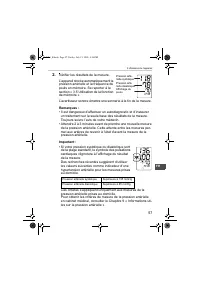
57 3.Utilisation de l’appareil FR 2. Vérifier les résultats de la mesure. L’appareil stocke automatiquement la pression artérielle et la fréquence du pouls en mémoire. Se reporter à la section « 3.5 Utilisation de la fonction de mémoire ». L’avertisseur sonore émettra une sonnerie à la fin de la mes...
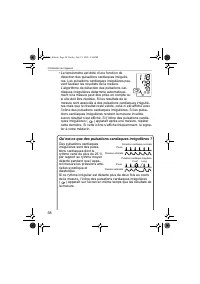
Page 58 - • Le tensiomètre est doté d’une fonction de; Qu’est-ce que des pulsations cardiaques irrégulières ?; ) apparaît sur l’écran en même temps que les résultats de
58 3.Utilisation de l’appareil • Le tensiomètre est doté d’une fonction de détection des pulsations cardiaques irréguliè-res. Les pulsations cardiaques irrégulières peu-vent fausser les résultats de la mesure. L’algorithme de détection des pulsations car-diaques irrégulières détermine automatique-me...
Page 59 - ) s’affiche fréquemment, le signaler à votre
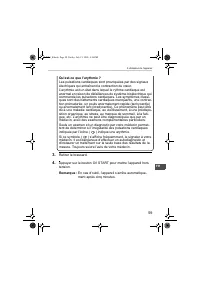
59 3.Utilisation de l’appareil FR Qu’est-ce que l’arythmie ? Les pulsations cardiaques sont provoquées par des signaux électriques qui entraînent la contraction du cœur.L’arythmie est un état dans lequel le rythme cardiaque est anormal en raison de défaillances du système bioélectrique qui commande ...
Page 60 - Instructions en cas de conditions spéciales; Ne pas appliquer une pression excessive.
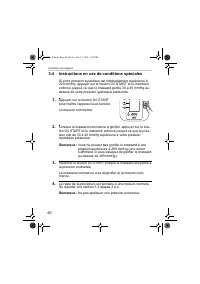
60 3.Utilisation de l’appareil 3.4 Instructions en cas de conditions spéciales Si votre pression systolique est habituellement supérieure à 220 mmHg, appuyer sur le bouton O/I START et le maintenir enfoncé jusqu’à ce que le brassard gonfle 30 à 40 mmHg au-dessus de votre pression systolique présumée...
Page 61 - Utilisation de la fonction de mémoire; Appuyer sur le bouton MEMORY.
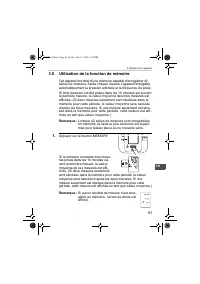
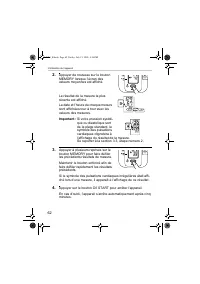
61 3.Utilisation de l’appareil FR 3.5 Utilisation de la fonction de mémoire Cet appareil est doté d’une mémoire capable d’enregistrer 42 séries de mesures. Après chaque mesure, l’appareil enregistre automatiquement la pression artérielle et la fréquence du pouls. Si trois mesures ont été prises dans...
Page 62 - Appuyer sur le bouton O/I START pour arrêter l’appareil.
62 3.Utilisation de l’appareil 2. Appuyer de nouveau sur le bouton MEMORY lorsque l’écran des valeurs moyennes est affiché. Le résultat de la mesure la plus récente est affiché. La date et l’heure de chaque mesure sont affichées tour à tour avec les valeurs des mesures. Important : Si votre pression...
Page 63 - Pour supprimer toutes les valeurs stockées en mémoire
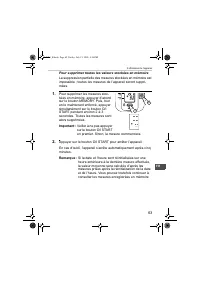
63 3.Utilisation de l’appareil FR Pour supprimer toutes les valeurs stockées en mémoire La suppression partielle des mesures stockées en mémoire est impossible ; toutes les mesures de l’appareil seront suppri-mées. 1. Pour supprimer les mesures stoc-kées en mémoire, appuyer d’abord sur le bouton MEM...
Page 64 - Guide de référence rapide; Fixer le brassard autour du bras à l’aide de la bande en tissu.
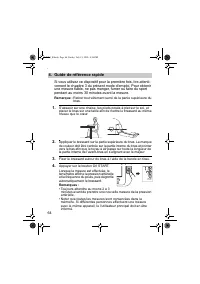
64 4.Guide de référence rapide 4. Guide de référence rapide Si vous utilisez ce dispositif pour la première fois, lire attenti-vement le chapitre 3 du présent mode d’emploi. Pour obtenir une mesure fiable, ne pas manger, fumer ou faire du sport pendant au moins 30 minutes avant la mesure. Remarque :...
Page 65 - Résolution des erreurs et des problèmes
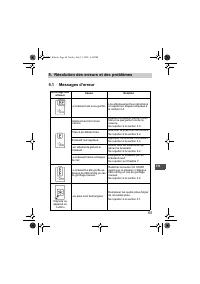
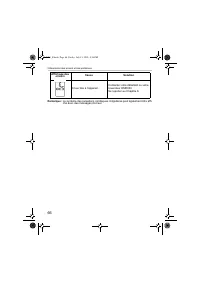
65 5.Résolution des erreurs et des problèmes FR 5. Résolution des erreurs et des problèmes 5.1 Messages d’erreur Affichage des erreurs Cause Solution Le brassard est sous-gonflé. Lire attentivement les instructions et répéter les étapes indiquées à la section 3.4. Déplacement lors d’une mesure Répét...
Page 67 - Dépannage
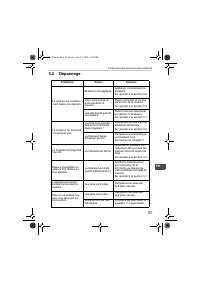
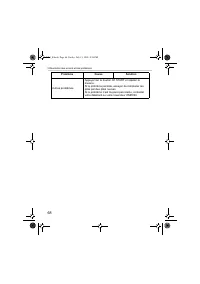
67 5.Résolution des erreurs et des problèmes FR 5.2 Dépannage Problème Cause Solution La mesure est extrême-ment basse (ou élevée). Brassard mal appliqué. Appliquer correctement le brassard. Se reporter à la section 3.2. Vous avez bougé ou parlé pendant la mesure. Rester immobile et ne pas parler lo...
Page 69 - Maintenance et stockage; • Ne pas installer l’appareil et le brassard dans des environne-; • Ne pas procéder vous-même à des réparations d’aucune
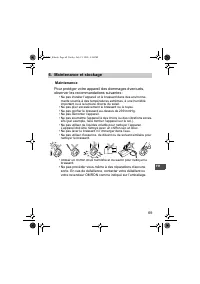
69 6.Maintenance et stockage FR 6. Maintenance et stockage Maintenance Pour protéger votre appareil des dommages éventuels, observer les recommandations suivantes : • Ne pas installer l’appareil et le brassard dans des environne- ments soumis à des températures extrêmes, à une humidité important ou ...
Page 70 - Calibration et service; • Des tests rigoureux ont été réalisés afin de garantir la préci-
70 6.Maintenance et stockage Calibration et service • Des tests rigoureux ont été réalisés afin de garantir la préci- sion de ce tensiomètre et de lui assurer une longue durée de vie. • Il est généralement recommandé de faire inspecter l’appareil tous les deux ans afin de garantir son bon fonctionne...
Page 71 - Stockage; Débrancher le tuyau à air de la prise jack à air.
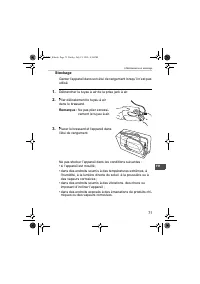
71 6.Maintenance et stockage FR Stockage Garder l’appareil dans son étui de rangement lorsqu’il n’est pas utilisé. 1. Débrancher le tuyau à air de la prise jack à air. 2. Plier délicatement le tuyau à air dans le brassard. Remarque : Ne pas plier excessi-vement le tuyau à air. 3. Placer le brassard ...
Page 72 - Pièces optionnelles; Utilisation du transformateur optionnel; • Ne jamais débrancher le câble d’alimentation avec les mains
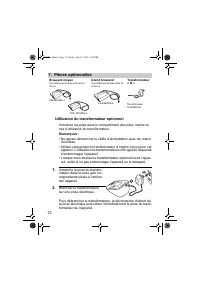
72 7.Pièces optionnelles 7. Pièces optionnelles Utilisation du transformateur optionnel Introduire les piles dans le compartiment des piles, même en cas d’utilisation du transformateur. Remarques : • Ne jamais débrancher le câble d’alimentation avec les mains mouillées. • Utiliser uniquement le tran...
Page 73 - Données techniques; Attention : Lire le mode d’emploi attentivement avant
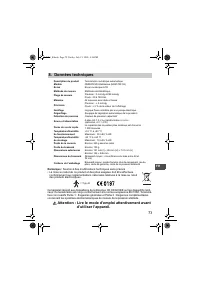
73 8.Données techniques FR 8. Données techniques Remarque : Soumis à des modifications techniques sans préavis • La mise au rebut de ce produit et des piles usagées doit être effectuée conformément aux réglementations nationales relatives à la mise au rebut des produits électroniques. Cet appareil r...
Page 75 - Informations utiles sur la pression artérielle; sion artérielle systolique
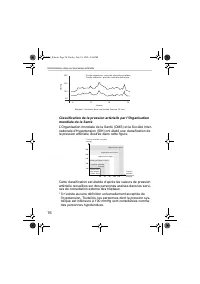
75 9.Informations utiles sur la pression artérielle FR 9. Informations utiles sur la pression artérielle Qu’est-ce que la pression artérielle ? La pression artérielle est une mesure de la pression exercée par le sang sur les parois des artères. La pression artérielle change constamment tout au long ...
Page 77 - Automatisches digitales Blutdruckmessgerät; Modell M3 Intellisense
Automatisches digitales Blutdruckmessgerät Modell M3 Intellisense • Instruction Manual• Mode d’emploi• Gebrauchsanweisung• Manuale di istruzioni• Manual de instrucciones• Gebruiksaanwijzing• РУКОВОДСТВО ПО ЭКСПЛУАТАЦИИ EN FR DE IT ES NL RU IM-HEM-7051-E-01-06/05 7051_E.book Page 77 Friday, July 15, ...
Page 78 - Inhalt
78 Inhalt Inhalt........................................................................................ 78Einführung .............................................................................. 79Sicherheitsinformationen ...................................................... 801. Überblick .........
Page 79 - Einführung
79 DE Einführung Vielen Dank, dass Sie sich für das OMRON M3 Oberarm-Blut-druckmessgerät entschieden haben. Das OMRON M3 Intellisense ist ein vollautomatisches Blut-druckmessgerät, das auf dem oszillometrischen Prinzip beruht. Es misst Ihren Blutdruck und die Pulsfrequenz einfach und schnell. Für da...
Page 80 - Sicherheitsinformationen; Alkalibatterien. Verwenden Sie keine anderen Batterietypen.
80 Sicherheitsinformationen Bei Schwangerschaft, Arrhythmie und Arteriosklerose sollten Sie sich an Ihren Arzt wenden.Ändern Sie niemals die Dosis eines vom Arzt verordneten Medikaments.Verwenden Sie das M3 Intellisense nur für sich selbst. Achtung: • Das Messgerät nicht unbeaufsichtigt bei Kleinkin...
Page 81 - Hauptgerät
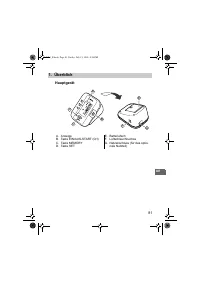
81 1.Überblick DE 1. Überblick Hauptgerät A. AnzeigeB. Taste EIN/AUS-START (O/I)C. Taste MEMORYD. Taste SET E. BatteriefachF. LuftschlauchbuchseG. Netzanschluss (für das optio- nale Netzteil) B D A C E G F 7051_E.book Page 81 Friday, July 15, 2005 4:36 PM
Page 82 - Armmanschette; Luftschlauch
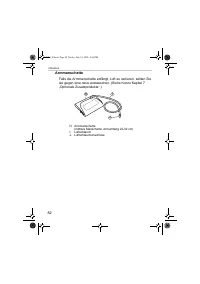
82 1.Überblick Armmanschette Falls die Armmanschette anfängt, Luft zu verlieren, sollten Sie sie gegen eine neue austauschen. (Siehe hierzu Kapitel 7 „Optionale Zusatzprodukte“.) H. Armmanschette (mittlere Manschette: Armumfang 22-32 cm) I. Luftschlauch J. Luftschlauchanschluss I H J 7051_E.book Pag...
Page 83 - schlag
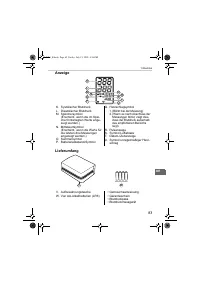
83 1.Überblick DE Anzeige Lieferumfang K. Systolischer BlutdruckL. Diastolischer BlutdruckM. Speichersymbol (Erscheint, wenn die im Spei-cher hinterlegten Werte ange-zeigt werden.) N. Mittelwertsymbol (Erscheint, wenn die Werte für die letzten drei Messungen angezeigt werden.) O. SummersymbolP. Batt...
Page 84 - Batterien einsetzen und auswechseln; Das Hauptgerät kopfüber drehen.
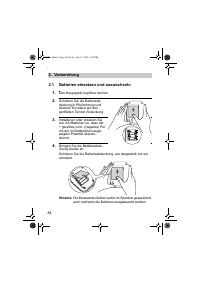
84 2.Vorbereitung 2. Vorbereitung 2.1 Batterien einsetzen und auswechseln 1. Das Hauptgerät kopfüber drehen. 2. Schieben Sie die Batterieab-deckung in Pfeilrichtung und drücken Sie dabei auf den geriffelten Teil der Abdeckung. 3. Installieren oder ersetzen Sie vier AA - Batterien so, dass der + (pos...
Page 85 - Batterie-Lebensdauer und Austausch
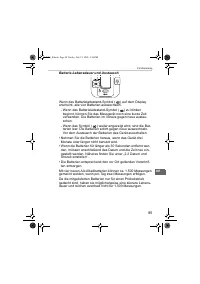
85 2.Vorbereitung DE Batterie-Lebensdauer und Austausch Wenn das Batterieladestand-Symbol ( ) auf dem Display erscheint, alle vier Batterien auswechseln. - Wenn das Batterieladestand-Symbol ( ) zu blinken beginnt, können Sie das Messgerät noch eine kurze Zeit verwenden. Die Batterien im Voraus gegen...
Page 86 - Datum und Uhrzeit einstellen; Datum und die Uhrzeit einstellen.
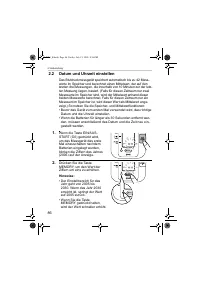
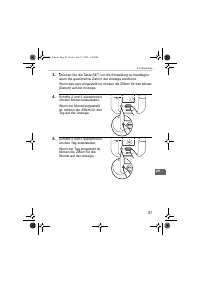
86 2.Vorbereitung 2.2 Datum und Uhrzeit einstellen Das Blutdruckmessgerät speichert automatisch bis zu 42 Mess-werte im Speicher und berechnet einen Mittelwert, der auf den letzten drei Messungen, die innerhalb von 10 Minuten zur der letz-ten Messung liegen, basiert. (Falls für diesen Zeitraum nur z...
Page 88 - Die Minuten sind eingestellt.
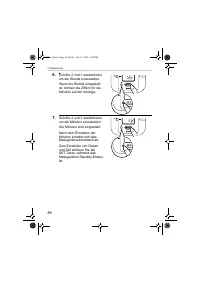
88 2.Vorbereitung 6. Schritte 2 und 3 wiederholen, um die Stunde einzustellen. Wenn die Stunde eingestellt ist, blinken die Ziffern für die Minuten auf der Anzeige. 7. Schritte 2 und 3 wiederholen, um die Minuten einzustellen. Die Minuten sind eingestellt. Nach dem Einstellen der Minuten schaltet si...
Page 89 - Anpassen der Einstellungsmodi
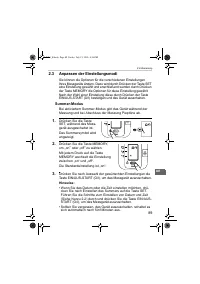
89 2.Vorbereitung DE 2.3 Anpassen der Einstellungsmodi Sie können die Optionen für die verschiedenen Einstellungen Ihres Messgeräts ändern. Dazu wird durch Drücken der Taste SET eine Einstellung gewählt und anschließend werden durch Drücken der Taste MEMORY die Optionen für diese Einstellung gewählt...
Page 90 - Verwendung des Messgeräts; Sie können die Messung am rechten oder linken Arm durchführen.; Richtige
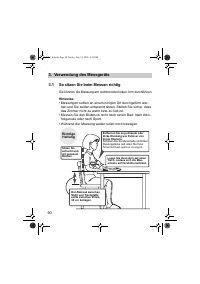
90 3.Verwendung des Messgeräts 3. Verwendung des Messgeräts 3.1 So sitzen Sie beim Messen richtig Sie können die Messung am rechten oder linken Arm durchführen. Hinweise: • Messungen sollten an einem ruhigen Ort durchgeführt wer- den und Sie sollten entspannt sitzen. Stellen Sie sicher, dass das Zim...
Page 91 - • Die richtige Körperhaltung ist zum Erlangen genauer Ergeb-; Falsche Haltung
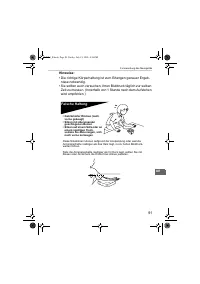
91 3.Verwendung des Messgeräts DE Hinweise: • Die richtige Körperhaltung ist zum Erlangen genauer Ergeb- nisse notwendig. • Sie sollten auch versuchen, Ihren Blutdruck täglich zur selben Zeit zu messen. (Innerhalb von 1 Stunde nach dem Aufstehen wird empfohlen.) Falsche Haltung Diese Situationen kön...
Page 92 - Anlegen der Armmanschette
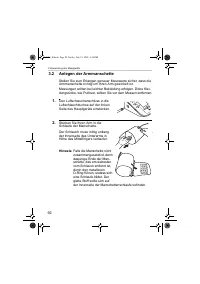
92 3.Verwendung des Messgeräts 3.2 Anlegen der Armmanschette Stellen Sie zum Erlangen genauer Messwerte sicher, dass die Armmanschette richtig um Ihren Arm gewickelt ist.Messungen sollten bei leichter Bekleidung erfolgen. Dicke Klei-dungstücke, wie Pullover, sollten Sie vor dem Messen entfernen. 1. ...
Page 93 - Armmanschette richtig anbringen.; Messungen am rechten Arm; • Die Manschette sollte; ) Der Schlauch muss mittig
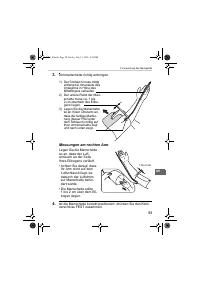
93 3.Verwendung des Messgeräts DE 3. Armmanschette richtig anbringen. Messungen am rechten Arm Legen Sie die Manschette so an, dass der Luft-schlauch an der Seite Ihres Ellbogens verläuft.• Achten Sie darauf, dass Ihr Arm nicht auf dem Luftschlauch liegt, da dadurch der Luftstrom zur Manschette behi...
Page 94 - Eine Messung vornehmen; Übliche Gründe für ungenaue Messungen
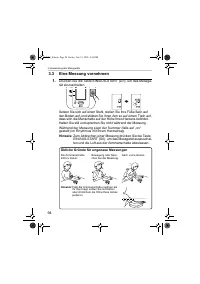
94 3.Verwendung des Messgeräts 3.3 Eine Messung vornehmen 1. Drücken Sie die Taste EIN/AUS-START (O/I), um das Messge-rät einzuschalten. Setzen Sie sich auf einen Stuhl, stellen Sie Ihre Füße flach auf den Boden auf, und stützen Sie Ihren Arm so auf einem Tisch auf, dass sich die Manschette auf der ...
Page 95 - Überprüfen Sie die Messergebnisse.
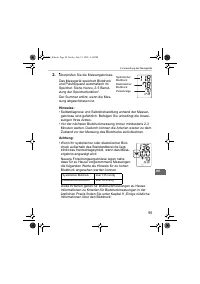
95 3.Verwendung des Messgeräts DE 2. Überprüfen Sie die Messergebnisse. Das Messgerät speichert Blutdruck und Pulsfrequenz automatisch im Speicher. Siehe hierzu „3.5 Benut-zung der Speicherfunktion“. Der Summer ertönt, wenn die Mes-sung abgeschlossen ist. Hinweise: • Selbstdiagnose und Selbstbehandl...
Page 96 - • Ihr Blutdruckmessgerät beinhaltet eine Funk-; Was ist unregelmäßiger Herzschlag?
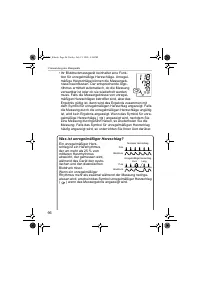
96 3.Verwendung des Messgeräts • Ihr Blutdruckmessgerät beinhaltet eine Funk- tion für unregelmäßige Herzschläge. Unregel-mäßige Herzschläge können die Messergeb-nisse beeinflussen. Der entsprechende Algo-rithmus ermittelt automatisch, ob die Messung verwertbar ist oder ob sie wiederholt werden muss...
Page 97 - ) Folge einer Arrhythmie ist oder nicht, kann nur durch
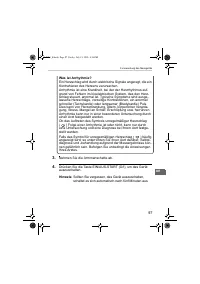
97 3.Verwendung des Messgeräts DE Was ist Arrhythmie? Ein Herzschlag wird durch elektrische Signale angeregt, die ein Kontrahieren des Herzens verursachen.Arrhythmie ist eine Krankheit, bei der der Herzrhythmus auf-grund von Fehlern im bioelektrischen System, das den Herz-schlag steuert, anormal ist...
Page 98 - Anweisungen für spezielle Bedingungen; Nicht mehr Druck als notwendig anwenden.
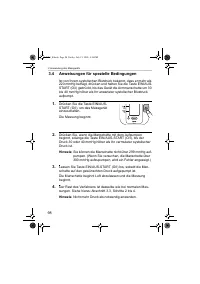
98 3.Verwendung des Messgeräts 3.4 Anweisungen für spezielle Bedingungen Ist von Ihrem systolischen Blutdruck bekannt, dass er mehr als 220 mmHg beträgt, drücken und halten Sie die Taste EIN/AUS-START (O/I) gedrückt, bis das Gerät die Armmanschette um 30 bis 40 mmHg höher als Ihr erwarteter systolis...
Page 99 - Benutzung der Speicherfunktion; Drücken Sie die Taste MEMORY.
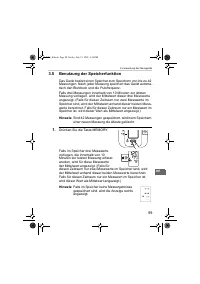
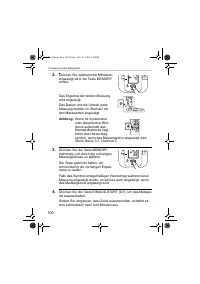
99 3.Verwendung des Messgeräts DE 3.5 Benutzung der Speicherfunktion Das Gerät besitzt einen Speicher zum Speichern von bis zu 42 Messungen. Nach jeder Messung speichert das Gerät automa-tisch den Blutdruck und die Pulsfrequenz. Falls drei Messungen innerhalb von 10 Minuten zur letzten Messung vorli...
Page 101 - Löschen aller gespeicherten Werte
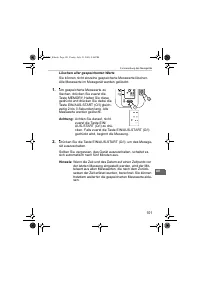
101 3.Verwendung des Messgeräts DE Löschen aller gespeicherten Werte Sie können nicht einzelne gespeicherte Messwerte löschen. Alle Messwerte im Messgerät werden gelöscht. 1. Um gespeicherte Messwerte zu löschen, drücken Sie zuerst die Taste MEMORY. Halten Sie diese gedrückt und drücken Sie dabei di...
Page 102 - Machen Sie Ihren Oberarm frei.
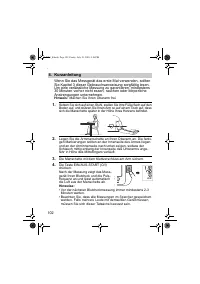
102 4.Kurzanleitung 4. Kurzanleitung Wenn Sie das Messgerät das erste Mal verwenden, sollten Sie Kapitel 3 dieser Gebrauchsanweisung sorgfältig lesen. Um eine verlässliche Messung zu garantieren, mindestens 30 Minuten vorher nicht essen, rauchen oder körperliche Anstrengungen unternehmen. Hinweis: M...
Page 103 - Fehlermeldungen
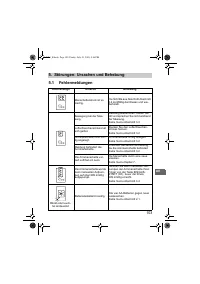
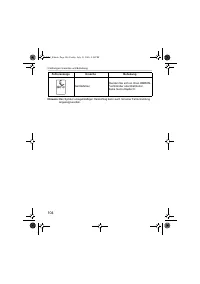
103 5.Störungen: Ursachen und Behebung DE 5. Störungen: Ursachen und Behebung 5.1 Fehlermeldungen Fehleranzeige Ursache Behebung Manschettendruck ist zu niedrig. Die Schritte aus Abschnitt Abschnitt 3.4 sorgfältig durchlesen und wie-derholen. Bewegung bei der Mes-sung. Messung wiederholen. Halten Si...
Page 105 - Fehlersuche und -behebung
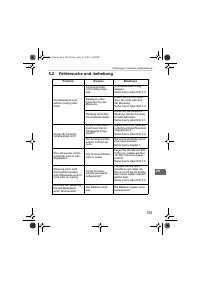
105 5.Störungen: Ursachen und Behebung DE 5.2 Fehlersuche und -behebung Problem Ursache Behebung Die Messwerte sind extrem niedrig (oder hoch). Armmanschette nicht richtig ange-legt. Armmanschette richtig anlegen. Siehe hierzu Abschnitt 3.2. Bewegung oder Sprechen bei der Messung. Halten Sie still u...
Page 107 - Wartung und Aufbewahrung; Wartung; • Das Hauptgerät und die Manschette keinen extremen Tempera-; • Nehmen Sie selbst keine Reparaturen vor. Wenden Sie sich
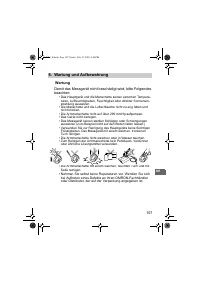
107 6.Wartung und Aufbewahrung DE 6. Wartung und Aufbewahrung Wartung Damit das Messgerät nicht beschädigt wird, bitte Folgendes beachten: • Das Hauptgerät und die Manschette keinen extremen Tempera- turen, Luftfeuchtigkeiten, Feuchtigkeit oder direkter Sonnenein-strahlung aussetzen. • Die Manschett...
Page 108 - Kalibrierung und Wartung; • Die Genauigkeit dieses Blutdruckmessgeräts wurde sorgfältig
108 6.Wartung und Aufbewahrung Kalibrierung und Wartung • Die Genauigkeit dieses Blutdruckmessgeräts wurde sorgfältig geprüft und in Hinblick auf eine lange nutzbare Lebensdauer entwickelt. • Es wird im Allgemeinen empfohlen, bei dem Messgerät alle zwei Jahre eine Inspektion durchführen zu lassen, u...
Page 109 - Aufbewahrung; • An Plätzen, die Vibrationen oder Stößen ausgesetzt sind,
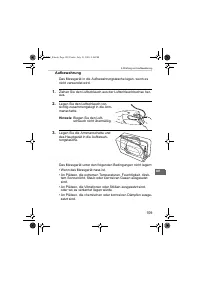
109 6.Wartung und Aufbewahrung DE Aufbewahrung Das Messgerät in die Aufbewahrungstasche legen, wenn es nicht verwendet wird. 1. Ziehen Sie den Luftschlauch aus der Luftschlauchbuchse her-aus. 2. Legen Sie den Luftschlauch vor-sichtig zusammengelegt in die Arm-manschette. Hinweis: Biegen Sie den Luft...
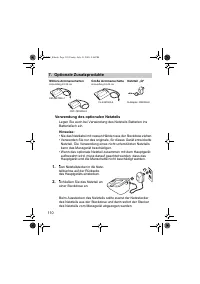
Page 110 - Optionale Zusatzprodukte; Verwendung des optionalen Netzteils; • Wenn das optionale Netzteil zusammen mit dem Hauptgerät
110 7.Optionale Zusatzprodukte 7. Optionale Zusatzprodukte Verwendung des optionalen Netzteils Legen Sie auch bei Verwendung des Netzteils Batterien ins Batteriefach ein. Hinweise: • Nie das Netzkabel mit nassen Händen aus der Steckdose ziehen.• Verwenden Sie nur das originale, für dieses Gerät entw...
Page 111 - Achtung: Lesen Sie diese Gebrauchsanweisung aufmerk-
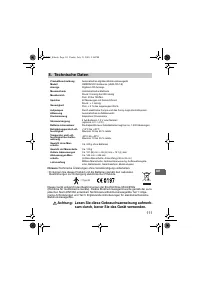
111 8.Technische Daten DE 8. Technische Daten Hinweis: Technische Änderungen ohne Vorankündigung vorbehalten. • Entsorgen Sie dieses Produkt und die Batterien gemäß den nationalen Bestimmungen zur Entsorgung elektronischer Produkte. Dieses Gerät entspricht den Bestimmungen der EG-Richtlinie 93/42/EW...
Page 112 - EC
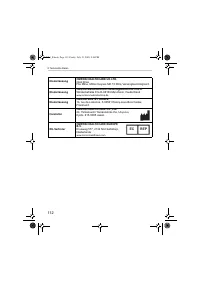
112 8.Technische Daten Niederlassung OMRON HEALTHCARE UK LTD. Opal DriveFox Milne, Milton Keynes MK 15 0DG, Vereinigtes Königreich Niederlassung OMRON Medizintechnik Handelsgesellschaft m.b.H. Windeckstraße 81a D-68163 Mannheim, Deutschland www.omron-medizintechnik.de Niederlassung OMRON SANTÉ FRANC...
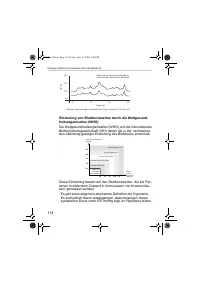
Page 113 - Einige nützliche Informationen über den Blutdruck; systolischer Blutdruck
113 9.Einige nützliche Informationen über den Blutdruck DE 9. Einige nützliche Informationen über den Blutdruck Blutdruck - was ist das eigentlich? Der Blutdruck ist die Kraft, mit der der Blutstrom gegen die Arterienwände drückt. Der arterielle Druck ändert sich im Ver-lauf des Herzzyklus ständig. ...
Page 115 - Misuratore di pressione automatico digitale; Modello M3 Intellisense
Misuratore di pressione automatico digitale Modello M3 Intellisense • Instruction Manual• Mode d’emploi• Gebrauchsanweisung• Manuale di istruzioni• Manual de instrucciones• Gebruiksaanwijzing• РУКОВОДСТВО ПО ЭКСПЛУАТАЦИИ EN FR DE IT ES NL RU IM-HEM-7051-E-01-07/05 7051_E.book Page 115 Friday, July 1...
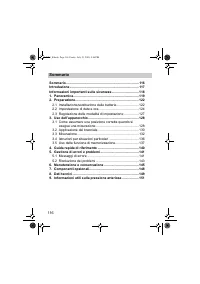
Page 116 - Sommario; Come assumere una posizione corretta quando si
116 Sommario Sommario .............................................................................. 116Introduzione .......................................................................... 117Informazioni importanti sulla sicurezza ............................. 1181. Panoramica .....................
Page 117 - Introduzione
117 IT Introduzione Grazie per aver acquistato il misuratore di pressione arteriosa OMRON M3 Intellisense. OMRON M3 Intellisense è un misuratore di pressione comple-tamente automatico, il cui funzionamento si basa sul principio oscillometrico. L’apparecchio misura in modo semplice e rapido la pressi...
Page 118 - Informazioni importanti sulla sicurezza
118 Informazioni importanti sulla sicurezza Consultare il medico curante in caso di gravidanza, aritmia o arterio-sclerosi.Non modificare mai le dosi di medicinali prescritte dal medico curante.Usare l’apparecchio M3 Intellisense solo per una persona. Attenzione: • Non lasciare l’apparecchio incusto...
Page 119 - Unità principale
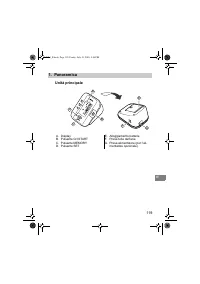
119 1.Panoramica IT 1. Panoramica Unità principale A. DisplayB. Pulsante O/I STARTC. Pulsante MEMORYD. Pulsante SET E. Alloggiamento batterieF. Presa tubo dell’ariaG. Presa alimentatore (per l’ali- mentatore opzionale) B D A C E G F 7051_E.book Page 119 Friday, July 15, 2005 4:36 PM
Page 120 - Bracciale; Tubo dell’aria
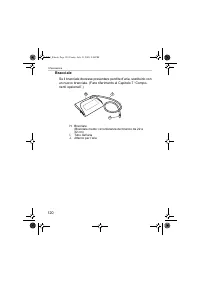
120 1.Panoramica Bracciale Se il bracciale dovesse presentare perdite d’aria, sostituirlo con un nuovo bracciale. (Fare riferimento al Capitolo 7 “Compo-nenti opzionali”.) H. Bracciale (Bracciale medio: circonferenza del braccio da 22 a 32 cm) I. Tubo dell’aria J. Attacco per l’aria I H J 7051_E.boo...
Page 121 - N. Indicatore del valore medio
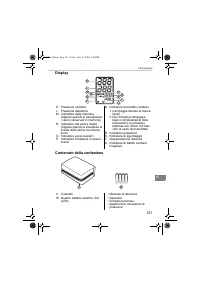
121 1.Panoramica IT Display Contenuto della confezione K. Pressione sistolicaL. Pressione diastolicaM. Indicatore della memoria (Appare quando si visualizzano i valori conservati in memoria) N. Indicatore del valore medio (Appare quando si visualizza la media delle ultime tre misura-zioni) O. Indica...
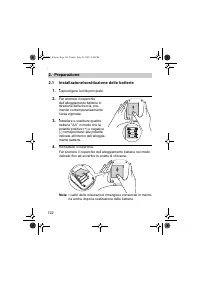
Page 122 - Installazione/sostituzione delle batterie; Capovolgere l’unità principale.
122 2.Preparazione 2. Preparazione 2.1 Installazione/sostituzione delle batterie 1. Capovolgere l’unità principale. 2. Far scorrere il coperchio dell’alloggiamento batterie in direzione della freccia, pre-mendo contemporaneamente l’area zigrinata. 3. Installare o sostituire quattro batterie “ AA ” i...
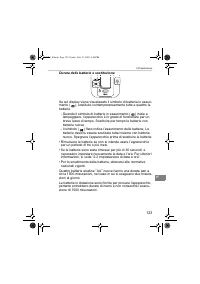
Page 123 - Durata delle batterie e sostituzione
123 2.Preparazione IT Durata delle batterie e sostituzione Se sul display viene visualizzato il simbolo di batteria in esauri-mento ( ), sostituire contemporaneamente tutte e quattro le batterie. - Quando il simbolo di batterie in esaurimento ( ) inizia a lampeggiare, l’apparecchio è in grado di fun...
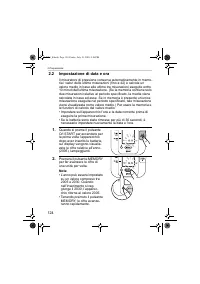
Page 124 - Impostazione di data e ora; eseguire la prima misurazione.
124 2.Preparazione 2.2 Impostazione di data e ora Il misuratore di pressione conserva automaticamente in memo-ria i valori delle ultime misurazioni (fino a 42) e calcola un valore medio in base alle ultime tre misurazioni eseguite entro 10 minuti dall’ultima misurazione. (Se la memoria contiene solo...
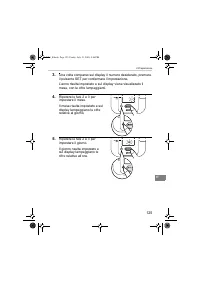
Page 126 - I minuti risultano impostati.
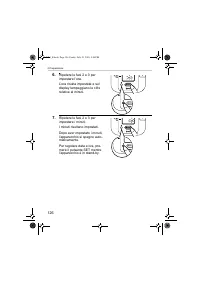
126 2.Preparazione 6. Ripetere le fasi 2 e 3 per impostare l’ora. L’ora risulta impostata e sul display lampeggiano le cifre relative ai minuti. 7. Ripetere le fasi 2 e 3 per impostare i minuti. I minuti risultano impostati. Dopo aver impostato i minuti, l’apparecchio si spegne auto-maticamente. Per...
Page 127 - Regolazione delle modalità di impostazione; Modalità avvisi acustici
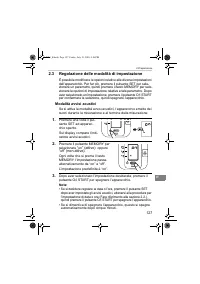
127 2.Preparazione IT 2.3 Regolazione delle modalità di impostazione È possibile modificare le opzioni relative alle diverse impostazioni dell’apparecchio. Per far ciò, premere il pulsante SET per sele-zionare un parametro, quindi premere il tasto MEMORY per sele-zionare le opzioni di impostazione r...
Page 128 - Uso dell’apparecchio; • Eseguire la misurazione in un luogo tranquillo, stando seduti; Posizione
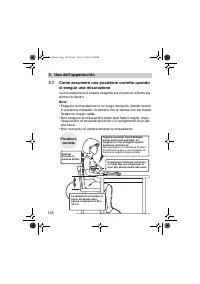
128 3.Uso dell’apparecchio 3. Uso dell’apparecchio 3.1 Come assumere una posizione corretta quando si esegue una misurazione La misurazione può essere eseguita sia al braccio sinistro sia al braccio destro. Note: • Eseguire la misurazione in un luogo tranquillo, stando seduti in posizione rilassata....
Page 129 - • Per ottenere risultati accurati è necessario assumere una; Posizione errata
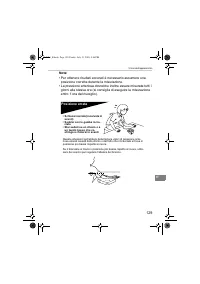
129 3.Uso dell’apparecchio IT Note: • Per ottenere risultati accurati è necessario assumere una posizione corretta durante la misurazione. • La pressione arteriosa dovrebbe inoltre essere misurata tutti i giorni alla stessa ora (si consiglia di eseguire la misurazione entro 1 ora dal risveglio). Pos...
Page 130 - Applicazione del bracciale
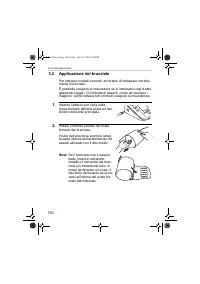
130 3.Uso dell’apparecchio 3.2 Applicazione del bracciale Per ottenere risultati accurati, accertarsi di indossare corretta-mente il bracciale.È possibile eseguire le misurazioni se si indossano capi d’abbi-gliamento leggeri. Gli indumenti pesanti, come ad esempio i maglioni, vanno tuttavia tolti pr...
Page 131 - Posizionare correttamente il braccio.; Esecuzione delle misurazioni al braccio destro; • Il bracciale deve essere; ) Sistemare il bracciale
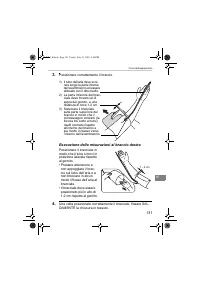
131 3.Uso dell’apparecchio IT 3. Posizionare correttamente il braccio. Esecuzione delle misurazioni al braccio destro Posizionare il bracciale in modo che il tubo si trovi in posizione laterale rispetto al gomito.• Prestare attenzione a non appoggiare il brac-cio sul tubo dell’aria e a non bloccare ...
Page 132 - Misurazione; Premere il pulsante O/I START per accendere l’apparecchio.; Problemi comuni che determinano risultati imprecisi
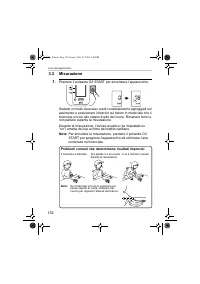
132 3.Uso dell’apparecchio 3.3 Misurazione 1. Premere il pulsante O/I START per accendere l’apparecchio. Sedersi in modo da avere i piedi completamente appoggiati sul pavimento e posizionare il braccio sul tavolo in modo tale che il bracciale si trovi allo stesso livello del cuore. Rimanere fermi e ...
Page 133 - L’avviso acustico emette un suono al termine della misurazione.
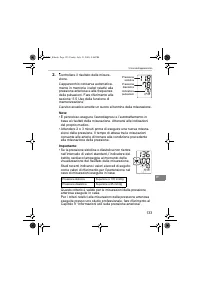
133 3.Uso dell’apparecchio IT 2. Controllare il risultato della misura-zione. L’apparecchio conserva automatica-mente in memoria i valori relativi alla pressione arteriosa e alla frequenza delle pulsazioni. Fare riferimento alla sezione “3.5 Uso della funzione di memorizzazione”. L’avviso acustico e...
Page 134 - • Il misuratore di pressione comprende una fun-; Che cos’è il battito cardiaco irregolare?
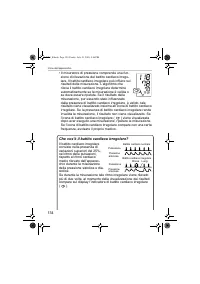
134 3.Uso dell’apparecchio • Il misuratore di pressione comprende una fun- zione di rilevazione del battito cardiaco irrego-lare. Il battito cardiaco irregolare può influire sui risultati della misurazione. L’algoritmo che rileva il battito cardiaco irregolare determina automaticamente se la misuraz...
Page 135 - ) nel risultato della misurazione
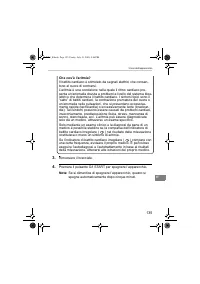
135 3.Uso dell’apparecchio IT Che cos’è l’aritmia? Il battito cardiaco è stimolato da segnali elettrici che consen-tono al cuore di contrarsi.L’aritmia è una condizione nella quale il ritmo cardiaco pre-senta un’anomalia dovuta a problemi a livello del sistema bioe-lettrico che determina il battito ...
Page 136 - Istruzioni per situazioni particolari; La misurazione ha inizio.
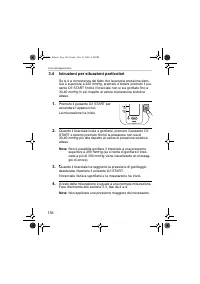
136 3.Uso dell’apparecchio 3.4 Istruzioni per situazioni particolari Se si è a conoscenza del fatto che la propria pressione sisto-lica è superiore a 220 mmHg, premere e tenere premuto il pul-sante O/I START finché il bracciale non si sia gonfiato fino a 30-40 mmHg in più rispetto al valore di press...
Page 137 - Uso della funzione di memorizzazione; Premere il pulsante MEMORY.
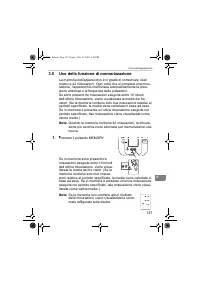
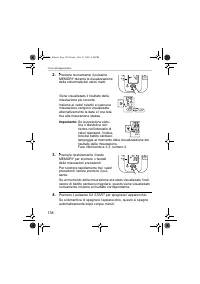
137 3.Uso dell’apparecchio IT 3.5 Uso della funzione di memorizzazione La memoria dell’apparecchio è in grado di conservare i dati relativi a 42 misurazioni. Ogni volta che si completa una misu-razione, l’apparecchio memorizza automaticamente la pres-sione arteriosa e la frequenza delle pulsazioni. ...
Page 138 - Premere il pulsante O/I START per spegnere l’apparecchio.
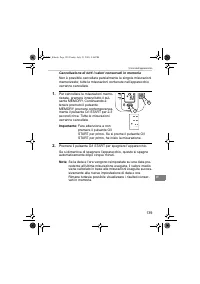
138 3.Uso dell’apparecchio 2. Premere nuovamente il pulsante MEMORY durante la visualizzazione della schermata dei valori medi. Viene visualizzato il risultato della misurazione più recente. Insieme ai valori relativi a ciascuna misurazione vengono visualizzate alternativamente la data e l’ora rela-...
Page 139 - Cancellazione di tutti i valori conservati in memoria
139 3.Uso dell’apparecchio IT Cancellazione di tutti i valori conservati in memoria Non è possibile cancellare parzialmente le singole misurazioni memorizzate; tutte le misurazioni contenute nell’apparecchio verranno cancellate. 1. Per cancellare le misurazioni memo-rizzate, premere innanzitutto il ...
Page 140 - Guida rapida di riferimento; Se è la prima volta che si usa l’apparecchio, leggere con; • Attendere sempre almeno 2 o 3 minuti prima di eseguire una
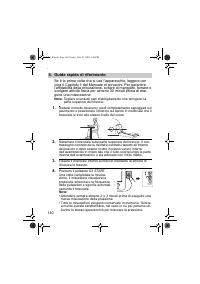
140 4.Guida rapida di riferimento 4. Guida rapida di riferimento Se è la prima volta che si usa l’apparecchio, leggere con cura il Capitolo 3 del Manuale di istruzioni. Per garantire l’affidabilità della misurazione, evitare di mangiare, fumare o svolgere attività fisica per almeno 30 minuti prima d...
Page 141 - Gestione di errori e problemi
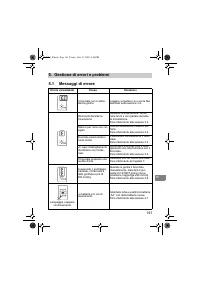
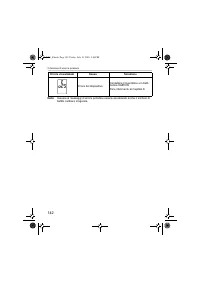
141 5.Gestione di errori e problemi IT 5. Gestione di errori e problemi 5.1 Messaggi di errore Errore visualizzato Causa Soluzione Il bracciale non è abba-stanza gonfio. Leggere e ripetere con cura le fasi elencate nella sezione 3.4. Movimenti durante la misurazione Ripetere la misurazione. Rima-ner...
Page 143 - Risoluzione dei problemi
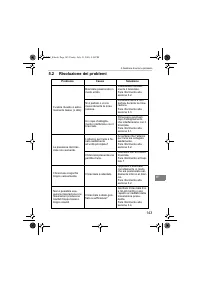
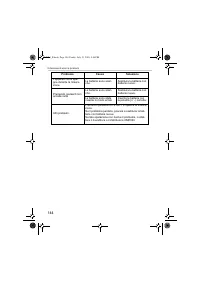
143 5.Gestione di errori e problemi IT 5.2 Risoluzione dei problemi Problema Causa Soluzione Il valore rilevato è estre-mamente basso (o alto). Bracciale posizionato in modo errato. Posizionare corretta-mente il bracciale. Fare riferimento alla sezione 3.2. Si è parlato o ci si è mossi durante la mi...
Page 145 - Manutenzione e conservazione; Manutenzione; • Non esporre l’unità principale e il bracciale a temperature; • Non tentare in alcun modo di riparare da soli l’apparecchio. In
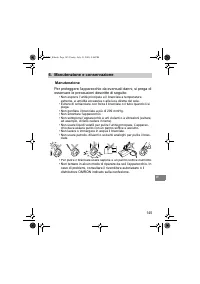
145 6.Manutenzione e conservazione IT 6. Manutenzione e conservazione Manutenzione Per proteggere l’apparecchio da eventuali danni, si prega di osservare le precauzioni descritte di seguito: • Non esporre l’unità principale e il bracciale a temperature estreme, a umidità eccessiva o alla luce dirett...
Page 146 - Calibrazione e assistenza; • La precisione di questo misuratore di pressione arteriosa è
146 6.Manutenzione e conservazione Calibrazione e assistenza • La precisione di questo misuratore di pressione arteriosa è stata verificata con cura; l’apparecchio è progettato per durare a lungo. • Per garantirne la precisione e il funzionamento corretto, si consiglia di far controllare l’apparecch...
Page 147 - Conservazione; Scollegare il tubo dell’aria dalla presa.
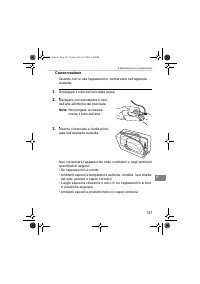
147 6.Manutenzione e conservazione IT Conservazione Quando non si usa l’apparecchio, conservarlo nell’apposita custodia. 1. Scollegare il tubo dell’aria dalla presa. 2. Ripiegare con delicatezza il tubo dell’aria all’interno del bracciale. Nota: Non piegare eccessiva-mente il tubo dell’aria. 3. Inse...
Page 148 - Componenti opzionali; Uso dell’alimentatore opzionale; • Se si conserva l’alimentatore insieme all’unità principale, pre-; Bracciale grande
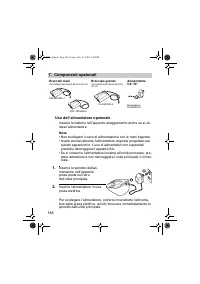
148 7.Componenti opzionali 7. Componenti opzionali Uso dell’alimentatore opzionale Inserire le batterie nell’apposito alloggiamento anche se si uti-lizza l’alimentatore. Note: • Non scollegare il cavo di alimentazione con le mani bagnate.• Usare esclusivamente l’alimentatore originale progettato per...
Page 149 - Attenzione: Leggere attentamente il manuale di istru-
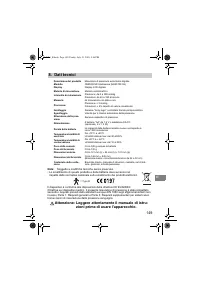
149 8.Dati tecnici IT 8. Dati tecnici Nota: Soggetto a modifiche tecniche senza preavviso • Lo smaltimento di questo prodotto e delle batterie deve avvenire nel rispetto della normativa nazionale sullo smaltimento dei prodotti elettronici. Il dispositivo è conforme alle disposizioni della direttiva ...
Page 151 - Informazioni utili sulla pressione arteriosa; Che cos’è la pressione arteriosa?
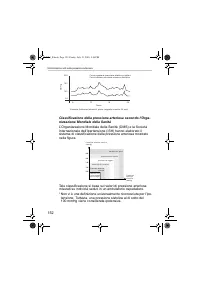
151 9.Informazioni utili sulla pressione arteriosa IT 9. Informazioni utili sulla pressione arteriosa Che cos’è la pressione arteriosa? La pressione arteriosa è una misura della forza di scorrimento del sangue contro le pareti delle arterie. La pressione arteriosa cambia costantemente nel corso del ...
Page 153 - Monitor de presión arterial digital automático; Modelo M3 Intellisense
Monitor de presión arterial digital automático Modelo M3 Intellisense • Instruction Manual• Mode d’emploi• Gebrauchsanweisung• Manuale di istruzioni• Manual de instrucciones• Gebruiksaanwijzing• РУКОВОДСТВО ПО ЭКСПЛУАТАЦИИ EN FR DE IT ES NL RU IM-HEM-7051-E-01-07/05 7051_E.book Page 153 Friday, July...
Page 154 - Índice; Cómo sentarse correctamente cuando se realice la
154 Índice Índice ..................................................................................... 154Introducción ......................................................................... 155Información importante sobre seguridad .......................... 1561. Descripción general ..............
Page 155 - Introducción
155 ES Introducción Gracias por comprar el monitor de presión arterial OMRON M3 Intellisense para brazo. El OMRON M3 Intellisense es un monitor de presión arterial totalmente automático cuyo funcionamiento se basa en el prin-cipio oscilométrico. Mide su presión arterial y su pulso de manera sencilla...
Page 156 - Información importante sobre seguridad
156 Información importante sobre seguridad Consulte a su médico si está embarazada, padece arritmia o arterios-clerosis.No modifique nunca la dosis de medicación que le haya prescrito su médico.Utilice M3 Intellisense únicamente para usted mismo. Precaución: • No permita que niños o personas que no ...
Page 157 - Descripción general; Unidad principal; G. Toma para el adaptador AC
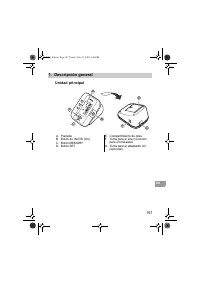
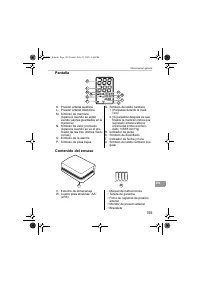
157 1.Descripción general ES 1. Descripción general Unidad principal A. PantallaB. Botón de INICIO (O/I)C. Botón MEMORYD. Botón SET E. Compartimiento de pilasF. Toma para el aire (conexión para el brazalete) G. Toma para el adaptador AC (opcional) B D A C E G F 7051_E.book Page 157 Friday, July 15, ...
Page 158 - Brazalete; Tubo de aire
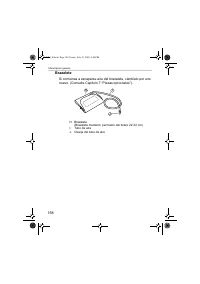
158 1.Descripción general Brazalete Si comienza a escaparse aire del brazalete, cámbielo por uno nuevo. (Consulte Capítulo 7 “Piezas opcionales”). H. Brazalete (Brazalete mediano: perímetro del brazo 22-32 cm) I. Tubo de aire J. Clavija del tubo de aire I H J 7051_E.book Page 158 Friday, July 15, 20...
Page 159 - Pantalla; N. Símbolo de valor promedio
159 1.Descripción general ES Pantalla Contenido del envase K. Presión arterial sistólicaL. Presión arterial diastólicaM. Símbolo de memoria (Aparece cuando se están viendo valores guardados en la memoria) N. Símbolo de valor promedio (Aparece cuando se ve el pro-medio de las tres últimas medi-ciones...
Page 160 - Colocación o sustitución de las pilas; Ponga boca abajo la unidad principal.
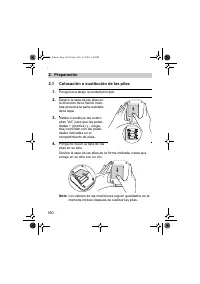
160 2.Preparación 2. Preparación 2.1 Colocación o sustitución de las pilas 1. Ponga boca abajo la unidad principal. 2. Deslice la tapa de las pilas en la dirección de la flecha mien-tras presiona la parte estriada de la tapa. 3. Instale o sustituya las cuatro pilas “ AA ” para que las polari- dades ...
Page 161 - Duración de las pilas y su sustitución
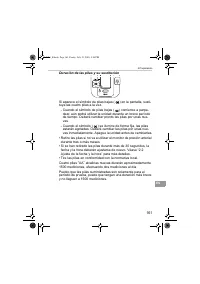
161 2.Preparación ES Duración de las pilas y su sustitución Si aparece el símbolo de pilas bajas ( ) en la pantalla, susti- tuya las cuatro pilas a la vez. - Cuando el símbolo de pilas bajas ( ) comience a parpa- dear, aún podrá utilizar la unidad durante un breve período de tiempo. Deberá cambiar p...
Page 162 - Ajuste de la fecha y la hora; zarla por primera vez.
162 2.Preparación 2.2 Ajuste de la fecha y la hora Su monitor de presión arterial guarda automáticamente en la memoria un máximo de 42 mediciones y calcula un promedio basándose en las tres últimas mediciones tomadas en los 10 minutos anteriores a la última lectura. (Si durante ese período de tiempo...
Page 163 - El año se ajusta y los dígitos de mes parpadean en la pantalla.
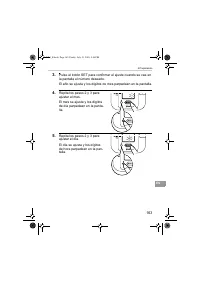
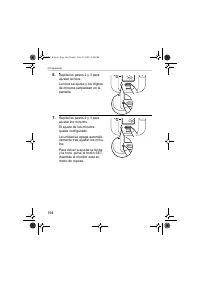
163 2.Preparación ES 3. Pulse el botón SET para confirmar el ajuste cuando se vea en la pantalla el número deseado. El año se ajusta y los dígitos de mes parpadean en la pantalla. 4. Repita los pasos 2 y 3 para ajustar el mes. El mes se ajusta y los dígitos de día parpadean en la panta-lla. 5. Repit...
Page 165 - Ajustar los modos de configuración; Modo de alarma
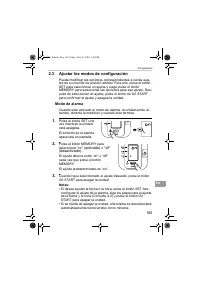
165 2.Preparación ES 2.3 Ajustar los modos de configuración Puede modificar las opciones correspondientes a varios ajus-tes de su monitor de presión arterial. Para ello, pulse el botón SET para seleccionar un ajuste y luego pulse el botón MEMORY para seleccionar las opciones para ese ajuste. Des-pué...
Page 166 - Uso del monitor de presión arterial; Puede realizar la medición en el brazo izquierdo o en el derecho.; Postura
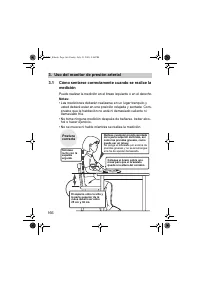
166 3.Uso del monitor de presión arterial 3. Uso del monitor de presión arterial 3.1 Cómo sentarse correctamente cuando se realice la medición Puede realizar la medición en el brazo izquierdo o en el derecho. Notas: • Las mediciones deberán realizarse en un lugar tranquilo y usted deberá estar en un...
Page 167 - • Una postura correcta durante la medición es determinante
167 3.Uso del monitor de presión arterial ES Notas: • Una postura correcta durante la medición es determinante para obtener resultados precisos. • Debería también intentar medir su presión a la misma hora todos los días. (Se recomienda hacerlo durante la primera hora después de levantarse). Postura ...
Page 168 - Colocación del brazalete
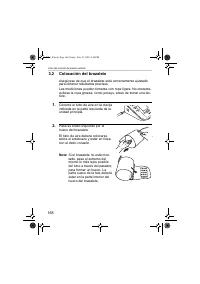
168 3.Uso del monitor de presión arterial 3.2 Colocación del brazalete Asegúrese de que el brazalete está correctamente ajustado para obtener resultados precisos.Las mediciones pueden tomarse con ropa ligera. No obstante, quítese la ropa gruesa, como jerseys, antes de tomar una lec-tura. 1. Conecte ...
Page 169 - Coloque el brazo correctamente.; Tomar mediciones en el brazo derecho; • El brazalete deberá que-; ) El tubo de aire deberá
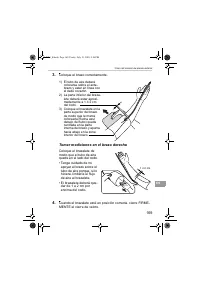
169 3.Uso del monitor de presión arterial ES 3. Coloque el brazo correctamente. Tomar mediciones en el brazo derecho Coloque el brazalete de modo que el tubo de aire quede en el lado del codo.• Tenga cuidado de no apoyar el brazo sobre el tubo de aire porque, si lo hiciera, limitaría el flujo de air...
Page 170 - Obtener una lectura; Pulse el botón de INICIO O/I para encender la unidad.; Causas habituales de resultados imprecisos
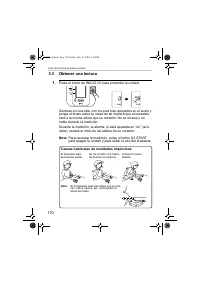
170 3.Uso del monitor de presión arterial 3.3 Obtener una lectura 1. Pulse el botón de INICIO O/I para encender la unidad. Siéntese en una silla, con los pies bien apoyados en el suelo y ponga el brazo sobre la mesa de tal manera que el brazalete esté a la misma altura que su corazón. No se mueva y ...
Page 171 - La alarma sonará cuando termine la medición.
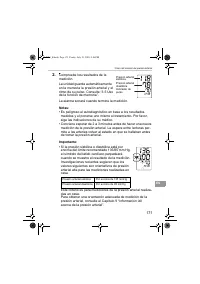
171 3.Uso del monitor de presión arterial ES 2. Compruebe los resultados de la medición. La unidad guarda automáticamente en la memoria la presión arterial y el ritmo de su pulso. Consulte “3.5 Uso de la función de memoria”. La alarma sonará cuando termine la medición. Notas: • Es peligroso el autod...
Page 172 - • Su monitor de presión arterial tiene una función; ¿Qué es el latido cardíaco irregular?
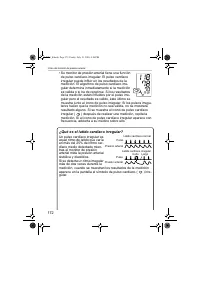
172 3.Uso del monitor de presión arterial • Su monitor de presión arterial tiene una función de pulso cardíaco irregular. El pulso cardíaco irregular puede influir en los resultados de la medición. El algoritmo de pulso cardíaco irre-gular determina inmediatamente si la medición es válida o si ha de...
Page 173 - Pulse el botón de INICIO O/I para apagar el monitor.
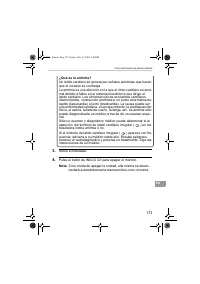
173 3.Uso del monitor de presión arterial ES ¿Qué es la arritmia? Un latido cardíaco se genera por señales eléctricas que hacen que el corazón se contraiga.La arritmia es una afección en la que el ritmo cardíaco es anor-mal debido a fallos en el sistema bioeléctrico que dirige el latido cardíaco. Lo...
Page 174 - Instrucciones para casos especiales; Comienza la medición.
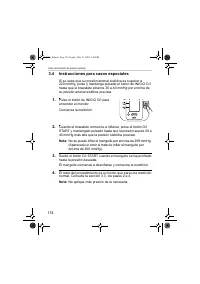
174 3.Uso del monitor de presión arterial 3.4 Instrucciones para casos especiales Si se sabe que su presión arterial sistólica es superior a 220 mmHg, pulse y mantenga pulsado el botón de INICIO O/I hasta que el brazalete alcance 30 a 40 mmHg por encima de su presión arterial sistólica prevista. 1. ...
Page 175 - Uso de la función de memoria; Pulse el botón MEMORY.
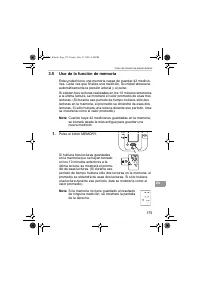
175 3.Uso del monitor de presión arterial ES 3.5 Uso de la función de memoria Esta unidad tiene una memoria capaz de guardar 42 medicio-nes. Cada vez que finaliza una medición, la unidad almacena automáticamente la presión arterial y el pulso. Si existen tres lecturas realizadas en los 10 minutos an...
Page 177 - Para borrar todos los valores almacenados en la memoria
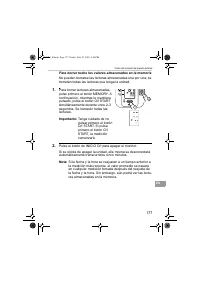
177 3.Uso del monitor de presión arterial ES Para borrar todos los valores almacenados en la memoria No pueden borrarse las lecturas almacenadas una por una; se borrarán todas las lecturas que tenga la unidad. 1. Para borrar lecturas almacenadas, pulse primero el botón MEMORY. A continuación, mientr...
Page 178 - Guía de referencia rápida; Si utiliza este dispositivo por primera vez, lea atentamente; • Conviene esperar siempre de 2 a
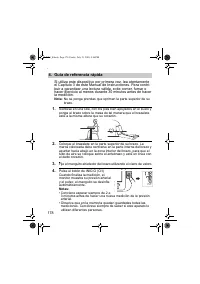
178 4.Guía de referencia rápida 4. Guía de referencia rápida Si utiliza este dispositivo por primera vez, lea atentamente el Capítulo 3 de este Manual de Instrucciones. Para contri- buir a garantizar una lectura válida, evite comer, fumar o hacer ejercicio al menos durante 30 minutos antes de hacer ...
Page 179 - Tratamiento de errores y problemas
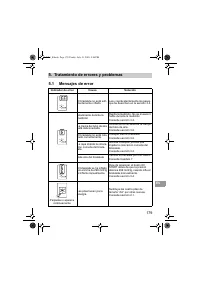
179 5.Tratamiento de errores y problemas ES 5. Tratamiento de errores y problemas 5.1 Mensajes de error Indicador de error Causa Solución El brazalete no está sufi-cientemente inflado. Lea y repita atentamente los pasos que se describen en la sección 3.4. Movimiento durante la medición Repita la med...
Page 181 - Resolución de problemas
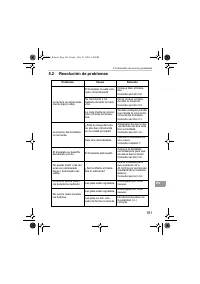
181 5.Tratamiento de errores y problemas ES 5.2 Resolución de problemas Problema Causa Solución La lectura es extremada-mente baja (o alta). El brazalete no está colo-cado correctamente. Coloque bien el braza-lete. Consulte sección 3.2. Se ha movido o ha hablado durante la medi-ción. No se mueva ni ...
Page 183 - Mantenimiento y almacenaje; Mantenimiento; • No someta la unidad principal ni el brazalete a temperaturas y; • No efectúe ningún tipo de reparación por su cuenta. Si se
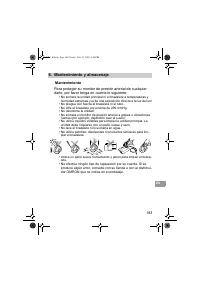
183 6.Mantenimiento y almacenaje ES 6. Mantenimiento y almacenaje Mantenimiento Para proteger su monitor de presión arterial de cualquier daño, por favor tenga en cuenta lo siguiente: • No someta la unidad principal ni el brazalete a temperaturas y humedad extremas y evite una exposición directa a l...
Page 184 - Calibrado y revisión; • La precisión de este monitor de presión arterial ha sido verifi-
184 6.Mantenimiento y almacenaje Calibrado y revisión • La precisión de este monitor de presión arterial ha sido verifi- cada cuidadosamente y está diseñado para tener una larga vida útil. • Como norma general se recomienda hacer una inspección del monitor de presión arterial cada dos años para aseg...
Page 185 - Almacenaje; Desenchufe el tubo de aire de la toma de aire.
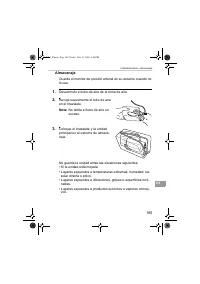
185 6.Mantenimiento y almacenaje ES Almacenaje Guarde el monitor de presión arterial en su estuche cuando no lo use. 1. Desenchufe el tubo de aire de la toma de aire. 2. Recoja suavemente el tubo de aire en el brazalete. Nota: No doble el tubo de aire en exceso. 3. Coloque el brazalete y la unidad p...
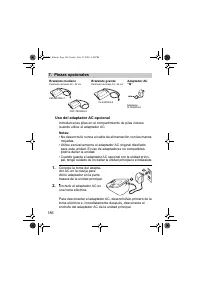
Page 186 - Uso del adaptador AC opcional; • No desenchufe nunca el cable de alimentación con las manos; Brazalete grande
186 7.Piezas opcionales 7. Piezas opcionales Uso del adaptador AC opcional Introduzca las pilas en el compartimiento de pilas incluso cuando utilice el adaptador AC. Notas: • No desenchufe nunca el cable de alimentación con las manos mojadas. • Utilice exclusivamente el adaptador AC original diseñad...
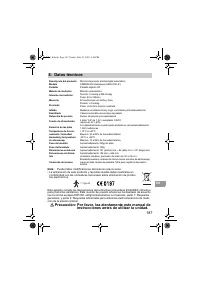
Page 187 - Precaución: Por favor, lea atentamente este manual de
187 8.Datos técnicos ES 8. Datos técnicos Nota: Puede haber modificaciones técnicas sin previo aviso. • La eliminación de este producto y las pilas usadas deben realizarse en conformidad con las normativas nacionales sobre eliminación de produc-tos electrónicos. Este aparato cumple las disposiciones...
Page 189 - Información útil acerca de la presión arterial; ¿Qué es la presión arterial?
189 9.Información útil acerca de la presión arterial ES 9. Información útil acerca de la presión arterial ¿Qué es la presión arterial? La presión arterial es una medida de la fuerza ejercida por el flujo sanguíneo contra las paredes de las arterias. La presión arterial varía constantemente durante e...
Page 191 - Digitale automatische bloeddrukmeter; Model M3 Intellisense
Digitale automatische bloeddrukmeter Model M3 Intellisense • Instruction Manual• Mode d’emploi• Gebrauchsanweisung• Manuale di istruzioni• Manual de instrucciones• Gebruiksaanwijzing• РУКОВОДСТВО ПО ЭКСПЛУАТАЦИИ EN FR DE IT ES NL RU IM-HEM-7051-E-01-07/05 7051_E.book Page 191 Friday, July 15, 2005 4...
Page 192 - Inhoud
192 Inhoud Inhoud ................................................................................... 192Inleiding ................................................................................ 193Belangrijke veiligheidsinformatie ....................................... 1941. Overzicht ..............
Page 193 - Inleiding
193 NL Inleiding Dank u voor de aankoop van de OMRON M3 Intellisense bloeddrukmeter voor de bovenarm. De OMRON M3 Intellisense is een volledig automatische bloeddrukmeter die werkt volgens het oscillometrische prin-cipe. Hiermee meet u de bloeddruk en de hartslag eenvoudig en snel. De meter maakt vo...
Page 194 - Belangrijke veiligheidsinformatie
194 Belangrijke veiligheidsinformatie Raadpleeg uw arts bij zwangerschap, aritmie of arteriosclerose.Wijzig nooit de dosis van door uw arts voorgeschreven medicatie.Gebruik de M3 Intellisense alleen voor uzelf. Let op: • Laat de meter niet zonder toezicht bij kinderen of personen die geen instemming...
Page 195 - Hoofdeenheid; optionele netadapter)
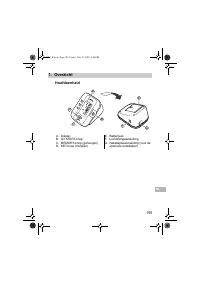
195 1.Overzicht NL 1. Overzicht Hoofdeenheid A. DisplayB. O/I START-knopC. MEMORY-knop (geheugen)D. SET-knop (instellen) E. BatterijvakF. LuchtslangaansluitingG. Netadapteraansluiting (voor de optionele netadapter) B D A C E G F 7051_E.book Page 195 Friday, July 15, 2005 4:36 PM
Page 196 - Armmanchet; Luchtslang
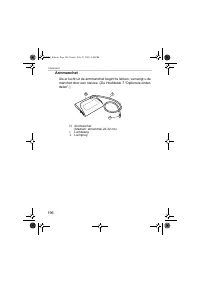
196 1.Overzicht Armmanchet Als er lucht uit de armmanchet begint te lekken, vervangt u de manchet door een nieuwe. (Zie Hoofdstuk 7 “Optionele onder-delen”.) H. Armmanchet (Medium: armomtrek 22-32 cm) I. Luchtslang J. Luchtplug I H J 7051_E.book Page 196 Friday, July 15, 2005 4:36 PM
Page 197 - N. Symbool gemiddelde waarde
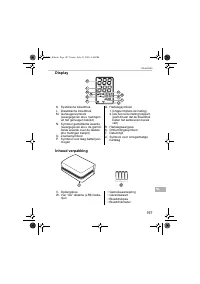
197 1.Overzicht NL Display Inhoud verpakking K. Systolische bloeddrukL. Diastolische bloeddrukM. Geheugensymbool (weergegeven als u metingen uit het geheugen bekijkt) N. Symbool gemiddelde waarde (weergegeven als u de gemid-delde waarde over de laatste drie metingen bekijkt) O. ZoemersymboolP. Symbo...
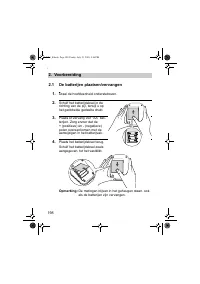
Page 198 - De batterijen plaatsen/vervangen; Draai de hoofdeenheid ondersteboven.
198 2.Voorbereiding 2. Voorbereiding 2.1 De batterijen plaatsen/vervangen 1. Draai de hoofdeenheid ondersteboven. 2. Schuif het batterijdeksel in de richting van de pijl, terwijl u op het geribbelde gedeelte drukt. 3. Plaats of vervang vier “ AA ” bat- terijen. Zorg ervoor dat de + (positieve) en - ...
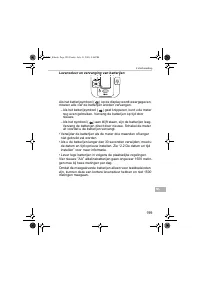
Page 199 - Levensduur en vervanging van batterijen
199 2.Voorbereiding NL Levensduur en vervanging van batterijen Als het batterijsymbool ( ) op de display wordt weergegeven, moeten alle vier de batterijen worden vervangen. - Als het batterijsymbool ( ) gaat knipperen, kunt u de meter nog even gebruiken. Vervang de batterijen op tijd door nieuwe. - ...
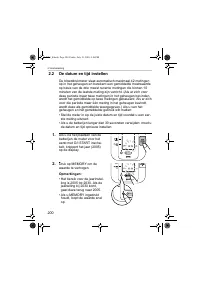
Page 200 - De datum en tijd instellen; • Als u de batterijen langer dan 30 seconden verwijdert, moet u
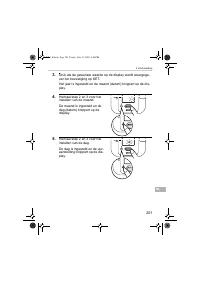
200 2.Voorbereiding 2.2 De datum en tijd instellen De bloeddrukmeter slaat automatisch maximaal 42 metingen op in het geheugen en berekent een gemiddelde meetwaarde op basis van de drie meest recente metingen die binnen 10 minuten van de laatste meting zijn verricht. (Als er zich voor deze periode m...
Page 203 - De instellingen wijzigen; Zoemer
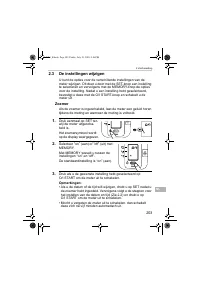
203 2.Voorbereiding NL 2.3 De instellingen wijzigen U kunt de opties voor de verschillende instellingen van de meter wijzigen. Dit doet u door met de SET-knop een instelling te selecteren en vervolgens met de MEMORY-knop de opties voor de instelling. Nadat u een instelling hebt geselecteerd, bevesti...
Page 204 - Het apparaat gebruiken; Juiste
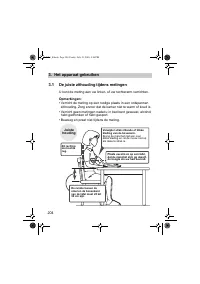
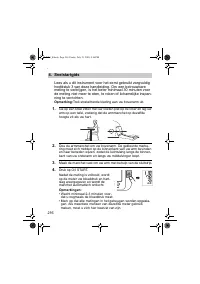
204 3.Het apparaat gebruiken 3. Het apparaat gebruiken 3.1 De juiste zithouding tijdens metingen U kunt de meting aan uw linker- of uw rechterarm verrichten. Opmerkingen: • Verricht de meting op een rustige plaats in een ontspannen zithouding. Zorg ervoor dat de kamer niet te warm of koud is. • Verr...
Page 205 - • De juiste houding tijdens het meten is essentieel voor het ver-
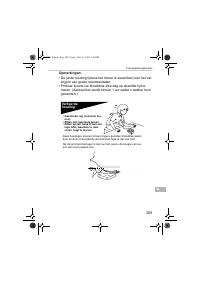
205 3.Het apparaat gebruiken NL Opmerkingen: • De juiste houding tijdens het meten is essentieel voor het ver- krijgen van goede meetresultaten. • Probeer tevens uw bloeddruk elke dag op dezelfde tijd te meten. (Aanbevolen wordt binnen 1 uur nadat u wakker bent geworden.) Verkeerde houding Deze houd...
Page 206 - De armmanchet aanbrengen
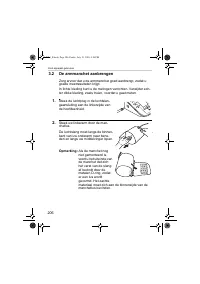
206 3.Het apparaat gebruiken 3.2 De armmanchet aanbrengen Zorg ervoor dat u de armmanchet goed aanbrengt, zodat u goede meetresultaten krijgt.In lichte kleding kunt u de metingen verrichten. Verwijder ech-ter dikke kleding, zoals truien, voordat u gaat meten. 1. Steek de luchtplug in de luchtslan-ga...
Page 207 - Plaats de arm in de juiste positie.; Metingen aan de rechterarm verrichten; • De manchet moet 1 tot; ) De luchtslang moet langs de
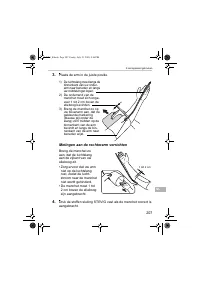
207 3.Het apparaat gebruiken NL 3. Plaats de arm in de juiste positie. Metingen aan de rechterarm verrichten Breng de manchet zo aan, dat de luchtslang aan de zijkant van uw elleboog zit.• Zorg ervoor dat uw arm niet op de luchtslang rust, zodat de lucht-stroom naar de manchet niet wordt gehinderd. ...
Page 208 - Een meting verrichten; Veel voorkomende oorzaken van onnauwkeurige mee-
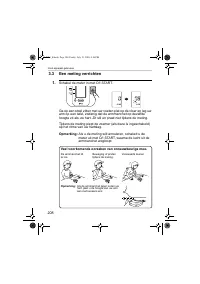
208 3.Het apparaat gebruiken 3.3 Een meting verrichten 1. Schakel de meter in met O/I START. Ga op een stoel zitten met uw voeten plat op de vloer en leg uw arm op een tafel, zodanig dat de armmanchet op dezelfde hoogte zit als uw hart. Zit stil en praat niet tijdens de meting. Tijdens de meting pie...
Page 209 - Controleer het meetresultaat.
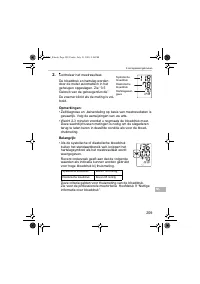
209 3.Het apparaat gebruiken NL 2. Controleer het meetresultaat. De bloeddruk en hartslag worden door de meter automatisch in het geheugen opgeslagen. Zie “3.5 Gebruik van de geheugenfunctie”. De zoemer klinkt als de meting is vol-tooid. Opmerkingen: • Zelfdiagnose en -behandeling op basis van meetr...
Page 210 - • Uw bloeddrukmeter heeft ook een functie voor; Wat is onregelmatige hartslag?
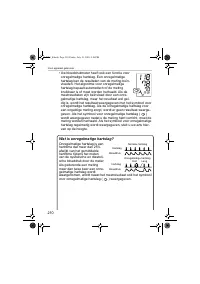
210 3.Het apparaat gebruiken • Uw bloeddrukmeter heeft ook een functie voor onregelmatige hartslag. Een onregelmatige hartslag kan de resultaten van de meting beïn-vloeden. Het algoritme voor onregelmatige hartslag bepaalt automatisch of de meting bruikbaar is of moet worden herhaald. Als de meetres...
Page 211 - ) bij het resultaat op aritmie wijst, kan alleen worden
211 3.Het apparaat gebruiken NL Wat is aritmie? De hartslag wordt veroorzaakt door elektrische signalen die het hart doen samentrekken.Aritmie is een toestand waarbij het hartritme abnormaal is door storingen in het bio-elektrisch systeem dat voor de hartslag zorgt. Typische symptomen zijn overgesla...
Page 212 - Instructies voor speciale omstandigheden; De manchet begint leeg te lopen en de meting begint.
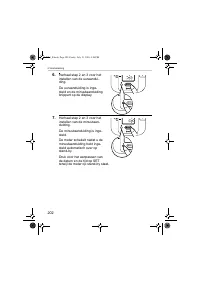
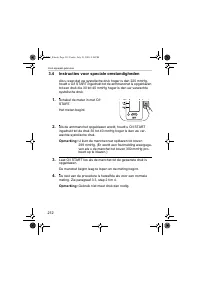
212 3.Het apparaat gebruiken 3.4 Instructies voor speciale omstandigheden Als u weet dat uw systolische druk hoger is dan 220 mmHg, houdt u O/I START ingedrukt tot de armmanchet is opgeblazen tot een druk die 30 tot 40 mmHg hoger is dan uw verwachte systolische druk. 1. Schakel de meter in met O/I S...
Page 213 - Gebruik van de geheugenfunctie
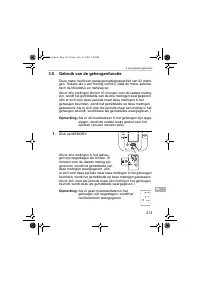
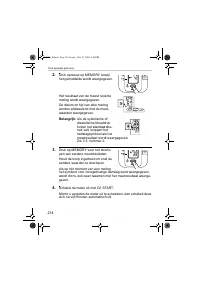
213 3.Het apparaat gebruiken NL 3.5 Gebruik van de geheugenfunctie Deze meter heeft een geheugenopslagcapaciteit van 42 metin-gen. Telkens als u een meting verricht, slaat de meter automa-tisch de bloeddruk en hartslag op. Als er drie metingen binnen 10 minuten voor de laatste meting zijn, wordt het...
Page 215 - Alle in het geheugen opgeslagen waarden wissen
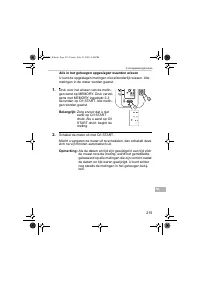
215 3.Het apparaat gebruiken NL Alle in het geheugen opgeslagen waarden wissen U kunt de opgeslagen metingen niet afzonderlijk wissen. Alle metingen in de meter worden gewist. 1. Druk voor het wissen van de metin-gen eerst op MEMORY. Druk vervol-gens met MEMORY ingedrukt 2-3 seconden op O/I START. A...
Page 217 - Oplossen van fouten en problemen
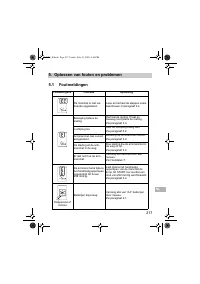
217 5.Oplossen van fouten en problemen NL 5. Oplossen van fouten en problemen 5.1 Foutmeldingen Foutweergave Oorzaak Oplossing De manchet is niet vol-doende opgeblazen. Lees en herhaal de stappen zoals beschreven in paragraaf 3.4. Beweging tijdens de meting Herhaal de meting. Praat en beweeg niet ti...
Page 219 - Problemen oplossen
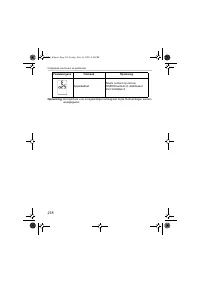
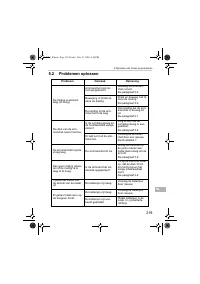
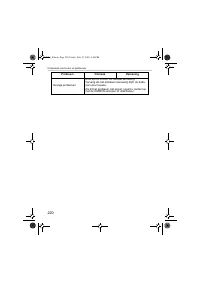
219 5.Oplossen van fouten en problemen NL 5.2 Problemen oplossen Probleem Oorzaak Oplossing De meting is extreem laag (of hoog). Armmanchet niet cor-rect aangebracht. Bevestig de armman-chet correct. Zie paragraaf 3.2. Beweging of praten tij-dens de meting. Praat en beweeg niet tij-dens de meting.Zi...
Page 221 - Opslag en onderhoud; Onderhoud; • Voer nooit zelf reparaties uit. Raadpleeg bij defecten uw
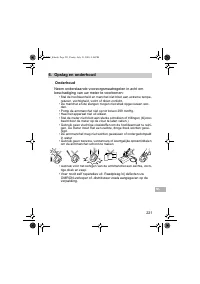
221 6.Opslag en onderhoud NL 6. Opslag en onderhoud Onderhoud Neem onderstaande voorzorgsmaatregelen in acht om beschadiging van uw meter te voorkomen: • Stel de hoofdeenheid en manchet niet bloot aan extreme tempe- raturen, vochtigheid, vocht of direct zonlicht. • De manchet en de slangen mogen nie...
Page 222 - Kalibratie en onderhoud; • De nauwkeurigheid van deze bloeddrukmeter is zorgvuldig
222 6.Opslag en onderhoud Kalibratie en onderhoud • De nauwkeurigheid van deze bloeddrukmeter is zorgvuldig getest en hij is ontworpen voor een lange levensduur. • Het wordt algemeen aanbevolen de meter elke twee jaar te laten controleren op juiste werking en nauwkeurigheid. Raad-pleeg de erkende ve...
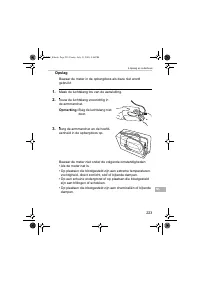
Page 223 - Opslag; Maak de luchtslang los van de aansluiting.
223 6.Opslag en onderhoud NL Opslag Bewaar de meter in de opbergdoos als deze niet wordt gebruikt. 1. Maak de luchtslang los van de aansluiting. 2. Vouw de luchtslang voorzichtig in de armmanchet. Opmerking: Buig de luchtslang niet door. 3. Berg de armmanchet en de hoofd-eenheid in de opbergdoos op....
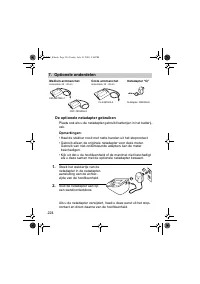
Page 224 - Optionele onderdelen; De optionele netadapter gebruiken; • Kijk uit dat u de hoofdeenheid of de manchet niet beschadigt
224 7.Optionele onderdelen 7. Optionele onderdelen De optionele netadapter gebruiken Plaats ook als u de netadapter gebruikt batterijen in het batterij-vak. Opmerkingen: • Haal de stekker nooit met natte handen uit het stopcontact.• Gebruik alleen de originele netadapter voor deze meter. Gebruik van...
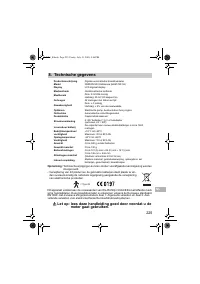
Page 225 - Technische gegevens; Let op: lees deze handleiding goed door voordat u de
225 8.Technische gegevens NL 8. Technische gegevens Opmerking: Technische wijzigingen kunnen zonder voorafgaande kennisgeving worden doorgevoerd. • Verwijdering van dit product en de gebruikte batterijen dient plaats te vin- den overeenkomstig de nationale regelgeving aangaande de verwijdering van e...
Page 227 - Nuttige informatie over bloeddruk; systolische
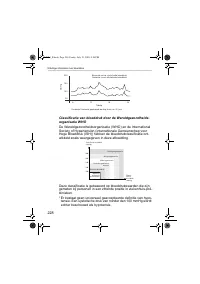
227 9.Nuttige informatie over bloeddruk NL 9. Nuttige informatie over bloeddruk Wat is bloeddruk? Bloeddruk is de druk van het bloed op de slagaderwand. Arteri-ele bloeddruk verandert voortdurend tijdens de hartcyclus. De hoogste bloeddruk in deze cyclus wordt de systolische bloeddruk genoemd, de la...
Page 229 - РУ
Измеритель артериального давления и частоты пульса автоматический Модель M3 Intellisense • Instruction manual• Mode d’emploi• Gebrauchsanweisung• Manuale di istruzioni• Manual de instrucciones• Gebruiksaanwijzing• РУКОВОДСТВО ПО ЭКСПЛУАТАЦИИ EN FR DE IT ES NL РУ IM-HEM-7051-E-01-07/05 7051_E.book Pa...
Page 230 - Содержание
230 Содержание Содержание .............................................................................. 230 Введение ................................................................................... 231 Важные меры предосторожности ........................................ 232 1. Обзор ..............
Page 231 - Введение; OMRON M3 Intellisense
231 РУ Введение Благодарим Вас за покупку прибора OMRON M3 Intellisense для измерения давления на плече . OMRON M3 Intellisense является полностью автоматическим прибором для измерения давления , работающим на осциллометрическом принципе . Он измеряет артериальное давление и пульс просто и быстро . ...
Page 232 - M3 Intellisense; Внимание
232 Важные меры предосторожности При беременности , аритмии или атеросклероз проконсультируйтесь с лечащим врачом . Никогда не изменяйте дозировку медикаментов , выписанных лечащим врачом . M3 Intellisense предназначен только для личного использования . Внимание : • Не оставляйте прибор без присмотр...
Page 233 - Обзор; Электронный
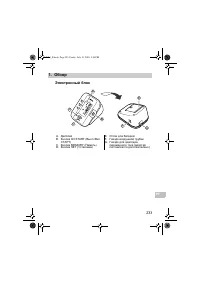
233 1. Обзор РУ 1. Обзор Электронный блок A. Дисплей B. Кнопка O/I START ( Выкл ./ Вкл . СТАРТ ) C. Кнопка MEMORY ( Память ) D. Кнопка SET ( Установка ) E. Отсек для батарей F. Гнездо воздушной трубки G. Гнездо для адаптера переменного тока ( адаптер поставляется дополнительно ) B D A C E G F 7051_E...
Page 234 - Манжета
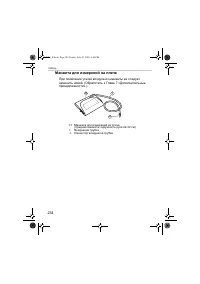
234 1. Обзор Манжета для измерений на плече При появлении утечки воздуха из манжеты ее следует заменить новой . ( Обратитесь к Главе 7 « Дополнительные принадлежности ».) H. Манжета для измерений на плече ( Средняя манжета : окружность руки 22-32 см ) I. Воздушная трубка J. Коннектор воздушной трубк...
Page 235 - Дисплей
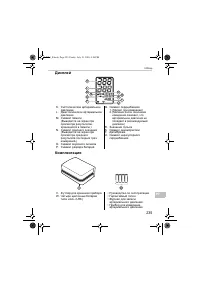
235 1. Обзор РУ Дисплей Комплектация K. Систолическое артериальное давление L. Диастолическое артериальное давление M. Символ памяти ( Выводится на экран при просмотре результатов , хранящихся в памяти .) N. Символ среднего значения ( Выводится на экран при просмотре среднего результата последних тр...
Page 236 - Подготовка; Примечание
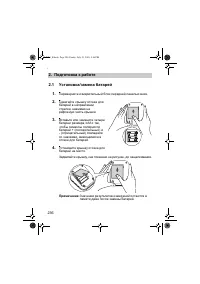
236 2. Подготовка к работе 2. Подготовка к работе 2.1 Установка / замена батарей 1. Переверните измерительный блок передней панелью вниз . 2. Сдвигайте крышку отсека для батарей в направлении стрелки , нажимая на рифленую часть крышки . 3. Вставьте или замените четыре батареи размера « AA » так , чт...
Page 238 - Установка; MEMORY; Примечания
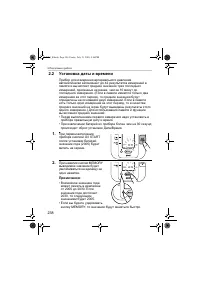
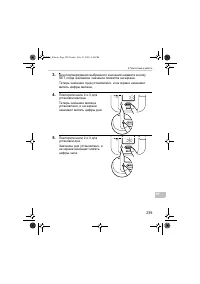
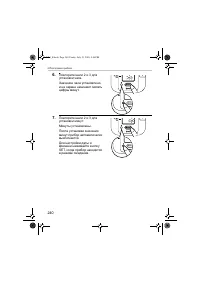
238 2. Подготовка к работе 2.2 Установка даты и времени Прибор для измерения артериального давления автоматически запоминает до 42 результатов измерений в памяти и вычисляет среднее значение трех последних измерений , сделанных не ранее , чем за 10 минут до последнего измерения . ( Если в памяти име...
Page 241 - Настройка; Состояние
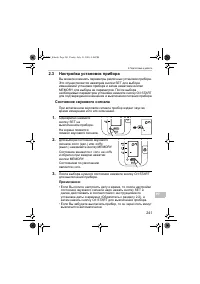
241 2. Подготовка к работе РУ 2.3 Настройка установок прибора Вы можете изменять параметры различных установок прибора . Это осуществляется нажатием кнопки SET для выбора изменяемой установки прибора и затем нажатием кнопки MEMORY для выбора ее параметров . После выбора необходимых параметров устано...
Page 242 - Правиль
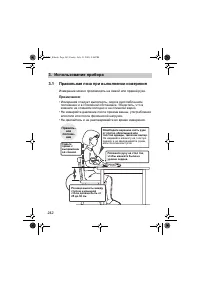
242 3. Использование прибора 3. Использование прибора 3.1 Правильная поза при выполнении измерения Измерение можно производить на левой или правой руке . Примечания : • Измерения следует выполнять , сидя в расслабленном положении и в спокойной обстановке . Убедитесь , что в комнате не слишком холодн...
Page 243 - Неправильное
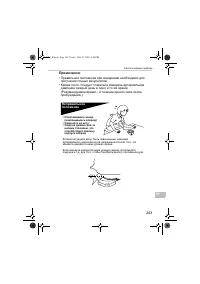
243 3. Использование прибора РУ Примечания : • Правильное положение при измерении необходимо для получения точных результатов . • Кроме этого , следует стараться измерять артериальное давление каждый день в одно и то же время . ( Рекомендуемое время – в течение одного часа после пробуждения .) Непра...
Page 244 - Закрепление
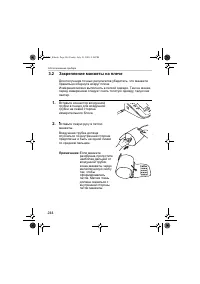
244 3. Использование прибора 3.2 Закрепление манжеты на плече Для получения точных результатов убедитесь , что манжета правильно обернута вокруг плеча . Измерения можно выполнять в легкой одежде . Тем не менее , перед измерением следует снять толстую одежду , такую как свитер . 1. Вставьте коннектор...
Page 245 - Измерение
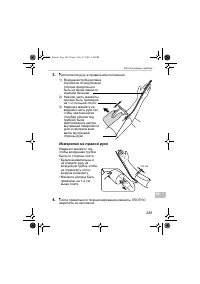
245 3. Использование прибора РУ 3. Расположите руку в правильном положении . Измерение на правой руке Наденьте манжету так , чтобы воздушная трубка была со стороны локтя . • Будьте внимательны и не кладите руку на воздушную трубку , чтобы не ограничить поток воздуха в манжету . • Манжета должна быть...
Page 246 - Выполнение
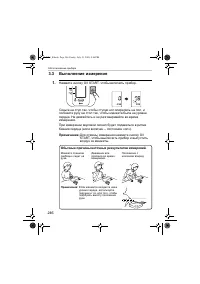
246 3. Использование прибора 3.3 Выполнение измерения 1. Нажмите кнопку O/I START, чтобы включить прибор . Сядьте на стул так , чтобы ступни ног опирались на пол , и положите руку на стол так , чтобы манжета была на уровне сердца . Не двигайтесь и не разговаривайте во время измерения . При измерении...
Page 247 - Важно
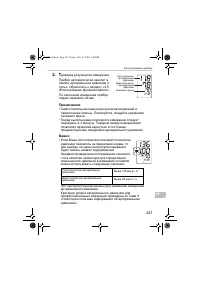
247 3. Использование прибора РУ 2. Проверка результатов измерения . Прибор автоматически заносит в память артериальное давление и пульс . Обратитесь к разделу «3.5 Использование функции памяти ». По окончании измерения прибор подает звуковой сигнал . Примечания : • Самостоятельная оценка результатов...
Page 250 - Указания
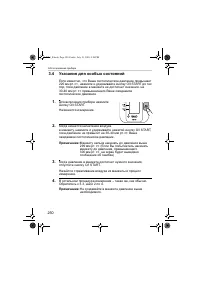
250 3. Использование прибора 3.4 Указания для особых состояний Если известно , что Ваше систолическое давление превышает 220 мм рт . ст ., нажмите и удерживайте кнопку O/I START до тех пор , пока давление в манжете не достигнет значения , на 30-40 мм рт . ст . превышающего Ваше ожидаемое систолическ...
Page 251 - Использование
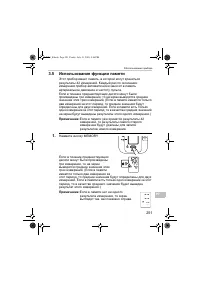
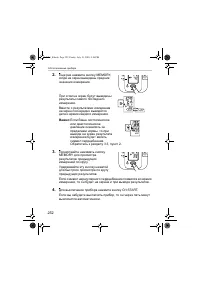
251 3. Использование прибора РУ 3.5 Использование функции памяти Этот прибор имеет память , в которой могут храниться результаты 42 измерений . Каждый раз по окончании измерения прибор автоматически заносит в память артериальное давление и частоту пульса . Если в течение предшествующих десяти минут ...
Page 253 - START
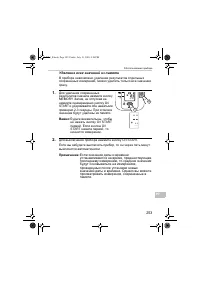
253 3. Использование прибора РУ Удаление всех значений из памяти В приборе невозможно удаление результатов отдельных сохраненных измерений , можно удалить только все значения сразу . 1. Для удаления сохраненных результатов сначала нажмите кнопку MEMORY. Затем , не отпуская ее , нажмите одновременно ...
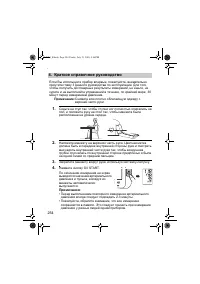
Page 254 - Краткое
254 4. Краткое справочное руководство 4. Краткое справочное руководство Если Вы используете прибор впервые , пожалуйста , внимательно прочтите главу 3 данного руководства по эксплуатации . Для того , чтобы получить достоверные результаты измерений , не ешьте , не курите и не выполняйте упражнений в ...
Page 257 - Поиск
257 5. Устранение ошибок и неисправностей РУ 5.2 Поиск и устранение неисправностей Проблема Причина Средство Значение слишком низкое ( или высокое ). Неправильно наложена манжета на плечо . Правильно закрепите манжету на плече . Обратитесь к разделу 3.2. Движение или разговор во время измерения . Не...
Page 259 - Обслуживание
259 6. Обслуживание и хранение РУ 6. Обслуживание и хранение Обслуживание Для предотвращения повреждений прибора , пожалуйста , не допускайте : • Воздействия на измерительный блок и манжету чрезмерно высокой или низкой температуры , влажности , влаги или прямого солнечного света . • Тугого сворачива...
Page 260 - Проверка
260 6. Обслуживание и хранение Проверка и обслуживание • Данный прибор для измерения артериального давления предназначен для длительной эксплуатации и его точность была тщательно проверена . • Для обеспечения правильной работы и точности прибора рекомендуется проверять прибор каждые два года . Пожал...
Page 261 - Хранение
261 6. Обслуживание и хранение РУ Хранение Когда прибор не используется , храните его в футляре . 1. Отсоедините воздушную трубку от гнезда воздушной трубки . 2. Аккуратно сверните воздушную трубку и положите ее внутрь манжеты для измерения на плече . Примечание : Не слишком сгибайте воздушную трубк...
Page 263 - Технические
263 8. Технические характеристики РУ 8. Технические характеристики Примечание : Технические характеристики могут быть изменены без предварительного уведомления • Утилизация данного изделия и использованных батарей должна осуществляться в соответствии с государственными правилами по утилизации электр...