Page 2 - Contents; Before using the unit
2 Contents Before using the unit Introduction ........................................................................... 3Important Safety Information ............................................... 41.Overview ............................................................................. 62.Prepara...
Page 3 - Introduction
3 EN Introduction Thank you for purchasing the OMRON M1 Eco Upper Arm Blood Pressure Monitor. The OMRON M1 Eco is a manual inflation blood pressure monitor, operating on the oscillometric principle. It measures your blood pressure and pulse rate simply and quickly. The unit also stores up to 42 meas...
Page 4 - Important Safety Information; • People with severe blood flow problems, or blood disorders, should
4 Important Safety Information Consult your doctor during pregnancy, arrhythmia and arteriosclerosis.You should never change the dosage of medication prescribed by your doctor.Use the M1 Eco only for yourself. Warning: Indicates a potentially hazardous situation which, if not avoided, could result i...
Page 5 - General Safety Precautions
5 Important Safety Information EN (Battery Usage) • If battery fluid should get on your skin or clothing, immediately rinse with plenty of clean water. • Use only four “AA” alkaline batteries with this unit. Do not use other types of batteries. • Do not insert the batteries with their polarities inc...
Page 6 - Main unit; F. Battery compartment
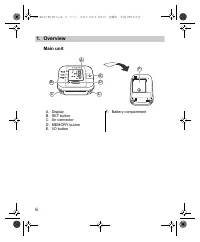
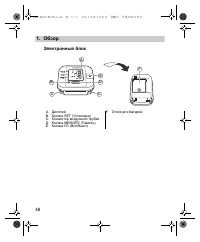
6 1.Overview 1. Overview Main unit A. DisplayB. SET buttonC. Air connectorD. MEMORY buttonE. I/O button F. Battery compartment B A C C E D F M1 Eco HE2-4011C-EN-RU.book 6 ページ 年 月 日 金曜日 午後 時 分
Page 7 - Air Release Button
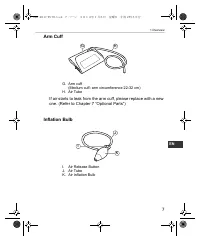
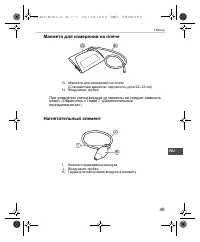
7 1.Overview EN Arm Cuff If air starts to leak from the arm cuff, please replace with a new one. (Refer to Chapter 7 “Optional Parts”) Inflation Bulb G. Arm cuff (Medium cuff: arm circumference 22-32 cm) H. Air Tube I. Air Release Button J. Air TubeK. Air Inflation Bulb H G J K I HE2-4011C-EN-RU.boo...
Page 8 - O. Average value symbol
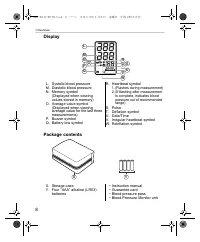
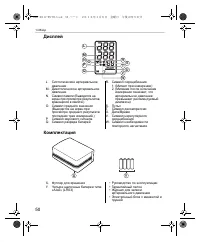
8 1.Overview Display Package contents L. Systolic blood pressureM. Diastolic blood pressureN. Memory symbol (Displayed when viewing values stored in memory) O. Average value symbol (Displayed when viewing average value for the last three measurements) P. Buzzer symbolQ. Battery low symbol R. Heartbe...
Page 9 - Installing/Replacing the Batteries; Turn the main unit upside down.
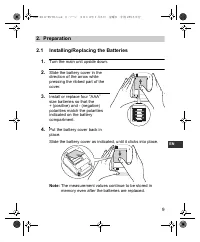
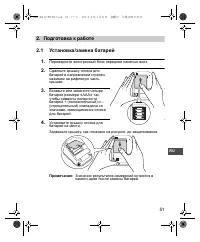
9 2.Preparation EN 2. Preparation 2.1 Installing/Replacing the Batteries 1. Turn the main unit upside down. 2. Slide the battery cover in the direction of the arrow while pressing the ribbed part of the cover. 3. Install or replace four “ AAA ” size batteries so that the + (positive) and - (negative...
Page 10 - Battery Life & Replacement
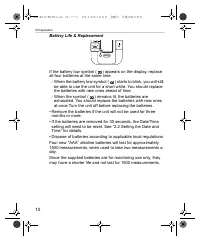
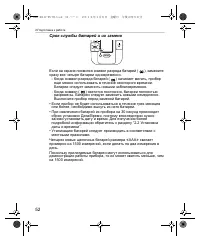
10 2.Preparation Battery Life & Replacement If the battery low symbol ( ) appears on the display, replace all four batteries at the same time. - When the battery low symbol ( ) starts to blink, you will still be able to use the unit for a short while. You should replace the batteries with new on...
Page 11 - Setting the Date and Time; measurement for the first time.
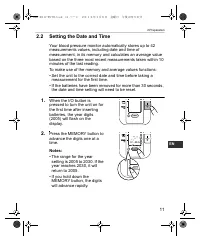
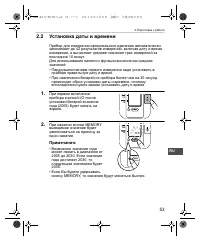
11 2.Preparation EN 2.2 Setting the Date and Time Your blood pressure monitor automatically stores up to 42 measurements values, including date and time of measurement, in its memory and calculates an average value based on the three most recent measurements taken within 10 minutes of the last readi...
Page 12 - The year is set and the month digits flash on the display.
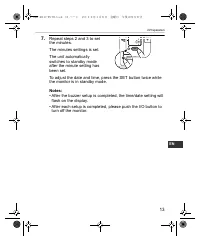
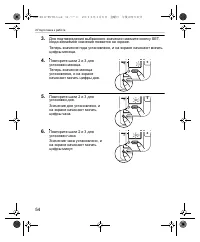
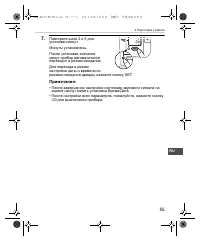
12 2.Preparation 3. Press the SET button to confirm the setting when the desired number appears on the display. The year is set and the month digits flash on the display. 4. Repeat steps 2 and 3 to set the month. The month is set and the day digits flash on the display. 5. Repeat steps 2 and 3 to se...
Page 14 - Adjusting the Settings Modes; Buzzer Mode
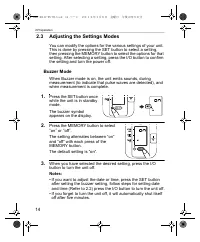
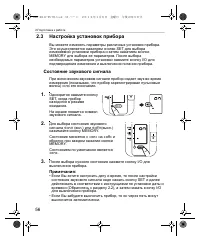
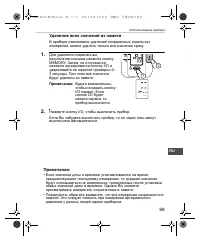
14 2.Preparation 2.3 Adjusting the Settings Modes You can modify the options for the various settings of your unit. This is done by pressing the SET button to select a setting, then pressing the MEMORY button to select the options for that setting. After selecting a setting, press the I/O button to ...
Page 15 - How to Sit Correctly When Taking a Measurement; You can take a measurement on either your left or right arm.
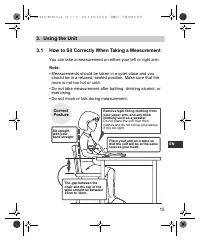
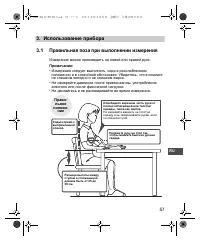
15 3.Using the Unit EN 3. Using the Unit 3.1 How to Sit Correctly When Taking a Measurement You can take a measurement on either your left or right arm. Note: • Measurements should be taken in a quiet place and you should be in a relaxed, seated position. Make sure that the room is not too hot or co...
Page 16 - Incorrect Posture
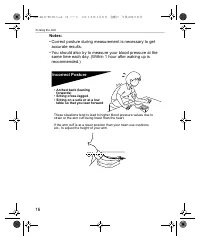
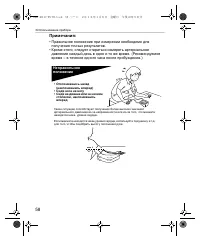
16 3.Using the Unit Notes: • Correct posture during measurement is necessary to get accurate results. • You should also try to measure your blood pressure at the same time each day. (Within 1 hour after waking up is recommended.) Incorrect Posture These situations tend to lead to higher blood pressu...
Page 17 - Applying the Arm Cuff; • Be sure to wrap the arm cuff correctly so that you get accurate
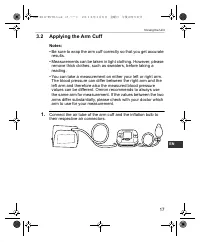
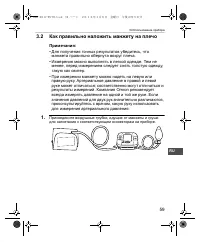
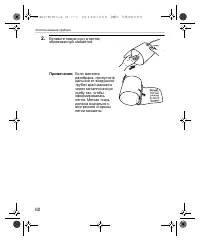
17 3.Using the Unit EN 3.2 Applying the Arm Cuff Notes: • Be sure to wrap the arm cuff correctly so that you get accurate results. • Measurements can be taken in light clothing. However, please remove thick clothes, such as sweaters, before taking a reading. • You can take a measurement on either yo...
Page 19 - Position the arm correctly.; Taking measurements on the right arm; • The cuff should be 1 to 2; ) The air tube should run
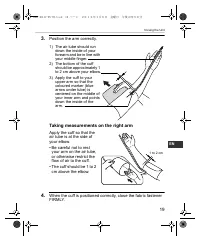
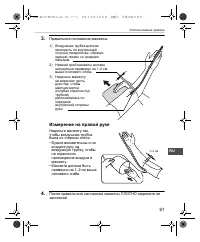
19 3.Using the Unit EN 3. Position the arm correctly. Taking measurements on the right arm Apply the cuff so that the air tube is at the side of your elbow.• Be careful not to rest your arm on the air tube, or otherwise restrict the flow of air to the cuff. • The cuff should be 1 to 2 cm above the e...
Page 20 - Taking a Reading; Preparation
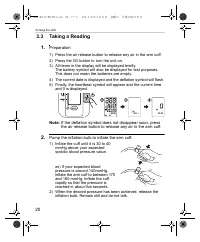
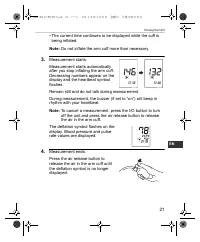
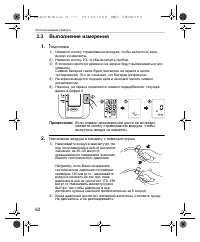
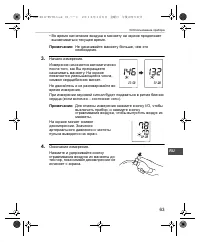
20 3.Using the Unit 3.3 Taking a Reading 1. Preparation 1) Press the air release button to release any air in the arm cuff. 2) Press the I/O button to turn the unit on. 3) All items in the display will be displayed briefly. The battery symbol will also be displayed for test purposes. This does not m...
Page 22 - Common Causes of Inaccurate Results
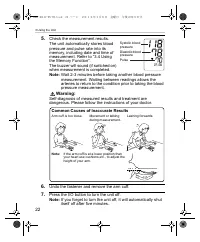
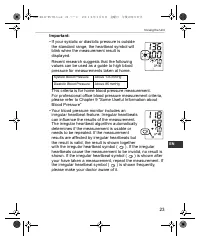
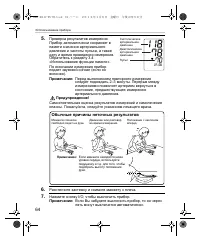
22 3.Using the Unit 5. Check the measurement results.The unit automatically stores blood pressure and pulse rate into its memory, including date and time of measurement. Refer to “3.4 Using the Memory Function”.The buzzer will sound (if switched on) when measurement is completed. Note: Wait 2-3 minu...
Page 24 - What is Irregular Heartbeat?; ) in the results indicates arrhythmia or not can only be; If the irregular heartbeat symbol (; Normal Heartbeat
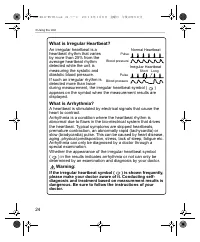
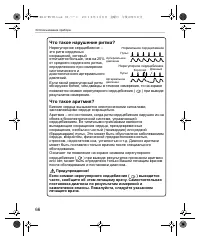
24 3.Using the Unit What is Irregular Heartbeat? An irregular heartbeat is a heartbeat rhythm that varies by more than 25% from the average heartbeat rhythm detected while the unit is measuring the systolic and diastolic blood pressure.If such an irregular rhythm is detected more than twice during m...
Page 25 - Using the Memory Function
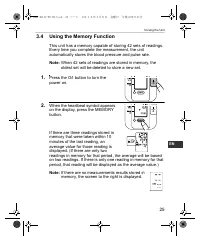
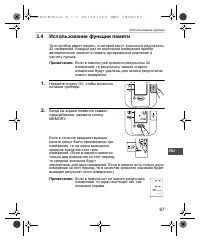
25 3.Using the Unit EN 3.4 Using the Memory Function This unit has a memory capable of storing 42 sets of readings. Every time you complete the measurement, the unit automatically stores the blood pressure and pulse rate. Note: When 42 sets of readings are stored in memory, the oldest set will be de...
Page 26 - Press the I/O button to turn the unit off.
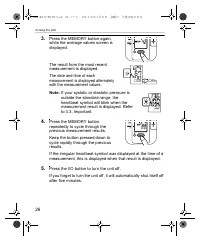
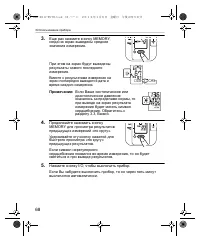
26 3.Using the Unit 3. Press the MEMORY button again, while the average values screen is displayed. The result from the most recent measurement is displayed. The date and time of each measurement is displayed alternately with the measurement values. Note: If your systolic or diastolic pressure is ou...
Page 27 - To Delete All the Values Stored in Memory
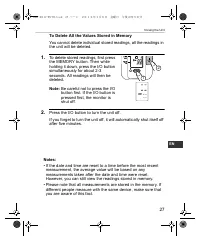
27 3.Using the Unit EN To Delete All the Values Stored in Memory You cannot delete individual stored readings, all the readings in the unit will be deleted. 1. To delete stored readings, first press the MEMORY button. Then while holding it down, press the I/O button simultaneously for about 2-3 seco...
Page 28 - Quick Reference Guide; Remove any tight-fitting clothing from your upper arm.
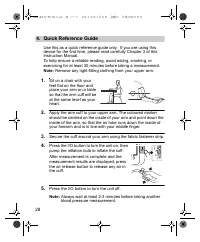
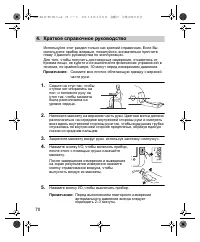
28 4.Quick Reference Guide 4. Quick Reference Guide Use this as a quick reference guide only. If you are using this device for the first time, please read carefully Chapter 3 of this Instruction Manual.To help ensure a reliable reading, avoid eating, smoking, or exercising for at least 30 minutes be...
Page 29 - Handling Errors and Problems
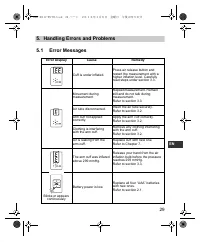
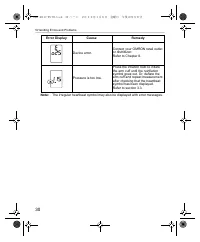
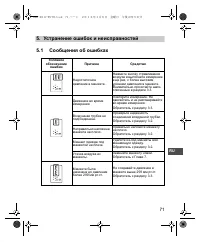
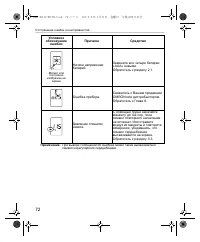
29 5.Handling Errors and Problems EN 5. Handling Errors and Problems 5.1 Error Messages Error Display Cause Remedy Cuff is under inflated. Press air release button and restart the measurement with a higher inflation level. Carefully read steps under section 3.3. Movement during measurement Repeat me...
Page 31 - Troubleshooting
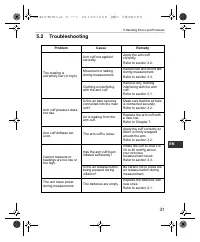
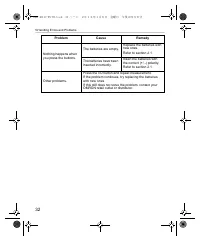
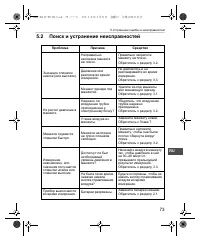
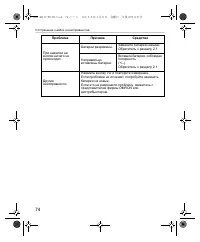
31 5.Handling Errors and Problems EN 5.2 Troubleshooting Problem Cause Remedy The reading is extremely low (or high). Arm cuff not applied correctly. Apply the arm cuff correctly. Refer to section 3.2. Movement or talking during measurement. Remain still and do not talk during measurement.Refer to s...
Page 33 - Maintenance and Storage; Maintenance; • Do not subject the main unit and cuff to extreme temperatures,; • Do not carry out repairs of any kind yourself. If a defect
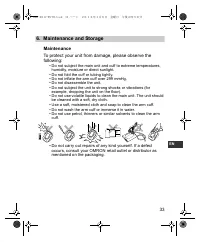
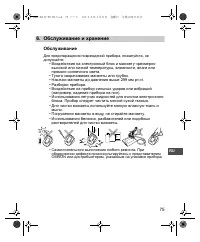
33 6.Maintenance and Storage EN 6. Maintenance and Storage Maintenance To protect your unit from damage, please observe the following: • Do not subject the main unit and cuff to extreme temperatures, humidity, moisture or direct sunlight. • Do not fold the cuff or tubing tightly.• Do not inflate the...
Page 34 - Calibration and Service; • The accuracy of this blood pressure monitor has been
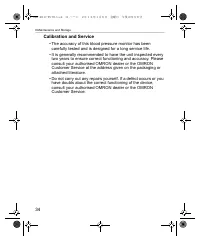
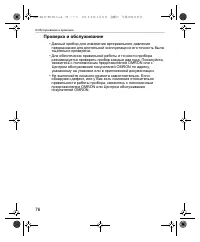
34 6.Maintenance and Storage Calibration and Service • The accuracy of this blood pressure monitor has been carefully tested and is designed for a long service life. • It is generally recommended to have the unit inspected every two years to ensure correct functioning and accuracy. Please consult yo...
Page 35 - Storage; Keep the unit in its storage case when not in use.
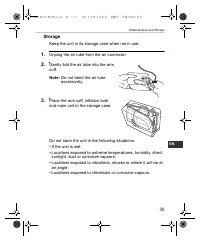
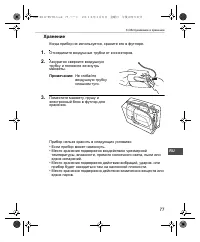
35 6.Maintenance and Storage EN Storage Keep the unit in its storage case when not in use. 1. Unplug the air tube from the air connector. 2. Gently fold the air tube into the arm cuff. Note: Do not bend the air tube excessively. 3. Place the arm cuff, inflation bulb and main unit in the storage case...
Page 36 - Medium Arm Cuffs; Large Arm Cuff; Small Arm Cuff; Small cuff and bulb combination; Regular bulb
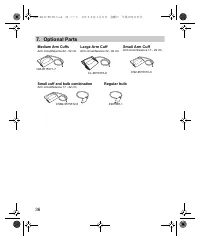
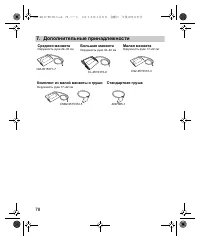
36 7.Optional Parts 7. Optional Parts Medium Arm Cuffs Arm circumference 22 - 32 cm Large Arm Cuff Arm circumference 32 - 42 cm Small Arm Cuff Arm circumference 17 - 22 cm Small cuff and bulb combination Arm circumference 17 - 22 cm Regular bulb CM-9515371-7 CL-9515370-9 CS2-9515373-3 CSB2-9515372-5...
Page 37 - Caution: Please read the instruction manual carefully
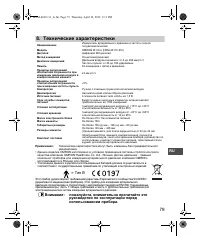
37 8.Technical Data EN 8. Technical Data Note: Subject to technical modification without prior notice. • This OMRON product is produced under the strict quality system of OMRON Healthcare Co. Ltd., Japan. The Core component for OMRON blood pressure monitors, which is the Pressure Sensor, is produced...
Page 39 - Some Useful Information about Blood Pressure; What is Blood Pressure?
39 9.Some Useful Information about Blood Pressure EN 9. Some Useful Information about Blood Pressure What is Blood Pressure? Blood pressure is a measure of the force of blood flowing against the walls of the arteries. Arterial blood pressure is constantly changing during the course of the heart’s cy...
Page 43 - M1 Eco; В Д В
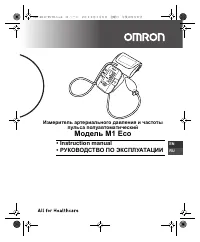
И M1 Eco • Instruction manual• В Д В Э А АЦИИ M1 Eco EN RU HE2-4011C-EN-RU.book 43 ページ 年 月 日 金曜日 午後 時 分
Page 45 - АЩИ
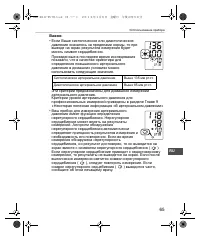
45 RU В OMRON M1 Eco . OMRON M1 Eco , . . , 42 3- 10 . ( , . , .) , . Д И АЩИ В А . HE2-4011C-EN-RU.book 45 ページ 年 月 日 金曜日 午後 時 分
Page 51 - AA
51 2. RU 2. 2.1 / 1. . 2. , . 3. « AA » , + ( ) – ( ) , . 4. . , , . : . HE2-4011C-EN-RU.book 51 ページ 年 月 日 金曜日 午後 時 分
Page 53 - MEMORY
53 2. RU 2.2 42 , , 10 . : • . • 30 , . 1. I/ (2005) . 2. MEMORY . : • 2005 2030. 2030, 2005. • MEMORY, . HE2-4011C-EN-RU.book 53 ページ 年 月 日 金曜日 午後 時 分
Page 59 - Omron
59 3. RU 3.2 : • , . • . , , . • . ; . Omron . , , . 1. , . M1 Eco HE2-4011C-EN-RU.book 59 ページ 年 月 日 金曜日 午後 時 分