Mikrotik LHG 5 (RBLHG5kit) - User Manual
Mikrotik LHG 5 (RBLHG5kit) Access Point – User Manual, read for free online in PDF format. We hope this helps you resolve any issues you may have. If you have further questions, please contact us through the contact form.

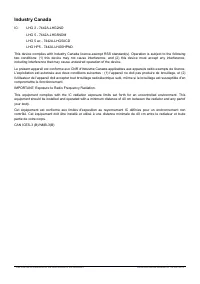

Table of Contents:
- Page 2 – Powering; The device accepts powering only from Passive PoE injectors.; Configuration; . In case IP connection is not available,; Extension slots and ports; The reset button has three functions:
- Page 4 – Federal Communication Commission Interference Statement; LHG 5 ac - TV7LHG5ACD
- Page 5 – Industry Canada; IMPORTANT: Exposure to Radio Frequency Radiation.
- Page 6 – Frequency bands terms of use
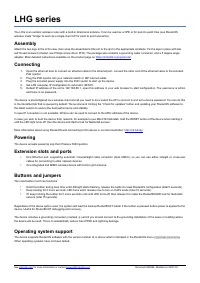
LHG series
The LHG is an outdoor wireless router with a built-in directional antenna. It can be used as a CPE or for point to
point links (use RouterOS wireless mode “bridge” to work as a single-client AP for point to point scenarios).
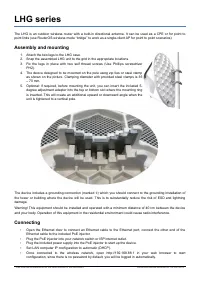
Assembly and mounting
1. Attach the two legs to the LHG case.
2. Snap the assembled LHG unit to the grid in the appropriate locations.
3. Fix the legs in place with two self thread screws (Use Phillips screwdriver
PH2).
4. The device designed to be mounted on the pole using zip ties or steel clamp
as shown on the picture. Clamping diameter with provided steel clamps is 35
– 70 mm.
5. Optional: if required, before mounting the unit, you can insert the included 5-
degree adjustment adapter into the top or bottom slot where the mounting ring
is inserted. This will create an additional upward or downward angle when the
unit is tightened to a vertical pole.
The device includes a grounding connection (marked )
⏚
which you should connect to the grounding installation of
the tower or building where the device will be used. This is to substantially reduce the risk of ESD and lightning
damage.
Warning! This equipment should be installed and operated with a minimum distance of 40 cm between the device
and your body. Operation of this equipment in the residential environment could cause radio interference.
Connecting
•
Open the Ethernet door to connect an Ethernet cable to the Ethernet port, connect the other end of the
Ethernet cable to the included PoE injector.
•
Plug the PoE injector into your network switch or ISP internet outlet.
•
Plug the included power supply into the PoE injector to start up the device.
•
Set LAN computer IP configuration to
automatic
(DHCP).
•
Once connected to the wireless network, open http://192.168.88.1 in your web browser to start
configuration, since there is no password by default, you will be logged in automatically.
See mikrotik.com/products for the latest version of this document.
Document #49249 Modified on: 02.JUL.2019
"Loading the manual" means you need to wait until the file loads and becomes available for online reading. Some manuals are very large, and the time they take to appear depends on your internet speed.
Summary
• We recommend clicking the “Check for updates” button and updating your RouterOS software to the latestversion to ensure the best performance and stability. • Choose your country, to apply country regulation settings and set up your password in the screen thatloads. The device is preconfigured as a...
Federal Communication Commission Interference Statement FCC ID:LHG 2 - TV7LHG2ND LHG 5 - TV7LHG5NDM LHG 5 ac - TV7LHG5ACD LHG HP5 - TV7LHG5HPND This equipment has been tested and found to comply with the limits for a Class B digital device, pursuant to Part 15of the FCC Rules. These limits are desig...
Industry Canada IC: LHG 2 - 7442A-LHG2ND LHG 5 - 7442A-LHG5NDM LHG 5 ac - 7442A-LHG5ACD LHG HP5 - 7442A-LHG5HPND This device complies with Industry Canada licence-exempt RSS standard(s). Operation is subject to the followingtwo conditions: (1) this device may not cause interference, and (2) this dev...