Mikrotik LDF 5 ac (RBLDFG-5acD) - User Manual
Mikrotik LDF 5 ac (RBLDFG-5acD) Access Point – User Manual, read for free online in PDF format. We hope this helps you resolve any issues you may have. If you have further questions, please contact us through the contact form.
Table of Contents:
- Page 2 – Mounting; The IP rating scale for this device is IP54.; Powering; Maximum power consumption:; First steps; version to ensure the best performance and stability; Configuration; . In case IP connection is not available,
- Page 4 – Federal Communication Commission Interference Statement; Reorient or relocate the receiving antenna.; IMPORTANT: Exposure to Radio Frequency Radiation.
- Page 5 – WARNING; Industry Canada
- Page 6 – Frequency bands terms of use
LDF 5, LDF 5 ac
The LDF (Lite dish feed) is an outdoor wireless system with a built-in antenna, meant to be installed on satellite
offset dish antennas.
Assembly
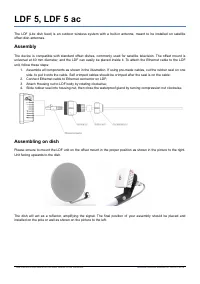
The device is compatible with standard offset dishes, commonly used for satellite television. The offset mount is
universal at 40 mm diameter, and the LDF can easily be placed inside it. To attach the Ethernet cable to the LDF
unit, follow these steps:
1. Assemble all components as shown in the illustration. If using pre-made cables, cut the rubber seal on one
side, to put it onto the cable. Self crimped cables should be crimped after the seal is on the cable;
2. Connect Ethernet cable to Ethernet connector on LDF;
3. Attach Housing nut to LDF body by rotating clockwise;
4. Slide rubber seal into housing nut, then close the waterproof gland by turning compression nut clockwise.
Assembling on dish
Please ensure to mount the LDF unit on the offset mount in the proper position as shown in the picture to the right.
Unit facing upwards to the dish.
The dish will act as a reflector, amplifying the signal. The final position of your assembly should be placed and
installed on the pole or wall as shown on the picture to the left.
See mikrotik.com/products for the latest version of this document.
Document #52844 Modified on: 24.OCT.2019
"Loading the manual" means you need to wait until the file loads and becomes available for online reading. Some manuals are very large, and the time they take to appear depends on your internet speed.
Summary
Mounting The IP rating scale for this device is IP54. The Device designed to use outdoors, please ensure that any cable openings are directed downwards. Use POE injector with Cat6 cable. Installation infrastructure (towers and masts), as well as the router itself, to be properly grounded. Mounting a...
Federal Communication Commission Interference Statement This equipment has been tested and found to comply with the limits for a Class A digital device,according to Part 15 of the FCC Rules. These limits are designed to provide reasonable protectionagainst harmful interference in a residential insta...
WARNING : the OEM must ensure that the FCC labeling requirements are met. This includes a visible labels on the outside of the OEM enclosure specifying the appropriate MikroTik OEM RF Module FCC identifier for this productas well as any other required FCC notices as presented below.LDF 5 - FCC ID: T...