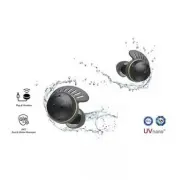
Page 2 - Quick Guide; Using Easily in Order; Connecting the smartphone to earbuds with Bluetooth (
2 Quick Guide Using Easily in Order 1. Connecting the smartphone to earbuds with Bluetooth ( [ Please refer to “Connecting the Smartphone to Earbuds via Bluetooth” on page 11.) a Press the settings app [ / ] of the smartphone. Then select Bluetooth and turn on the Bluetooth function. ( Off > On) ...
Page 5 - Please refer to “Listening to Music”,
5 3. Using earbuds with touch ( [ Please refer to “Listening to Music”, “Receiving Phone Call”, and “Listening to Ambient Sound/Active Noise Cancellation (ANC)” on pages 15, 16, and 17.) You can touch the earbuds to play or pause music, or receive or reject a phone call. You can change how the funct...
Page 6 - Please refer to “Connecting and Disconnecting with an Analog; Please refer to “Charging by Wire”, “Description on
6 4. Connecting to an external device for use (Plug and Wireless mode) ( [ Please refer to “Connecting and Disconnecting with an Analog Device” on pages 18.) You can connect the charging case to a device such as an airplane stereo system, treadmill, cassette player, radio, and TV to listen with the ...
Page 7 - Please refer to “Connecting
7 6. Connecting the LG TONE Free app ( [ Please refer to “Connecting the LG TONE Free App” on page 23.) a Search for “LG TONE Free” on Google Play Store or App Store on your smartphone or scan the QR code below to install the LG TONE Free app. b Run the app to use various functions (checking the ear...
Page 8 - Contents
8 Quick Guide 2 Using Easily in Order Exploring the Product 9 Charging Case 10 Earbuds Connecting with Bluetooth for Use 11 Connecting the Smartphone to Earbuds via Bluetooth 12 Multiple Connections 12 Automatic Reconnection Listening to Sound with Earbuds 13 Wearing Earbuds 14 Replacing the Ear hoo...
Page 9 - Charging Case; Exploring the Product
9 Exploring the Product Charging Case A C G E F C B D A Mood light: When you open the charging case, the mood light turns on and off. B Case charging port: You can charge a device or use Plug and Wireless mode. C UVnano LED: If you charge the device with the earbuds attached and the cover closed, th...
Page 10 - Earbuds
10 Earbuds D B B C E A A Ear hooks B Speaker mesh (microphone) C Touch pad D Microphone E Earbuds charging terminals Note • Be careful that foreign substances are not over the Earbuds charging terminals.
Page 11 - Connecting the Smartphone to Earbuds via Bluetooth; Connecting with Bluetooth for Use
11 Connecting with Bluetooth for Use Connecting the Smartphone to Earbuds via Bluetooth a Turn on the Bluetooth® function of your smartphone or a device you want to connect. b Open the cover with earbuds attached to the charging case. The blue battery status indicator on the front blinks. If the blu...
Page 12 - Multiple Connections; Automatic Reconnection
12 Multiple Connections If you use the LG TONE Free app, you can connect and use two devices, such as a smartphone and a PC at the same time. a Please activate Multi-Point & Multi-Pairing on the LG TONE Free app. b Put the earbuds in the charging case and perform the connecting procedures in the...
Page 13 - Wearing Earbuds; Listening to Sound with Earbuds
13 Listening to Sound with Earbuds Wearing Earbuds a In the charging case, bend the inside of the earbuds outward and separate it. Note • If you use an ear gel sized to fit your ears, you can improve performance of active noise cancellation (ANC). You can then listen to music with rich sound quality...
Page 15 - Listening to Music
15 Listening to Music Function How to Use Play/Pause : Touch the left or right earbud once. Volume control : Touch the left (volume down) or right (volume up) earbud twice. Next song : Touch the left or right earbud three times. Note • You can change how to use the function in the touch pad settings...
Page 16 - Receiving Phone Call; Smartphone call function
16 Receiving Phone Call Function How to Use Receiving calls : Touch the left or right earbud once. Hanging up calls : Touch the left or right earbud twice. Rejecting calls : Touch and hold the left or right earbud. Smartphone call function Function/Status Description Receiving calls/When receiving p...
Page 17 - Listening to ambient sound
17 Listening to Ambient Sound/Active Noise Cancellation (ANC) Listening to ambient sound The listening to ambient sound function makes you hear outside sounds, so that you can be aware about your surroundings and hazards. Active noise cancellation (ANC) The active noise cancellation (ANC) function b...
Page 18 - Connecting to an External Device for; Connecting; Connecting and Disconnecting with an Analog Device; Connecting with an analog device; Connecting to an External Device for Use (Plug
18 Connecting to an External Device for Use (Plug and Wireless Mode) Connecting You can connect the charging case to an analog device such as audio in airplane seat, treadmill, cassette, radio, TV to listen to the sound with an earbuds. Function How to Use Mute or unmute : Touch the left or right ea...
Page 19 - Disconnecting with an analog device
19 c Wear earbuds on your ears. d Slide the Plug and Wireless mode switch to the right to turn on the mode. e The indicator on the charging case blinks green. f When the charging case and earbuds are connected, the indicator turns off. Disconnecting with an analog device a Push the Plug and Wireless...
Page 20 - Charging by Wire; Charging
20 Charging Charging by Wire If you connect the charging cable, the charging status shows up on the charging case. Note • The earbuds and charging case are charged at the same time. • The Case charging port of the charging case does not support the power supply function to other devices such as smar...
Page 21 - Description on UVnano
21 Description on UVnano The charging case has a built-in UVnano LED to keep the earbuds clean.If you charge the device with the earbuds attached and the cover closed, the UVnano LED operates for 10 minutes. * UVnano is a compound word of UV and nanometer, the unit of UV. Note • The UVnano indicator...
Page 22 - Checking Battery Status; Battery status indicator
22 Checking Battery Status If you open the charging case, the battery status of the earbuds is displayed.When the earbuds are not attached, the battery status of the charging case is displayed. Battery status indicator Battery level state (charger not connected) / Charging status (charger connected)...
Page 23 - Connecting the LG TONE Free App; Connecting to the Bluetooth App
23 Connecting to the Bluetooth App Connecting the LG TONE Free App a Search for “LG TONE Free” on Google Play Store or App Store on your smartphone or scan the QR code below to install the LG TONE Free app. b Run the app to use various functions (checking the earbuds battery, voice notification, cha...
Page 24 - Safety Notices and Warnings; Safety Precautions
24 Safety Precautions Safety Notices and Warnings The following “Safety Precautions” are to prevent unexpected dangers or damages, so be sure to read them thoroughly.‘Safety Precautions’ are divided into ‘Warning’ and ‘Caution’. . WARNING: Failure to follow the instructions may result in serious inj...
Page 25 - Precautions when Using the Product
25 > Caution • Replacement of a battery with an incorrect type that can defeat a safeguard (for example, in the case of some lithium battery types). • Disposal of a battery into fire or a hot oven, or mechanically crushing or cutting of a battery, may result in an explosion. • Leaving a battery i...
Page 26 - Troubleshooting; Things to Check before Reporting Malfunction
26 Things to Check before Reporting Malfunction Troubleshooting If you experience the following symptoms while using the product, please check them again. They may not be malfunctions. Symptom Cause and Solution If the power does not turn on • Check the battery level and charge it. If a call cannot ...
Page 27 - Product Specifications; Appendix
27 Appendix Product Specifications General Description Bluetooth Specifications V 5.3 (HSP/HFP/A2DP/AVRCP) Battery Earbud: 3.7 V / 68 mAh, Lithium-ionCharging case: 3.7 V / 390 mAh, Lithium-ion Music Play Time Earbuds & With Charging case ANC Off: Up to 10 & Up to 30 hours*ANC On: Up to 6 &a...
Page 28 - Safety Information; Prevention of Hearing Loss; Additional Information; Radio frequency exposure; Safety information
28 Safety Information Prevention of Hearing Loss If the volume of the headset is too high, you can experience permanent hearing loss. Set the volume to a safe level. It may sound normal, but if you often listen to high-pitch sounds that can damage your hearing, your ears get used to it over time.If ...
Page 29 - WARNING
29 Bluetooth connection precautions The following environments affect the range and reception of Bluetooth signals: - When walls, metal, human bodies, or other obstacles exist between the Bluetooth device and the connected device. - When equipment that uses 2.4 GHz frequency signals (wireless LANs, ...
Page 31 - Cleaning Earbud; Cleaning Guide
31 Cleaning Guide Cleaning Earbud Clean the speaker hole and air ventilation hole regularly so that they are not blocked by foreign substances (sebum, earwax, etc.).*If the speaker hole and air ventilation hole are blocked, volume may be low, noise may occur, and the noise canceling performance may ...