Page 3 - Table of Contents
03 Table of Contents Safety Instructions ............................................. 04 Product Overview ............................................... 09 Installation ........................................................... 10 Freestanding Installation ...........................................
Page 4 - Safety Instructions; Basic Safety Precautions; WARNING; IMPORTANT SAFETY INSTRUCTIONS
04 Safety Instructions Your safety and the safety of others are very important. We have provided many important safety messages in this manual and on the appliance. Always read and follow all safety messages. Basic Safety Precautions After reading this manual, please keep it in an easily accessible ...
Page 5 - Installation and Usage
05 To reduce the risk of fire, explosion, electric shock, or injury to persons when using this appliance, follow basic precautions, including the following: Installation and Usage • To avoid an electrical short or fire, do not install, charge or store the product where it may be exposed to water, ra...
Page 6 - Operation
06 Operation • Read all instructions before using the appliance, and save these instructions. • This appliance is designed for normal indoor domestic use only. It is not to be used for any non-residential, commercial, or industrial application. • Do not tamper with controls. • If the product has bee...
Page 7 - SAVE THESE INSTRUCTIONS
07 • This product is too heavy for use by children. • Only qualified LG Electronics technicians or service personnel may disassemble, repair or modify the product. • Do not insert metal objects into holes or gaps in the product or the charging station. • Do not put any object into openings. Do not u...
Page 8 - CAUTION
08 To reduce the risk of injury to persons, malfunction, or damage to the product or property when using the appliance, follow basic safety precautions, including the following: • Do not subject the product to shocks or drop it. • Secure the product in the charging station when not in use, to avoid ...
Page 9 - Product Overview; Freestanding Installation
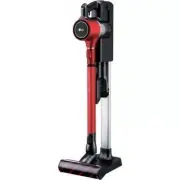
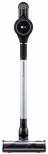
09 Product Overview Freestanding Installation Wall-Mounted Installation 6 1 4 9 5 2 3 7 8 6 1 4 9 2 3 8 1 Product body 2 Extending wand 3 Power Carpet Nozzle 4 Charging station 5 Charging station stand 6 Attachment storage 7 Charging station base 8 Adapter 9 Battery Included Accessories • Included a...
Page 10 - Installation; Using Double-Sided Tape
10 Installation Freestanding Installation 1 Assemble the charging station stand by inserting the support pipe into the base. Slide the charging station onto the top of the support pipe. Take care to avoid pinch points. CAUTION • Avoid getting your fingers stuck in any gaps. 2 Insert the power cable ...
Page 11 - Wall Installation; Attachment Storage
11 CAUTION • To avoid product damage or personal injury, take care not to drop the product parts while unpacking them. • Do not use the double-sided tape on wallpaper. The weight of the charging station and the product could damage the paper. • We recommend anchoring the station with the anchoring s...
Page 12 - Before Using; Attaching the Wand and
12 Before Using • The dust bin lid must be in place before using the product. Otherwise, the suction strength will deteriorate and cleaning will not be satisfactory. • Support the bottom of the product when cleaning an elevated surface. • Store the vacuum in the charging station or flat on the floor...
Page 13 - Charging the Battery; Charging the Auxiliary Battery; Adjusting the Suction
13 Charging the Battery 1 Put the product on the charging station. • The battery indicator has 3 bars to indicate the charge level. The bars will flash during charging. 2 An auxiliary battery can be charged in the base of the charging station. • The auxiliary charge indicator will flash until the au...
Page 14 - Using the Nozzles; Power Carpet Nozzle; Power Floor Nozzle (some models
14 Using the Nozzles • The nozzles included may vary by product. • The nozzle can be attached to the product body or extension pipe. • Adjust the suction lower if the inlet gets stuck on the floor, carpet, or bedding or higher if you need more power. CAUTION • Do not use the product for anything oth...
Page 15 - Maintenance; Emptying the Dust Bin; Cleaning the Filters
15 Maintenance Emptying the Dust Bin 1 Remove the battery from the unit before cleaning the dustbin. 2 Hold the dust bin over a wastebasket or trash can. 3 Press the release button at the bottom front of the dust bin to open the bin and shake to empty it. • Be careful as dust/foreign matter may spil...
Page 17 - Cleaning the Power; Cleaning the Bedding Power
17 Cleaning the Power Floor/Carpet Nozzle Check the brush and roller heads before using and clean as needed. 1 Remove the nozzle from the product. Press the release button to remove the head from the wand or product body. 2 Turn the head upside down and insert a flat- blade screwdriver in the cover ...
Page 18 - Before Calling for Service
18 Before Calling for Service Save time and money by checking the following before calling for service. Symptom Cause Solution The vacuum does not operate. Battery is dead. • Charge the battery. Vacuum is powered off. • Press the power button to power on the vacuum. Suction is weak. Dust bin is full...
Page 19 - Product Specifications
19 Product Specifications Item/Model A90**** Exterior dimensions 10.2 in. (W) x 10.6 in. (D) x 44.1 in. (H)260 mm (W) x 270 mm (D) x 1120 mm (H) Weight 5.7 lb / 2.7 kg Power consumption: 400 W (Maximum power: 450 W)/250 W/ 80 W (Turbo/Power/Standard) Suction power 140 W 1 Battery DC 25.55 V Battery ...
Page 20 - Warranty
20 Warranty ARBITRATION NOTICE: THIS LIMITED WARRANTY CONTAINS AN ARBITRATION PROVISION THAT REQUIRES YOU AND LG TO RESOLVE DISPUTES BY BINDING ARBITRATION INSTEAD OF IN COURT, UNLESS YOU CHOOSE TO OPT OUT. IN ARBITRATION, CLASS ACTIONS AND JURY TRIALS ARE NOT PERMITTED. PLEASE SEE THE SECTION TITLE...