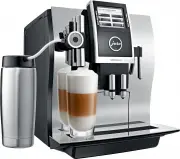
Page 2 - Your IMPRESSA Z9 One Touch TFT
2 Table of contents Your IMPRESSA Z9 One Touch TFT Control elements 4 Important information 6 Proper use ...................................................................................................................................................... 6For your safety ..............................
Page 3 - ‘Espresso’; Symbol description
3 Table of contents Warnings J WARNING J CAUTION Always take note of any information marked with the words CAUTION or WARNING and a warning sign. The signal word WARNING draws your attention to potential serious injury, and the signal word CAUTION to potential minor injury. CAUTION CAUTION draws you...
Page 4 - Control elements
4 Control elements Control elements 4 11 1 2 7 6 5 3 9 12 14 13 8 10 1 Bean container cover 2 Water tank cover 3 Water tank 4 Power switch and mains cable (side of machine) 5 Height-adjustable cappuccino frother 6 Coffee grounds container 7 Drip tray 8 Grinder adjustment switch 9 Bean container wit...
Page 5 - Top of the machine
5 Control elements 3 1 2 4 5 Top of the machine 1 Q On/Off button 2 g Rotary Switch 3 O P button (programming) Front 4 Display 5 Multi-function buttons (button function depends on what is shown in the display)
Page 6 - Important information; To avoid danger of potentially fatal electric shock:
6 Important information Important information The machine is designed and intended for private domestic use. It should only be used for coffee preparation and to heat milk and water. Use for any other purpose will be deemed improper. JURA Elektroapparate AG cannot accept any responsi-bility for the ...
Page 7 - Place the machine out of the reach of children.
7 Important information U Never open and repair the machine yourself. Do not modify the machine in any way that is not described in these instructions for use. The machine contains live parts. If opened, there is a danger of potentially fatal injury. Repairs may only be carried out by authorised JUR...
Page 8 - Only fill the water tank with fresh, cold water.
8 Important information U Do not put the IMPRESSA or any individual parts in the dishwasher. U Switch your IMPRESSA off at the power switch before any cleaning operation. Always wipe the IMPRESSA with a damp cloth rather than a wet one, and protect it from prolonged expo-sure to water splash. U Only...
Page 9 - Do not use damaged filter cartridges.
9 Important information People, including children, who U do not have the physical, sensory or mental capabilities to use the machine safely or U are inexperienced or lack knowledge in how to use the machine safely must be supervised by a responsible person when using it, or must be instructed in ho...
Page 10 - Preparing and using for the first time; JURA on the Internet
10 1 Preparing and using for the first time 1 Preparing and using for the first time Visit us on the Internet. You can download short operating instruc- tions for your machine from the JURA website (www.jura.com). You will also find interesting and up-to-date information on your IMPRESSA and on ever...
Page 11 - with
11 1 Preparing and using for the first time Precondition: The bean container has been filled. T Insert the mains plug into a power socket. 3 T Switch on the IMPRESSA using the power switch on the left- hand side of the machine. Q T Press the On/Off button to switch the IMPRESSA on. Th...
Page 12 - First-time use without filter
12 1 Preparing and using for the first time T Place a receptacle (at least 500 ml) under the cappuccino frother. T Press the ‘Next’ button. ‘Filter is being rinsed.’ , water flows out of the cappuccino frother. E You can interrupt rinsing of the filter at any time by pressing any button. Press...
Page 13 - ‘Save’
13 1 Preparing and using for the first time E If you do not know the hardness of your water, you must find this out first (see Chapter 1 ‘Preparing and using for the first time – Determining the water hardness’). g T Turn the Rotary Switch to change the water hardness set- ting, e.g. to ‘25 °d...
Page 14 - during; Adjusting the grinder; CAUTION
14 1 Preparing and using for the first time You can adjust the grinder on a continuous scale to suit the degree of roast of your coffee. If you adjust the consistency of grind when the grinder is not oper-ating, the grinder adjustment switch could be damaged. T Only adjust the consistency of grind...
Page 15 - Filling the water tank; Connecting milk
15 1 Preparing and using for the first time Daily maintenance of the machine and hygiene when handling milk, coffee and water are key to a perfect coffee result in the cup every time. You should therefore change the water daily. Milk, sparkling mineral water or other liquids can damage the water tan...
Page 16 - Preparation; You can follow the current status of preparation on the display.
16 2 Preparation 2 Preparation E While a product is being prepared, you can stop preparation at any time. Just press any button. E During preparation, you can change the preset amounts by turning the Rotary Switch g . E You can follow the current status of preparation on the display. Coffee tastes b...
Page 17 - In coffee à la carte mode:; Espresso and coffee
17 2 Preparation The following additional products are shown in the product selector: U ‘Ristretto’ U ‘2 ristretti’ U ‘2 espressi’ U ‘2 coffees’ U ‘Special coffee’ U In coffee à la carte mode: Briefly press the Rotary Switch once to enter ‘coffee à la carte’ mode. In this mode you can select the cof...
Page 18 - before
18 2 Preparation Briefly press the Rotary Switch once to enter ‘coffee à la carte’ mode. In this mode you can select the coffee strength and amounts before preparation. E The settings made in ‘coffee à la carte’ mode are one-off set- tings and are not stored. E The machine will exit ‘coffee à la car...
Page 19 - no higher; Special coffee
19 2 Preparation Example: Proceed as follows to prepare a special coffee using the product selector. Precondition: ‘Please select product:’ is displayed. T Place a cup under the cappuccino frother. g T Turn the Rotary Switch to view the product selector. g T Turn the Rotary Switch un...
Page 20 - ‘Please select product:’; Ground coffee
20 2 Preparation Coffee preparation starts. The preset amount of water for espresso flows into the glass.Preparation stops automatically. ‘Please select product:’ appears on the display. To ensure that the cappuccino frother always works properly, you must clean it daily when you have been preparing...
Page 21 - permanently
21 2 Preparation E If you did not fill the machine with a sufficient amount of ground coffee, ‘Not enough ground coffee.’ is displayed and the IMPRESSA stops the operation. E The desired speciality coffee must be prepared within approx-imately one minute after filling with the ground coffee. Otherwi...
Page 22 - hold
22 2 Preparation T Place a cup under the coffee spout. T Press and hold the ‘Coffee’ button. ‘Coffee’ and the fill volume are displayed. T Hold the ‘Coffee’ button down until ‘Enough coffee? Press button.’ appears. T Release the ‘Coffee’ button. Preparation starts and the coffee flows into t...
Page 23 - (within approximately; Hot water
23 2 Preparation The following temperatures can be selected for preparing hot water: ‘Normal’ , ‘High’ , ‘Low’ . There is a danger of scalding from hot water splashes. T Avoid direct contact with the skin. Example: Proceed as follows to prepare hot water. Precondition: ‘Please select product:’ i...
Page 24 - Daily; ‘Welcome to JURA’; Switching on
24 3 Daily operation 3 Daily operation Daily maintenance of the machine and hygiene when handling milk, coffee and water are key to a perfect coffee result in the cup every time. You should therefore change the water daily. When the IMPRESSA is switched on, it automatically prompts you to perform th...
Page 25 - Wipe the surface of the machine with a clean, soft, damp; Switching off
25 3 Daily operation T Wipe the surface of the machine with a clean, soft, damp cloth (e.g. microfibre cloth). E In the interests of hygiene, we recommend changing the milk pipe on a regular basis (approx. every 6 months). Replacement pipes are available from specialised dealers. When you switch y...
Page 26 - Permanent settings in programming mode; Programme item
26 4 Permanent settings in programming mode 4 Permanent settings in programming mode Press the P button to enter programming mode. You can navigate through the programme items and permanently save the required settings simply by turning the Rotary Switch and using the multi-function buttons. The fol...
Page 27 - Product; Product settings
27 4 Permanent settings in programming mode In the programme item ‘Product settings (3/7)’ / ‘Programming’ you can make individual settings for all speciality coffees, milk and hot water. The following permanent settings can be made: Product Temperature Coffee strength Amount Ristretto,espresso,cof...
Page 29 - Renaming a product
29 4 Permanent settings in programming mode T Press the ‘Classic-library’ button. ‘Classic-library’ E Next select the button of the product you want to move to the start screen. No product is prepared at this point. E Select the ‘No product’ button if you want to leave a position on the start scre...
Page 31 - Automatic switch-off
31 4 Permanent settings in programming mode T Press the ‘Save energy’ button. ‘Save energy’ T Press the ‘Save Level 2’ button. T Press the ‘Save’ button. ‘Saved’ appears briefly on the display. ‘Machine settings (4/7)’ O T Press the P button to exit programming mode. ‘Please select produ...
Page 32 - all products; Language
32 4 Permanent settings in programming mode In the programme item ‘Machine settings (4/7)’ / ‘Choose language’ you can select the language used by your IMPRESSA. E If you choose the wrong language by mistake, you can easily reset the machine to ‘Deutsch’ : Press the P button to enter programming mo...
Page 33 - automatically; Rinses
33 4 Permanent settings in programming mode Example: Proceed as follows to reset the values for ‘Espresso’ to the factory settings. Precondition: ‘Please select product:’ is displayed. O T Press the P button. ‘Maintenance status (1/7)’ g T Turn the Rotary Switch until the programme ite...
Page 35 - Unit for amount of water
35 4 Permanent settings in programming mode In the programme item ‘Machine settings (5/7)’ / ‘Units’ you can select the unit used for the amount of water. Example: Proceed as follows to change the unit for the amount of water from ‘ml’ to ‘oz’ . Precondition: ‘Please select product:’ is display...
Page 36 - Querying information
36 4 Permanent settings in programming mode O T Press the P button to exit programming mode. ‘Please select product:’ E The set background is only displayed on the start screen. In the programme item ‘Information (7/7)’ you can view the follow- ing information. U ‘Product counter’ : Number of ...
Page 37 - Maintenance; not; Rinsing the machine
37 5 Maintenance 5 Maintenance Your IMPRESSA has the following integrated maintenance pro-grammes: U Rinsing the machine ( ‘Rinse the coffee system’ ) U Rinsing the cappuccino frother ( ‘Rinse the milk system’ ) U Cleaning the cappuccino frother ( ‘Clean the milk system’ ) U Changing the filter ( ‘C...
Page 38 - daily
38 5 Maintenance After each milk preparation, the IMPRESSA prompts you to rinse the milk system. Precondition: ‘Rinse the milk system.’ is displayed and the Rotary Switch lights up. T Place a receptacle under the cappuccino frother. k T Press the Rotary Switch. ‘Milk system is being rinsed....
Page 41 - new; Changing the filter
41 5 Maintenance E You can interrupt rinsing of the filter at any time by pressing any button. Press the Rotary Switch k to continue rinsing of the filter. E The water may be slightly discoloured. This is not harmful to health and does not affect the taste. Rinsing of the filter stops automatically...
Page 42 - ‘Next’; Cleaning the machine
42 5 Maintenance T Insert the new filter cartridge into the water tank, exerting slight pressure. T Close the filter holder. It will click into place audibly. E After two months, the filter will cease to work. Set the date on the date plate on the filter holder in the water tank. T Fill the wa...
Page 44 - Descaling the machine
44 5 Maintenance The IMPRESSA builds up deposits of limescale over time and auto-matically prompts you to descale it when necessary. The degree of calcification depends on the hardness of your water. If the descaling agent comes into contact with the skin or eyes, this can cause irritation. T Avoi...
Page 45 - ‘Press the Rotary Switch.’
45 5 Maintenance T Completely dissolve the contents of one blister (3 JURA des- caling tablets) in a receptacle holding 600 ml of water. This may take several minutes. T Pour the solution into the empty water tank and insert it into the machine. ‘Press the Rotary Switch.’ , the Rotary Switch lig...
Page 46 - ‘Fill bean container.’; Descaling the water tank
46 5 Maintenance Coffee beans may be covered with a slight oil film which remains on the walls of the bean container. These traces may negatively affect the coffee result. For this reason clean the bean container from time to time. Precondition: ‘Fill bean container.’ is displayed. Q T Switch...
Page 47 - Display; Message
47 6 Display messages 6 Display messages Message Cause/Result Action ‘Fill water tank.’ The water tank is empty. You cannot prepare any products. T Fill the water tank (see Chapter 1 ‘Preparing and using for the first time – Filling the water tank’). ‘Empty coffee grounds contai-ner.’ The coffee gro...
Page 49 - Troubleshooting; Problem
49 7 Troubleshooting 7 Troubleshooting Problem Cause/Result Action When preparing a latte macchiato, the typical three layers do not form. – T Turn the setting wheel of the cappuccino frother to the far right and the Milk Foam position ü . T Change the length of the interval to at least 30 seconds...
Page 51 - Transport and environmentally friendly disposal; Disposal
51 8 Transport and environmentally friendly disposal 8 Transport and environmentally friendly disposal Keep the packaging for your IMPRESSA. It should be used to protect the machine during transport. In order to protect the IMPRESSA from frost during transport, the system must be emptied. Preconditi...
Page 52 - Technical; A S
52 9 Technical data 9 Technical data Voltage 220–240 V ~, 50 Hz Power 1350 W Conformity mark A S Energy consumption ‘Save No’ Approx. 26 Wh Energy consumption ‘Save Level 1’ Approx. 13 Wh Energy consumption ‘Save Level 2’ Approx. 17 Wh Pump pressure Static, max. 15 bar Holding capacity of water tank...
Page 56 - JURA contact details / Legal information; You will find additional contact details for your country at
56 11 JURA contact details / Legal information 11 JURA contact details / Legal information JURA Elektroapparate AGKaffeeweltstrasse 10CH-4626 NiederbuchsitenTel. +41 (0)62 38 98 233 @ You will find additional contact details for your country at www.jura.com. The machine complies with the following d...