Page 3 - Note
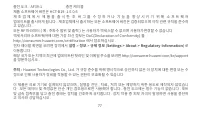
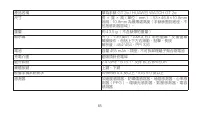
Note : If you experience skin discomfort when wearing the device, take it off and consult a doctor. The charging dock is not water resistant. Wipe the port, metal contacts, and the device dry during charging.
Page 4 - Contents
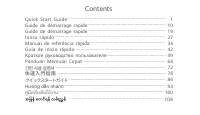
1 Quick Start Guide .............................................................................. 1 Guide de démarrage rapide .................................................................. 10 Guide de démarrage rapide .................................................................. 19 Início ...
Page 5 - Pairing your watch with your phone; onscreen instructions to complete the pairing.; Quick Start Guide; Downloading Huawei Health; search for Huawei Health in AppGallery or other app stores.
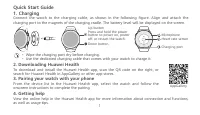
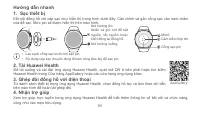
1 1. Charging Connect the watch to the charging cable, as shown in the following figure. Align and attach the charging port to the magnets of the charging cradle. The battery level will be displayed on the screen. 3. Pairing your watch with your phone From the device list in the Huawei Health app, s...
Page 6 - are trade; Privacy Policy; after pairing it with your phone.; Blasting Caps and Areas
2 3 Copyright © Huawei 2020. All rights reserved. THIS DOCUMENT IS FOR INFORMATION PURPOSE ONLY, AND DOES NOT CONSTITUTE ANY KIND OF WARRANTIES. Trademarks and Permissions , , and are trade marks or registered trademarks of Huawei Technologies Co., Ltd. The Bluetooth ® word mark and logos are regist...
Page 8 - Disposal and recycling information; electronic equipment (WEEE) and batteries according to local laws.
4 5 • The device has a built-in, non-removable battery, do not attempt to remove the battery, otherwise the device may be damaged. To replace the battery, take the device to an authorized service center. • If the battery leaks, ensure that the electrolyte does not make direct contact with your skin ...
Page 10 - It is recommended that the following accessories should be used:
6 7 The most recent and valid version of the DoC (Declaration of Conformity) can be viewed at http://consumer.huawei.com/certification.This device may be operated in all member states of the EU.Observe national and local regulations where the device is used.This device may be restricted for use, dep...
Page 11 - Please go to; Settings; on the device to view the E-label screen.; Disposal and recycling information(India); except public holidays.
7 product has been released. All software versions released by the manufacturer have been verified and are still compliant with the related rules.All RF parameters (for example, frequency range and output power) are not accessible to the user, and cannot be changed by the user.For the most recent in...
Page 12 - to the IC for this device type complies with this limit.
8 9 Official Recycling Partner: Reteck Envirotech Private Limited.Plot-4A, Sanghi Udyog, Near Navade Railway Station, Tal-Panvel, Dist. - Raigad, Taloja MIDC-410208.[email protected]www.reteck.in / www.reteck.co Reduction of hazardous substances(India) This device is compliant with the E-Waste (Mana...
Page 13 - IC Statement; If you
9 IC Statement This device complies with CAN ICES-3 (B)/NMB-3(B).This device complies with Industry Canada licence-exempt RSS standard(s).Operation is subject to the following two conditions: (1) this device may not cause interference, and (2) this device must accept any interference, including inte...
Page 14 - Guide de démarrage rapide; Jumelage de votre montre avec votre téléphone; et suivez les instructions à l'écran pour terminer le jumelage.; Téléchargement de Huawei Health
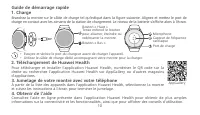
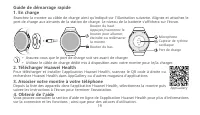
10 11 Guide de démarrage rapide 1. Charge Branchez la montre sur le câble de charge tel qu'indiqué dans la figure suivante. Alignez et mettez le port de charge en contact avec les aimants de la station de chargement. Le niveau de la batterie s'affiche alors à l'écran. • Essuyez et séchez le port du ...
Page 15 - sont des marques de commerce ou des marques; Politique de confidentialité
11 Copyright © Huawei 2020. Tous droits réservés. CE DOCUMENT EST À TITRE INFORMATIF UNIQUEMENT ET NE CONSTITUE AUCUNE GARANTIE QUELLE QU'ELLE SOIT. Marques de commerce et autorisations , , et sont des marques de commerce ou des marques déposées de Huawei Technologies Co., Ltd. La marque ainsi que l...
Page 16 - Fonctionnement et sécurité; n'utilisez pas votre appareil sans fil lorsque vous conduisez.
12 13 dynamitage. Fonctionnement et sécurité • L'utilisation d'un adaptateur de courant, d'un chargeur ou d'une batterie non approuvé(e) ou incompatible pourrait causer un incendie, une explosion ou créer d'autres risques. • Les températures idéales varient entre -20°C et +45°C. • Certains appareils...
Page 18 - Renseignements relatifs à l'élimination et au recyclage; réglementation locale.
14 15 • Les appareils sans fil peuvent interférer avec les instruments de vol d’un avion. N’utilisez pas votre périphérique là où les dispositifs sans fil ne sont pas autorisés conformément à la réglementation de la compagnie aérienne. • Pour obtenir la meilleure performance audio du microphone de v...
Page 19 - causer une exposition aux RF supérieure aux limites autorisées.; Déclaration; Cet appareil peut
15 contacter vos autorités locales, votre revendeur ou votre service de collecte des ordures ménagères, ou consulter notre site Web : http://consumer.huawei.com/en/. Réduction des substances dangereuses Cet appareil et ses accessoires électriques respectent les règles locales en vigueur sur la restr...
Page 20 - Bandes de fréquences et puissance; davantage de détails.; Informations relatives aux accessoires et aux logiciels; Il est recommandé que les accessoires suivants soient utilisés :
16 17 L'utilisation de cet appareil peut être restreinte, selon le réseau local. Bandes de fréquences et puissance (a) Bandes de fréquences au sein desquelles l'équipement radio fonctionne : certaines bandes peuvent ne pas être disponibles dans tous les pays ou régions. Veuillez contacter votre opér...
Page 21 - Veuillez accéder à; Conformité aux normes d'Industrie Canada; exposition aux RF supérieure aux limites autorisées.
17 Pour obtenir les informations les plus récentes concernant les accessoires et les logiciels, veuillez consulter la déclaration de conformité (DoC) sur la page http://consumer.huawei.com/certification. Veuillez accéder à Paramètre > À propos > Réglementation (Settings > About > Regulat...
Page 23 - • Assurez-vous que le port de charge soit sec avant de charger.; Associer votre montre à votre téléphone; suivez les instructions à l'écran pour terminer l'association.; Télécharger Huawei Health
19 Guide de démarrage rapide 1. En charge Branchez la montre au câble de charge ainsi qu'indiqué sur l'illustration suivante. Alignez et attachez le port de charge aux aimants de la station de charge. Le niveau de la batterie s'affichera sur l'écran. • Assurez-vous que le port de charge soit sec ava...
Page 24 - et
20 21 Copyright © Huawei 2020. Tous droits réservés. CE DOCUMENT EST FOURNI À TITRE INFORMATIF UNIQUEMENT. IL NE CONSTITUE AUCUNE FORME DE GARANTIE. Marques déposées et autorisations , et sont des m arques protégées ou déposées de Huawei Technologies Co., Ltd. Le nom et les logos Bluetooth ® sont de...
Page 25 - Utilisation et sécurité
21 Utilisation et sécurité • L'utilisation d'un adaptateur d'alimentation, d'un chargeur ou d'une batterie non approuvé ou incompatible pourrait entraîner un incendie, une explosion ou d'autres situations de danger. • La température idéale se situe entre -20°C et +45°C. • Certains appareils sans fil...
Page 27 - Consignes de mise au rebut et de recyclage; ou le service des ordures ménagères, ou rendez-vous sur le site Web; Réduction des substances dangereuses
23 Consignes de mise au rebut et de recyclage Sur votre produit, sur la batterie, dans la documentation ou sur l’emballage, le symbole de poubelle roulante barrée d’une croix vous rappelle que tous les produits électroniques et toutes les batteries doivent être apportés à des points de collecte dist...
Page 28 - RF dépassant les limites.; est conforme aux; Bandes de fréquences et alimentation
24 25 REACH et RoHS sur la page Web http://consumer.huawei.com/certification. Conformité réglementaire UE Exigences RF en matière d'exposition Informations de sécurité importantes concernant l'exposition aux radiofréquences (RF).Les directives d'exposition RF exigent que l'appareil soit utilisé à un...
Page 29 - Informations relatives aux accessoires et logiciels; été vérifiées et sont toujours conformes aux règles connexes.
25 fonctionne l'équipement radiotéléphonique : La puissance maximale pour toutes les bandes est inférieure à la valeur limite la plus élevée spécifiée par la norme harmonisée.Les bandes de fréquences et les limites nominales de la puissance d'émission (rayonnée et/ou conduite) applicables à cet équ...
Page 30 - ce dernier et consulter un médecin.
26 27 Attention : Toute modification apportée à cet appareil sans l'approbation expresse de Huawei Technologies Co., Ltd. peut annuler le droit de l'utilisateur à faire fonctionner l'équipement. Ce produit n'est pas conçu pour être utilisé en tant qu'appareil médical, et n'est pas destiné à diagnos...
Page 31 - Início rápido; Emparelhamento do relógio com o telefone; instruções no ecrã para concluir o emparelhamento.; Transferir a aplicação Huawei Health
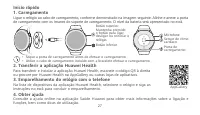
27 Início rápido 1. Carregamento Ligue o relógio ao cabo de carregamento, conforme demonstrado na imagem seguinte. Alinhe e anexe a porta de carregamento com os ímanes do suporte de carregamento. O nível da bateria será apresentado no ecrã. • Seque a porta de carregamento antes de efetuar o carregam...
Page 32 - Bluetooth; Política de Privacidade; Para melh; Áreas e dispositivos de detonação; Desligue o s; Operação e segurança; Utilizar um
28 29 Copyright © Huawei 2020. Todos os direitos reservados. ESTE DOCUMENTO DESTINA-SE EXCLUSIVAMENTE A FINS INFORMATIVOS E NÃO CONSTITUI QUALQUER TIPO DE GARANTIA. Marcas e Permissões , , e s ão ma rcas ou marcas registadas da Huawei Technologies Co., Ltd. No entanto, a palavra e logótipos da marca...
Page 34 - Informações sobre eliminação e reciclagem
30 31 • Caso haja vazamento da bateria, certifique-se de que o eletrólito não tenha contato direto com a pele ou os olhos. Se houver contato do eletrólito com sua pele ou olhos, lave-os imediatamente com água corrente e limpa e consulte um médico. • Ao carregar o dispositivo, certifique-se de que o ...
Page 35 - Redução de substâncias perigosas; resultar na superação dos limites de exposição a RF.; Declaração
31 e l é t r i c o e e l e t ró n i c o ( E E E ) é re c i c l a d o d e u m a m a n e i ra q u e m a n t é m m a t e r i a i s va l i o s o s e protege a saúde pública e o ambiente. Manuseio inadequado, quebras acidentais, danos e/ou reciclagem inadequada no fim de vida do produto poderão ser preju...
Page 36 - Rec
32 33 http://consumer.huawei.com/certification. Este dispositivo pode ser operado em todos os estados membros da UE. Cumpra com os regulamentos nacionais e locais onde o dispositivo for utilizado. Este dispositivo poderá ter uma utilização restrita, dependendo da rede local. Bandas de frequência e p...
Page 37 - Aceda a; consulte um
33 Para a informação mais atualizada acerca dos acessórios e do software, consulte a DdC (Declaração de Conformidade) em http://consumer.huawei.com/certification. Aceda a Definições > Sobre > Informações regulamentares (Settings > About > Regulatory Information) no dispositivo para ver o...
Page 38 - Manual de referência rápida; • Limpe a entrada do carregador antes de carregar.; Emparelhar o relógio ao seu telefone; instruções na tela para concluir o emparelhamento.; Botão para abaixar; Baixar o Huawei Health
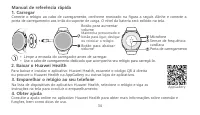
34 35 Manual de referência rápida 1. Carregar Conecte o relógio ao cabo de carregamento, conforme mostrado na figura a seguir. Alinhe e conecte a porta de carregamento aos imãs do suporte de carga. O nível da bateria será exibido na tela. • Limpe a entrada do carregador antes de carregar. • Use o ca...
Page 39 - Desligue
35 Copyright © Huawei 2020. Todos os direitos reservados. O CONTEÚDO DESTE DOCUMENTO É MERAMENTE INFORMATIVO E NÃO CONSTITUI QUALQUER TIPO DE GARANTIA. Marcas Registradas e Licenças , e são marcas comerciais ou registradas da Huawei Technologies Co., Ltd. A marca e logotipo Bluetooth ® são proprieda...
Page 41 - Informações de descarte e reciclagem
37 pele ou os olhos. Se houver contato do eletrólito com sua pele ou olhos, lave-os imediatamente com água corrente e limpa e consulte um médico. • Ao carregar o dispositivo, certifique-se de que o adaptador de energia esteja conectado a uma tomada próxima aos dispositivos e de fácil acesso. • Desco...
Page 44 - Acesse; Sobre; no
40 41 Para obter as informações mais recentes sobre acessórios e software, consulte a Declaração de Conformidade (DoC) em http://consumer.huawei.com/certification. Acesse Config. > Sobre > Informações regulatórias (Settings > About > Regulatory Information) no dispositivo para exibir a t...
Page 45 - Certificação ANATEL
41 Certificação ANATEL Este produto está homologado pela Anatel de acordo com os procedimentos regulamentados para avaliação da conformidade de produtos para telecomunicações e atende aos requisitos técnicos aplicados. 00237-20-03257 Este equipamento não tem direito à proteção contra interferência p...
Page 46 - conexión y las funciones, así como sugerencias de uso.; Cómo descargar Salud de Huawei
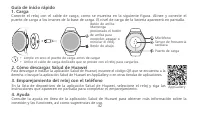
42 43 Guía de inicio rápido 1. Carga Conecte el reloj con el cable de carga, como se muestra en la siguiente figura. Alinee y conecte el puerto de carga a los imanes de la base de carga. El nivel de carga de la batería aparecerá en pantalla. • Limpie en seco el puerto de carga antes de cargar. • Uti...
Page 47 - Copyright © Huawei 2020. Todos los derechos reservados.; CONSTITUYE GARANTÍA DE NINGÚN TIPO.; Marcas registradas y permisos; son marcas comerciales o registradas de Huawei; Política de privacidad; Para; Cápsulas detonadoras y zonas de detonación; Apague el; Operación y seguridad
43 Copyright © Huawei 2020. Todos los derechos reservados. EL PRESENTE DOCUMENTO TIENE COMO ÚNICA FINALIDAD LA DE PROVEER INFORMACIÓN Y NO CONSTITUYE GARANTÍA DE NINGÚN TIPO. Marcas registradas y permisos , y son marcas comerciales o registradas de Huawei Technologies Co., Ltd. La marca denominativa...
Page 49 - Información sobre eliminación de residuos y reciclaje; El símbolo del
45 • Si la batería pierde líquido electrolítico, asegúrese de que este no entre en contacto directo con la piel o los ojos. Si el líquido electrolítico entra en contacto con la piel o los ojos, lave inmediatamente la zona afectada con agua limpia y consulte a un médico. • Cuando cargue el dispositiv...
Page 51 - Bandas de frecuencia y potencia; con el operador local.; Información de software y accesorios; Se recomienda usar los siguientes accesorios:
47 en http://consumer.huawei.com/certification. Este dispositivo puede ser utilizado en todos los estados miembro de la Unión Europea. Cumpla con las reglamentaciones nacionales y locales del lugar donde se utilice el dispositivo. El uso de este dispositivo puede estar restringido dependiendo de la ...
Page 52 - Acceda a
48 49 y la potencia de salida) y, por lo tanto, no podrá modificarlos. Para consultar la información más actualizada sobre accesorios y software, consulte la DoC (Declaración sobre cumplimiento) en http://consumer.huawei.com/certification. Acceda a Ajustes > Acerca de > Información sobre norma...
Page 53 - сопряжение, следуя инструкциям на экране.; Загрузка приложения Huawei Health; или других магазинах приложений.
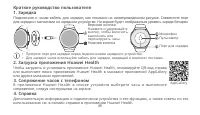
49 Краткое руководство пользователя 1. Зарядка Подключите к часам кабель для зарядки, как показано на нижеприведенном рисунке. Совместите порт для зарядки с магнитами на зарядном устройстве. На экране будет отображаться уровень заряда батареи. • Протрите порт для зарядки перед подключением зарядного...
Page 54 - Словесный знак и логотип; Политика конфиденциальности; конфиденциальности, с которой можно ознакомиться на веб-сайте; Места проведения взрывных работ; электронных устройств.; Безопасная эксплуатация
50 51 Copyright © Huawei 2020. Все права защищены. Д АННЫЙ ДОКУМЕНТ НОСИТ СПРАВОЧНЫЙ Х АРАКТЕР И НЕ ПОДРАЗУМЕВАЕТ НИКАКИХ ГАРАНТИЙ. Товарные знаки , и являются товарными знаками или зарегистрированными товарными знаками компании Huawei Technologies Co., Ltd. Словесный знак и логотип Bluetooth ® явля...
Page 57 - Инструкции по утилизации; местными законами и положениями.; Сокращение выбросов вредных веществ
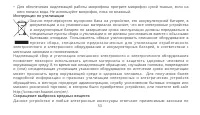
53 • Для обеспечения надлежащей работы микрофона протрите микрофон сухой тканью, если на него попала вода. Не используйте микрофон, пока он влажный. Инструкции по утилизации Значок перечеркнутого мусорного бака на устройстве, его аккумуляторной батарее, в документации и на упаковочных материалах озн...
Page 58 - Важная информация о радиочастотном излучении:; Заявление; основным требованиям и прочим положениям директивы 2014/53/EU.; Диапазоны частот и мощность
54 55 ограничению использования опасных веществ в электронном и электрическом оборудовании: Регламент ЕС по регистрации, оценке, получению разрешения и ограничению применения химических веществ (REACH), Директива ЕС об ограничении содержания вредных веществ (RoHS), Директива об использовании и утили...
Page 59 - у местного оператора связи.; Информация об аксессуарах и программном обеспечении; Зарядная станция: AF39-1 Кабель для зарядки
55 (a) Диапазоны частот, в которых работает это радиооборудование: некоторые диапазоны частот не используются в определенных странах или регионах. Более подробную информацию спрашивайте у местного оператора связи. (b) Максимальная радиочастотная мощность, передаваемая в диапазонах частот, в которых ...
Page 60 - клиентов в Вашей стране или регионе см. на веб-сайте
56 57 Чтобы посмотреть информацию об элек тронной маркировке, выберите Настройки > О программе > Нормативная информация (Settings > About > Regulatory Information) . Информацию о телефоне горячей линии и адресе электронной почты службы под держки клиентов в Вашей стране или регионе см. н...
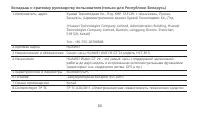
Page 61 - Вкладыш к краткому руководству пользователя
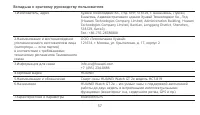
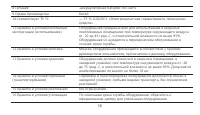
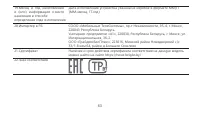
57 Вкладыш к краткому руководству пользователя 1.Изготовитель, адрес Хуавэй Текнолоджис Ко., Лтд. КНР, 518129, г. Шэньчжэнь, Лунган, Баньтянь, Административное здание Хуавэй Текнолоджис Ко., Лтд. (Huawei Technologies Company Limited, Administration Building, Huawei Technologies Company Limited, Bant...
Page 68 - Panduan Memulai Cepat; Level baterai akan ditampilkan di layar.; Menyandingkan gelang dengan ponsel Anda; untuk menyelesaikan penyandingan.; Mengunduh Huawei Health
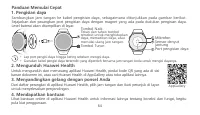
64 65 Panduan Memulai Cepat 1. Pengisian daya Sambungkan jam tangan ke kabel pengisian daya, sebagaimana ditunjukkan pada gambar berikut. Sejajarkan dan pasangkan port pengisian daya dengan magnet yang ada pada dudukan pengisian daya. Level baterai akan ditampilkan di layar. • Lap port pengisi daya ...
Page 69 - Merek Dagang dan Izin; adalah merek dagang atau merek dagang terdaftar dari Huawei; Kebijakan Privasi
65 Hak cipta © Huawei 2020. Semua hak dilindungi undang-undang. DOKUMEN INI DIMAKSUDKAN UNTUK TUJUAN INFORMASI SAJA, DAN TIDAK MENGGANTIKAN JENIS GARANSI APA PUN. Merek Dagang dan Izin , , dan adalah merek dagang atau merek dagang terdaftar dari Huawei Technologies Co., Ltd. Merek kata dan logo Blue...
Page 70 - mengganggu operasi peledakan.; Operasi dan keselamatan
66 67 mengganggu operasi peledakan. Operasi dan keselamatan • Menggunakan adaptor daya, pengisi daya, atau baterai yang tidak disetujui atau tidak kompatibel dapat menyebabkan kebakaran, ledakan, atau bahaya lainnya. • Suhu yang ideal adalah -20°C hingga +45°C. • Beberapa perangkat nirkabel dapat me...
Page 72 - Informasi mengenai pembuangan dan daur ulang
68 69 • Perangkat nirkabel dapat mengganggu sistem penerbangan pesawat. Jangan gunakan perangkat Anda bila perangkat nirkabel tidak diizinkan sesuai dengan peraturan maskapai penerbangan tersebut. • Untuk memastikan kinerja audio terbaik dari mikrofon perangkat Anda, gunakan kain untuk mengelap area...
Page 74 - Perangkat ini dapat dilarang penggun; Pita frekuensi dan daya; Direkomendasikan untuk menggunakan aksesori berikut ini:
70 71 Perangkat ini dapat dioperasikan di semua negara anggota Uni Eropa. Patuhi peraturan lokal dan nasional tempat perangkat tersebut digunakan. Perangkat ini dapat dilarang penggun aannya, tergantung pada jaringan lokal. Pita frekuensi dan daya (a) Pita frekuensi pengoperasian peralatan radio: Be...
Page 76 - 간편 사용 설명서
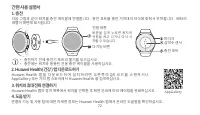
72 73 1. 충전 다음 그림과 같이 워치를 충전 케이블에 연결합니다 . 충전 포트를 충전 거치대의 자석에 맞춰서 부착합니다 . 배터리 레벨이 화면에 표시됩니다 . • 충전하기 전에 충전기 포트의 물기를 닦으십시오 . • 충전에는 워치와 동봉된 전용 충전 케이블을 사용하십시오 . 간편 사용 설명서 3. 워치와 휴대전화 연결하기 4. 도움 받기 Huawei Health 앱의 장치 목록에서 워치를 선택한 후 화면 안내에 따라 페어링을 완료하십시오 . 연결과 기능 및 사용 팁에 대한 자세한 정보는 Huawei Health 앱에서 온라인...
Page 77 - 상표 및 허가; 개인 정보 보호 정책
73 저작권 © Huawei 2020. 모든 권리 보유 . 이 문서는 정보 제공용으로만 사용되며 어떠한 보증도 하지 않습니다 . 상표 및 허가 , , 및 은 Huawei Technologies Co., Ltd. 의 상표 또는 등록 상표입니다 . Bluetooth ® 단어 표시와 로고는 Bluetooth SIG, Inc. 가 소유한 등록 상표이며 Huawei Technologies Co., Ltd. 에 의한 해당 표시의 사용은 라이센스에 따른 것입니다 . 언급된 기타 상표 , 제품 , 서비스 및 회사 이름은 해당 소유자의 재산일 수 ...
Page 82 - 快速入門指南; Huawei Health; 在 Huawei Health 應用程式的裝置清單中,選取手錶並按照螢幕上的提示完成配對。
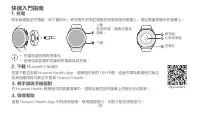
78 79 1. 充電 將手錶連接至充電線,如下圖所示。將充電孔對準並連接到充電底座的磁鐵上。電池電量將顯示在螢幕上。 • 充電前請先擦乾充電孔。 • 使用包裝盒隨附的專用充電線為其充電。 快速入門指南 2. 下載 Huawei Health 若要下載並安裝 Huawei Health App,請掃描右側的 QR 代碼,或者在華為應用程式商店或其他應用程式商店中搜尋 Huawei Health。 3. 將手錶與手機配對 4. 取得幫助 在 Huawei Health 應用程式的裝置清單中,選取手錶並按照螢幕上的提示完成配對。 查看 Huawei Health App 中的使用指南,取得連線指引...
Page 87 - NCC 聲明:
83 依據低功率電波輻射性電機管理辦法 使用過度恐傷害視力 a、使用 30 分鐘請休息 10 分鐘。 b、未滿 2 歲幼兒不看螢幕,2 歲以上每天看螢幕不要超過 1 小時。 內建固定式電池:消費者不可自行拆卸內建電池,如要拆卸需請專業人士 / 維修廠商拆卸。 NCC 聲明: • 經型式認證合格之低功率射頻電機,非經許可,公司、商號或使用者均不得擅自變更頻率、加大功率或變 更原設計之特性及功能。 • 低功率射頻電機之使用不得影響飛航安全及干擾合法通信;經發現有干擾現象時,應立即停用,並改善至 無干擾時方得繼續使用。 • 前項合法通信,指依電信法規定作業之無線電通信。 • 低功率射頻電機須忍受合法...
Page 90 - クイックスタートガイド; Huawei Health アプリのダウンロード
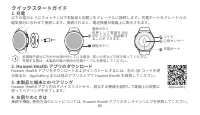
86 87 1. 充電 以下の図のようにウォッチ ( 以下本製品と記載 ) をクレードルに接続します。充電ポートをクレードルの 磁気部分に合わせて接続します。接続されると、電池残量が画面上に表示されます。 • 金属端子部分に汚れや水滴が付いている場合、乾いた布などで拭き取ってください。 • 充電する際は、本製品付属の専用の充電ケーブルを使用してください。 クイックスタートガイド 3. 本製品と端末とのペアリング 4. お困りのときは Huawei Health アプリ内のデバイスリストから、該当する機器を選択して画面上の説明に 従ってペアリングを完了します。 接続や機能、使用方法のヒントについ...
Page 91 - 個人情報保護方針
87 Copyright © Huawei 2020. All rights reserved. 本書は参考用のため、いなかる保証も行いません。 商標と許可 、 、および は、Huawei Technologies Co., Ltd. の商標または登録商標です。 Bluetooth ® お よ び そ の ロ ゴ は Bluetooth SIG, Inc. の 登 録 商 標 で す。 こ の 商 標 の 使 用 は Huawei Technologies Co., Ltd. によりライセンス供与されています。 本書に記載されたその他の商標、製品、サービス、会社名は、それぞれの権利者に帰属しま...
Page 93 - 皮膚感作性
89 • 使用していないときは、コンセントと本製品から充電器のプラグを抜いてください。 • 充電端子部のそばにピンなどの鋭利な金属性の物を置かないでください。充電端子部の磁石が 金属性の物を引きつけ、怪我の原因になる場合があります。 • 無線機器は航空機の航空システムを妨害するおそれがあります。航空会社の規則に従って、無 線機器の使用が許可されていない場所では本製品を使用しないでください。 • 本製品のオーディオ性能を最大限に発揮するために、マイクやスピーカーの開口部が濡れた場 合、乾いた柔らかい布できれいに拭き取って下さい。 皮膚感作性 使用者によっては、長時間の使用により、体質や体調によっ...
Page 97 - Ghép đôi đồng hồ với điện thoại; trên màn hình để hoàn tất ghép đôi.; Hướng dẫn nhanh
93 1. Sạc thiết bị • Lau sạch cổng sạc trước khi sạc pin.• Sử dụng cáp sạc chuyên dụng đi kèm vòng đeo tay để sạc pin. 4. Nhận trợ giúp Xem trợ giúp trực tuyến trong ứng dụng Huawei Health để biết thêm thông tin về kết nối và chức năng, cũng như các mẹo hữu dụng. Kết nối đồng hồ với cáp sạc như hiển...
Page 98 - và; Chính sách Quyền riêng tư; vụ bằng ứng dụng sau khi ghép cặp với điện thoại.; Kíp nổ và Khu vực nổ mìn; thể dẫn đến hiện tượng cháy, nổ hoặc các mối nguy hiểm khác.
94 95 Bản quyền © Huawei 2020. Bảo lưu mọi quyền. TÀI LIỆU NÀY CHỈ MANG TÍNH CHẤT CUNG CẤP THÔNG TIN VÀ KHÔNG CẤU THÀNH BẤT KỲ CAM KẾT NÀO. Thương hiệu và Giấy phép , và là thương hiệu hoặc thương hiệu đã đăng ký của Huawei Technologies Co., Ltd.Nhãn từ và biểu trưng Bluetooth ® là những thương hi...
Page 100 - Thông tin về việc thải bỏ và tái chế
96 97 chất điện phân tiếp xúc với da hoặc bán vào mắt của bạn, hãy rửa bằng nước sạch và tham vấn bác sỹ. • Đối với thiết bị có thể cắm vào ổ cắm, ổ cắm phải được lắp gần thiết bị và có thể dễ dàng tiếp cận. • Rút bộ sạc ra khỏi các ổ cắm điện và khi không sử dụng thiết bị. • Không đặt vật kim loại ...
Page 103 - cập nhật ở quốc gia hoặc khu vực của bạn.; Thận trọng
99 cập nhật ở quốc gia hoặc khu vực của bạn. Thận trọng : Bất cứ sự thay đổi hoặc chỉnh sửa nào đối với thiết bị này sẽ không được Huawei Technologies Co., Ltd. chấp thuận vì quy định tuân thủ có thể không cho phép người dùng vận hành thiết bị. Sản phẩm này không được thiết kế để làm thiết bị y tế v...
Page 104 - จนเคล็ดลับการใช้งาน; จับคู่นาฬิกา ด้วยโทรศัพท์ของคุณ; หน้าจอเพื่อสิ้นสุดการจับคู่; คู่มือเริ่มต้นใช้งาน; การดาวน์โหลด Huawei Health; Huawei Health ใน AppGallery หรือร้านค้าแอพอื่น ๆ
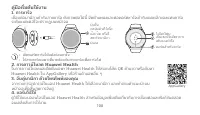
100 101 1. การชาร์จ • เช็ดพอร์ตชาร์จให้แห้งก่อนชาร์จ • ใช้สายชาร์จเฉพาะที่มาพร้อมกับสายชาร์จเพื่อชาร์จไฟ 4. ขอรับวิธีใช้ ดูวิธีใช้แบบออนไลน์ในแอป Huawei Health ส�าหรับข้อมูลเพิ่มเติมเกี่ยวกับการเชื่อมต่อและฟังก์ชันตลอด จนเคล็ดลับการใช้งาน เชื่อมต่อนาฬิกาเข้ากับสายชาร์จ ดังภาพต่อไปนี้ จัดต�าแหน่งและต...
Page 108 - ข้อมูลการก�าจัดและการรีไซเคิล; สัญลักษณ์ถังขยะล้อเลื่อนที่มีกากบาทบนผลิตภัณฑ์ แบตเตอรี่; การลดสารอันตราย
104 105 ข้อมูลการก�าจัดและการรีไซเคิล สัญลักษณ์ถังขยะล้อเลื่อนที่มีกากบาทบนผลิตภัณฑ์ แบตเตอรี่ วรรณกรรมหรือบรรจุภัณฑ์จะแจ้งเตือนคุณว่าต้องน�าผลิตภัณฑ์อิเลคทรอนิคส์และแบตเตอรี่ทั้งหมด ไปแยกที่จุดรวบรวมขยะเมื่อหมดอายุการใช้งาน; ขยะเหล่านี้จะต้องไม่ถูกทิ้งปนในขยะมูลฝอย ธรรมดากับขยะจากครัวเรือน ผู้ใช้จะ...
Page 110 - ข้อมูลอุปกรณ์เสริมและซอฟต์แวร์
106 107 (ข) คลื่นความถี่วิทยุความถี่สูงที่ส่งผ่านคลื่นความถี่ที่อุปกรณ์วิทยุด�าเนินการ: พลังงานไฟสูงสุดส�าหรับแถบ ทั้งหมดน้อยกว่าค่าขีดจ�ากัดสูงสุดที่ระบุไว้ในมาตรฐานฮาร์โมไนซ์ที่เกี่ยวข้อง แถบความถี่และขีดจ�ากัดที่ใช้ในการส่งสัญญาณ (ที่มีการแผ่รังสีและ/หรือด�าเนินการ) ที่ใช้กับอุปกรณ์วิทยุนี้มี ดัง...
Page 111 - อีเมลที่ได้รับการปรับปรุงเมื่อเร็วๆ นี้ในประเทศหรือภูมิภาคของคุณ; ข้อควรระวัง; หากคุณรู้สึกไม่สบายผิวหนังเมื่อสวมอุปกรณ์ ให้ถอดออกและปรึกษาแพทย์ น
107 โปรดไปที่ http://consumer.huawei.com/en/support/hotline เพื่อขอข้อมูลเกี่ยวกับสายด่วนและที่อยู่ อีเมลที่ได้รับการปรับปรุงเมื่อเร็วๆ นี้ในประเทศหรือภูมิภาคของคุณ ข้อควรระวัง : การเปลี่ยนแปลงหรือการดัดแปลงอุปกรณ์นี้โดยที่ไม่ได้รับอนุญาตอย่างเป็นลายลักษณ์อักษร จาก Huawei Technologies Co., Ltd. อาจม...
Page 112 - ထ အတွွေ့မှု
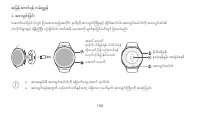
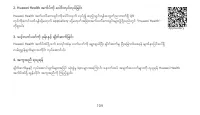
108 109 အမြန် စတင်ရန် လြ််းညွှန် 1. အ ်းသွင််းမြင််း အ ောက်အ ော်ပြြါ ြ ုံတွင် ပြသထောားသည ် တ င်ား နောရီက ောားသွင်ားကက ားနှင ် ခ တ်ဆက်ြါ။ ောားသွင်ားအြါက်က ောားသွင်ားစင်၏ သုံလ က်မ ောားနှင ် ခ န်ည ပြီား တွွဲခ တ်ြါ။ ဘက်ထရီ ြမောဏက မ က်နှောပြင်အြေါ်တွင် ပြသြါမည်။ ထ အတွွေ့မှု လ က်တ ုံုံ့ပြန်သည ် ခလ တ် မ က်...
Page 119 - EU
115 နှင ် / သ ုံ့မဟ တ် မအလ ော်ကန်စွော ပြန်လည် သ ုံားပြ န အ ောင် အဆောင်ရ က်ပခင်ားတ ုံ့သည် က န်ားမောအရားနှင ် ြတ်ဝန်ားက င်က နတရောယ် ပ စ်အစန င်ြါသည်။ သင ် EEE စွန ်ြစ်ြစစည်ားမ ောားက မည်သည ်အနရောသ ုံ့၊ မည်သ ုံ့ ယူသွောားရမည ် အ ကောင်ား အနောက်ထြ် ခ က် လက်မ ောား သ ရှ ရန် သင်၏ အဒသတွင်ား ောဏောြ င်မ ောား၊ လက်...
Page 120 - ပ ကည ြ က်; ကက ြ်နှုန််း
116 117 RF ထ တွွေ့မှု စ နှုန််းမ ာ်းအရ စက်က ို လ ူ့မ က်နှာမှ အနည််းဆို ်း 1 စင်တီမီတာအကွာတွင်ထာ်း၍ အသို ်းပပုပပီ်း လက် ကာက်ဝတ်တွင်သာ ဝတ်ဆင်ရမည်။ ဤလမ်ားညွှန်ခ က်က လ က်နောရန် ြ က်ကွက်ြါက RF ထ အတွွေ့မှု ကန ်သတ်ခ က်မ ောားက အက ော်လွန်ပခင်ား ပ စ်န င်ြါသည်။ ပ ကည ြ က် ဤ အ ကောင်ားအ ကောင ် ဤစက် HCT-B19 သည် 20...
Page 121 - RF
117 (b) ထွဲတွင် အရဒီယ ြစစည်ားမ ောားပ င ် လည်ြတ်လ ြ်အဆောင်သည ် ကက မ်နှုန်ားလှိုင်ားခွင်မ ောားတွင် ထ တ်လွှင ်အနသည ် ပမင ်ဆ ုံား အရဒီယ ကက မ်နှုန်ား - လှိုင်ားခွင် ောားလ ုံား တွက် မ ောားဆ ုံားြါဝါသည် သက်ဆ င်ရော ည နှိုင်ားထောားသည ် စုံနှုန်ားထွဲတွင် သတ်မှတ်ထောားသည ် ပမင ်ဆ ုံား ကန ်သတ်တန် ားထက်နည်ားြါသည်...
Page 123 - « هب هاگتسد رد ،یکینورتکلا بسچرب ۀحفص ۀدهاشم یارب ًافطل
.تسا HCT-B19: 1.0.0.6 لوصحم رازفا مرن هخسن یاه هخسن مامت تحص .دش دهاوخ رشنتم هدنزاس طسوت لوصحم هضرع زا سپ اهدرکلمع دوبهب ای تلااکشا عفر روظنم هب یرازفا مرن یاه یناسرزور هب .دراد تقباطم هطوبرم نیناوق اب نانچمه و تسا هدیسر دییأت هب هدنزاس طسوت هدش رشتنم یرازفا مرن ربراک طسوت رییغت لباق و دریگ یمن رارق...
Page 125 - .دینکن هدافتسا دوخ هاگتسد زا ،تسین زاجم میس یب; تفایزاب و عفد هب طوبرم تاعلاطا; تیاس بو; کانرطخ داوم شهاک
10 .دینکن هدافتسا دوخ هاگتسد زا ،تسین زاجم میس یب • هتفرگ رارق بآ اب سامت رد هک نفورکیم زا تمسق نآ ندرک کشخ یارب یا هچراپ زا ،هاگتسد نفورکیم یتوص درکلمع نیرتهب زا نانیمطا تهج .دینک یراددوخ نآ زا هدافتسا زا ،دنا هدشن کشخ لماک روط هب نفورکیم سیخ یاه تمسق هک ینامز ات .دینک هدافتسا ،تسا تفایزاب و عفد هب...
Page 127 - یصوصخ میرح ظفح تسایس
8 .تسا ظوفحم قوقح هیلک .Huawei 2020 © یرادرب هخسن قح .دوش یمن یتنامض هنوگ چیه بجوم و دراد یناسر علاطا هبنج طقف دنس نیا اهزوجم و یراجت مئلاع .تسا Huawei Technologies Co., Ltd. هدش تبث یراجت مئلاع ای یراجت مئلاع و ، طسوت ییاه تملاع نینچ زا هدافتسا هنوگ ره و تسا Bluetooth SIG, Inc. هب قلعتم هدش تبث یرا...
Page 128 - عیرس یزادنا هار یامنهار; .دیزادرپب Huawei Health; نفلت اب تعاس ندرک تفج .; .دینک لابند یزاس تفج
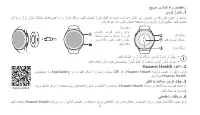
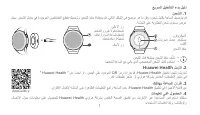
7 ندرک ژراش . 1 نآ هب و زارت ژراش هاگیاج یاهابر نهآ اب ار ژراش هاگرد .دینک لصتم ژراش لباک هب ،تسا هدش هداد ناشن ریز ریوصت رد هک روط نامه ار تعاس .دش دهاوخ هداد ناشن شیامن ۀحفص یور یرتاب ژراش حطس .دینک لصتم • .دینک کشخ ار ژراش هاگرد ،ندرک ژراش زا شیپ • .دینک هدافتسا نآ هارمه صوصخم ژراش لباک زا ،تعاس ...
Page 129 - .كتقطنم وأ كدلب يف ا ًرخؤم ثیدحت; هیبنت; .ةدعملا لیغشت يف مدختسملا قح لطبُت نأ
6 HCT-B19: 1.0.0.6 وه جتنملا جمانرب رادصإ تارادصإ عیمج نم ققحتلا مت دقو .جتنملا قلاطإ مت دق نوكی نأ دعب فئاظولا نیسحت وأ ءاطخلأا حلاصلإ عینصتلا ةهج لبق نم جمانربلا تاثیدحت قلاطإ متیس .ةلصلا تاذ دعاوقلل لثتمت لازت لاو عینصتلا ةهج لبق نم اهقلاطإ مت يتلا جمانربلا ةطساوب اهرییغت نكمی لاو مدختسملا لبِق ن...
Page 131 - هریودت ةداعإو زاهجلا نم صلختلا لوح تامولعم
4 .ناریطلا ةكرش حئاولل • فجت ىتح نوفوركیملا مدختست لا .ءاملل تضرعت يتلا نوفوركیملا ةقطنم حسمل شامق ةعطق مدختسا ،كزاهج نوفوركیمل يتوص ءادأ لضفأ نامضل .ا ًمامت ةلتبملا قطانملا هریودت ةداعإو زاهجلا نم صلختلا لوح تامولعم تاجتنملا عیمج ذخأ بجی هنأب كرِّكذُی ةوبعلا وأ بیتكلا وأ ةیراطبلا وأ جتنملا ىلع دوجو...
Page 133 - ةیصوصخلا ةسایس
2 .ةظوفحم قوقحلا عیمج .2020 ماعل Huawei ةكرشل © رشنلاو عبطلا قوقح .تانامضلا نم عون ّيأ لكشی لاو ،طقف ةیتامولعملا ضارغلأل دنتسملا اذه حیراصتلاو ةیراجتلا تاملاعلا ةكرشل ةل َّجسم ةیراجت تاملاع وأ ةیراجت تاملاع يه و ، و ، Huawei Technologies Co., Ltd. بناج نم تاملاعلا هذهل مادختساّیأو. Bluetooth SIG, In...