Page 2 - Model:
Model: PLK-L01 For DTS patents, see http://patents.dts.com. Manufactured under license from DTS Licensing Limited. DTS, the Symbol, & DTS and the Symbol together are registered trademarks, and DTS Sound is a trademark of DTS, Inc. © DTS, Inc. All Rights Reserved. Please visit http://consumer.hua...
Page 3 - ภาษาไทย; Contents
i English . . . . . . . . . . . . . . . . . . . . . . . . . . . . . . . . . . . . . . . . 1Français . . . . . . . . . . . . . . . . . . . . . . . . . . . . . . . . . . . . . . 14 香港繁體 . . . . . . . . . . . . . . . . . . . . . . . . . . . . . . . . . . . . . . . 21 Indonesia . . . . . . . . . . . . ....
Page 5 - For more information
1 For more information Read the Quick Start Guide included with your device. Go to http://consumer.huawei.com/en/ to download the user guide for your device (including safety information) and read the FAQ, privacy policy, and other information. Go to Settings > About phone > Legal information ...
Page 6 - Your phone at a glance
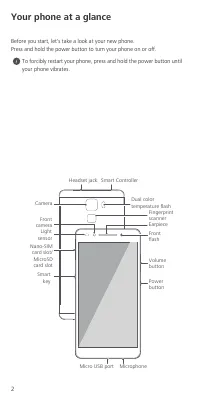
2 Your phone at a glance Before you start, let's take a look at your new phone.Press and hold the power button to turn your phone on or off. To forcibly restart your phone, press and hold the power button until your phone vibrates. Light sensor Headset jack Power button Volumebutton Micro USB port F...
Page 7 - Getting started
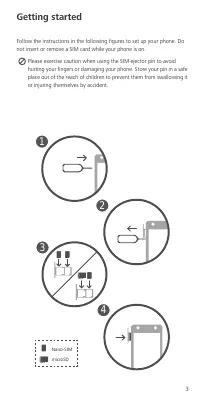
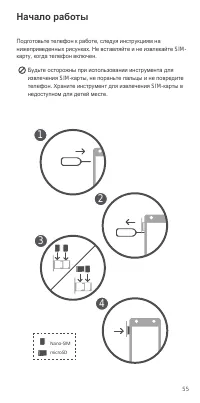
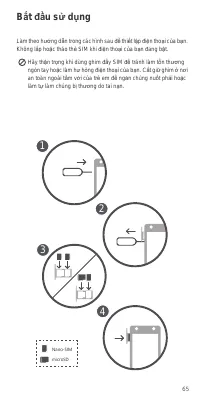
3 Getting started Follow the instructions in the following figures to set up your phone. Do not insert or remove a SIM card while your phone is on. Please exercise caution when using the SIM ejector pin to avoid hurting your fingers or damaging your phone. Store your pin in a safe place out of the r...
Page 8 - Safety information; Elec tr onic devic e; Areas with flammables and explosives
4 Safety information This section contains important information about the operation of your device. It also contains information about how to use the device safely. Read this information carefully before using your device. Elec tr onic devic e Do not use your device if using the device is prohibite...
Page 9 - Operating envir onment
5 • Concentrate on driving. Your first responsibility is to drive safely. • Do not hold the device while driving. Use hands-free accessories. • When you must make or answer a call, pull off the road safely and park the vehicle first. • RF signals may affect the electronic systems of motor vehicles. ...
Page 14 - Personal Information and Data Security
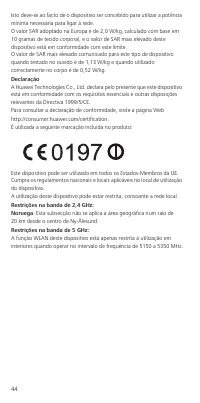
10 The following marking is included in the product: This device may be operated in all member states of the EU.Observe national and local regulations where the device is used.This device may be restricted for use, depending on the local network. Restrictions in the 2.4 GHz band:Norway : This subsec...
Page 15 - Legal Notice; Trademarks and Permissions; Notice
11 • Install security software or patches released by Huawei or third-party application providers. • Some applications require and transmit location information. As a result, a third-party may be able to share your location information. • Your device may provide detection and diagnostic information ...
Page 18 - Pour plus d'informations
14 Pour plus d'informations Lire le Guide de Démarrage Rapide inclus dans votre appareil. Ouvrez HiCare pour lire le guide de l'utilisateur et les informations de service ou chercher de l'aide auprès du forum en ligne. Allez à http://consumer.huawei.com/en/ pour télécharger le guide de l'utilisateur...
Page 19 - Votre téléphone en un clin d’œil
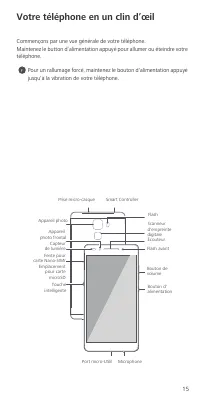
15 Votre téléphone en un clin d’œil Commençons par une vue générale de votre téléphone.Maintenez le button d’alimentation appuyé pour allumer ou éteindre votre téléphone. Pour un rallumage forcé, maintenez le bouton d'alimentation appuyé jusqu'à la vibration de votre téléphone. Capteur de lumière Pr...
Page 20 - Commencer
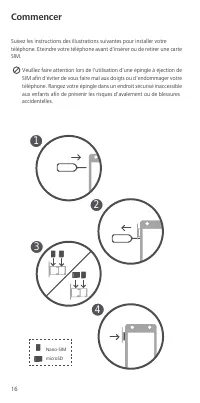
16 Commencer Suivez les instructions des illustrations suivantes pour installer votre téléphone. Eteindre votre téléphone avant d'insérer ou de retirer une carte SIM. Veuillez faire attention lors de l'utilisation d'une épingle à éjection de SIM afin d'éviter de vous faire mal aux doigts ou d'endomm...
Page 21 - Informations relatives à la sécurité; Interfér enc es avec des équ ipements médic au x
17 Informations relatives à la sécurité Cette section contient des informations importantes relatives à l'utilisation de votre appareil. Elle contient également des informations sur la manière d'utiliser votre appareil en toute sécurité. Veuillez lire attentivement ces informations avant d'utiliser ...
Page 24 - Mention légale; Po litique de confidentialité
20 Mention légale Co py right © Huawei Technol ogies C o. , Ltd. 2015 . Tous dr oits réservés. CE DOCUMENT EST FOURNI À TITRE INFORMATIF UNIQUEMENT. IL NE CONSTITUE EN AUCUN CAS UNE FORME DE GARANTIE. Po litique de confidentialité Pour une meilleure compréhension de la protection des informations pe...
Page 25 - 更多資訊
21 更多資訊 請閱讀附帶於您的裝置的新手指南。 前往 http://consumer.huawei.com/en/ 以下載您的裝置的使用者指南 (包括安全資訊)及閱讀常見問題、私隱政策和其他資訊。 前往 設定 > 關於手機 > 法律資訊 以閱讀法律資訊。 請瀏覽 http://consumer.huawei.com/en/support/hotline/ 以取得您所在國 家或地區的最新聯絡資訊。 香港繁體
Page 26 - 手機概覽
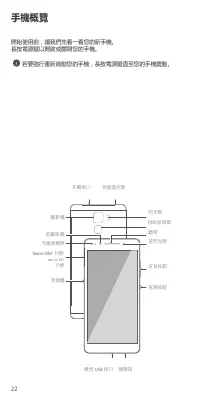
22 手機概覽 開始使用前,讓我們先看一看您的新手機。長按電源鍵以開啟或關閉您的手機。 若要強行重新啟動您的手機,長按電源鍵直至您的手機震動。 光線感應器 耳機接口 電源按鈕 音量按鈕 微型 USB 接口 前攝影機 聽筒 傳聲筒 智能鍵 閃光燈 智能遙控器 Nano-SIM 卡槽/ microSD 卡槽 指紋掃描器 前閃光燈 攝影機
Page 27 - 開始使用
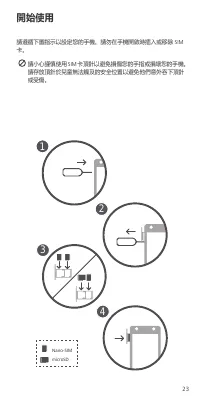
23 開始使用 請遵循下圖指示以設定您的手機。 請勿在手機開啟時插入或移除 SIM 卡。 請小心謹慎使用 SIM 卡頂針以避免損傷您的手指或損壞您的手機。 請存放頂針於兒童無法觸及的安全位置以避免他們意外吞下頂針或受傷。 1 2 3 4 Nano-SIM microSD
Page 28 - 安全資訊; 醫療設備的干擾
24 安全資訊 本部分包含關於裝置的重要資訊。亦包括如何安全使用裝置的資訊。使用裝置前請仔細閱讀此資訊。 醫療設備的干擾 • 請遵循由醫院及健康護理中心訂立的規則。請勿在禁止使用裝置的地方使用裝置。 • 某些無線裝置可能影響助聽器或起搏器的效能。向您的服務供應商查詢更多資訊。 • 起搏器製造商建議在手機與起搏器之間保持最少 15 公分的距離, 以免對起搏器產生干擾。如您使用起搏器,請於起搏器的反側使用手機,並切勿將手機置於胸前口袋內。 操作環境 • 要防止有可能的聽覺受損,請勿長時間收聽高度音 量。 • 理想操作溫度為 0°C 到 35°C 。理想保存溫度為 -20°C 到 45°C 。極 度...
Page 29 - 符合歐盟規範
25 • 處理棄置裝置及其配件是受當地規則所限制。支持徹底收集及回收。 符合歐盟規範 身體攜帶操作 當裝置在耳邊使用或與身體保持距離 1.5 公分,才符合 RF 規格。請確 保裝置配件、例如裝置箱及裝置皮套,無包含金屬元件。保持身體遠離裝置以符合距離需求。 憑證資訊 (SAR) 本裝置符合無線電波暴露準則的規定。本裝置為低功率無線電話筒與接收器。按照國際指引建議,本裝置的設計未超出無線電波暴露限制。這些指引是由國際非電離輻射保護委員 (ICNIRP) 制訂,一間獨立科學機構,並包括安全措拖以確保所有使用 者的安全,不論他們的年齡及健康程度。特定吸收率 (SAR) 是一種單位,用於測量人體使用裝...
Page 30 - 法律通知; 版權所有
26 法律通知 版權所有 © 華為技術有限公司 2015 。保留一切權利。 本文件用途只提供資訊,並不構成任何形式的保證。 私隱政策 如要深入了解我們如何保障您的個人資料,請前往 http://consumer.huawei.com/privacy-policy 參考私隱政策。 本指南中的所有圖案或插圖,包括但不限於手機顏色、大小和顯示的內容均只用作參考。 實際産品可能有異。 本指南的全部內容 不構成任何明示或暗示的保證。
Page 31 - Untuk informasi lainnya
27 Untuk informasi lainnya Bacalah Panduan Memulai Cepat yang disertakan dengan perangkat Anda. Buka http://consumer.huawei.com/en/ untuk mengunduh panduan pengguna untuk perangkat Anda (termasuk informasi keselamatan) dan baca Tanya Jawab, kebijakan privasi, serta informasi yang lain. Buka Pengatur...
Page 32 - Sekilas tentang ponsel Anda
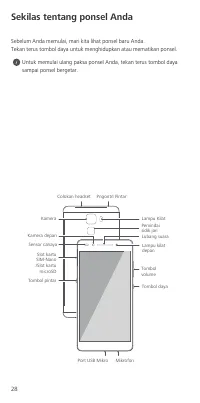
28 Sekilas tentang ponsel Anda Sebelum Anda memulai, mari kita lihat ponsel baru Anda.Tekan terus tombol daya untuk menghidupkan atau mematikan ponsel. Untuk memulai ulang paksa ponsel Anda, tekan terus tombol daya sampai ponsel bergetar. Sensor cahaya Colokan headset Tombol daya Tombol volume Port ...
Page 33 - Cara memulai
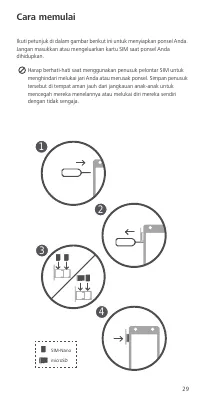
29 Cara memulai Ikuti petunjuk di dalam gambar berikut ini untuk menyiapkan ponsel Anda. Jangan masukkan atau mengeluarkan kartu SIM saat ponsel Anda dihidupkan. Harap berhati-hati saat menggunakan penusuk pelontar SIM untuk menghindari melukai jari Anda atau merusak ponsel. Simpan penusuk tersebut ...
Page 34 - Informasi keselamatan; Gangguan dengan pe ralatan medis
30 Informasi keselamatan Bagian ini memuat informasi penting tentang penggunaan perangkat ini. Bagian ini juga berisi informasi tentang cara menggunakan perangkat dengan aman. Bacalah informasi ini dengan saksama sebelum menggunakan perangkat Anda. Gangguan dengan pe ralatan medis • Patuhi peraturan...
Page 36 - Pemberitahuan Hukum; Kebijakan Priva si
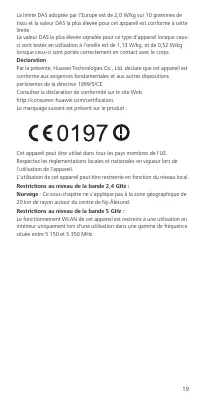
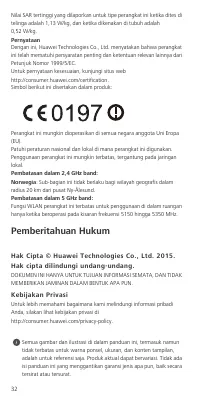
32 Nilai SAR tertinggi yang dilaporkan untuk tipe perangkat ini ketika dites di telinga adalah 1,13 W/kg, dan ketika dikenakan di tubuh adalah 0,52 W/kg. Pernyataan Dengan ini, Huawei Technologies Co., Ltd. menyatakan bahwa perangkat ini telah mematuhi persyaratan penting dan ketentuan relevan lainn...
Page 37 - Untuk maklumat lanjut
33 Untuk maklumat lanjut Baca Panduan Mula Pantas disertakan bersama peranti anda. Pergi ke http://consumer.huawei.com/en/ untuk memuat turun panduan pengguna untuk peranti anda (termasuk maklumat keselamatan) dan baca Soalan Lazim, dasar privasi dan maklumat lain. Pergi ke Tetapan > Mengenai tel...
Page 38 - Telefon anda sekilas pandang
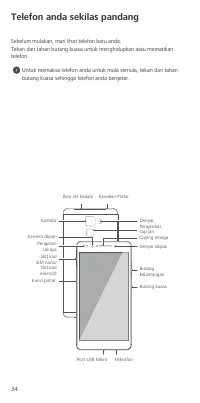
34 Telefon anda sekilas pandang Sebelum mulakan, mari lihat telefon baru anda.Tekan dan tahan butang kuasa untuk menghidupkan atau mematikan telefon. Untuk memaksa telefon anda untuk mula semula, tekan dan tahan butang kuasa sehingga telefon anda bergetar. Pengesan cahaya Bicu set kepala Butang kuas...
Page 39 - Bermula
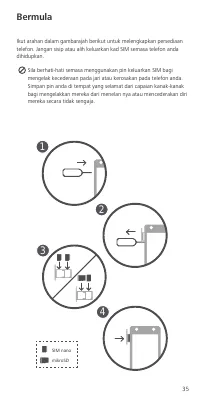
35 Bermula Ikut arahan dalam gambarajah berikut untuk melengkapkan persediaan telefon. Jangan sisip atau alih keluarkan kad SIM semasa telefon anda dihidupkan. Sila berhati-hati semasa menggunakan pin keluarkan SIM bagi mengelak kecederaan pada jari atau kerosakan pada telefon anda. Simpan pin anda ...
Page 40 - Maklumat keselamatan; Gangguan dengan pe ralatan perubatan
36 Maklumat keselamatan Bahagian ini mengandungi maklumat penting mengenai operasi peranti anda. Ia juga mengandungi maklumat mengenai bagaimana untuk menggunakan peranti dengan selamat. Baca maklumat ini dengan teliti sebelum menggunakan peranti anda. Gangguan dengan pe ralatan perubatan • Ikuti pe...
Page 42 - Notis Perundangan; Das ar Pr ivasi
38 Had SAR yang diguna pakai oleh Eropah ialah 2.0 W/kg dipuratakan pada 10 gram tisu, dan nilai SAR tertinggi untuk peranti ini mematuhi had ini. Nilai SAR tertinggi dilaporkan untuk jenis peranti ini apabila digunakan pada telinga ialah 1.13 W/kg, dan apabila dipakai dengan betul pada badan ialah ...
Page 43 - Para mais informação
39 Para mais informação Leia o Manual de Iniciação incluído com o seu dispositivo. Go to http://consumer.huawei.com/en/ para transferir o manual de instruções para o seu dispositivo (incluindo informação de segurança) e leia o FAQ, política de privacidade e outra informação. Ir para Definições > ...
Page 44 - Início
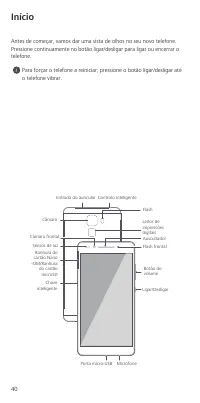
40 Início Antes de começar, vamos dar uma vista de olhos no seu novo telefone.Pressione continuamente no botão ligar/desligar para ligar ou encerrar o telefone. Para forçar o telefone a reiniciar, pressione o botão ligar/desligar até o telefone vibrar. Sensor de luz Entrada do auricular Ligar/Deslig...
Page 45 - Iniciação
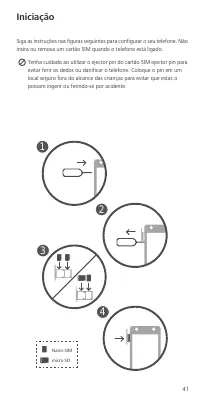
41 Iniciação Siga as instruções nas figuras seguintes para configurar o seu telefone. Não insira ou remova um cartão SIM quando o telefone está ligado. Tenha cuidado ao utilizar o ejector pin do cartão SIM ejector pin para evitar ferir os dedos ou danificar o telefone. Coloque o pin em um local segu...
Page 46 - Informações de segurança; Inter ferência c om equipamentos médicos
42 Informações de segurança Esta secção contém informações importantes relacionadas com o funcionamento do dispositivo. Contém também informações sobre como utilizar o dispositivo de forma segura. Leia estas informações atentamente antes de utilizar o dispositivo. Inter ferência c om equipamentos mé...
Page 49 - Aviso legal; Política de privac idade
45 Aviso legal Copyr ight © Huawei Technologies Co ., Ltd. 2015. Todo s os direitos reser vados. ESTE DOCUMENTO DESTINA-SE EXCLUSIVAMENTE A FINS INFORMATIVOS E NÃO CONSTITUI QUALQUER TIPO DE GARANTIA. Política de privac idade Para compreender melhor como nós protegermos as suas informaçãoes pessoais...
Page 50 - สําหรับข้อมูลเพิ่มเติม; การตั้งค่า
ภาษาไทย 46 สําหรับข้อมูลเพิ่มเติม อ่านคู่มือเริ่มต้นใช้งานด่วนที่มาพร้อมกับอุปกรณ์ของคุณ ไปที่ http://consumer.huawei.com/en/ เพื่อดาวน์โหลดคู่มือผู้ใช้สําหรับอุปกรณ์ของคุณ ( รวมถึงข้อมูลความปลอดภัย ) และอ่านคําถามที่พบบ่อย นโยบายความเป็นส่วนตัว และข้อมูลอื่นๆ ไปที่ การตั้งค่า > เกี่ยวกับโทรศัพท์...
Page 51 - การใช้โทรศัพท์ในครั้งแรก; ก่อนเริ่มต้นใช้งาน กรุณาตรวจสอบโทรศัพท์เครื่องใหม่ของคุณ
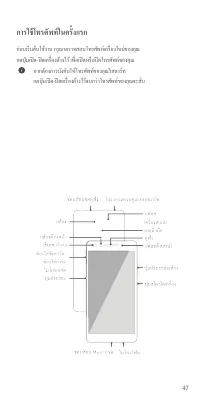
47 การใช้โทรศัพท์ในครั้งแรก ก่อนเริ่มต้นใช้งาน กรุณาตรวจสอบโทรศัพท์เครื่องใหม่ของคุณ กดปุ่มเปิด - ปิดเครื่องค้างไว้ เพื่อเปิดหรือปิดโทรศัพท์ของคุณ หากต้องการบังคับให้โทรศัพท์ของคุณรีสตาร์ท กดปุ่มเปิด - ปิดเครื่องค้างไว้จนกว่าโทรศัพท์ของคุณจะสั่น
Page 52 - เริ่มต้นการใช้งาน; ปฏิบัติตามคําแนะนําในภาพต่อไปนี้เพื่อดําเนินการตั้งค่าโทรศัพท์
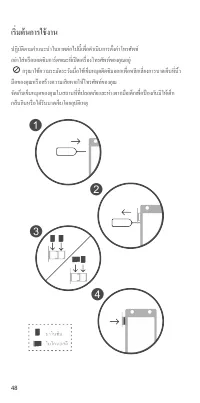
48 เริ่มต้นการใช้งาน ปฏิบัติตามคําแนะนําในภาพต่อไปนี้เพื่อดําเนินการตั้งค่าโทรศัพท์ อย่าใส่หรือถอดซิมการ์ดขณะที่เปิดเครื่องโทรศัพท์ของคุณอยู่ กรุณาใช้ความระมัดระวังเมื่อใช้เข็มหมุดดีดซิมออกเพื่อหลีกเลี่ยงการบาดเจ็บที่นิ้ว มือของคุณหรือสร้างความเสียหายให้โทรศัพท์ของคุณ จัดเก็บเข็มหมุดของคุณในสถานที่ท...
Page 53 - ข้อมูลความปลอดภัย; สัญญาณรบกวนต่ออุปกรณ์ทางการแพทย์
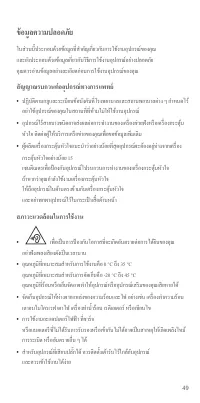
49 ข้อมูลความปลอดภัย ในส่วนนี้ประกอบด้วยข้อมูลที่สําคัญเกี่ยวกับการใช้งานอุปกรณ์ของคุณ และยังประกอบด้วยข้อมูลเกี่ยวกับวิธีการใช้งานอุปกรณ์อย่างปลอดภัย คุณควรอ่านข้อมูลอย่างละเอียดก่อนการใช้งานอุปกรณ์ของคุณ สัญญาณรบกวนต่ออุปกรณ์ทางการแพทย์ ปฏิบัติตามกฎและระเบียบข้อบังคับที่โรงพยาบาลและสถานพยาบาลต่า...
Page 54 - การใช้งานเมื่อพกพาไว้บนร่างกาย
50 เก็บแบตเตอรีให้ห่างจากสถานที่ที่ร้อนเกินไปหรือถูกแสงแดดโดยตรง อย่าวางแบตเตอรีบนหรือในอุปกรณ์ทําความร้อน เช่น เตาไมโครเวฟ เตาไฟ หรือเรดิเอเตอร์ แบตเตอรีอาจจะระเบิดได้หากร้อนเกินไป อย่าทิ้งแบตเตอรีในกองไฟเนื่องจากอาจเกิดการระเบิด นอกจากนี้ แบตเตอรีที่เสียหายก็อาจระเบิดได้เช่นกัน กําจัดแบตเตอร...
Page 56 - ข้อจํากัดสําหรับย่านความถี่; WLAN; หมายเหตุทางกฎหมาย; ลิขสิทธิ์; นโยบายความเป็นส่วนตัว
52 ข้อจํากัดสําหรับย่านความถี่ 5 GHz: ฟังก์ชัน WLAN ของอุปกรณ์นี้ถูกจํากัดให้ใช้งานเฉพาะในอาคารเท่านั้น เมื่ออุปกรณ์ทํางานในย่านความถี่ 5150 ถึง 5350 MHz หมายเหตุทางกฎหมาย ลิขสิทธิ์ © Huawei Technologies Co., Ltd. 2015 ขอสงวนลิขสิทธิ์ทุกประการ เอกสารนี้จัดทําขึ้นเพื่อวัตถุประสงค์ในการให้ข้อมูลเท่านั...
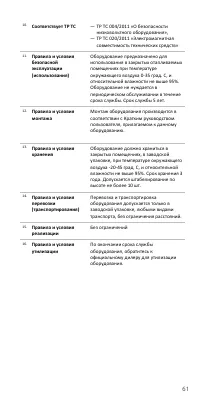
Page 60 - Медицинское
56 Меры предосторожности В данном разделе приведена важная информация по работе и безопасной эксплуатации вашего устройства . Внимательно прочтите данный раздел перед началом работы . Медицинское оборудование • Соблюдайте правила , принятые в больницах и медицинских учреждениях . Не используйте устр...
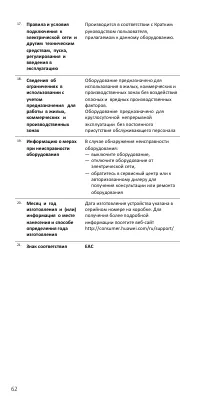
Page 63 - Уведомления; Все
59 Ограничения в диапазоне 5 ГГц : Функцию WLAN на данном устройстве в диапазоне частот 5150- 5350 МГц разрешено использовать только в помещениях . Уведомления Copyri ght © Huawei Technol ogi es Co. , Ltd. 2015. Все права защищены . ДАННЫЙ ДОКУМЕНТ ПРЕДОСТАВЛЯЕТСЯ ТОЛЬКО В ИНФОРМАЦИОННЫХ ЦЕЛЯХ БЕЗ К...
Page 70 - Thông tin an toàn; ườ
66 Thông tin an toàn M ụ c này ch ứ a thông tin quan tr ọ ng v ề vi ệ c v ậ n hành thi ế t b ị c ủ a b ạ n. Nó c ũ ng ch ứ a thông tin v ề cách s ử d ụ ng thi ế t b ị m ộ t cách an toàn. Hãy đọ c k ỹ thông tin này tr ướ c khi s ử d ụ ng thi ế t b ị c ủ a b ạ n. Gây nhi ễ u thi ế t b ị y t ế • Tuân t...
Page 72 - Thông Báo Pháp Lý
68 Để bi ế t tuyên b ố tuân th ủ quy đị nh này, hãy truy c ậ p trang web http://consumer.huawei.com/certification.Vi ệ c đ ánh d ấ u sau c ũ ng bao g ồ m trong s ả n ph ẩ m: Thi ế t b ị này có th ể đượ c s ử d ụ ng ở t ấ t c ả các n ướ c thành viên Liên minh châu Âu (EU).Tuân th ủ các quy đị nh qu ố...






 Huawei Ascend D2 User Manual
 Huawei Honor 4C User Manual
 Huawei Honor 4X User Manual
 Huawei Honor 6 Plus User Manual
 Huawei P8 User Manual
 Huawei P8 Lite User Manual
 Huawei P40 Lite 6/128GB Crush Green (JNY-LX1) User Manual
 Huawei P40 Lite 6/128GB Midnight Black (JNY-LX1) User Manual
 Huawei U8110 Manual
 Huawei U8350 Manual
 Huawei U8500 Manual
 Huawei U8860 Manual


